For those of us that don’t come here everyday, I came recently and see all this about RoonOS 3.0. It seems that it may be somewhat straightforward if you have a Nucleus but not so much if we are running a NUC or similar with ROCK.
So what are the advantages of 3.0, and what are the consequences of not updating?
A lot of us bought into Roon due to the set-it-and-forget-it ease of use. I’m not one to go rooting around in BIOS if I don’t have to. Why so complicated?
—-
IMPORTANT STAFF ANNOUNCEMENT
For the original Nucleus Rev. A & B users…
It’s RoonOS 3.0, the custom Linux distribution running ROCK. There is no Roon 3.0 yet. If you don’t need Tailscale, there is for now no real reason to upgrade your NUC.
As @idyllic_pushpin wrote, this is about RoonOS 3.0, not Roon 3.0.
This affects only Nucleus and ROCK servers, as it is the operating system on which Roon runs on these servers.
The new features enabled by this are listed in the release notes:
Current Nucleus (One and Titan) and ROCK installations created since 2023 update to RoonOS 3.0 automatically.
It’s just a hassle for older Nucleus (original models) and ROCK installations before 2023 because the basic installation method (BIOS settings) has changed, which means that a reinstallation is necessary IF one wants to switch to RoonOS 3.0.
However, there is no requirement to do this, and Roon itself works exactly the same on the old RoonOS 1.0 as on 3.0, with the exception of the features listed in the release notes.
This is exactly why I feel Roon dropped the ball a bit and did not fully explain this roll out and the various ramifications. And why they still need to do so.
Then please post your feedback to Roon Labs in Feedback. They are unlikely to see it here in the user discussion area.
You asked if someone can do a guide and I gave you the basic pointers that should help decide if you want to do anything.
If you want to switch to RoonOS 3.0 and have an older ROCK that was installed in Legacy BIOS mode, then the steps are exactly like installing ROCK in the first place, by following the available guide
Thanks. Your response is helpful and my bad for having it seem it was a criticism of your response. I feel in a larger, general sense, that Roon has done a very poor job of explaining this. There are going to be a lot of people not comfortable messing with boot disks and reinstalling software etc.
And they don’t have to. Though everyone who has a ROCK already did it at least once (or knows someone)
However, I guess Roon Labs should have prefaced the release announcement with “this only applies to Nucleus/ROCK” in the first sentence instead of the third.
Though I’m not sure where the supposed confusion comes from? Users either got the update automatically or they got nothing and the only way to even know about it is to read the forum?
It’s difficult to be aware of where confusion comes from if one is already “clued in”. It all seemed perfectly obvious to me, for instance. Hence your feedback in Feedback would be valuable to Roon Labs
mjw
(You want nice, supportive? Call a damn helpline.)
8
Have you read Community and Help Center documents?
I have. But that is all how to install type of information. I haven’t seen anything that explains exactly what is this OS 3.0 and more importantly, do we NEED to move to it or if it is completely optional. I’ve seen people discuss it but not from Roon. If I never do it (I have lifetime subscription) will my Rock just keep working fine? I shouldn’t have to dig for that information when a company is pushing out an apparently major update.
mjw
(You want nice, supportive? Call a damn helpline.)
10
I thought the opening paragraph of the guide says it all:
The transition to RoonOS 3.0 includes under-the-hood improvements for your ROCK or Nucleus device aimed at enhancing system security, network reliability, and overall performance. These modernization efforts bring your device up to current industry standards, though you may need to make a quick adjustment to how you access your network folders
The Nucleus and Nucleus Plus are not upgradable, but continue to work. Likewise, a NUC that isn’t setup for UEFI will also continue to work. Unlike the original Nucleus models, a NUC can be upgraded with some changes to the BIOS and reinstalling Roon OS.
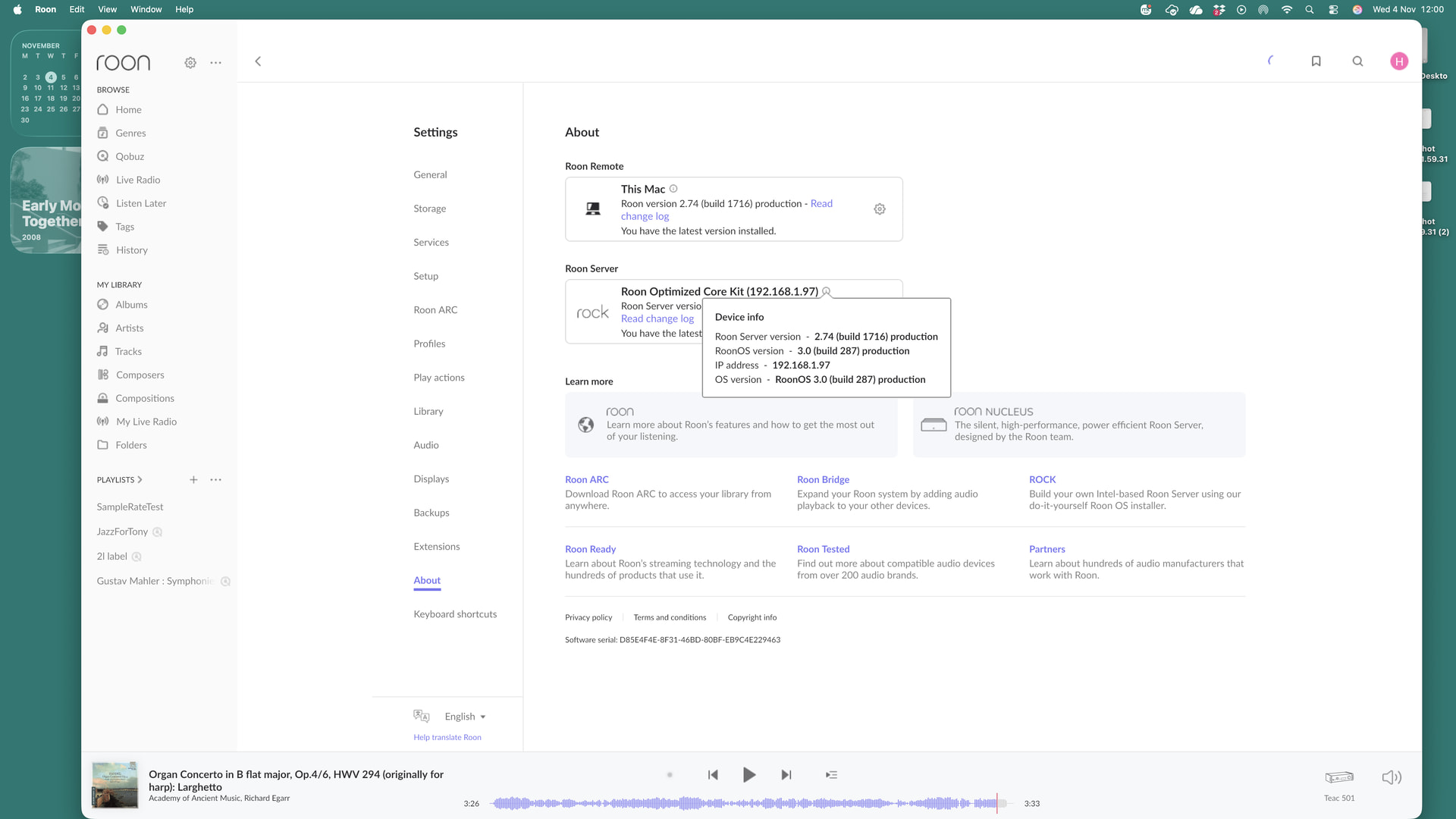
Ben, I was also a little confused over this upgrade, the Roon About interface does not show the RoonOS version explicitly, however, if you click on the ? symbol as per the screen shot you get the information.
It sounds like I don’t really need to upgrade my ROCK to 3.0, but I do have an issue that probably makes it a good idea to do the upgrade.
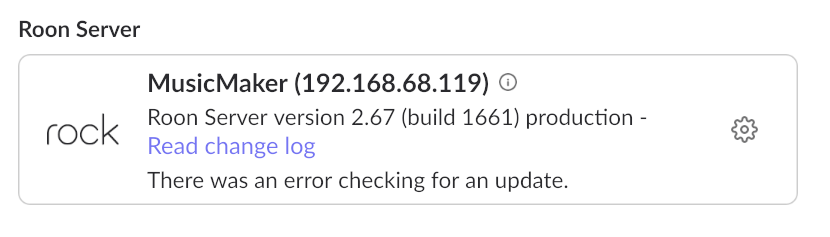
My current ROCK status via the Roon Remote app shows that it is running an old version – 2.67 (Build 1661) and it also shows that its attempts to download and install a newer version has repeatedly failed.
So, I would like to move over to the 3.0 version of ROCK. Can someone explain (like I’m 5) how to do this. I have no idea if my NUC is in UEFI mode or not. I have my ROCK in rack with all cables tied down and I really don’t want to have to be jacking around and yanking my ROCK out to connect it to a monitor and spelunk through the BIOS just to do an update.
In most cases this can be fixed by going to the web admin page and clicking Reinstall in the Operating System section. At worst, it will show an error code that will tell the support team more about the cause. (It may be a network issue, in which case it must be fixed, anyway)
If ROCK is in BIOS mode, then the procedure is exactly the same as a new installation of ROCK, following the current instructions.
When did you install ROCK? That would probably tell us. (And you can see the mode it’s in by going to its BIOS setup)
OK, I did the reinstall for the Operating System. And that worked in terms of fixing the error message. It now reads “You have the latest version.”
[FWIW, I thought about doing the OS update, but when I think of OS, I think of Windows, MacOS or, in this case, Linux. So I avoided that until you suggested it, because I didn’t want to risk updating the Linux stub Roon uses. So, I was confused about that and appreciate the clarification.]
I started using my ROCK NUC in October 2022. It’s an Intel Core i3 10th Gen i3-10110U Dual-core. I believe it was on the list of Roon-recommended NUCs at the time. I did the install without going into the BIOS, just using the USB drive with the automated script. I did later go into the BIOS to force auto reboots after a power failure but I don’t recall doing anything with UEFI.
What happens if the NUC is not in UEFI mode and I try to install the 3.0 update from a USB drive?
The Reinstall button’s name and its placement are a bit confusing. The way RoonOS is designed, it gets an atomic (everything as one unit) reinstallation every time there is an update, which makes it resilient and largely self-healing. This includes the OS and Roon Server. The Reinstall button probably works very similarly, but one needs to know a thing or two about the architecture to have an idea about the effect. This could be fixed by naming and explaining it differently.
The first RoonOS to support (and require) UEFI was released on November 9, 2022, so this would make yours probably a BIOS installation:
However, the default BIOS setting in 2022 was probably UEFI, so this seems a little odd:
However, there is a better way to tell, now that the Reinstall button on the ROCK brought everything up to date: Which version number does the web admin page now display in the Operating System section? (This is different from the Roon Server version).
If it’s 1.0, it’s a Legacy BIOS installation because these didn’t update further. If it was an UEFI installation, it should already have updated to RoonOS 3.0.
The installation will fail.
Boot mode set to UEFI: UEFI is required for RoonOS 3.0, including the redesigned Web Administration Interface and Tailscale for Roon ARC. Please disable legacy boot.
OK, I checked the version and it’s 1.0 (build 259) production.
So, it sounds like the USB install image is no good to me until I go into the NUC BIOS and disable the legacy boot mode. Is that correct?
Any other alternative? If not, I may have to try to get my hands on a monitor to connect to the NUC, because I really don’t want to deal with recabling.
Thanks again for the replies and help – I appreciate it.
I just rechecked my rack and while the network cable for the NUC is tied down, the power cable isn’t, so pulling it out, connecting to a monitor and changing the boot mode should be doable.
So, once I do that, it should just be a matter of loading the 3.0 Roon Server onto a USB drive and doing the automatic install. Is that correct?
FWIW, I have regular database backups done automatically. I have those stored on the NUC, but will copy the most recent backups to a couple of my networked PCs.
mjw
(You want nice, supportive? Call a damn helpline.)
19
The automated Roon database backups are actually on a USB-connected SSD, and the backups of the backup files are on two additional computers on my network.
 IMPORTANT STAFF ANNOUNCEMENT