I moved the Stacks discussion to a thread of its own:
Hi René,
Really loving Deep Roon, I keep finding new uses for it. It’s now become my primary way of discovering and adding new music to Roon 
On a more technical / architectural note, I had a question about write access. Did you deliberately leave out editing album credits? I saw that 0.5.5 took editAlbum out, and that the README is careful about anything that writes to the library.
For my own use I’ve added two tools in a local fork:
roon_album_credit: puts a credit (an artist Roon knows, in a role) on an album in the library, or takes one offroon_versions_group/roon_versions_ungroup: what Edit › Group alternate versions does in Roon, including taking a copy out of one of Roon’s own automatic groups
But my guess is you’ve intentional (and sensibly!) held back from any destructive actions other than the fairly safe ones like removing a track from the current queue?
Hi René, just wanted to say a big thank you for building Deep Roon MCP. It’s an excellent piece of work, and absolutely useful. I’ve been discovering so many things in my library with the help of your tool.
As Ed_Wegryn said earlier in the thread, Roon should really make an MCP interface an official part of the product. Thank you for the great job, and for sharing it with the community!
2 Likes
Hi @RBM got to say I have been loving my conversations with Claude using Deep Roon MCP about my library and what is missing from there.
Cost me a good chunk of money in the last week fixing up missing albums that Claude through Deep Roon thought I should own. I am looking forward to continuing that conversation in the next couple of hours to see what it says.
3 Likes
Have you asked Claude to do a really deep interrogation on your music tastes based on your library and listening habits, then ask it to suggest radio stations, record stores, music sites, blogs and magazines that align to your tastes and then finally get it to build a profile from it and save it as a skill.
Then any time you ask it for music recommendations it will call up that skill (you can manually edit it under settings->customise->skills) before answering music taste related questions.
With a bit of manual tweaking, asking it to look at the staff picks and record of the week pages for your my favourite music stores / sites helps. I’ve found it’s become scarily good at answering “What’s good this week that should be on my radar?” and can you add a couple of standout tracks from each to my Roon queue
I’ve also started to use it pick out gigs for me. I paste in the event listings url for venues I like and ask it what I should book and why. Although not sure that’s really a good idea, I now have way too many gigs booked 
Example 'Build me a music taste skill' prompt (ready to cut and paste)
Build or update my music skill using my Roon library through the Deep Roon MCP. If a music taste skill already exists, keep its name, treat its contents as claims to test, and preserve anything still accurate.

The skill should help with anything music-related: discovery, choosing from my library, gigs, artist and recording questions, and Roon actions. Recommend old music as readily as new. Don't force a recommendation or load the full profile when a question doesn't need it.

Keep everything in one `SKILL.md`, with a profile of no more than about 1,500 words. Use plain text and lists. Don't create logs, databases, caches or other data files.

## 1. Analyse my library
Run `roon_status`. If the MCP isn't connected, stop and tell me.

Use read-only tools only. Don't play anything or change Roon during the build.

Use bulk queries, and don't make one call per album across the library:
- `roon_focus` for library composition, including genres, labels, artists and producers, overall and for recent additions
- `roon_top` by year, plus the last 3–6 months, for albums, artists and tracks
- `roon_library`, `roon_favorites`, `roon_playlists`, `roon_listen_later` and `roon_radio`
- Sampled `roon_history` from the last 3 years to see what I finish and revisit
- `roon_album` with `credits: true` for up to 25 important albums, to find recurring producers, players, engineers and other collaborators

Weight repeated plays over several years most heavily, then returning to music long after adding it, favourites and playlists, recent listening, and finally ownership. Don't treat a large collection as proof of love. Flag bulk imports, background listening or likely listening by someone else.

## 2. Ask me a few questions
After the analysis, ask about 8 quick questions in one message, based on what you found. I can skip any. Cover:
- 3–4 albums or areas where my listening is ambiguous, and why they do or don't work for me
- Music I own or know outside Roon, such as vinyl or Bandcamp
- Music people assume I'd like, but don't
- What makes a recommendation feel too obvious or miss the mood
- How adventurous recommendations should be by default

Don't ask about anything you can reasonably infer.

## 3. Write the profile
Include only what would change a recommendation:
- **Core taste and current direction:** what lasts, what's new, and what looks like a phase
- **Why it works:** for each main taste area, what seems to draw me to it, such as groove, atmosphere, production or voice. Say when this is inferred rather than something I've told you.
- **Depth:** for each area, whether I'm a newcomer, familiar, deep or specialist, and what would therefore be too obvious
- **Connections:** the producers, players, labels, scenes and lineages that link the music I keep
- **Moods and uses:** which music suits which situations
- **Loved vs admired:** what I play versus what I merely own or respect
- **Not for me:** what I've tried and dropped, with the reason if known, plus common wrong assumptions
- **Known outside Roon:** relevant music Roon can't show
- **Practical details:** confirmed services, Roon zones, approximate location for gigs, and a short list of trusted sources and venues, each with what it's useful for

Include enough evidence to make claims useful, such as an example or rough play count. Avoid descriptions that could fit any fan of the genre.

## 4. Write the skill rules
**At query time**
- Use only as much of the profile and as many tools as the question needs. Aim for no more than 15 Roon calls, with no per-album loops.
- Check recent plays and additions when they matter. Search the web for current releases, gigs and availability.
- My request and current mood override the profile.

**For discovery**
- Start with the mood and my depth in that area, not just the genre.
- Find candidates through connections, using credits on relevant albums, `roon_similar` including `appears_on`, labels, scenes, compilations and trusted sources.
- In areas I know well, skip the obvious canon unless you have evidence it's a real gap. In areas I barely know, a classic is fine if it suits my taste.
- Use `roon_search` to check that I don't already own a pick, and to check availability on my services.
- Default to 3–5 varied picks. For each, give the specific connection to my listening, why it suits this moment, a track to start with, and one reason it might not land.
- If a pick could be sent to any fan of the genre, replace it.

**For my library**
- Recommend only what you've confirmed I own.
- Mix favourites, forgotten albums and barely played music that fits. Avoid recent repeats and music I've rejected, unless there's a good reason.

**For Roon actions**
- Play or change something only when I explicitly ask, and never remove anything by implication.
- Before adding an album, check for duplicates and the correct edition, then confirm what changed.

**For updates**
- When I say why something worked or didn't, or what I already know, propose a one-line profile update. Keep it specific unless I clearly state a broader preference.
- "Not now" or "wrong mood" doesn't mean dislike.
- If the skill is writable, update it after I agree. If it isn't, give me the full revised `SKILL.md` to save.
- Edit existing lines rather than adding to the profile indefinitely, and stay within the word limit.
- If the profile is over 6 months old or recent listening contradicts it, suggest refreshing it. A refresh should repeat step 1 with bulk queries, ask only about new uncertainties, and preserve what I've told you unless I change it.

## 5. Test it
Test these with live data, without changing anything in Roon:
1. New releases I might like
2. An older album I'm missing
3. A specific mood in my deepest genre
4. Something forgotten from my library for tonight
5. A gig at a relevant venue
6. Where to start with an unfamiliar artist, and who played on a recording
7. A dry run of adding an album

Fix any generic answers, discovery picks I already own, or library picks I don't own. Then give me the finished `SKILL.md` and a short summary of what you found and what you're unsure about.
3 Likes
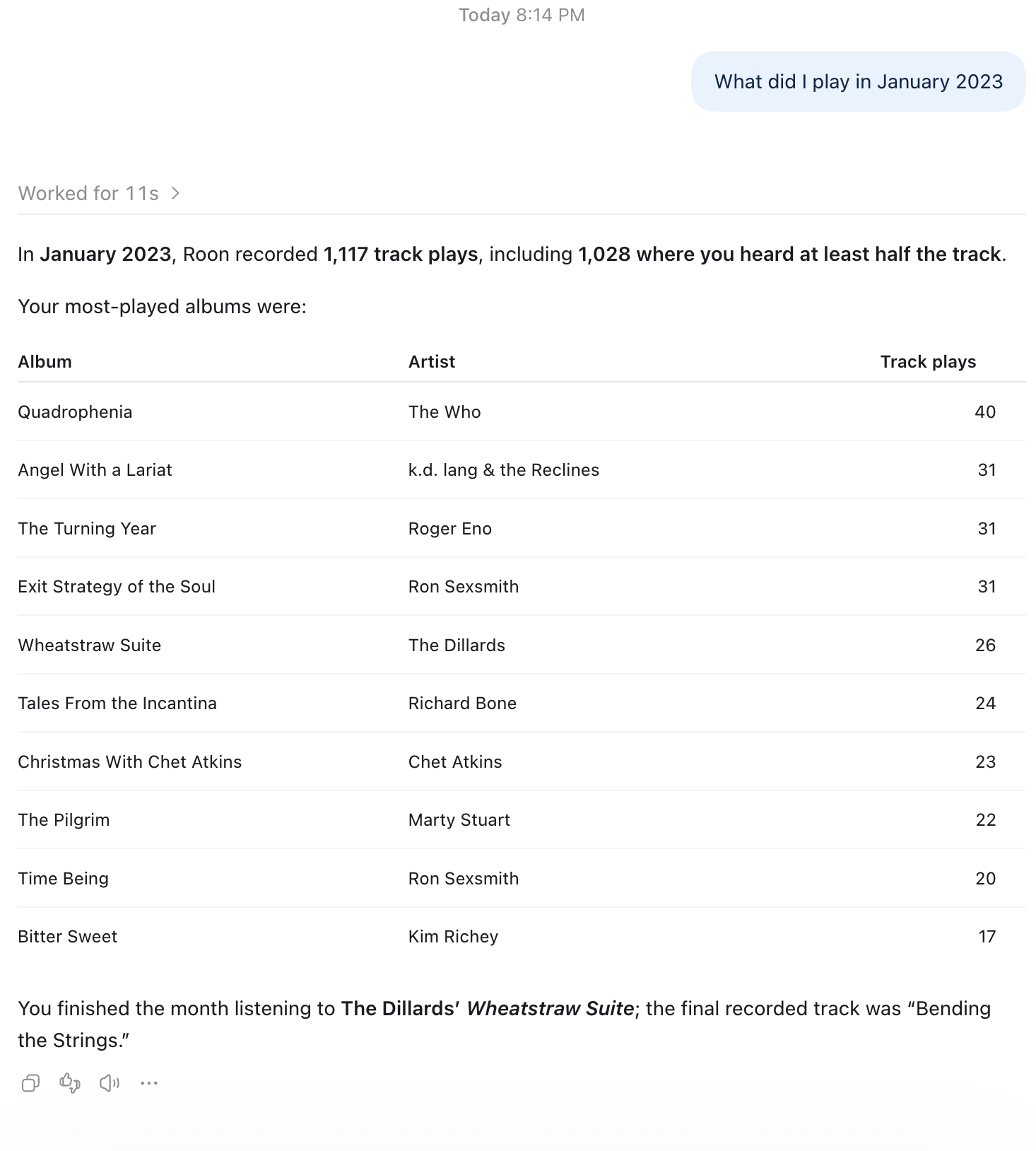
BTW I have this working well in ChatGPT. It is fun,
And this is going to present problems for my wallet:

2 Likes
I don’t listen to Radio, I am mostly just an album listener
I like the idea of asking about gigs though.
It does tell me it can’t deal with the volume of music I have listened too though. I have it maintaining a couple of lists of albums that I should own and tracking the additions to my library across two too be added lists. As I said it is interesting too go back after each batch of adding music and to continue the conversation
I have had some long conversations with Claude about this.
In my experience, it does work, to a point. Claude and other models can “see” images, but they can’t “listen” to music (at least not as of yet or that I know).
What it learns about your tastes and habits are important starting points. But all the recommendations it makes are based on what it has learned in its training or on what it finds on searches. They are based on descriptions: reviews, mostly.
This means that its knowledge is uneven. It has a lot of information about popular music or stuff that gets written about. I’m pretty sure music content in English far outstrips what’s available in other languages (this language imbalance is an issue with LLMs in general).
For building “starter” playlists for genres/styles that I don’t know that well, it works great for me. But I’ve had mixed success with others that I’m more familiar with. The suggestions were either too obvious or way off the mark.
It does take a little trial and error with the prompts. But something that I’d love to have and is not possible yet (as far as I know) is having it find more songs that sound a particular way. I tried describing it in detail, but it would need to listen to understand what I mean.
1 Like
What’s right
I don’t hear music. I have no access to audio as a signal: I can’t perceive timbre, groove, the texture of a distorted guitar, or the reverb on a recording. Everything I know about music comes from text: reviews, interviews, annotated lyrics, forums, genre descriptions, album credits. When I recommend something, I’m building a bridge between descriptions, not between sounds.
This explains what you noticed:
- Genres you don’t know well work fine, because the literature on a genre’s essentials (the canonical albums, the central artists) is abundant and consistent.
- Genres you know well give uneven results, because there you can see the gaps: recommendations that are too obvious or that “miss the mood.”
- The language bias is real. There is far more text about music in English than in Portuguese, and far more still than in smaller languages. Regional scenes, independent artists, and niche Brazilian music tend to be poorly represented in what I know.
- Asking for “more songs with this specific sound” is the weakest point. Sounds are hard to put into words, and I can only work with the description, not with the thing itself.
A small adjustment
Saying this is an absolute impossibility for AI would be an exaggeration. There are models that process audio, and traditional recommendation systems (like those of Spotify and Deezer) analyze acoustic features and the listening behavior of millions of people. What applies to me, in a text conversation, is the limitation described in the post. It’s not a law about all AI.
How to work around it in practice
- Give concrete anchors: three or four specific tracks that have the sound you’re looking for, and not just adjectives. I can look up what’s said about them (instrumentation, producer, studio, era, influences) and start from there.
- Use technical terms when you know them: “dry, muffled drums,” “bass with a lot of sustain,” “recorded on tape, without heavy compression.”
- Use credits as a shortcut: same producer, same studio, same session musicians. That often tells you more about the sound than the genre does.
- Ask for explanations, not just names: “why do you think this sounds like that?” helps you quickly judge whether the bridge makes sense.
- Treat my suggestions as a starting point and confirm by listening. To actually find similar sounds, tools that analyze audio have the advantage. With best regards, Claude

1 Like
Deep Roon MCP 0.5.5 — roon_cover consistently fails on Linux, while the same album artwork works on Windows
Hi René,
I’ve been testing Deep Roon MCP 0.5.5 with ChatGPT Desktop (Work mode) and Codex CLI on Windows and Linux.
The integration is working well overall, but I’ve encountered a reproducible issue with roon_cover on Linux.
The tool consistently fails to retrieve album artwork on Linux, even though:
- Other MCP tools, including
roon_statusandroon_now_playing, work. roon_now_playingreturns a valid artwork identifier and HTTP URL.- The exact same artwork can be downloaded directly from the Linux machine using
curl. roon_coversuccessfully retrieves the artwork on Windows.
I’m sharing the test results below in case they help identify the cause.
1. Test environments
Windows 11 — ChatGPT Desktop, Work mode
Deep Roon MCP is launched using:
[mcp_servers.deep-roon-desktop]
enabled = true
command = 'C:\nvm4w\nodejs\npx.cmd'
args = ["-y", "deep-roon-mcp@0.5.5"]

[mcp_servers.deep-roon-desktop.env]
DEEP_ROON_INTERNAL = "off"
DEEP_ROON_READ_ONLY = "library"
ROON_HOST = "192.168.1.115"
This profile uses the official Roon API only.
Linux — ChatGPT Desktop, Work mode, and Codex CLI
Both clients use the following MCP configuration:
[mcp_servers.deep-roon]
command = "/usr/local/bin/npx"
args = ["-y", "deep-roon-mcp@0.5.5"]

[mcp_servers.deep-roon.env]
DEEP_ROON_INTERNAL = "on"
ROON_HOST = "192.168.1.115"
The internal protocol is enabled on Linux.
Important configuration difference: Windows uses DEEP_ROON_INTERNAL=off, while Linux uses DEEP_ROON_INTERNAL=on. I have not established whether this setting affects the implementation of roon_cover.
Roon Core
- Roon Optimized Core Kit (ROCK)
- Intel NUC
- IP address:
192.168.1.115 - Roon 2.74 (build 1717) earlyaccess during earlier Windows tests
- Roon 2.75 (build 1721) earlyaccess during Linux tests
- Deep Roon MCP 0.5.5
The Core was updated during this testing period, so the Windows/Linux comparison was not performed under completely identical conditions.
No MCP software is installed on ROCK.
2. Successful artwork retrieval on Windows
On ChatGPT Desktop for Windows, using Work mode, I tested:
deep-roon-desktop.roon_now_playing
{}
Followed by:
deep-roon-desktop.roon_cover
{"zone":"Korg DS-DAC-10R"}
The tool successfully retrieved the artwork for two albums:
| Artist | Album | Track |
|---|---|---|
| Siiilk | Silk - Forgotten Gems | Jungle |
| Ghinzu | Irina Palm | Irina Palm Theme |
For both albums, the MCP response included a text content block with the track metadata and an image content block containing base64-encoded JPEG data.
The image was visible when expanding the MCP tool-call details in ChatGPT Desktop.
There is a separate user-interface limitation: the JPEG could not be embedded directly in the final assistant response. However, the MCP image retrieval itself succeeded on Windows.
3. Reproducible failure on Linux — ChatGPT Desktop Work
On Linux, roon_status succeeded and reported:
{
  "deep_roon_mcp": "0.5.5",
  "core": {
    "name": "Roon Optimized Core Kit",
    "version": "2.75 (build 1721) earlyaccess",
    "address": "192.168.1.115"
  },
  "enabled_in_roon": true,
  "internal_protocol": "works"
}
Other consultation tools also worked, including roon_zones, roon_library, and roon_now_playing.
I then tested album artwork retrieval on the Korg DS-DAC-10R zone.
The first test concerned:
Artist: Siiilk
Album: Silk - Forgotten Gems
Track: Beautiful Day
The call:
deep-roon.roon_now_playing
{}
returned an artwork identifier and URL:
image:
ceeeb8ec26e3b1fca93702b6ab7dccec

image_url:
http://192.168.1.115:9330/api/image/ceeeb8ec26e3b1fca93702b6ab7dccec?scale=fit&width=600&height=600
However:
deep-roon.roon_cover
{"zone":"Korg DS-DAC-10R"}
failed with the exact error:
Roon doesn't hand over the cover right now
The MCP result was reported as an error (isError: true), with no image content block.
I changed the album to:
Artist: Ghinzu
Album: Irina Palm
Track: Irina Palm Theme
roon_now_playing again succeeded and provided:
image:
f9f3835c853615b8f45b5edbfe1c21fb

image_url:
http://192.168.1.115:9330/api/image/f9f3835c853615b8f45b5edbfe1c21fb?scale=fit&width=600&height=600
But roon_cover returned exactly the same error:
Roon doesn't hand over the cover right now
I repeated this test on the Ghinzu album. It failed again.
These failures occurred before any image content reached the ChatGPT interface, so this is not merely an image-rendering problem.
4. Independent reproduction — Codex CLI on Linux
I also tested the Ghinzu album from Codex CLI on the same Linux machine, using the same deep-roon profile.
The sequence was:
deep-roon/roon_now_playing({})
Completed

deep-roon/roon_cover({"zone":"Korg DS-DAC-10R"})
Failed
Exact error:
Roon doesn't hand over the cover right now
The artwork identifier was again:
f9f3835c853615b8f45b5edbfe1c21fb
This is significant because the same failure occurs in two different MCP clients on Linux.
It suggests that the problem is not specific to ChatGPT Desktop’s image-rendering interface.
Both clients do, however, share the same Linux machine and MCP configuration.
5. Direct HTTP tests from Linux — Both artwork URLs work
To determine whether Linux could actually access the artwork through Roon’s HTTP endpoint, I tested both URLs directly using curl.
Ghinzu — Irina Palm
curl --noproxy '*' -sS -L \
  --connect-timeout 5 --max-time 20 \
  -D ghinzu-headers.txt \
  -o ghinzu-cover.jpg \
  -w '\nHTTP: %{http_code}\nType: %{content_type}\nOctets: %{size_download}\nTemps: %{time_total}s\n' \
  'http://192.168.1.115:9330/api/image/f9f3835c853615b8f45b5edbfe1c21fb?scale=fit&width=600&height=600'
Actual result:
HTTP: 200
Type: image/jpeg
Octets: 92870
Temps: 0.055761s
Response headers:
HTTP/1.1 200 OK
Access-Control-Allow-Origin: *
Etag: 81b3bf9e56e4b840feb9ea09b10f865c3035ef7d:47a562981cbc199f86ef86ff7db45b93
Accept-Ranges: bytes
Cache-Control: max-age=21600, public
Content-Type: image/jpeg
Content-Length: 92870
Siiilk — Silk - Forgotten Gems
The other URL was also successfully downloaded:
http://192.168.1.115:9330/api/image/ceeeb8ec26e3b1fca93702b6ab7dccec?scale=fit&width=600&height=600
Response headers:
HTTP/1.1 200 OK
Access-Control-Allow-Origin: *
Etag: e26f863b5f3313523a0a5906e5bc127d5373f37b:47a562981cbc199f86ef86ff7db45b93
Accept-Ranges: bytes
Cache-Control: max-age=21600, public
Content-Type: image/jpeg
Content-Length: 277201
I verified the downloaded files with Linux’s file and wc commands:
$ wc -c siiilk-cover.jpg ghinzu-cover.jpg

277201 siiilk-cover.jpg
 92870 ghinzu-cover.jpg
370071 total
$ file siiilk-cover.jpg ghinzu-cover.jpg

siiilk-cover.jpg: JPEG image data, JFIF standard 1.01,
baseline, precision 8, 600x600, components 3

ghinzu-cover.jpg: JPEG image data, JFIF standard 1.01,
baseline, precision 8, 600x600, components 3
Both images are therefore accessible and downloadable from Linux, using the exact HTTP URLs supplied by Deep Roon MCP.
This is the most important diagnostic result so far.
6. Observations and possible causes
Based on these tests, the following points are established:
- MCP connectivity works on Linux.
roon_now_playingreturns the expected metadata and artwork identifiers.- The Roon HTTP image endpoint responds with HTTP 200 and valid JPEG files when accessed directly using
curlon Linux. roon_coverconsistently fails on Linux, in both ChatGPT Desktop Work and Codex CLI.roon_coversuccessfully returns JPEG image content on Windows, including artwork from the same Ghinzu album.
This suggests that the failure occurs somewhere in the image-retrieval path used by roon_cover, rather than being caused by a missing artwork file or a general inability of Linux to reach the Roon Core.
Possible areas worth investigating include:
- The HTTP request or response handling used by
roon_coverunder Linux/Node.js. - Differences between the Node.js runtime environments on Windows and Linux.
- Whether the internal-protocol setting changes the code path used for artwork retrieval.
- The conditions under which Deep Roon MCP emits the error
Roon doesn't hand over the cover right now.
These are hypotheses only. I have not inspected the relevant source-code path or captured a low-level failure trace from roon_cover.
The Roon Core version difference also prevents this from being a strictly controlled Windows/Linux comparison.
7. Expected versus actual behavior
Expected: roon_cover({"zone":"Korg DS-DAC-10R"}) retrieves the current album artwork and returns an MCP image content block, as observed on Windows.
Actual on Linux: The call fails consistently with:
Roon doesn't hand over the cover right now
No image content is returned, even though the artwork URL works when downloaded directly with curl.
8. Questions for René
René, could you help clarify a few points?
- Does
roon_coveruse the same artwork retrieval mechanism whenDEEP_ROON_INTERNALis enabled and disabled? - Is there any known Linux-specific issue with
roon_coverin version 0.5.5? - Does the error message
Roon doesn't hand over the cover right nowcorrespond to a specific failure condition that could help narrow down the investigation? - Is there a recommended way to enable diagnostic logging for the underlying artwork request?
I can provide additional non-destructive test results if needed, including the Linux Node.js and npm versions, and further HTTP diagnostics.
For now, I have deliberately avoided changing the working Windows configuration or installing anything on ROCK.
Thanks for your work on Deep Roon MCP. Apart from this artwork issue, the integration has been functioning very well in my tests.
I’d be happy to help isolate the problem further.
Best regards. dp
Update / Erratum — The issue is not Linux-specific
Hi René,
I have an important update to my original report.
I reproduced the exact same roon_cover failure on Windows 11, using Deep Roon MCP 0.5.5 with the following configuration:
DEEP_ROON_INTERNAL = "on"
ROON_HOST = "192.168.1.115"
DEEP_ROON_READ_ONLY was not set.
The test was performed against Roon 2.75 (build 1721) earlyaccess, using the same Core as the Linux tests.
roon_now_playing succeeded and returned the correct artwork identifier and URL for Siiilk’s Silk - Forgotten Gems album.
However, roon_cover failed with exactly the same error observed on Linux:
Roon doesn't hand over the cover right now
This changes my initial assessment.
The failure is not specific to Linux. So far, the results show a correlation with the MCP configuration:
| Environment | INTERNAL | READ_ONLY | roon_cover |
|---|---|---|---|
| Windows | off | library | Success |
| Windows | on | unset | Failure |
| Linux | on | unset | Failure |
I have also confirmed that the artwork URLs are directly accessible from Linux using curl, returning HTTP 200 and valid JPEG files.
My current hypothesis is that the failure may be related to the internal-protocol setting or another difference between these MCP profiles, rather than the operating system itself.
This is not yet proof of causation.
I am now preparing another test on Linux using the configuration that works on Windows:
DEEP_ROON_INTERNAL = "off"
DEEP_ROON_READ_ONLY = "library"
I will report the results here.
Sorry for the initially misleading Linux-specific diagnosis, and thanks for your help!
Further update — roon_cover also works on Linux with INTERNAL=off
Hi René,
I have now completed another test on Linux using the same configuration as my working Windows profile:
DEEP_ROON_INTERNAL = "off"
DEEP_ROON_READ_ONLY = "library"
ROON_HOST = "192.168.1.115"
Result: Success.
Using ChatGPT Desktop Work on Linux, I called:
deep-roon-desktop.roon_now_playing({})
deep-roon-desktop.roon_cover({"zone":"Korg DS-DAC-10R"})
The current track was “Jungle” by Siiilk, from Silk - Forgotten Gems.
roon_cover successfully returned the track/album metadata together with an image/jpeg content block. The artwork was visible in the MCP tool output, with no error.
The results now form a consistent pattern:
| OS | INTERNAL | READ_ONLY | roon_cover |
|---|---|---|---|
| Windows | off | library | Success |
| Windows | on | unset | Failure |
| Linux | on | unset | Failure |
| Linux | off | library | Success |
This confirms that the issue is not Linux-specific.
The strongest hypothesis now concerns a configuration-dependent behavior, potentially related to the internal protocol.
However, since DEEP_ROON_READ_ONLY also differs between the two profiles, the internal-protocol setting has not yet been isolated as the sole cause.
The artwork HTTP endpoints are accessible directly using curl on Linux, returning HTTP 200 and valid JPEG files.
I hope this additional information helps narrow down the investigation.
Best regards.
Hey @Dirk-Pitt –
Thanks for the thorough investigation. Long story short: your table at the end pretty much says it all. It isn’t Linux and it isn’t READ_ONLY: with DEEP_ROON_INTERNAL=on, roon_cover took the cover key from Roon’s internal graph, but asked for it on the official /api/image/ endpoint, which only knows the official API’s keys. Hence “Roon doesn’t hand over the cover right now”. Reproduced on my own Cores.
The fix is in: Deep Roon now uses the zone’s official image key first, and falls back to the internal key on the right path.
Or get it with npx -y deep-roon-mcp@0.5.6 (or @latest).
1 Like
Hi René @RBM ,
Great news! I’ve now tested Deep Roon MCP 0.5.6 on both Windows and Linux with DEEP_ROON_INTERNAL=on.
The fix works on both platforms.
This confirms that the original roon_cover issue has been fixed.
Thank you very much for investigating, reproducing, and fixing this so quickly. Much appreciated! 
1 Like
Deep Roon MCP 0.5.7: edit your own playlists
Until now Deep Roon could only make a new playlist. 0.5.7 can now add, remove, move and rename tracks in a playlist you already have.
It’s experimental and off by default. Switch on Edit existing playlists in Claude Desktop › Settings › Extensions › Deep Roon MCP, or set DEEP_ROON_PLAYLIST_EDIT=1.
- Your own playlists only. Imported, smart, Qobuz and TIDAL playlists are refused. With a read-only library the tools aren’t there at all.
- Checked twice. Each edit starts from a fresh read and is checked again right before it’s written. Afterwards the whole playlist is read back. If the result doesn’t match, Deep Roon says so and never tries again by itself.
- One copy at a time. If a track is in a playlist twice, you can remove or move one copy and leave the other.
This came from kvarnelis on GitHub, who contributed a carefully built and well-tested patch. Thank you!
As always, it goes through Roon’s internal protocol, so keep a recent backup of your Roon database before you let an assistant change things.
Download: Release Deep Roon MCP 0.5.7 · renebouwmeester/deep-roon-mcp · GitHub (or npx -y deep-roon-mcp).
2 Likes
Hi René,
I have several Roon profiles. After switching profiles in Roon, deep-roon.roon_history({"limit":5}) still returns the history of my first profile.
Is roon_history profile-specific? If so, is there a way to select a different profile via Deep Roon MCP?
Thanks! dp.
Yes, the history is per profile. Deep Roon is a Roon remote of its own, like each Roon app, and picks a profile when it connects: currently simply the first one. Switching profiles in a Roon app doesn’t change Deep Roon’s choice.
There’s no way to choose yet, but I’ll add one: a ROON_PROFILE setting with the profile’s name, and a profile option on the history tools. I’ll let you know when it’s in.
1 Like
Aaaaaand… The fix is in:
0.5.8 adds ROON_PROFILE (or “Roon profile” in Claude Desktop’s settings) to choose one by name, a profile option on the history, most played, Daily Picks, mixes, favourites and Listen Later tools, and roon_profiles to list them.
Now pushed, ready to pull.
2 Likes
Yes, tested and working perfect. Thanks.
2 Likes
Just wanted to come back here to say that this is now one my most used pieces of software.
It’s also made me discover a lot more music that I love.
And, I’ve now made a small iphone / carplay app (ARC is too much for just listening to a stream and one can’t interact with ARC without touching the screen) for myself that I can use to listen on the go with Claude playing the music based on what I ask for verbally. (somewhat, I suspect, like what @RBM has done but much simpler)
I’ve put in a feature request for Roon to make ARC a selectable zone. Maybe they will do it. WOuld make the MCP much more useful on the road.
Thanks so much for this @RBM
1 Like
Thanks for sharing – and great to hear. I use Basso (and sometimes Roon) in a similar vein – with similar enjoyment.
What protocol do you use for playback from Roon on the go? Squeeze emulation?
Airplay (shairplay) zone → Icecast → Tailscale funnel → homemade iphone app.
With the first three running in a single docker container