In fact, the data provided by Roon for live radio is not always consistent. I’ll look into this in a bit more detail.
However, none of this will be included in RoonPilot version 2.0.0, as it would delay the release of this version; but it has been noted for the next version of RoonPilot.
Does the forthcoming 2.0 bridge mean anything for my hardware purchase, or am I buying the same kit? There is no updated hardware coming, right? Just trying to catch up.
Don’t worry. Nothing is changing with regard to the RoonPilot hardware. It is, and remains, the same device from Waveshare. The new and additional bridges (IR Bridge and RME Bridge) are purely optional add-ons developed by me, which can be integrated into RoonPilot, but do not have to be.
IR Bridge:
A small ESP32-based companion that lets Roon zones control devices whose volume or power functions are not available through Roon. Any Roon zone can be linked individually to the Bridge and assigned its own IR profile, commands and volume settings. Pairing, configuration, IR learning, profile management, diagnostics and firmware updates are handled exclusively through RoonPilot.
RME Bridge:
A small ESP32-S3-based companion, specifically for the RME ADI-2 DACs. This bridge will then communicate directly with the RME DAC via USB and the MIDI protocol and will be controlled by RoonPilot and/or a web browser or REST API, just like the IR Bridge. However, I do receive the status directly back from the RME DAC and can display it.
Beautiful, thank you! These forums are wonderful for projects, but somehow I do wish there was an AI summary at the top or something for a really active topic like this one. Anyways much appreciated - Ali says a sale on the Waveshare will start in a couple days, so I’m going to wait and see before hitting buy! Looking forward to this - your GitHub page is very very complete. (I only wish there was as complete documentation for reflashing the Emporia Vue!)
One further request to consider, for a future release, please: it would be nice to add a Mute control.
I often prefer to Mute, rather than (or in addition to) Pause. One reason is that my Wiim Amp often makes my speakers click when it goes into power saving, so I prefer to mute it.
I had an interesting thing happen with it, last night.
I’d been using it on battery only, and I must have let it run flat (I assume). When I came back to it, it was dark, unresponsive. Switching either way made no difference.
[That also made me realise I couldn’t remember which way the switch goes. It’s not marked, and when it’s working, it’s obvious. I’m not sure if this is mentioned in the web pages, but I noted it as:
turn OFF
move switch to the right
away from the USB-C port
anti-clockwise when looking at the display
turn ON
move switch to the left
towards the USB-C port
clockwise when looking at the display (mnemonic: clockwise to GO)
]
I tried plugging it into power. No difference: still unresponsive. I thought it would be a good idea to leave it 30 mins or so, in case a flat battery was upsetting it. I then realised that I didn’t know whether the battery charges with the power switch in both positions, or only when it’s off? Of course, there is no charging light on the device, which is a shame. Does anyone know?
Fortunately, it did still respond via USB. I first checked the console, and it seemed to be in a boot loop, complaining about corruption in the image. Sadly I wasn’t able to capture any detail.
I wrote the firmware to the device, once more, and companion firmware too, and then restored the config (what a great idea to have config backup, thank you!), and now all seems well.
I don’t know whether it really did run itself totally flat on battery, nor whether that might be related to the issue I had, but it’s interesting, I thought.
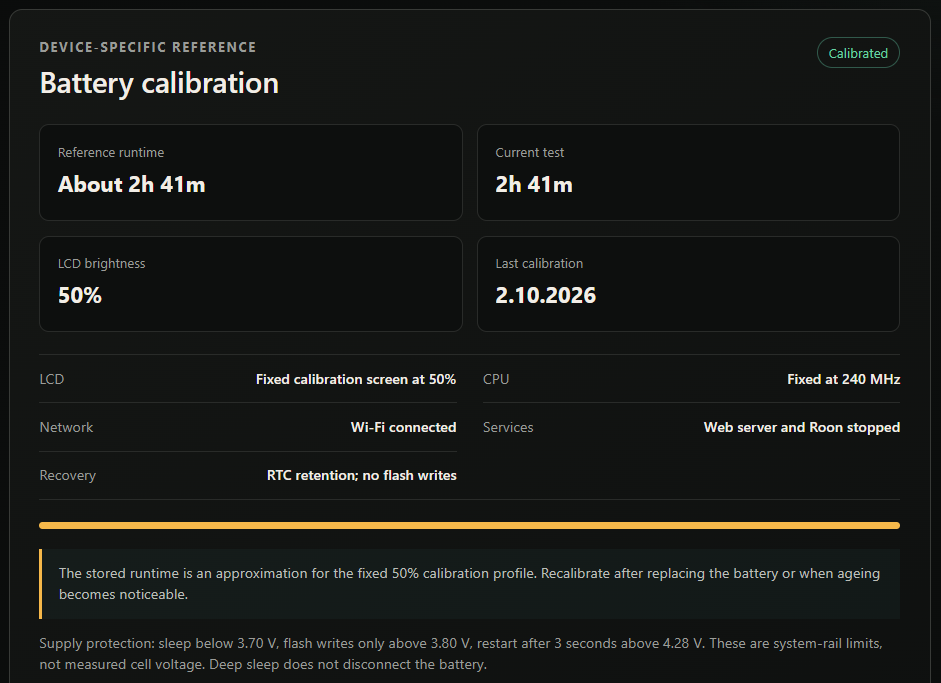
As I’ve said many times before, the small battery in this device is, unfortunately, a major weak point. The charging circuitry takes a very long time to charge it, and the hardware does not allow the charge level to be read. The calibration routine I’ve built in is only a workaround. It takes several hours to fully charge the battery, and this should always be done using a mains power supply rather than a computer’s USB port.
I added a replacement battery to my Waveshare puck. I let it charge overnight before running a calibration. Everything was working fine this morning. I unplugged it and started the calibration process. I noticed it had passed the 2hr mark. I came back a couple hours later and the display was dark and lifeless. I assumed the battery had run it’s course and was completely dead. I tried plugging it back in to mains power adapter and still nothing. It did not turn on. It’s been charging most of the day, and will now, not even turn on. I assume RoonPilot needs it powered to communicate, so even that doesn’t load.
Question? If the recalibration process finishes by draining the battery, how does one then look at the battery calibration metrics? Plugging it back in? Hum, that didn’t work. I’m assuming I have to wait until it fully charges? That can’t be right, because it should power on under AC power. It did before doing the calibration. It’s showing no signs of life today so has me a bit concerned.
A quick tip: Hold off on the calibration for a little while. In RoonPilot version 2.0.0, the calibration process has been refined slightly and provides more information.
I did read it. But with no signs of life under power is perplexing. Does the puck need a necessary ‘level’ of battery power before it will even turn on power? I’ve seen that with other products - especially those with screens - but this one is so tiny…
I can’t say. As I’ve already mentioned, the battery supply and charging circuitry in this device aren’t exactly a masterpiece from Waveshare. When my device arrived from China, the power switch was set to ‘on’ and the battery was completely flat. It took hours for the battery to recharge a little.
Another feature request to consider, please Georg.
It would be nice if the RoonPilot webserver supplied a favicon.
I use the Chrome browser’s new vertical tab, which shrinks every open tab to its favicon. So having a distinctive one would help me find my roonpilot tab at a glance.
Important note: Please do not use RoonPilot’s battery calibration function for the time being. In rare cases, the bootloader may become damaged when the battery voltage approaches the undervoltage threshold (causing a 1-bit flip), resulting in the device failing to start up. The only solution in such cases is to completely reflash the device. I have now been able to reproduce the problem and am working on a solution. Incidentally, during my tests I achieved a battery runtime of almost 5 hours whilst the calibration was running.

 I’m assuming I have to wait until it fully charges? That can’t be right, because it should power on under AC power. It did before doing the calibration. It’s showing no signs of life today so has me a bit concerned.