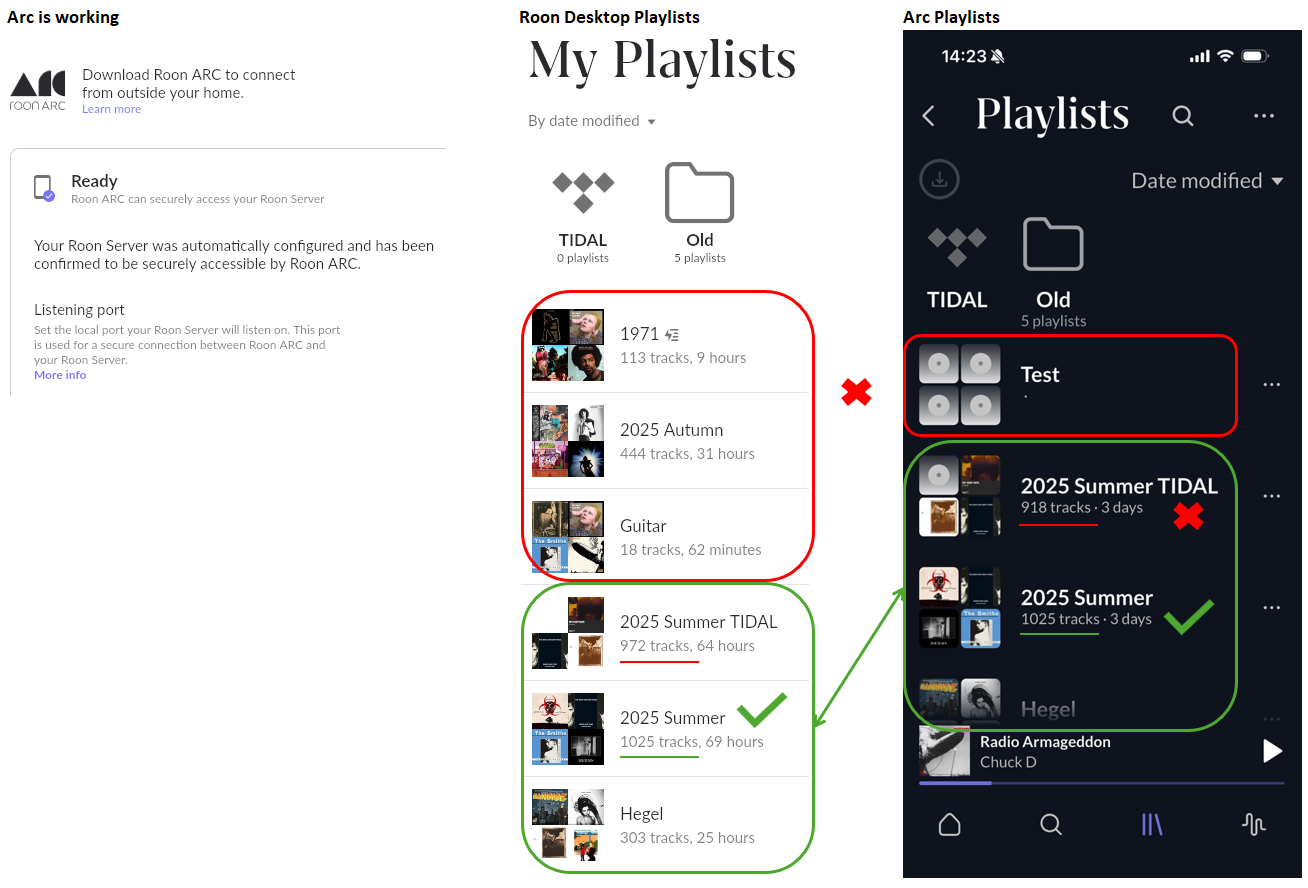
Adding a new playlist or editing existing in Roon desktop does not add/update to ARC. Creating a playlist in ARC doesn't sync back to Roon desktop.
ARC is working, I can use it in and outside of the house on iPhone and Apple Carplay and is on the latest version Roon ARC 1.70 (373).
I have one profile across devices but did have two and recently deleted one unused profile, however the problem existed prior to this. I also switched from Qobuz to TIDAL in the last couple of months but the issue exists whether it is from my library or streaming. I reference these two points in passing and largely to dismiss them.
Thanks for the report. I not aware of similar issues, it is strange that your playlists are not syncing properly. Just to confirm here, the same issue happens if you force-quit ARC and open it on your WiFi network (same network as the Roon Server)? Or does this issue only occur on a cellular connection? Is there any chance in behaivor if you log out and back into TIDAL in Roon Settings → Services?
Hi, I’ve forced the app to quit and made sure I’m on the same WiFi network as Roon desktop devices. In actual fact I changed my fphone this week and everything is as per the old phone (no better or worse). I’ve also logged out and back into TIDAL in Roon services. I think my next step is to uninstall the app and offload the data then try again. I’ll let you know how that goes.
I’ve deleted the ARC app and reinstalled. This seems to have corrected the issue, I just need to re download my offline content.
I should have tried disconnecting from Roon core kit first and reconnecting, I sense that may have done it and without having to re download content (I had to stop as my NUC fan was going into overdrive disrupting our evening).
I think I’m sorted and have tested adding and removing playlists, all working again.
Almost back to normal now. ARC is working via CarPlay but only for downloads (though not yet tried library files), but TIDAL tracks display but do not play, I get a message to say that TIDAL is not logged in. Coming home and trying Roon, TIDAL is logged in and working fine. ARC just doesn’t play TIDAL, with no error on the mobile app, it just hangs at zero seconds.
I’ll try a few more things and will update this post.
After posting the last message I forced a quit on the app and this seemed to enable TIDAL which is working again at home and out on a walk. I’ll test CarPlay again later but it is looking promising.