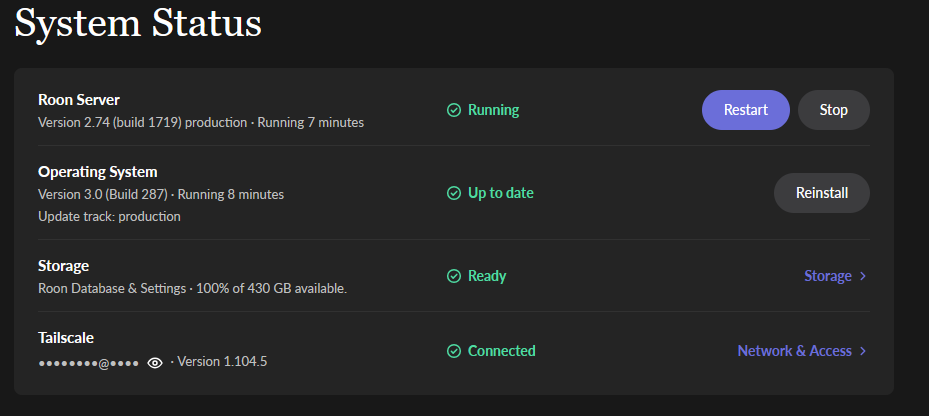
· I have just completed a migration of my ROCK install from a NUC8 to a NUC10, fresh install on the NUC10 and then restored from a backup.
Issue 1: I'm unable to enable System Output and my Ropiee (Verox) Audio devices. Both are showing as "Unnamed" and show as "Enabling..." in the Audio settings and I am unable to edit the names. I see I can't attach an image here, but I think I've described the problem reasonably well! All other devices seem to be working fine (or at least as they were before the migration).
Issue 2: In Settings -> About, I am unable to upgrade past ROCK 2.0 (build 1303). It tells me that an update is ready to be downloaded, but it fails after trying to download with message "There was an error checking for an update" when I Click here to install.
Tell us about your home network
· All devices mentioned are ethernet cabled and have run successfully for years before I migrated to the NUC10, so I don't think there's a hardware issue. It's as though the restore of the backup hasn't successfully populated the audio device names - so I think if I could edit the audio device names, that would at least solve the Ropieee issue.
Both symptoms point to the same place: the restored database is not cleanly applying the audio device state, and the ROCK update error may be tied to the same server-side problem.
Before we go further, please try a full restart of the ROCK from the RoonOS Web Administration Interface, then open Roon again and see whether the audio zones still show as unnamed and stuck on Enabling. If they do, the next useful step is to verify whether the restore itself completed cleanly, since that can affect saved device names and zone state.
I also want to check one thing about the update failure: is the ROCK able to reach the internet normally from that NUC10, or is there anything unusual on the network path since the migration?
Let us know what you see after the restart, thanks.
Hi. I have restarted everything multiple times, I have even re-restored the backup just in case it hadn’t completed properly or something but the problems persist, unfortunately.
How do I “verify whether the restore itself completed cleanly”? I’m not sure how to do that.
Do you have a PiHole in this setup, or any enterprise security/firewalls?
The ROCK isn’t responding to our log requests from cloud diagnostic servers despite reporting as online. The update problem might have a shared underlying cause.
In any case, please follow these steps to locate a set of RoonServer logs (RoonServer/Logs) from the database location. Compress the full log folder into a .zip and upload here at your convenience.
We’ll quickly identify the problem once we have the most recent logset.
Thanks for the logs. They’ve given us a much clearer picture.
Your restore worked. Both restores completed successfully, so there’s no need to run it again.
The underlying problem is DNS on the NUC10. Roon Server can still reach some of our services because it caches addresses it has looked up before. Everything that depends on the NUC10’s own lookups is failing with “Name or service not known”:
The update download. This is why “Click here to install” fails. You’re still on build 1303 while RoonOS 3.0 (build 287) is waiting to install.
Our diagnostics connection. This is why the server shows as online but doesn’t answer our log requests.
Time sync, and finding your QNAP by name.
The audio devices are a side effect. The Ropieee/iFi, your PC’s System Output and This Phone all fail at a security check as soon as a playback session starts. Your Pro-Ject, which runs older firmware, enables normally. We expect this to clear once the server is on a current build.
Next steps:
Power down the old NUC8. It’s still on your network at 192.168.1.38 and advertising itself.
Set the DNS servers on the NUC10. Open the ROCK Web Administration Interface ( http://192.168.1.55
) and switch networking to Static. Keep the .55 address, use your router as the gateway (probably 192.168.1.1), and enter 1.1.1.1 and 8.8.8.8 as the DNS servers. Then reboot. It’s also worth checking the DNS settings on your ASUS ZenWiFi, including any DNS filtering such as AiProtection or DNS Director.
Install the update. After the reboot, go to Settings → About and install it. Let it finish, as it may restart more than once.
Check the devices. See whether the Ropieee, System Output and This Phone now enable.
One question: your logs show Tailscale and Docker network interfaces on the NUC10, which we wouldn’t expect on a standard ROCK install. Did you install ROCK on it with the official installer, or is anything else, like Tailscale, running on it? Tailscale can take over DNS, which would match what we’re seeing.
Simply adding 1.1.1.1 to the static DNS config seems to have resolved everything. (I’m a bit surprised about the old .38 server advertising itself as its not even plugged in, but I did find that I’d reserved it as static on the router- years ago - so removed that just in case it was causing an issue).
Tailscale is there simply because I ran the option via the old ROCK admin screen - not yet done anything with that, but it seems to not be an issue at the moment at least.
To summarise, everything is looking fine now, system output and Ropieee device are functioning as they should.