1 - I'm one of many users who use Carbon Copy Cloner on my Mac (Studio M4 Max, macOS 27.2) to back up my Titan to Macintosh HD; I do this always after STOPping the server in the (much more pleasing, thanks) Web GUI. This is mainly to back up my music (FLAC files) but also the Roon 'System'. Is this (in addition to the inbuilt Roon backup routine) still safe, please?
2 - Since upgrading to RoonOS 3 I've noticed that those Roon 'system' files (that is, those in the 'Data' hierarchy, as opposed to 'Storage') now occupy nearly 1 TB - much more than before and making a backup to a 1TB hard drive impossible. Am I imagining things, please?
3 - Lastly, with the advent of macOS 27 and RoonOS 3 is there any way I can now delete the many multiple/duplicate Roon Server entries in System Settings > Privacy & Security > Local Network?
I can supply more details and screenshots if you need them. Thanks!
Thanks for the detailed questions, and for the kind words about RoonOS 3. We’ve gone through the logs from your Mac Studio:
1. Carbon Copy Cloner backups. Copying with Roon Server stopped is the right approach, so you’re fine to keep doing it. Please make sure the CCC job only ever copies from the Titan and never writes back to it. If you ever need to restore your library, please use one of Roon’s own backups rather than the copied files.
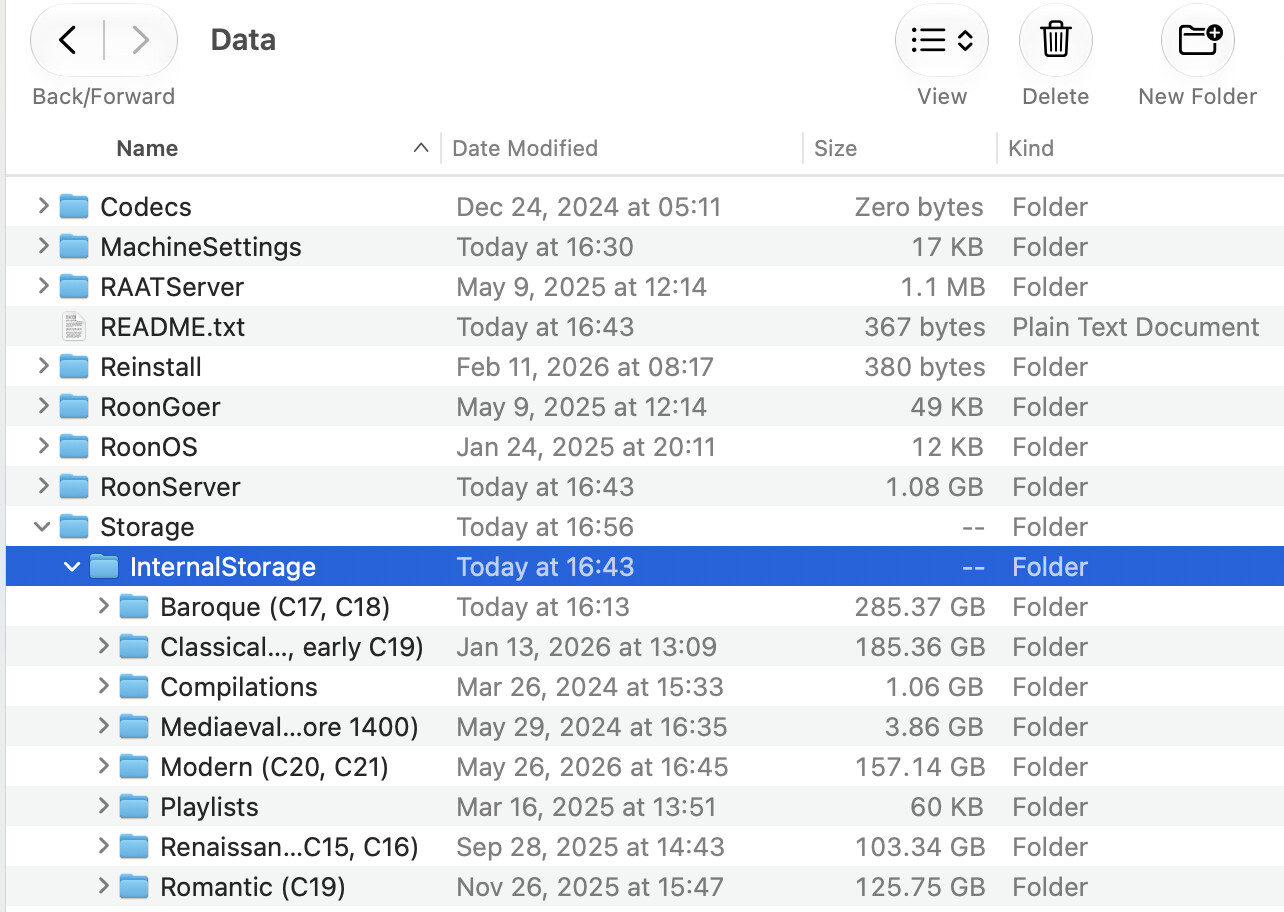
2. Data now around 1 TB. On a Titan, the internal music drive sits inside the Data share at Data/Storage/InternalStorage. If Finder or CCC is measuring or copying the whole of Data, your music is included, so it may be getting counted or backed up twice. RoonOS 3.0 also moved file sharing to a newer system (Samba 4), which may have changed how that folder shows up. To confirm, could you send us:
a screenshot of the folders at the top level of Data, with their sizes
3. Duplicate RoonServer entries in Local Network. Each Roon update installs a new version of Roon Server, and macOS adds an entry for each version. macOS doesn’t let apps or users remove individual entries, but the old ones are harmless. Only the current entry is used, and since all of yours are on, nothing needs changing. If audio devices ever go missing after an update, turning the RoonServer entries off and on again restores access.
One more thing from your logs: your Mac is connected over both Ethernet and Wi-Fi on the same network. We’d recommend turning Wi-Fi off while Ethernet is plugged in, as that tends to make the connection to the Titan more stable.
Many thanks, as always, for your quick and helpful reply!
May I draw your attention, please, to a recurrence of what may be the number-of-backups-exceeded bug, which I know you are working on. My post (additional info) is here?
I had to hard pull Titan to get anything to work. The logs as also requested in your answer 2 (thanks) ought to help, I hope?
Your comments about CCC noted. Always followed precisely as you say!
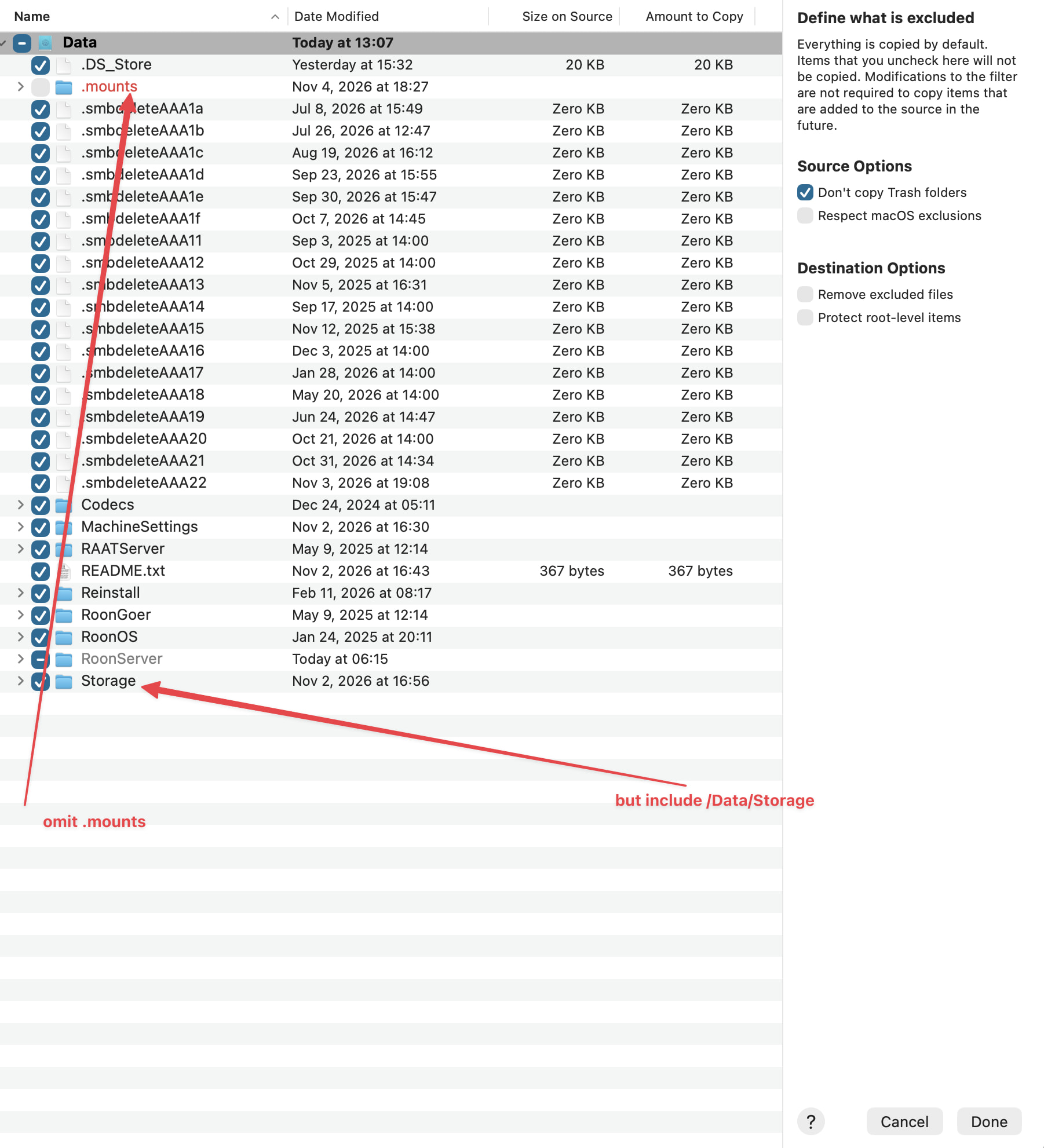
Yes, I can see what you mean. I doubt it, though, because I’ve been excluding such sub-folders with CCC’s Task Filter.
Sent…
Understood. I know you’ve kindly advised on this in the past. It’s just my would-be tidy mind that hates to see them there !
I know I could revoke access to everything and then add it back in only for the latest Roon Server. But that ‘everything’ would mean many other programs/permissions
And, presumably, I’d only clear them until another version is released, wouldn’t I?
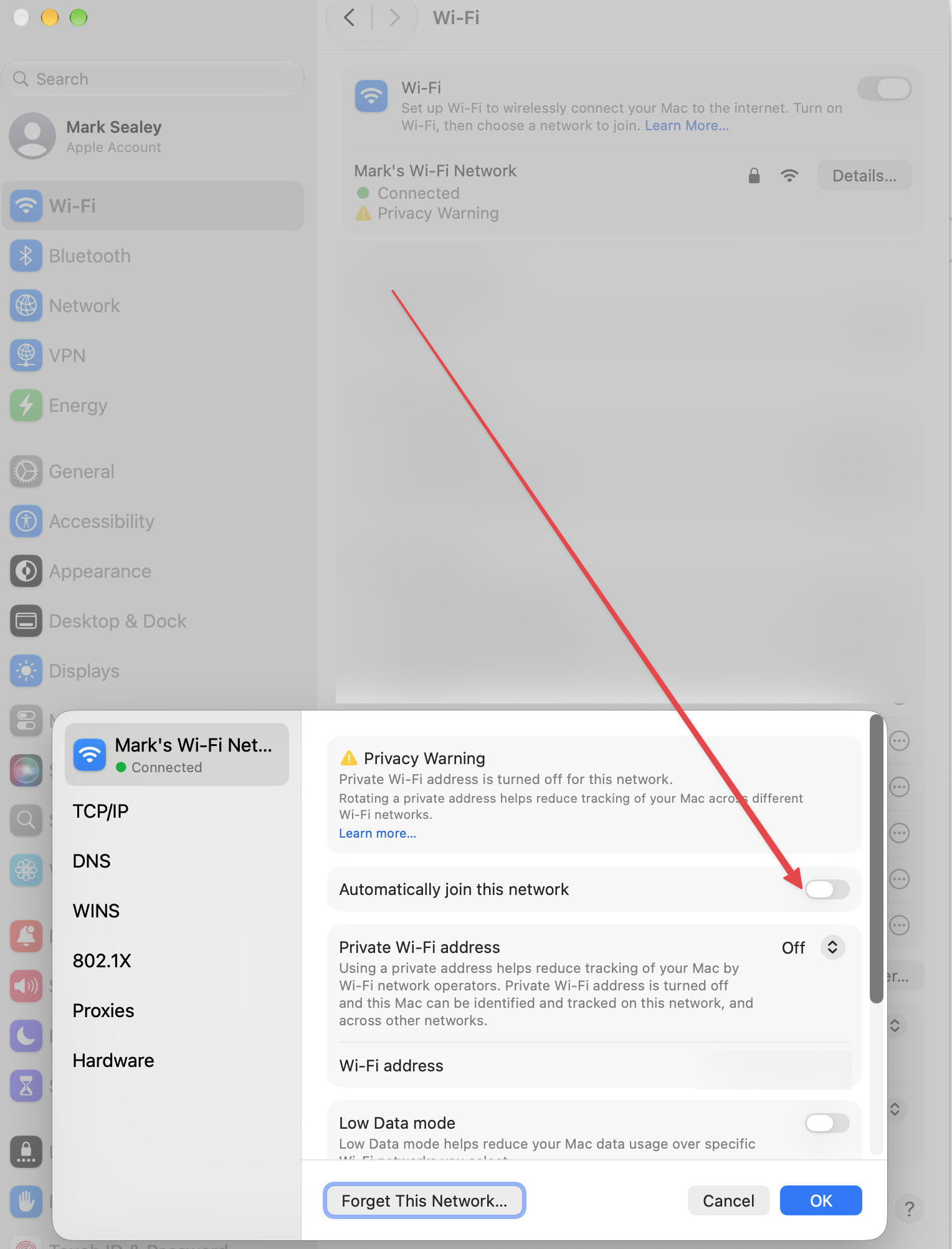
Thanks. Specifically, you’re suggesting turning off System Settings > Network > Wi-Fi; even though I do use it, and not for Titan?
Your help appreciated.
I’d say the most urgent issue is Titan’s Samba connection, which I can only re-establish (and avoid Jellyfish) by a hard pull; together with the ten backups maximum issue, for which I know a fix is imminent…
The next time your Titan hangs, check whether its Web GUI loads in a browser before you pull the power. If it does, restart the Titan from there instead. Otherwise, try holding the power button on the unit itself. A clean restart is gentler on the Roon database, and the check shows whether the whole Titan froze or only its connection to your Mac. Please also reply with the approximate date and time of the last hang, and whether it happened around a scheduled backup, so the right section of your logs is easy to find.
The Backup limit issue is tracked in your other thread, and updates on the fix will go there. This ticket is progressing through the pipeline and we expect it to release soon.
To make sense of the 1 TB figure, please say whether it comes from Finder or from CCC. Finder’s Get Info counts the music inside Data even when CCC skips it. A screenshot of your CCC Task Filter would also help. If RoonOS 3.0 changed the folder path your filter targets, CCC would copy the music again without any warning.
Yes, WiFi on the Mac network settings is the correct switch to turn off. On the same network, Ethernet already carries everything Wi-Fi does. With both connected, your Mac can reach the Titan over either one, and that may disrupt the share connection. If you need Wi-Fi for AirDrop, you can leave it on and turn off Auto-Join for your home network instead.
You’re right on both counts about the Local Network entries. Each update adds a new entry, so a reset wouldn’t stay tidy for long, and the old entries do no harm.
@connor - very many thanks for your quick and helpful reply!
Have interleaved my answers (the board’s integrated listing - always ‘1’ - to be ignored, of course):
Thanks. No. It never does. The Titan fails to show up in either the web GUI (including the new one). If it does (which it usually doesn’t) in Roon itself, I can often choose Titan, but selecting it does nothing.
Similarly, a less than four seconds hold on the Titan power button also fails to do what a hard pull always will.
Having said that, you can imagine how nervous I always am - because I know that the database will never thank me for doing what I do
Yes to sending you the date and time. Never associated with a scheduled backup, or initiated one in progress.
Great. Yes. Thanks. Good luck with progressing that .
CCC. Presumably because the Finder won’t see ‘invisible’ (leading.) files
But I may have found a ‘solution’ (?): since my last post - and a DM - to @benjamin I have successfully created clones by omitting the .mounts hierarchy under Data thus:
Doesn’t that mean that - since the advent of RoonOS 3 - a Nucleus stores the music files twice?
If not, may I inquire, please: what is .mounts, why is it there, and how does it work?
I ask - because perhaps I should be doing the opposite in CCC (FRT, with the server always stopped!), that is having CCC clone including .mounts but excluding Storage/Internal Storage ?!
Got it. Just Disconnect specifically during a Roon backup and then Connect for all the other uses I have, such as iPhone etc?
But this doesn’t apply to Roon’s own ‘internal’ backup routine, does it?
Is there a way, please, in which a future version of Roon could detect for the active presence of both Ethernet and W-Fi and perhaps ask users (this isn’t just me, is it?) which they’re prefer it to prioritize?
Thanks for the CCC task screenshot and for narrowing the 1 TB figure down to CCC.
Your music is stored once. .mounts and Storage/InternalStorage are two paths to the same internal drive: RoonOS 3.0 attaches the drive under .mounts and presents it again under Storage.
Finder hides .mounts because of the leading dot, but CCC reads hidden folders, so it was copying the same files through both paths. Excluding .mounts, as you have now done, is the right filter. Keep Storage/InternalStorage as the path you clone, and there is no need to do it the other way around.
On Wi-Fi, you don’t need to switch it off and on around each backup. Connor’s second option is the simpler one: leave Wi-Fi on and turn off Auto-Join for your home network on the Mac. AirDrop and the other iPhone features keep working because the Wi-Fi radio stays on, while everything on your home network, including the Titan share, goes over Ethernet. This applies to Roon’s own scheduled backups as well, since yours are written to a folder on the Mac and travel over the same connection.
Which connection the Mac uses to reach the Titan is decided by macOS, so it is outside what Roon Server on the Titan controls. We’ll pass your suggestion along, and the Feature Suggestions section below is where votes give it weight.
For the freezes, Benjamin’s steps in your backup thread are the ones to follow: note the time, restart, and post it there. Keeping the freeze reports in that thread lets us read them alongside the backup logs. Let us know how the next clone goes with .mounts excluded.

 !