I have the same booting problem (rebooting in less than 3 minutes) on a NucleusOne. Can’t roll back to 2.1. What other options do i have?
What about trying an HDMI Dummy plug as @Suedkiez has suggested?
I can see the roon on my tv. But it switches between Ronn logo an « working » « no action needed »
Ah, so you have a TV connected? Something different then. You say you can’t roll-back, have you tried the recovery procedure suggested by @noris?
For me that solved the issue!
Plug in a HDMI dongle, easy as that!
Hi @MarcusFF,
Thank you for your post.
You’re unfortunately encountering a known issue affecting this particular NUC model line.
We’ll merge your report into the tracking thread momentarily so you can receive updates as the team works on a solution.
Here are rollback instructions to RoonOS 2.1 you can use in the meantime.
This with HDMI dummy emulator is definitely most elegant solution. In my country i paid it 3EUR and it works. 
Just had this issue on mine too, early release…but not that NUC model…was ok on the first update for a. Few days then kept going off…
But dummy HDMI plug its good for now
Yes I would like to see an ETA for an update also. It is stable with an HDMI Emulator but as soon as I connect ROCK to my AVM90 and set the AVM90 to standby… crashes are back. So workable in the meantime because the emulator solves the issue, but I really would like to see a final solution soon.
Well, I was the proud user of a NAS installation that worked for years. The Roon came along and switched to a docker solution that was difficult to install and had issues updating. That was it for me and I switched to ROCK which I should have done from day one. For whatever reason my NUC8 i5 BEH works without an issue on 3.0 for weeks now.
I am experiencing frequent unexpected reboots of RoonOS 3.0 on my Intel NUC8i5BEH running ROCK.
The problem started in late October 2026, shortly after the Roon software updates. My system had been stable before that.
System configuration:
-
Hardware: Intel NUC8i5BEH
-
RoonOS: 3.0 (Build 287)
-
Roon Server: 2.74 (Build 1719)
-
HDMI: No device connected
Symptoms:
-
The connection to Roon Server is repeatedly lost, displaying “Waiting for Roon Server” followed by an “Unknown error” message.
-
The system automatically recovers after approximately 1–2 minutes.
-
After recovery, both the RoonOS and Roon Server uptime counters reset to less than one minute, strongly indicating that the operating system itself has restarted.
-
The issue persists after updating Roon Server from Build 1716 to Build 1719.
-
The frequency of these unexpected reboots appears to be increasing.
Recent occurrences (November 13, 2026, Japan Standard Time):
| Connection lost | Connection restored |
|---|---|
| 20:54 | 20:56 |
| 21:13 | 21:15 |
| 21:26 | 21:28 |
| 21:43 | 21:45 |
Four unexpected reboots occurred within approximately 51 minutes.
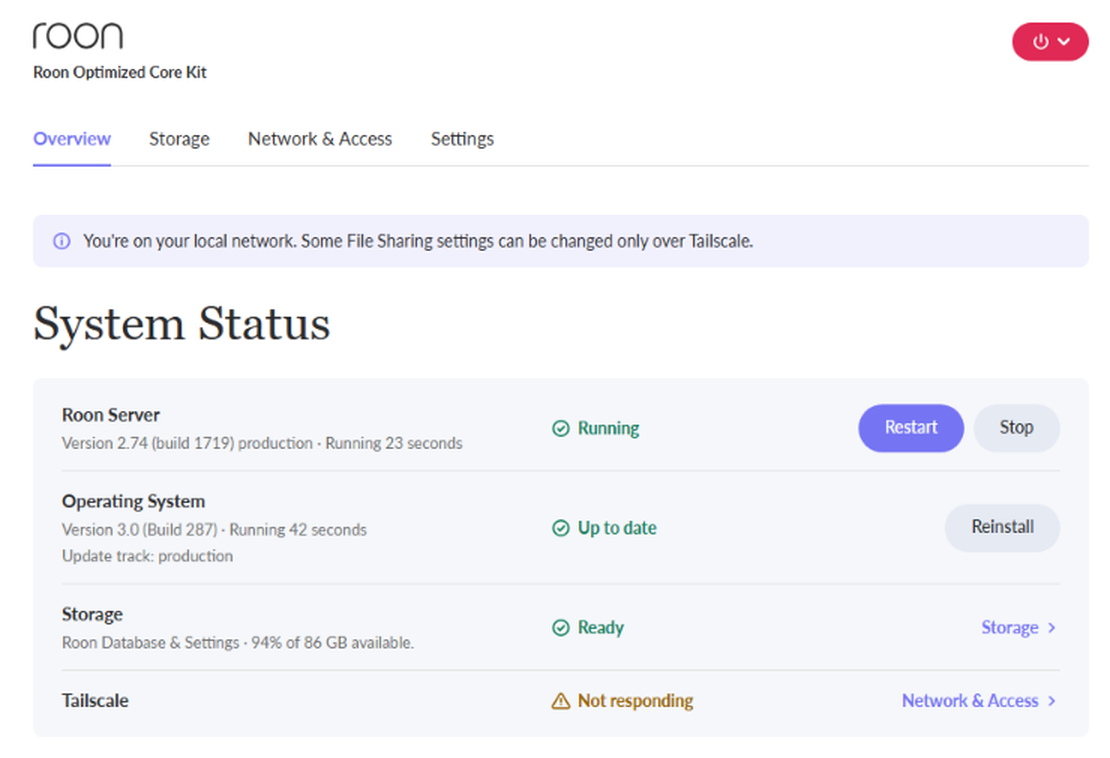
The attached screenshot was taken immediately after recovery at 21:45 JST on November 13, 2026. It shows:
-
RoonOS uptime: 42 seconds
-
Roon Server uptime: 23 seconds
-
RoonOS version: 3.0 (Build 287)
-
Roon Server version: 2.74 (Build 1719)
I understand that similar issues have been reported on certain Intel NUC models running RoonOS 3.0, possibly related to HDMI initialization.
I have not attempted an OS reinstall or rollback, as I would prefer to wait for an official fix.
Could the Roon team please provide an update on the investigation and let me know whether a fix is planned for an upcoming RoonOS release?
Thank you for your continued support.
@pea03720
You can temporarily solve this issue by connecting a monitor or a monitor-emulator-plug on th HDMI-connector of your NUC. This will prevent RoonOS to reboot constantly.
This is temporarily until Roon solves the issue. But as this problem is already more than 2 weeks old, I presume this is a harder one to solve by Roon so a temporary solution with a monitor/emulator is the best shot to be able to keep enjoying the music.
Kind regards, Frank.