What happens if you press the "Select a different Roon Server" button?
· I don't see Roon Server.
Please try to restart your network setup by unplugging, waiting 30 seconds and then replugging in your networking gear.
· No, the issue remains the same
Please select how you've connected your Roon Server to the internet
· Roon Server is connected by *Ethernet*
Have you checked your firewall settings to ensure that Roon is allowed through?
· Roon still won't connect even after checking this aspect
Have you verified that Roon Server is on the same subnet as your Remotes?
· My Remotes and Server are on the same subnet and I still can't connect
Sometimes the issues can be resolved with a reinstall of your Roon Remote app. Let's try to perform a reinstall and see if it helps.
· I've reinstalled the Roon Remote but it did not help
What is the operating system of your Roon Server host machine?
· *Windows*
Select any of the following components that are present in your local network setup
· *Antivirus* *software *installed on RoonServer _or _Roon Remotes
You mentioned antivirus software. Please select the specific Antivirus you have from the list below
· Bitdefender
Click below for next steps with a Bitdefender Antivirus
· I still need help.
Describe the issue
I installed the Roon update, 2.73 (build 1700) on a Windows 11 PC where both Roon and Roon Server run and I can no longer connect to Roon Server.
I can no longer connect to Roon server from Roon on the same Windows 11 PC or the iPad or my Android phone
I ran through all the checks and changes suggested leading up to this issue entry and none of them fixed the issue.
Note: I was streaming with Roon this morning just fine. Left to run some errands, when I got back, launched Roon on my Windows 11 machine and it prompted me with the update. I updated and now can not connect. Roon has been running flawlessly for roughly 2 years on this machine. I did to the stop of renaming Roon to Roon_old and reinstalling and that didn't fix it either.
Describe your network setup
I have 1 GB fiber, into an Asus router. Each room in the apartment is wired and every single device including the Roon Windows PC is hardwired. I use wifi only for phone and iPad.
I powered down my router and switch and restarted my Windows PC
I’m running Windows 11 Version 26H2 (OS Build 26300.9457)
I do have software development tools like VS Code and Visual Studio installed, so I also have the latest .NET installed
I want to reiterate that I was streaming with Roon just fine this morning and have been running Roon and Roon Server on this machine with no issues for about 2 years. I stopped being able to connect to Roon Server after installing the update
I took a quick glance through the Roon Server logs and Roon logs. I didn’t see anything out of the ordinary in the Server logs, but I saw a few things in the Roon logs. Brutal is the name of my Windows PC
Thanks for those snippets. Since this is on the same PC, I suspect this is a firewall issue, particually it can happen when you use a Public vs Private network, and I have seen Windows update sometimes revert these settings.
Since you are using a Windows PC, I would verify that both Roon.exe and RAATServer.exe have been added as exceptions to your Windows firewall.
You can use these instructions to add the exceptions and the executables themselves would be located in your Database Location/Application folder path.
I would also add these exceptions to any Antivirus or other firewall-blocking applications you may have and ensure that you connected to your network via a Private network, not a Public one, see this guide for more information.
If that doesn’t help, I would check to see if anything else is using port 9332 on your PC:
I did look at the firewall settings when going through the suggestions to create this post / ticket
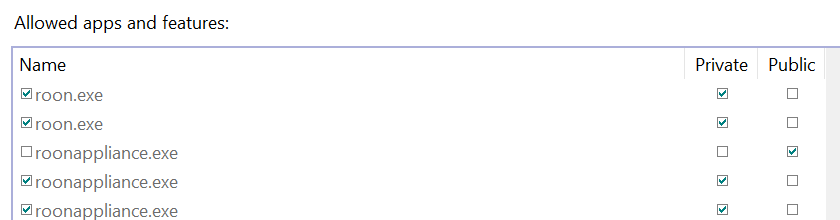
I just looked now, and the firewall settings are different from what they were the other day???
do I need Public, Private or both checked
I don’t get what’s happening. I edited the above firewall exceptions to be all Private and no Public
Apply those changes
Launch Roon Server and now I have even more entries and settings change to this
And I should add I could still not connect after those changes.
I want to add more to this surreal story
The night after I installed the latest update which broke Roon I left my PC on over night. Roon and Roon Server were not running over night. The next morning I decided to start diving back into my Roon connectivity issue so I launch both. To my surprise I connected to Roon Server. I streamed music off Qobuz for about two hours, then Roon lost connection with Roon Server and I could not re-connect. I tried restarting Roon Server and rebooting my machine and still could not connect.
And a reminder, Roon and Roon server have been working on this machine for about two years. This issue arose instantly after installing build 1700 update
After reviewing a fresh Roon Server log set, we can see Roon Server repeatedly stopping abruptly, with no error logged. On 10/12 it restarted 18 times within a few minutes, and on 10/13 it stopped the same moment your connection dropped. The server itself starts cleanly and listens on the correct ports each time, so this looks like something on the PC is terminating the Roon processes rather than a network issue.
Since Bitdefender is installed, we’d like you to:
Check Bitdefender’s Notifications and Protection → Advanced Threat Defense history for any blocked or quarantined Roon items.
Add exceptions in Bitdefender (Antivirus, Advanced Threat Defense, Online Threat Prevention and Firewall) for the folders *C:\Users\mhowe\AppData\Local\RoonServer* and **C:\Users\mhowe\AppData\Local\Roon**.
As a quick test, you could also pause Bitdefender completely for an hour.
In Windows Firewall (or Bitdefender’s firewall, if it’s enabled, it replaces Windows Firewall), remove all Roon entries and re-add RoonServer.exe, RoonAppliance.exe, RAATServer.exe and Roon.exe for Private networks. This is what will let your iPad and phone connect.
If it happens again, please note the time and we’ll review fresh Roon logs. It may also be helpful to review any RoonAppliance entries from Windows Event Viewer → Windows Logs → Application around that time.
I checked Bitdefender’s notifications and saw nothing related to Roon, Roon Server, or any local running app. Only saw a few browser IP blocks
I shut off Bitdefender (it’s currently off)
And I noticed something (by accident) when starting Roon Server
When I start Roon Server, right-click on the Roon Server icon in the tray and leave that pop-up up; I see Roon Server (I haven’t even tried to launch Roon yet), cycle through
Starting
Running
Error
Started
Not Responding
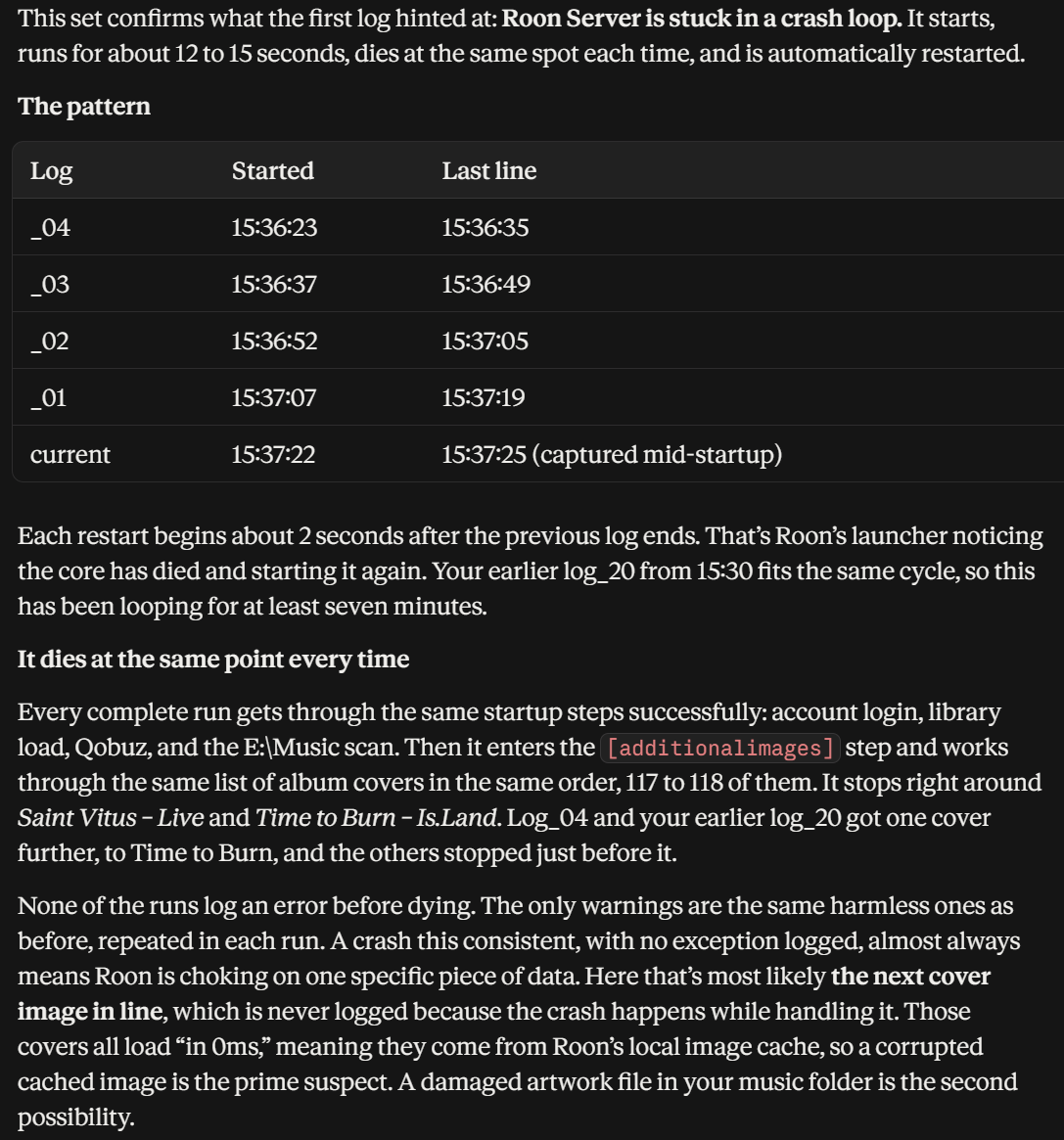
Thanks for digging into this, @Michael_Howes, and for spotting the tray cycling. That matches what we’re seeing: Roon Server crashes a few seconds after it starts, and Windows restarts it automatically.
The artwork theory is worth testing. Just keep in mind that the last line in the log isn’t always what caused the crash, because the final few lines are often lost when a process stops suddenly. These steps should narrow it down:
Check Event Viewer. Open Windows Logs → Application and look for an Application Error or .NET Runtime entry for RoonAppliance.exe at one of the crash times. Please send us a screenshot of the details, especially the Faulting module name.
Clear the image cache. Exit Roon Server from the tray, then rename C:\Users\mhowe\AppData\Local\RoonServer\Cache to Cache_old and start Roon Server again. Nothing in your library is lost; Roon rebuilds the cache.
If it still crashes, temporarily make E:\Music unavailable (rename the folder or disconnect the drive), then start Roon Server again. If it stays up, a damaged artwork file in your library becomes the likely cause.
Also, could you confirm that Advanced Threat Defense is off as well? Turning off Bitdefender’s main protection doesn’t always turn it off.
Let us know how each step goes, including the time of each test, and we’ll go through a fresh set of logs.
Nothing in the Event Viewer
Renamed the Cash to Cashe_old and still got the same Roon Server startup error loop
I also deleted all my cover images in my entire music library. I know, sounds sort of extreme but I’ve been embedding the images in the flac files these days and many of those images are likely not needed. Still got the startup error
And here is the big one. Renamed E:\Music and still got the Roon Server start error loop
It stops every time downloading cover section in the logs
here is where it stops
10/15 15:25:51 Trace: [additionalimages] downloading cover for 121:0:MR0004979694 (libraryalbum=LibraryAlbum[1912111, Iron Maiden - Killers]) (metaalbumid=121:0:MR0004979694)
10/15 15:25:51 Trace: [additionalimages] downloaded cover for 121:0:MR0004979694 in 0ms
10/15 15:25:51 Trace: [additionalimages] downloading cover for 121:0:MW0001063330 (libraryalbum=LibraryAlbum[655407, Manes - Vilosophe]) (metaalbumid=121:0:MW0001063330)
10/15 15:25:51 Trace: [additionalimages] downloaded cover for 121:0:MW0001063330 in 0ms
10/15 15:25:51 Trace: [additionalimages] downloading cover for 121:0:MW0000572589 (libraryalbum=LibraryAlbum[239663, Marduk - Rom 5:12]) (metaalbumid=121:0:MW0000572589)
10/15 15:25:51 Trace: [additionalimages] downloaded cover for 121:0:MW0000572589 in 0ms
10/15 15:25:51 Trace: [additionalimages] downloading cover for 62:1:639dc810-d312-4f3c-a7d8-abb5555fe75a (libraryalbum=LibraryAlbum[283183, Oakhelm - Echtra]) (metaalbumid=62:1:639dc810-d312-4f3c-a7d8-abb5555fe75a)
10/15 15:25:51 Trace: [additionalimages] downloaded cover for 62:1:639dc810-d312-4f3c-a7d8-abb5555fe75a in 0ms
10/15 15:25:51 Trace: [additionalimages] downloading cover for 62:1:ef991575-eb0c-363a-9da0-a3701d1b4057 (libraryalbum=LibraryAlbum[629551, Saint Vitus - Live]) (metaalbumid=62:1:ef991575-eb0c-363a-9da0-a3701d1b4057)
10/15 15:25:51 Trace: [additionalimages] downloaded cover for 62:1:ef991575-eb0c-363a-9da0-a3701d1b4057 in 0ms
Thanks for running through all of that, @Michael_Howes, and for confirming that Advanced Threat Defense was off too.
Your tests rule out a lot. Roon Server still crashed after the image cache was cleared and after E:\Music was taken offline, so damaged artwork or a problem file in your library is very unlikely to be the cause. The [additionalimages] lines are probably just what Roon Server happens to be doing when it stops. As mentioned before, the last few lines of a log often get lost when a process stops suddenly.
We tried to pull a fresh set of logs from your Roon Server, but it wasn’t running, so nothing came through. Could you:
Start Roon Server and leave it running for 10–15 minutes, even if the tray icon keeps cycling through errors.
Note the time you started it.
Reply here once that’s done.
We’ll grab the logs while it’s running and go through them closely.
I have some more clues
So, on both Saturday and Sunday, I was able to use Roon and stream (mostly from Qobuz) all morning
Then, sometime in the afternoon, Roon Server died both days.
This morning I started up Roon, got an update notification,and installed the update
I was able to stream for the last 1.5 hours.
I got a message that a background task hadn’t run in a long time (updating album meta data in my library or something?). I dug through the settings and found that task, which was set from 1-5 PM and requires a 4-hour window. I thought, well, it hasn’t run in a long time, so I changed the window to 9 AM - 1 PM, which caused the background task to start instantly ,and Roon Server died ,and Roon lost the connection with the server.
Just launched Roon Server (10/22/2026)
Start: 9:13 AM Central Standard Time
Stop: 9:26 AM Central Standard Time
So that background task (I don’t remember the exact setting, and I can’t look because now that the time window is now, it starts as soon as I start Roon Server so can’t connect to Roon Server. Sometime after 1 PM, I should be able to run Roon Server successfully
Would be curious if you looked at my logs both Saturday and Sunday to see if it was 1 PM Central Time or a little after when my Roon Server died