· The Nucleus boots up and I can connect to it in the Roon app without issue, but I have a question about configuration/storage/attached devices
Describe the issue
.
Roon Server: Version 2.74 (build 1716) production Operating System Version 3.0 (Build 287)
Related to streaming (qobuz). Connected Nucleus One to Samsung Q90F, TV shows enabled under displays. Using iPad as remote control, select Oppo as audio source. Played album. Before AND while playing, TV shows big "ROON" in center of screen. Nothing else. Same happens with Fiio M15S as audio source.
Hi BlackJack, Yes, I read that before starting. Nucleus to TV, and audio source chosen. A zone can be an output device, of which I use two (oppo wired and fiio wifi). https://help.roonlabs.com/portal/en/kb/articles/zone
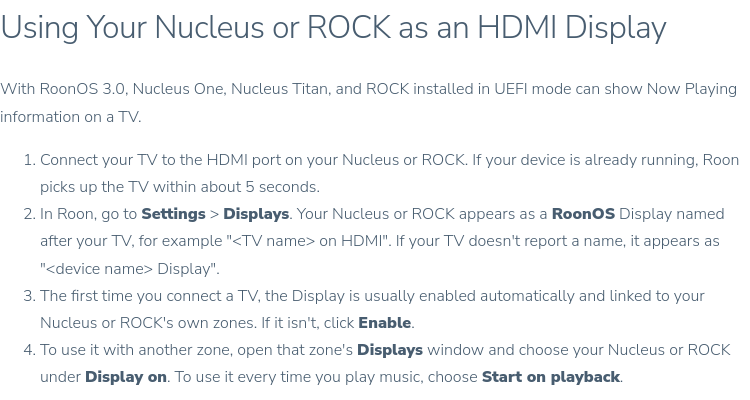
So you started the display on the Zone you’re listening to then or was there no prompt to turn on the display? Maybe use the Guide and post a screenshot for every step?
I’m not sure what you mean. I have only one zone. I have the HDMI going into the TV from the Nucleus, and the TV of course was on and feeding it’s HDMI2 signal, which showed the Roon logo. The screen shot would just show “ROON” on the screen, with nothing else. The TV was listed under displays, with the ‘lyrics’ slider on. This tells me the Nucleus was sending it’s signal to the TV, and the TV was getting the signal.
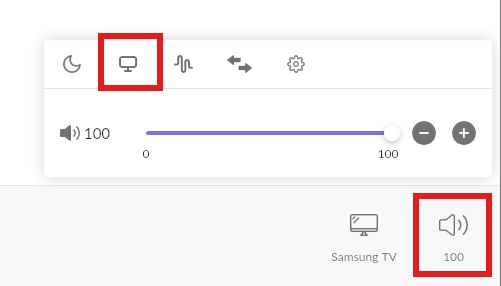
The point is that you need to enable the Display for the Zone. So first click the Speaker icon to bring up the Zone settings and then click the Display icon to turn it on for that Zone…
OK, thanks Geoff and Blackjack. I understand that now. I am able to bring up the oppo on the display, and when I play an album, the cover art shows. But the Roon post also says I should be able to see lyrics. When I tap the lower left of the ipad and select lyrics, the TV stays on album art.
Now, on to the wifi and the Fiio DAP. I selected to stop display on the TV icon from the volume control, switched to the Fiio, went back to the TV screen icon and saw that the Fiio was selected. I then turned on the display and selected display now (also turn on show when played). I selected a different album and played in on the Fiio. The TV continued to show the album I had playing on the Oppo. The Fiio M15S roon ready did not display on the screen.
I’ll reply to comments tomorrow…it’s (American) football day!
Thanks for writing in! We were able to review a fresh set of Roon Server logs. We’ve gone through them and can see what was happening. The Nucleus HDMI display was attached to the Nucleus’s own HDMI output zone, not to Oppo 205, which is why you only saw the Roon logo. Enabling the display from the Oppo zone, as you found, is the right fix.
A few things we’d like to check:
The logs show the Nucleus HDMI going into a Denon AVR rather than directly into the Q90F, and the HDMI link dropped and reconnected several times. Could you confirm your wiring, and if possible, try connecting the Nucleus directly to the TV?
The tracks you played (the Dylan Thomas readings and the BBC Proms recordings) don’t have lyrics available, so lyrics won’t appear for them. Could you try a studio album where the Roon app shows lyrics?
For the Fiio: we can see that zone dropping off the network now and then. Next time, make sure the Fiio is awake, move the display from Oppo to Fiio, note the exact time, and send us a fresh set of logs without restarting first.
I’ve tried various things, which explains the dropping off of the network. I tried direct to TV, but that really won’t work, due to TV issues, primarily, other HDMI inputs won’t let me set the display dark enough for night time viewing, plus extra button presses to change HDMI input.
I have the Nucleus going directly into my Denon now, and the Oppo works nicely, showing lyrics (whether I want them or not…I did not see a way to just show album art).
The Fiio is the problem. At this point, it still just shows the Roon logo. I can’t even get it to show album cover now. Under Displays, I disabled the Samsung and enabled the Denon, and via the speaker icon>TV icon, I selected both turn on when started and start now. It seems to me that it should not matter to the Nucleus whether it’s connected direct to a TV, or have an AV Tuner to pass through first; isn’t HDMI just HDMI, regardless of destination?
I don’t know how to find my logs, but I just finished playing with the Fiio about 5 minutes ago. If you think it won’t work going through the Denon, then there is no sense making another step.
Thanks for your patience. We’ve been through a fresh set of logs from your Nucleus, and here’s what we found.
The Denon isn’t the problem. HDMI through the AVR works fine, so there’s no need to connect the Nucleus straight to the TV.
On Nov 2, the Oppo was showing on the TV’s built-in Chromecast, not the Nucleus HDMI. Your logs show the Samsung’s Cast display showing the Oppo zone at that time. That’s why it worked for the Oppo and then stopped when the TV switched inputs.
The Fiio issue looks like a bug on our side. When you turned on the Nucleus HDMI display for the Fiio, Roon Server recorded the change but never told the display to switch. The display stayed on the Roon logo because it never got that command. We’re passing this to our development team with your logs.
In the meantime, this may help: choose the Fiio for the display, start playing to the Fiio, then restart Roon Server from the Nucleus web page. We haven’t confirmed that it works, so please let us know what you see.
To hide lyrics: go to Settings > Displays, select the Nucleus display, and turn off the Lyrics toggle. You’ll see just the album art.
We’ll update this thread when we hear back from the team.
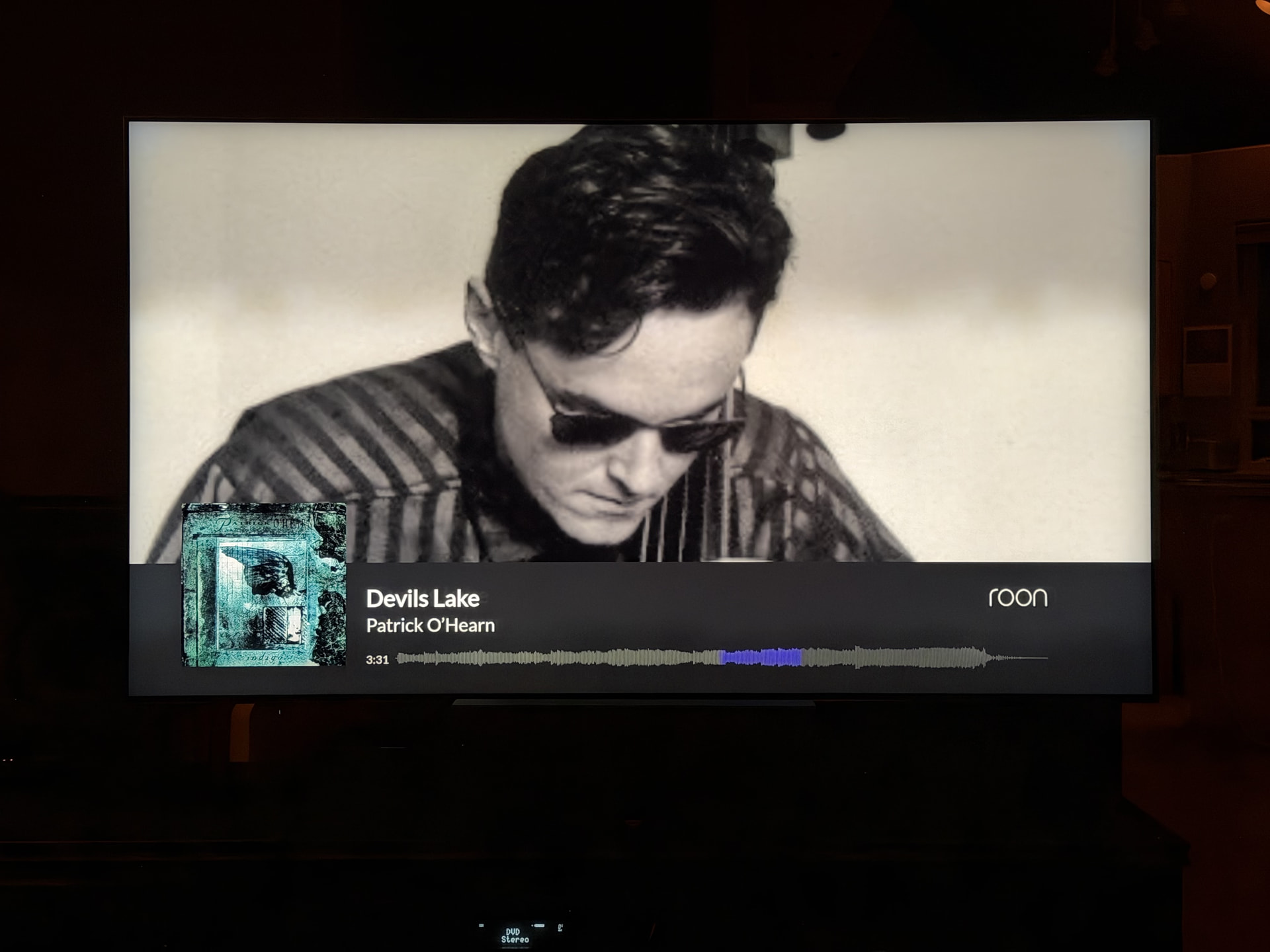
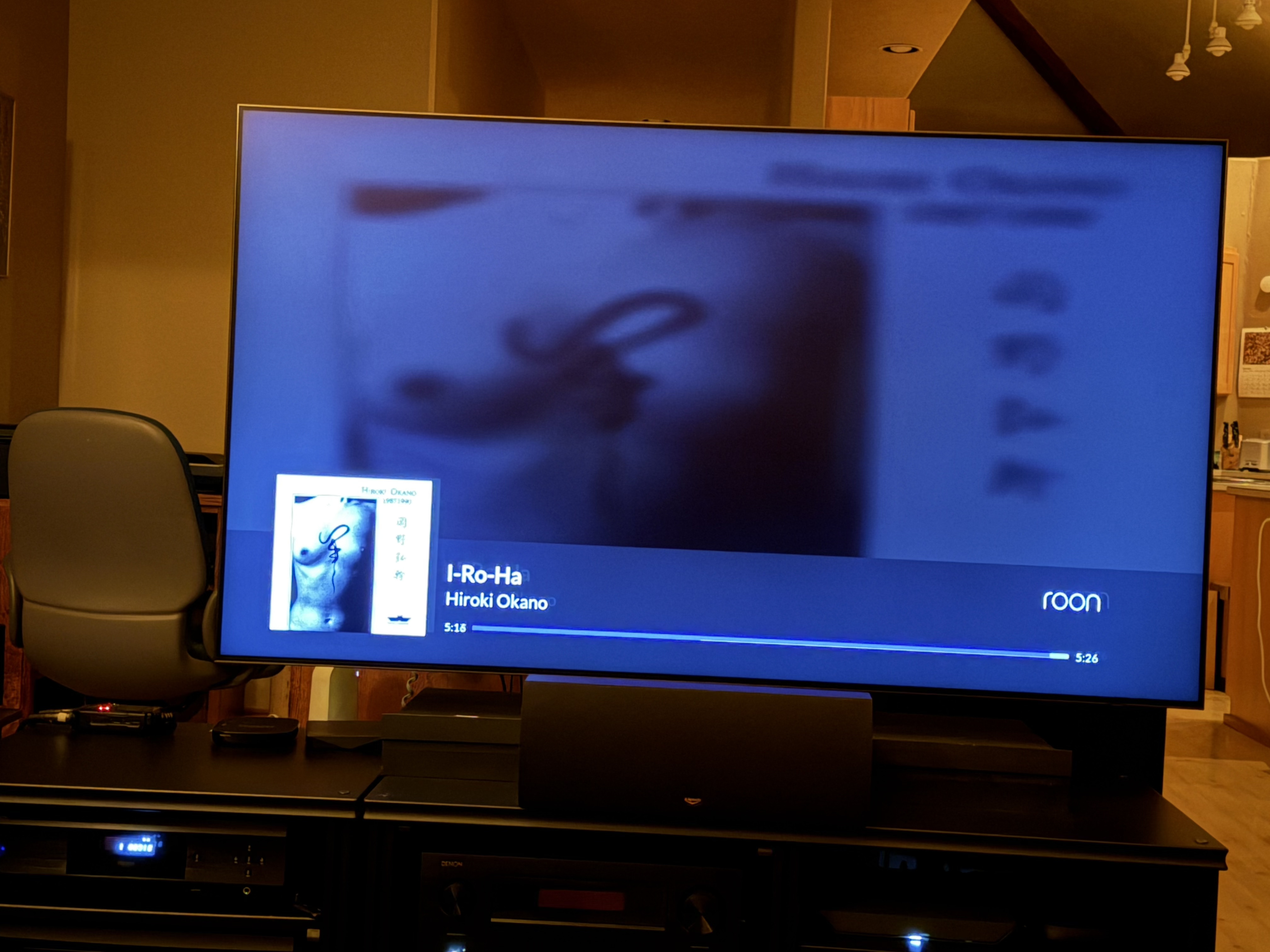
It seems to be working now, kind of. That is, I am getting a image from the Nucleus, but it’s not the cover art. Rather, it is the image you get when you tap the lower left when playing an album, the screen where you can select lyrics, bio, etc. (first upload).
The actual cover art, as seen on the Fiio screen, is the small color image in the lower left. Also note the progress bar lacks the total time on the right side, and the progress does not turn to purple until roughly half way.
There is a related issue with the Nucleus HDMI output and the
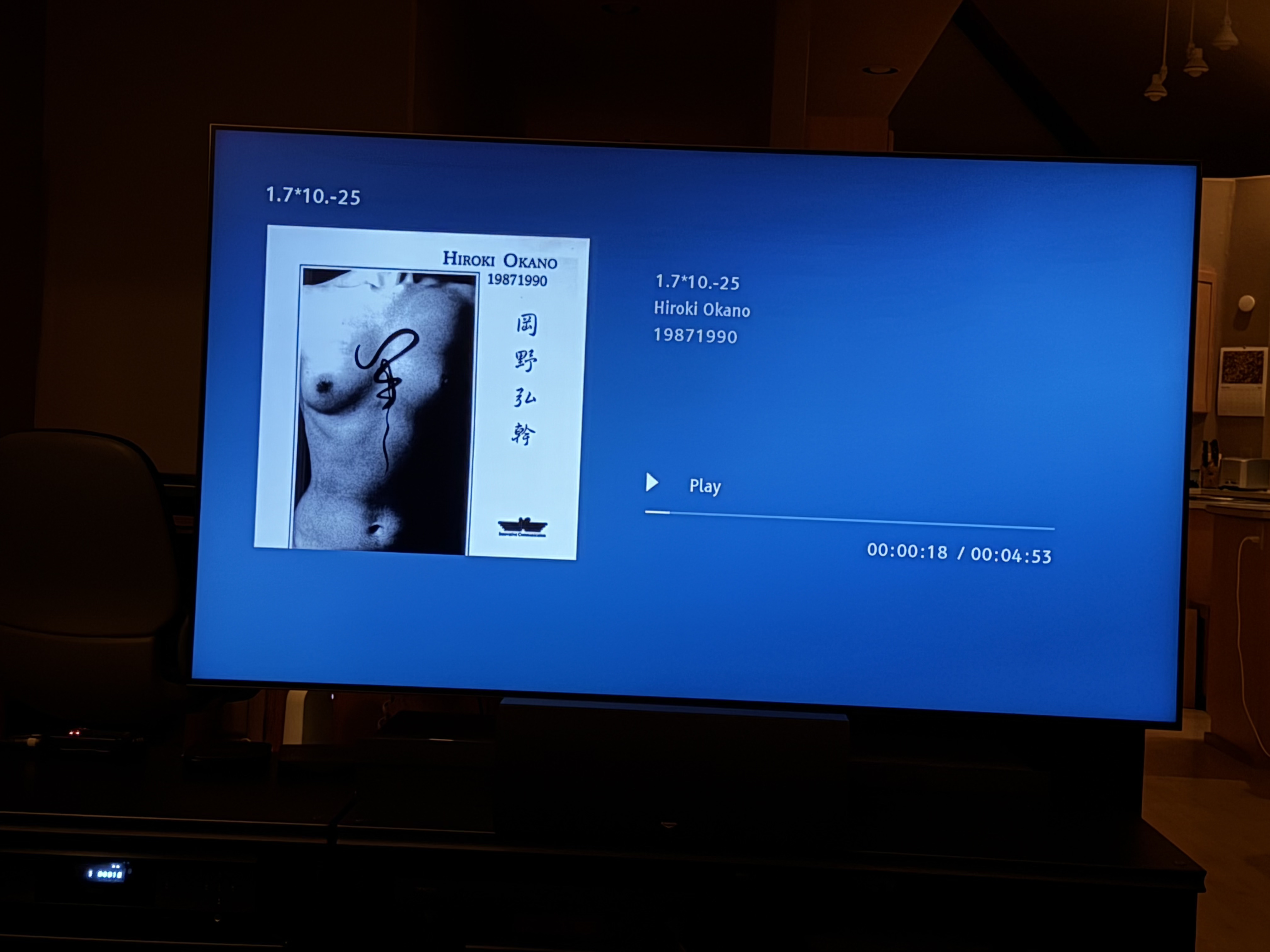
Oppo. Note I have USB out to the Oppo USB type B (i.e. printer type cable). When I select media player on the Denon, it shows this image.
Finally, a third issue that I’ve been seeing since getting the Nucleus One. Sticking with the Media Player video selection, sometimes the image from the previous album remains when I start a new album. Today, after turning off my system over night (except for the Nucleus), and I started to play a new album, the text information (album name, song name) and volume bar reflected the new album, but the image was from an album from yesterday. Restarting the Nucleus fixed this.
P.S. I realized the album I chose had an image some people won’t appreciate. It was coincidence, really.
Thanks for the photos and the detail, and we’re glad the Fiio is showing on the TV now. The fact that a restart got it working helps our team, because it fits the bug we reported.
Taking your points in order:
The layout. This is the normal Roon Display Now Playing screen. When Roon has artist photos, they fill the background (as with Patrick O’Hearn). When it doesn’t, you see a blurred, enlarged copy of the cover instead (as with Hiroki Okano). The cover itself always sits in the lower left. There isn’t a full-screen, cover-only view right now. If you’d like one, please post it in Feature Suggestions.
Progress bar. The missing total time and the purple fill starting partway through aren’t right. It only happens on tracks that show a waveform; the plain bar on the Hiroki Okano track looks correct. Your display logs show the waveform being resized and redrawn again and again, so we’ve added this to our report.
Denon “Media Player” vs. Nucleus. These are two different devices. The blue screen with “Play” is the Oppo 205’s own built-in screen, coming from its HDMI output, and Roon doesn’t control it. The Roon Display only comes from the Nucleus input. If switching the Denon to the Nucleus input also changes your audio, many Denon receivers have a “Video Select” setting. It lets you show video from one input while you listen to another, and your Denon manual should cover it.
Old image after overnight. Your logs show the display sometimes keeping the previous background image when it decides the artist images haven’t changed, which could explain what you saw. The logs we have end early on Nov 6, before it happened, so we can’t confirm it yet. Next time, please don’t restart. Just post here with the time and the album, and we’ll pull fresh logs from your Nucleus.
A small update (and to keep this thread alive) on the progress bar issue. At about 8:43pm PST this evening, using the Oppo, I started playing the Joni Mitchell album then decided I wanted to see the lyrics. As with yesterday, the Nucleus showed Roon logo and needed a restart. I was in the middle of a song, in pause, when I restarted. Immediately the progress bar showed purple from where I paused, and the right side had the track time. But when the next track started (I like the 1-2-3 countdown..cute), the same issue was there, never a right side total track time, and the progress bar waveform showed lighter grey as it progressed, then turned to purple a little past mid-way (staying light grey to the left, purple from then on).