Roon Remote won't connect to Roon Server on MacOS Tahoe.
Roon App takes 3 tries to get open up (first two tries it crashes before a window appears), third try gets you to "waiting for roon server" which it gets stuck. Server is on Synology, and is running/can control with ios app etc.
Describe your network setup
Eero 5 nodes + Gateaway. All nodes wired. Server on Synology (wired), remote on Macbook Pro (wired)
Thanks for the reply. I just checked the setting. It was on for Roon. Toggled it off and on, but the behaviour is the same. Roon app is still stuck at “waiting for your Roon server”. Should I try “Select a different Roon server” or would you like further diagnostics?
Can you please clarify for us exactly where do you run your Roon server ? From our report it should be on the other machine as you have stated in the description.
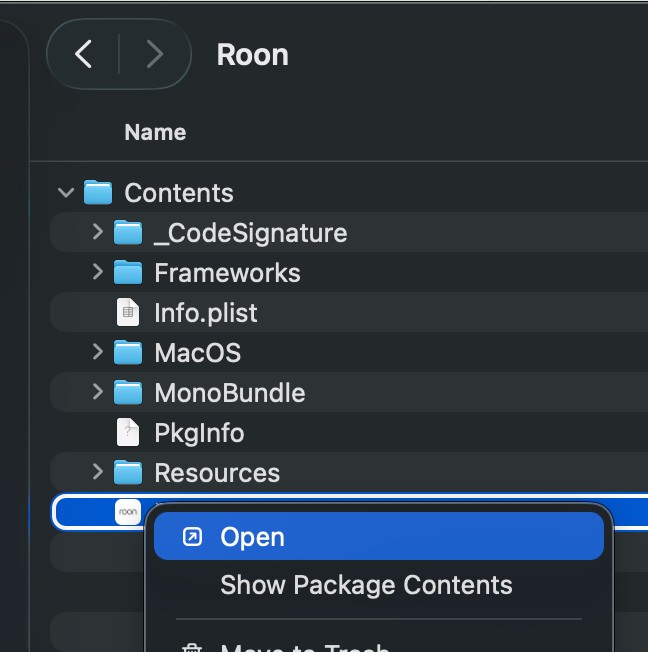
If so, then please try to run Roon on your Mac and start manually the Roon server. In order to do so please go to your Applications folder find there Roon press with Right Button Click → View package context and please run Roon Server from there.
After that please choose your server and try to connect to it.
If it still fails with those actions please send us a video of what you are doing exactly so we can clearly see what happens on your mac.
Thanks for your message. As you can see on the ticket description, I stated that the Roon Server is running on a Synology Network Attached Storage unit in the same network.
I use the Roon app on my Mac only as a remote to control that server, which is always on.
I use an additional remote with my iPhone, using the IOS Roon app, again as a remote for that Roon server running on Synology NAS.
Everything is working, (server as it’s playing on a roon-ready device, ios remote app etc) but the Mac Roon app, which was also working until the Tahoe OS upgrade I performed this morning.
Hope this clarifies.
I’ll restart everything and confirm the status of the issue shortly.
I suspect that after the upgrade the machine_id for your Mac remote has changed, which requires a reconnect. Could you please click on “Select a different Roon Server” and check if your NAS is available in the list?
I tried to request the diagnostic data from your remote, but it didn’t reach our server for some reason.
Can you please use the directions found here and send over a set of logs to our File Uploader? Once logs have been uploaded, please let us know so that we can check the server for your files. Thanks!
Uploaded the logs from the Remote running on Mac (the one that is not connecting)
Please let me know if the logs from the Synology NAS Roon Server is also needed.
It did not work I’m afraid. Disabling the wifi and restarting the Mac caused it to see the server briefly but it couldn’t connect and went back to “Looking for your server”
Before Tahoe I always used both connections (wired as the main connection, but MacOS needs wifi enabled for ecosystem things like iphone mirroring & apple watch pairing etc) and never had any issues.
Thanks for giving that a try! Let’s see if refreshing your instance of Roon on the mac may help - note that this isn’t something you’d normally have to after a mac update. Steps to follow below:
I have the same issue. Sometimes even after 3-4 tries it still fails and I wind up having to disable macOS firewall even though Roon.app and RAATServer are in the list with “Allow incoming connections” selected. I can then immediately turn the firewall back on and the Roon app continues to run without issue until the next time I need to launch it again.
I have another macbook pro with a Roon remote on it that I have not yet upgraded to MacOS Tahoe. I ran the same setup on it to compare.
Wireless on (different IP), Ethernet on (different IP) and the Roon app connected to the Roon Server running on my Synology instantly. This tells me Roon has no problem with multiple IPs (as was my experience with my main MBP before Tahoe) and we may be going down the wrong path here.
So there is I think a problem with MacOS Tahoe and/or Roon app. The crashing behaviour of the Roon app on Tahoe indicates that.
Plus, I think there’s a related or unrelated network problem on Tahoe as well, because my ethernet connection (2gb down/up) is only getting 2gb down/1gb up or 1gb down/up intermittently on Tahoe with the same hardware.
Would be great to have your thoughts on how this finding may impact the diagnosis of this issue and what else we can try.
Sharing my experience on the matter as I have several different Macs running Roon showing different behavior with MacOS 26 (release version).
On my Mac Mini M1 (Apple Silicon) Roon crashes on startup as described, taking multiple tries to open properly. A fresh install of Roon doesn’t change the matter.
I’m running RoonServer on this machine as well.
Logged in as a standard user without admin privileges. Firewall is disabled. FileVault is disabled. No AppleID and/or iCloud configured. No other stuff is installed or running as this machine is a dedicated to be a RoonServer only.
On my MacBook Pro 13" (2020 model, last one with intel processor), Roon starts right on the button every time. No parallel RoonServer running on this machine.
Running as user with admin privileges. Firewall is enabled, FileVault is disabled.
Lots of other stuff is running (Office, Adobe) as this is my working laptop. AppleID and iCloud configured.
So probably the issue is related to either:
differences between Apple Silicon / Intel Macs
lacking user privileges
running RoonServer in parallel on the same machine
I reverted the Mac mini M1 back to MacOS 15.7 (fresh install obviously) and have no issues anymore running the same lean configuration as described above. Unfortunately this means, I can’t try out other scenarios (running Roon w/o RoonServer in parallel, user with admin privileges etc.) for MacOS 26 to track the issue down any further.
Hope that might help shedding some more light on the problem.