Good evening
Roon is unusable today very slow is there any updates to this issue please?
21.46 280226
Good evening
Roon is unusable today very slow is there any updates to this issue please?
21.46 280226
Any update please system is very slow again this evening
2nd March 22:00
Hello @JOHN_HENRICK,
We have recently released a new feature in our latest update that may help improve the performance and behavior of your server:
With this update, Roon background work can now be scheduled, allowing you to control exactly when Roon runs its library maintenance tasks.
Please try scheduling the library analysis to run during your non-listening hours, and let us know if you notice an improvement in the server’s behavior!
Seems a lot better
But still seeing slow start of playback and searching today
13th March 10.30am
Hi @JOHN_HENRICK,
You have my apologies here, we’re no longer able to review the timestamp you’ve provided from the 13th. How are things currently performing? Could you share a fresh timestamp the next time you experience a drop in connection?
Thank you 
Good afternoon ,
thanks for the reply
i have reinstalled software from web page and restarted roon today but it seems to slow down again after a few hours.
time 18:22PM 17/03 slow on searching
Slow changing tracks today
190326 1300hrs
slow again track changing 46 tracks in queue 200326 1909
restarted rock ok now but seems to slow down gradually
Hi @JOHN_HENRICK,
Did you ever test out completely disabling all your sonos zones?
With that, after further analysis, it may be worth considering upping the RAM on your ROCK to 32GB.
With that, the logs show a persistent error: {“message”:“Extension Manager requires Docker!”,“is_error”:true}.
ROCK does not natively support Docker. This error suggests an extension is attempting to run or update in a way that is incompatible with the RoonOS environment. While this may not be the primary cause of the slowdown, failed background processes can consume unnecessary CPU cycles and contribute to logs filling up quickly.
I would disable any Roon Extensions that are producing errors, especially the “Extension Manager” if it was not installed via a separate compatible host (like a NAS or separate PC).
And lastly, if you haven’t yet tested out using only a small portion of your local library, that would be a good next step as well. 
Thanks for the reply and insight
I have removed the extension
I will look to upgrade memory as soon as I can find some in stock at reasonable prices
Will also test on smaller library
John
upgraded to 32gb
rock still seems to slow down the longer its used before reboot
time stamp today 19:44pm 290326
rebooting roon server resolves but slows down over a few days gradually - software issue ?
Hello @JOHN_HENRICK ,
can you please go to the “Library” section and make sure that your background settings are set like this and confirm that:
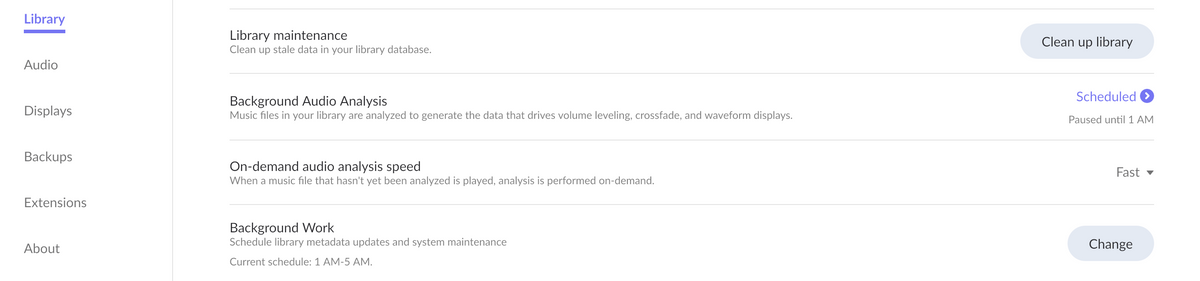
The reason why we ask you to set it up like this is that after investigation of logs from your device we still see that your machine is incredibly busy over long time doing intensive background work.
Looking forward to your reply.
Thanks.
That could have been a thing.
Because even when background disabled the real time might work slower when set to “Throttled”.
Did you notice any improvements so fat ?
Will keep testing and update further
Thanks
seeing slow change of songs and force rescan is taking longer again today i know that a restart resolves this for 48 hours but the slowness returns
timestamp 15:20 02042026
restart of rock system ok again!
timestamp 16:13 02042026
Hey @JOHN_HENRICK,
Thanks for the follow-ups! Based on the information you’ve provided so far, with things performing properly only after a reboot of Roon Server aligns with some additional memory-based optimizations our development team is actively working on.
We’ve recently released one of these optimizations to our Early Access branch of Roon, which should move over to Production as well soon.
We don’t have any additional troubleshooting steps to provide at this time, other than considering a daily reboot of your server until we fully release these optimizations. You have my apologies there!
Certainly, let us know if you have any additional questions. Thanks, John!
