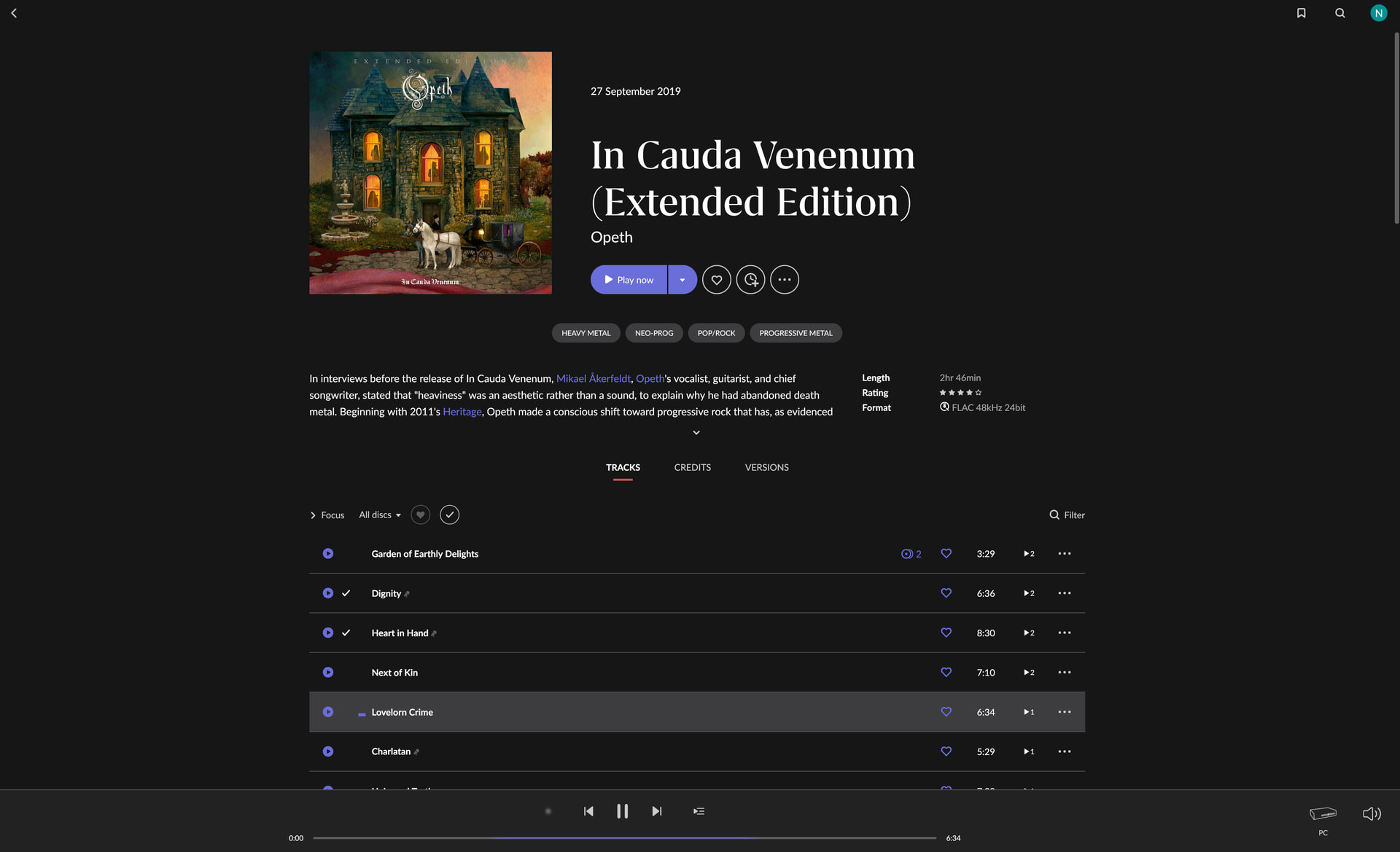
· I am running Windows 11 Pro, Version 25H2. Roon version 2.62, build 1641, 64 bit.
I have been using Qobuz without issue up until this week. Starting yesterday, some tracks will not load at all.
Today, I was listening to the Qobuz album Opeth - In Cauda Venenum (Extended Edition) without issue until I reached tracks "Lovelorn Crime" & "Charlatan". Neither track will load or play. Switching to the Qobuz Windows app works flawlessly. Once I skip to track "Universal Truth", Roon will start playing the album again.
I attempted to clear cache through Roon settings along with logging out of Qobuz, rebooting Roon server then logging back in. These tracks still will not play. I have also seen the issue yesterday but did not track which album I was seeing issues with.
Tell us about your home network
· Eero 7 Max Router. Calix GigaPoint GP1101x modem. 5/5 gigabit wired connection.
Thank you for the detailed report and for providing the exact tracks. I took a look at your logs, and they show a very specific (and fascinating) network routing issue happening under the hood.
When you attempt to play “Lovelorn Crime” and “Charlatan”, Roon successfully contacts Qobuz and is handed a URL for the audio file. However, when Roon actually reaches out to Qobuz’s Content Delivery Network (Akamai) to pull the FLAC file, the CDN server instantly drops the connection. Roon’s fetcher tries to grab the file over 200 times in rapid succession, getting exactly 0 blocks read and a -256kbps error every single time.
However, the precise moment you skip to “Universal Truth”, Roon connects to a healthy CDN node, the download speed instantly spikes to 55 Mbps, and the music plays perfectly.
This is almost certainly a routing failure or a stale DNS cache pointing your Windows 11 machine to a “dead” or inaccessible Akamai server for those specific files. Please try the following steps:
Disable IPv6: Windows 11 and Eero routers sometimes conflict over IPv6 routing to specific CDN nodes. Go to your Windows 11 Control Panel > Network and Internet > Network Connections, right-click your active adapter, select Properties, and uncheck Internet Protocol Version 6 (TCP/IPv6).
Change your DNS: If your Eero 7 Max is using your ISP’s default DNS, it might be hanging onto a bad IP address for Qobuz. Try changing the DNS servers in your Eero app to Cloudflare (1.1.1.1 and 1.0.0.1) or Google (8.8.8.8 and 8.8.4.4), then reboot both the router and the PC.
Eero Advanced Security: If you are subscribed to Eero Plus, temporarily disable Advanced Security in the Eero app. It occasionally misidentifies specific media server IP addresses as threats and silently blocks them.
Antiviruses Disable any antiviruses/firewalls on your Windows PC
I made all 4 changes and I am still unable to stream these 2 tracks. Do you have any additional suggestions that may clear this up? I rebooted my PC and router multiple times as well.
I was able to get the 2 tracks streaming for a moment but they are no longer working. The standard edition of this album is working without issue for me. I came across other albums where not all tracks will stream correctly. I did not have any issues or ever observe anything like this until the last Roon server update.
I tried both the Cloudflare DNS and Google DNS without success. I just want to ensure that I will be able to stream anything I would like through Roon/Qobuz.
I have also confirmed that all advanced Eero features and ad blocking have been fully disabled. Are there any other suggestions of anything I can do to clear this up? Most tracks I attempt to stream are working without issue.
Thank you for the update. Since changing the DNS, disabling IPv6, and bypassing Eero’s security features didn’t resolve the issue, we need to definitively rule out a regional routing conflict.
The Next Test: Use a VPN
To bypass your ISP’s routing entirely, please download and run any VPN service (even a basic free version) on your Windows 11 machine.
Why this matters: A VPN creates a tunnel that bypasses your ISP’s routing table and forces the Qobuz/Akamai system to hand you a different physical server node, often in a different region.
If the tracks play perfectly with the VPN active: We have 100% confirmation that the issue is a regional routing failure between your ISP and the CDN.
Please try playing those specific tracks while connected to a VPN and let us know the result. This is a vital diagnostic step to narrow down where the data is being dropped.