I swapped out the battery 2 times, but it doesn’t charge. Any hints at what I might be doing wrong?
Is the polarity of the battery correct and also the soldering of the connector?
I have no other idea…
Best DrCWO
Need to use the same original charging board from the original battery perhaps
No,
don’t open the battery!
Exchanging the connector with correct polarity must be enough to make it charge.
Best DrCWO
Hello DrCWO,
I have owned a rooNuimo (version 1.3.2) for several years, but for the first time I have had bluetooth connection problems for a few days.
I restarted several times the Roon core which is at home a Roon Optimized Core Kit installed on a Raspberry Pi 4 Model B Rev 1.2 without success.
I must admit that the rooNuimo remained completely discharged for several days, could it come from that?
I put it back on load, and once reloaded I relaunched Roon, but the status in the rooExtend extensions remains on “Disconnected”. At regular intervals there are attempts to connect but without success. The Bluetooth light flashes several times, but it doesn’t go any further.
Thank you for your support DrCWO.
Texas Tattoo
Here’s a few lines of the rooExtend system log:
Journal begins at Sun 2026-10-04 11:50:00 CEST, ends at Mon 2026-10-05 16:38:24 CEST. –
Oct 05 15:39:56 rooExtend rooExtend\[3377587\]: ----- response timeout

Oct 05 15:39:56 rooExtend rooExtend\[3377587\]: \*\*\*\*\* Cannot connect to Nuimo, restart rooNuimo to retry

Oct 05 15:39:56 rooExtend rooExtend\[3186053\]: ##### Terminated: rooNuimo with code: 5

Oct 05 15:39:56 rooExtend rooExtend\[3186053\]: Restarting Worker rooNuimo

Oct 05 15:39:56 rooExtend rooExtend\[3377670\]: ##### Start: rooNuimo 1.3.2

Oct 05 15:39:57 rooExtend rooExtend\[3377670\]: \*\*\*\*\* rooNuimo got paired with CORE

Oct 05 15:39:57 rooExtend rooExtend\[3377670\]: \*\*\*\*\* Restart Bluetooth service

Oct 05 15:39:58 rooExtend rooExtend\[3377670\]: \*\*\*\*\* Start Nuimo service

Oct 05 15:39:58 rooExtend rooExtend\[3377670\]: ----- Waiting for Nuimo device with deviceId: d51cd5de97a2

Oct 05 15:40:28 rooExtend rooExtend\[3377670\]: ----- response timeout
Rebooting the Roon Core makes no sense.
You must reboot the Raspberry Pi that hosts rooExtend!
What antenna do you have connected to the Pi?
Please send me the complete system log after reboot and some unsuccessful trys.
Also in the settings of rooNuimo you can select it shall look for any device not only the ID that is probably still in.
Best DrCWO
Dear DrCWO,
Everything’s fine, thank you for your reply. I just mixed the Roon core and the Pi. I just reboot the Pi as you recommended, and “voilà”.
Thanks again.
Texas_tattoo
1 Like
I keep having the folowing issue with rooNuimo. After use I switch off the Nuimo with the switch to conserve energy. When I turn on the Nuimo (I.e. the next day) I have to reboot the rooExtend Pi as well otherwise the Nuimo won’t connect. Both pi and Nuimo have the latest firmware installed.
Hi Anthro,
This is not the way it should be and we have to amalyze in depth as in my lab all works as expected.
Nevertheless I’m on holidays till end of next week.
Please be so kind and recontact me at end of next week.
Best DrCWO
1 Like
So, now I’m back and tested this with the new v3.6.0 coming soon.
I tested with both of the ID settings in the extended setting:
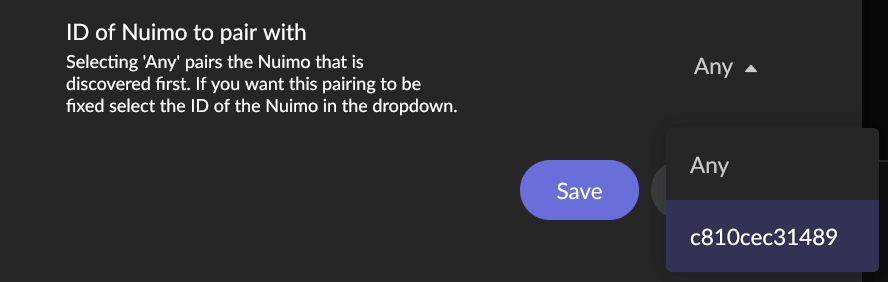
Both work without any issue.
Please let me know which antenna you use for Bluetooth. The single or double antenna from ZEXMTE or the internal antenna.
If ZEXMTE please let me now which BT 4.x, 5.x or 6.x
If you use the internal antenna of the Raspberry Pi BT please let me know which Pi and which case you Raspberry is in.
Best DrCWO
@DrCWO the Nuimo connects to rooExtend running on a Pi 3 Model B Rev 1.2. Using internal Bluetooth and the stock plastic casing. Range is not an issue.
Uuh, if I remember correctly there was an reported issue wir Pi3 I never could reproduce.
I recommend getting one of the ZEXMTE antennas.
This one Bluetooth Adapter 5.4 für PC, 150M Langstrecken USB Bluetooth Dongle, Bluetooth Stick Plug and Play, für Desktop, Laptop, PC, Headset, Tastatur, Maus, Bluetooth Stereo, mit Windows 11/10/8.1/7: Amazon.de: Computer & Zubehör should be fine. BT 6.0 not yet tested.
Best DrCWO
Still had one of those ZEXMTE antennas lying around. Previously it didn’t solve the problem so I don’t expect much. For good measure I reflashed rooExtend on the sd card. I will give you an update soon.
1 Like
Hello. I am running RooExtend/RooNuimo on a Raspberry Pi 4. A Senic Nuimo is connected but I need to replace it. Lucky me, I found an unused Nuimo on ebay.
Is there anything I need to configure when exchanging the 2 Nuimos or is it just unplug one and connect the other one?
For example, are there known issues with outdated formware on Nuimos?
Is there anything I need to know to pair the new Nuimo with the Pi or is it usually automtaic?
Many thanks for your help. Best regards, Bo
There are!
You have to update to the latest firmware. If not it would not work.
I updated some in the past but can’t remember how I did it. I guess there is a NRF tool. Please check the forum. maybe I have published it in the past.
Also check the extened settings of rooNuimo. If you selected your device ID there the other device won’t connect. So best you set it to “any”.
Best DrCWO
EDIT:
If you tell me where you found it I can get it for you and update the firmware. Please e-mail me at info@definiteaudio.de
1 Like
Thank you @DrCWO I sent an email
So the ZEXMTE nor the reflash solved the problem. The Nuimo still requires RooExtend to occasionally reboot in order to successfully connect.
The only other thing that comes to mind is the firmware version of the Nuimo.
Please perform the following test:
- Turn off the Nuimo.
- Press the front panel.
- While keeping the front panel pressed, turn on the Nuimo.
What do you see on the display? Is it the standard dots that appear during boot-up, or the DFU icon (a box with an arrow)?
Best DrCWO
The standard dots.
Ok, I’ve no more ideas what to check at the moment.
My problem is that I can’t reproduce your issue and - hope you understand - without reproduction I can’t to any debugging to find the cause of that issue.
Best DrCWO