Hi, I hope someone can help me speed up my Roon Server running on a Synology DS1522+.
I currently use a separate ROCK unit but am trying to reduce the amount of hardware I have. So, I installed Roon on my NAS. Since the system is currently very slow, I added a 10GbE network-card. I’m now thinking about installing Roon on a separate M.2 SSD, especially since my storage is nearly full. Does anyone have experience with this and can help me out?
Thanks in advance for any helpful tips!
Hey @Matz,
Thanks for the details, and welcome.
Before we get to the M.2 question, we want to flag something bigger that we’re seeing on our end. Your Roon Server is reporting a library of 1,307,727 tracks. That’s an extremely large collection, far beyond what the DS1522+ can handle, and honestly beyond what any of our own hardware is built for. The DS1522+ uses a dual-core AMD Ryzen R1600, which is roughly comparable to our entry-level hardware, and we’d generally consider that suitable for libraries around 100,000 tracks.
So the first thing we’d ask: does that number look right to you? A count that high is often a sign that Roon is scanning more than you intended.
On a Synology, the usual culprits are watched folders that include @eaDir, #recycle, or Btrfs snapshot directories, or the same music share being added twice, once by its local path and once as a network share. If any of that is happening, Roon is indexing the same files several times over, and that alone would explain the slowness regardless of hardware. It’s worth opening Settings → Storage and confirming exactly what each watched folder points at.
If the count is genuinely accurate, we’d want to be straightforward with you: we can’t promise Roon will perform well at that library size on the DS1522+, and we wouldn’t expect retiring the ROCK to work out here. That’s a collection size we don’t design around.
On your specific questions:
The 10GbE card won’t help. Roon Server’s performance is bound by CPU and database speed, not network throughput. Your bottleneck isn’t the link.
The M.2 SSD is a real improvement, though. Roon’s database is very sensitive to storage latency, and running it from a spinning array is genuinely painful. On DSM 7.2 or later you can create a proper storage volume on the M.2 slots (not just a read/write cache) and install Roon Server there. We’d recommend that regardless of what you decide about library size, it’s the biggest single improvement available on a Synology.
Your RAM is not the issue, incidentally, 64 GB is plenty.
Let us know what the Storage settings look like and we’ll take it from there. 
Hope, I understood you right. The size of the collection has been recorded correctly. A question regarding the M.2 SSD: Is 1TB enough? Does it have to be a genuine Synology drive, or will a Samsung SSD 990, Interne M.2 NVMe SSD Festplatte, 1TB, PCIe 4.0 x4 work too?
To put things into perspective, the NUC you built last year has a passmark score as follows:
Multithread Rating (16 cores, 16 threads)
36239
Single Thread Rating
4016
The NAS is way behind this:
Multithread Rating (2 cores, 4 threads)
3264
Single Thread Rating
1721
Whatever you throw at the NAS, i.e., memory, SSD, will not help. The NAS is CPU bound for a library of over 1 M tracks.
Just accept that your Roon server needs a dedicated machine. What you already have works, so stick with that.
The only way you could achieve your goal is a custom built server with lots of disk, memory, and a good processor. But this is an advanced Linux build, and requires plenty of knowledge—something I have done, but something a local PC shop wouldn’t have the skills to build.
The only beneficial improvement over what you have is locally mounted disk rather than Samba network shares.
Hi, thx, …and how can I do that—connecting the NAS to the NUC via USB, no Ethernet?!
It’s not possible - it’s Network Attached Storage.
If you’re running ROCK, as @Suedkiez says, this isn’t possible. However, if you are running Roon server on Linux, there are better ways to connect to Network Attached Storage. But, once again, these are advanced configurations.
One solution that works quite well with ROCK and network attached storage is to have a copy of all your music held on cheap* USB SSD connected to the NUC, with the primary version on the NAS. Then use Rsync to synchronise the NUC with your NAS (all additions and edits are done on the NAS.)
Since writes are few, you do not need top spec SSD.
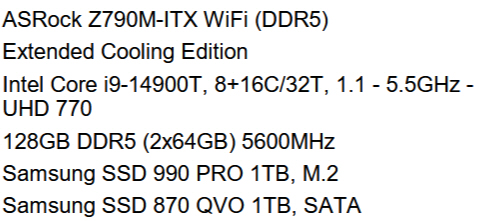
Yes, that’s what I used for the benchmark. I’d stick with this setup.
thank you, saves me the money I would spend for the M2…  …