A Roon on (Synology) NAS Primer

That is indeed a sensible approach, but somewhat time-consuming when polpulating a 12-bay NAS…

When I bought the Seagate HDDs for my NAS originally, of the 12 brand new drives, 2 were DOA which exactly didn’t fill me with confidence. Since then, they’ve been pretty solid. In ~ 700,000 combined drive hours, I’ve replaced two. Neither drive had failed, but both were showing increasing numbers of bad sectors. I prefer proactive over reactive maintenance :wink:

I purchased two QNAP NAS, one six bay and one eight bay. I loaded them up with Seagate Ironwolf 110s SSDs. Within two years eight of them died. When you purchase them in batches, it sucks when you purchase the batch from a bad lot drives. Seagate replaced them under warranty, but what a hassle. My drives were not supposed to be sold in the US, they were drives for European customers and I was on the phone for hours to get my drives replaced. I have had two more failures of original drives with the last two months. At least Seagate is replacing my 110s with Pro 125s. Seagate does honor their warranty and their customer services excellent.

Brand new user here, today’s my first day. But, I’m building a new listening room with a McIntosh 252, NAD C658 and Rega Planar 50th anniversary to compliment my living room home theater with a Marantz 7706, Emotiva XPA, and Goldenear setup with SVS for bass.

To make a long story short, this works perfectly. Sonos, and Marantz both came alive instantly and worked perfectly. My wife sat down for lunch and enjoyed an album with her sandwich. It’s a great vibe.

I agree with the summary, we need to stop the FUD around not having enough CPU power to make this work. I’m using 6 gigs of ram and less than 2% CPU. The app is speedy, it couldn’t be any more responsive.

In any event, in my research I came across Roon and was very pleased to see that Synology was supported. I’m running it on a Synology ds 1621+ with 64 gigs of ram, and 6 Seagate Ironwolf 16 tb drives and a pair of m.2 SSDs for caching. This is all on a 1g link back to a 10g core Unifi setup. Endpoints are a mix of wired and wireless.

Welcome, @Duuust. Thanks for the affirmation and helping to dispel the FUD. I hope your setup gives you many delightful music years to come!

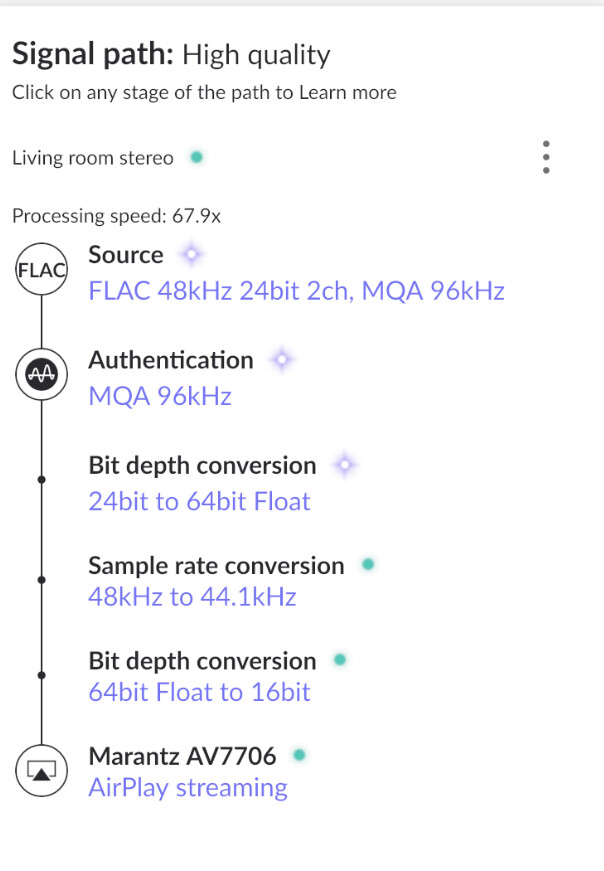
@DDPS thanks! Can you confirm something for me… what does ‘processing speed’ mean in this context?

It’s best explained by: https://help.roonlabs.com/portal/en/kb/articles/dsp-engine#Pay_attention_to_CPU_Usage

You’re good :wink:

Thanks again, @DDPS for your Primer. I ordered a PI4 with screen and sd card and in less than half an hour it was up and running. It freed my trusted RME ADI-2 DAC to be anywhere near a LAN plug socket; any socket. One observation and one question:

  1. I realized that with RoPieee I can play my ISO audio files using an old Audirvana 3.5 installation - after activating WiFi and UPnP/DLNA - Roon doesn’t support ISOs. Great!

  2. Now that ALSA is used on the PI4 there is no need to stay with DSM6, which supported ALSA over USB. Is there a recommended way to update DSM 6 > 7 and Roon for DSM 6 >7? Any recommendations? @crieke?

This is a really interesting thread. I am interested for two reasons, running Roon on a NAS and then long term data maintenance of my music files.

I am a lifetime Roon subscriber and I have had Roon Core on a windows PC, on various Linux installations but ultimately a line of NUCs running ROCK. Currently its running on Intel NUC12WSHi7 which has i7-1260P CPU, 2x8gb of crucial ram, with Roon installed on a 250GB Samsung 970 EVO Plus. The music is stored on a Samsung 4TB 870 EVO and the machine is in a fanless Akasa Newton WS case. It works well; however I have been wondering about running one machine, a NAS possibly, with any services running either natively or in Docker (for example) rather than multiple machines across the house. Also, any solution would ideally be fairly low powered – so not a gaming PC on 24/7!!

I also have a DS918+ NAS with a backup of my music data. It currently utilises SHR-1 with 20.8TB of space total. Firstly, thinking about data maintenance, I quite often buy new CDs and then rip them with dbpoweramp to FLAC files. I then copy the FLAC files to the NUC HDD, I then use FreefileSync to copy the files to the NAS). @DDPS makes the point around data maintenance that I had not considered before adequately. As my 4tb of music attached to the NUC won’t have data scrubbing etc, so possibly this should be considered the backup and not the main copy (I have other cold back up arrangements in place too). When adding new music FreeFileSync will check the NUC music files and compare to the NAS Music folder, and if the item only exists on the NUC it will copy it to the NAS. If the file is newer on the NUC, e.g., after changing meta-data for example (I occasionally use Easy tag for this) it will update from the NUC to the NAS. If the data is newer on the NAS (possibly as a result of data scrubbing – this is a guess I need to check up on) it is instructed to copy from the NAS to the NUC. The question then, with this approach will it ensure the NAS copy of my music, with data scrubbing etc, supports the copy of the music on the NUC? Is there a better way of doing this?

Secondly, I am also interested in a NAS which runs Roon instead of the NUC. My NAS already runs Plex well for TV/Film duties. I have a couple of SSDs not in use currently and I wonder if I should test Roon on the 918+ and see what it’s like to use. I am also wondering about upgrading the 918 in the medium term, and the 1522+ was the NAS at the top of my list. I would then simply move the four discs currently in the 918 (3x8gb and 1x10gb Western Digital Red Pros). I would then have a space for one further disk and was thinking of increasing the size, to a 16tb and then slowly updating the remaining drives over time. How regressive is it to revert from the NUC 12 i7 to a NAS? Do I have anything to lose by grabbing a Vantec enclosure for £30 and using one of my existing SSDs to try roon on the 918 NAS?

I think my ultimate aim would be to have one box for all my house stuff, backup (I also use Synology C2 backup and cold HDD backups on a rotation), pihole, Plex, Roon and anything else I can think of.

Hi, @tahsu.

I’ll share a few thoughts in response to your message.

I use an RS1221+, which is a quad-core Ryzen device. Please consider this when thinking through your plans - the 1522+ you’re considering is a reasonably powered device but it probably won’t perform as well with multi-application workloads as the RS1221+.

You mention that you’re considering promoting your NAS to primary and demoting your NUC to secondary. Personally, I think would be wise. As you point out, your NAS does data scrubbing, probably has redundancy in one form or another, and is the source of your C2 backups. To me, that sounds primary. Whether or not this changes your ripping workflow is another matter, but I think it would helpful for you to at least conceptualize the NAS as your primary.

A quick aside - I really like C2 as a Hyper Backup destination. Sounds like you do, too. I’ve used Hyper Backup with AWS and Azure in the past - C2 is so much easier to set up and use. It’s now at the top of my list of what I recommend to friends and colleagues.

FreeFileSync is great, you know what you’re doing with it, and you have an established workflow. If you’re interested in a syncing alternative, you could take a look at Syncthing (https://syncthing.net). I run Syncthing as a Synology package, though if I were to start again, I might run it in Docker. I have used many, many sync strategies over the years and Syncthing is, by far, my favorite.

You could easily set Syncthing up on both your NAS and your NUC and configure it to sync either bi-directionally or uni-directionally. In sync terms, this is equivalent to saying multi-master or single-master. You are currently bi-directional, or multi-master. For the sort of thing you’re doing, I personally prefer single master. If you were to go this route, you’d rip CDs on, lets say, your local Mac/PC/whatever. You’d use Easy Tag or whatever to modify metadata. You’d then copy those files to your NAS (personally, I just mount the Music drive from my NAS using SMB and manually drag ripped files into my Music share). That’s your primary copy, now. Then Syncthing would automatically copy them over to your NUC with no intervention from you.

I prefer Syncthing to Synology’s syncing tools. I have Syncthing “Folders” set up on my NAS for each of my home users. And my wife and I have a shared docs folder we call “Cabinet”. I have Syncthing on all of our personal computers and that’s what syncs stuff around. More on this if you want it.

I run Roon in a Docker container on Synology. It works great. There is a caveat here which is that the owner of the Docker image most (all?) of us use recently upgraded the image to the latest version of Debian slim (Bookworm) and that version is using quite a bit more memory than the previous version did. I’ve gone back to the previous version for the time being.

I also, as you aspire to do, run a few other things on my NAS including PiHole, Scrypted, glances, udp-proxy-2020, nginx, homepage, etc. My network is segmented into vlans for the purpose of isolating my personal machines from IoT stuff (and even Roon stuff). Some folks with similar setups on this forum figured out how to get Roon to run on an isolated vlan in Docker on Synology. If this is interesting to you, you can search for the thread or I can point you at it.

I suppose all of this is a long-winded way to say that I think it’s possible to consolidate to the NAS as you envision - it’s what I’ve done and I’ve now got a couple of decommissioned boxes (including a NUC) sitting around looking for something to do.

I hope some of this helps. Good luck with this … it’s fun stuff!

Thanks for your detailed reply @gTunes, it is much appreciated.

I had a look at the RS1221+, although I am not sure I can accomodate a rack mount NAS in my little server cupboard. I think I can, just about, accomodate the 1522+. I am also mindful of electrical usage with the increased drives in the bigger unit. Having said that, I will do a bit more research before I move to buy something anyway. I am wondering about 8 drives etc…

I had a play with FreeFileSync last night whereby the NAS is now the master of the files, and any updates will be applied to the NUC and not vice versa. I have set it up so I can see all the changes prior to agreeing to them anyway, just in case I have made a mistake.

Thanks for the recommendation of Syncthing, I think I might have used it in the distant past. I will take another look so I can better understand it.

I am interested to know what you run on your NAS, as I am always looking for inspiration, I will need to work my way through your list now - as I don’t know what they all do! I have had a few things running in Docker in the past, Jellyfin for one, to try it out, but came back to the native Plex.

I have my home network seperated out into, home, guest and IoT on my Synology 2600 router (also setup as a mesh with a couple of other synology units). I understand it to a degree, but I am always learning.

And you are right about this being ‘fun stuff’, I find myself always wondering whether I can set it up better. I am currently consolodating a few email addresses into one - which is a big job (and also sorting out passwords again on bitwarden), ripping 5000 CDs (mostly done on this) and then I need to continue working my way through them tagging and ensuring the files are stored correcty - I am a long way off this!

In summary, I am going to read up on Synthing, and perhaps even try a few different things in Docker (container manager) with the idea of bringing roon on in a future NAS iteration.

Thanks all, as I said, very interesting thread.

You worked quickly! :slight_smile:

If your goal with vlans is to isolate, let’s say, your “home” devices from your “IoT” devices, then you’ve probably set up firewall rules to do so. If this is the case, then before you start deploying more docker containers on your Synology device, you’ll possibly want to understand how set up multiple docker networks on your Synology so you can affinitize containers to the appropriate networks. This is discussed here:

If your multiple networks are primarily for aesthetic and organizational reasons, and you aren’t doing anything to limit traffic between them, then you can skip all of that. In my case, I have default, IoT, Guest, and Roon networks with granular controls in place.

Sure!

I do things that I don’t really need to do for fun and learning. So not all of these containers are really necessary and there are alternatives to doing things the way I do them.

I’m in the Apple ecosystem. My home automation hub is a Raspberry Pi running Home Assistant. Home Assistant runs fine in Docker but I use an external Zigbee antenna and this is trivial with HA on a Pi.

So on the Synology:

  • Roon, as you know.

  • jc21/nginx-proxy-manager : SSL cert management and http proxying. Allows me to give unique hostnames to the various things I run in Docker, access them on port 443, have them forwarded to their private ports. An example from below is that I have a custom DNS entry for home.[mydomain].com which I can get to at https://home.[mydomain].com

  • Package homepage · GitHub. Homepage. One of the many custom homepage builders out there. I like this. I configure it with links to all of the things in my home network but also the sites I use frequently. This is my start page in my browsers.

  • DDNS. I have a container that just updates a DNS record at my DNS provider with my current public IP. My own version of dynamic DNS so that my VPN-to-home solutions don’t break if my public IP changes. It hasn’t changed in a long time but it’s easy to keep this running and I don’t want it to break while I’m traveling.

  • koush/scrypted. Scrypted. I use this to connect my UniFi security cameras and doorbell to HomeKit.

  • synfinatic/udp-proxy-2020. Roon clients in my house are on the default network. Roon, endpoints, rooExtend, rooPieeee devices are all on the Roon network. UDP packets aren’t routed, by default, across vlans. So while most things work fine, by default the Roon client devices don’t show up as endponts. I run this udp proxy to solve that - with this running and configured correctly, iPhones, Macs, etc. show up as endpoints.

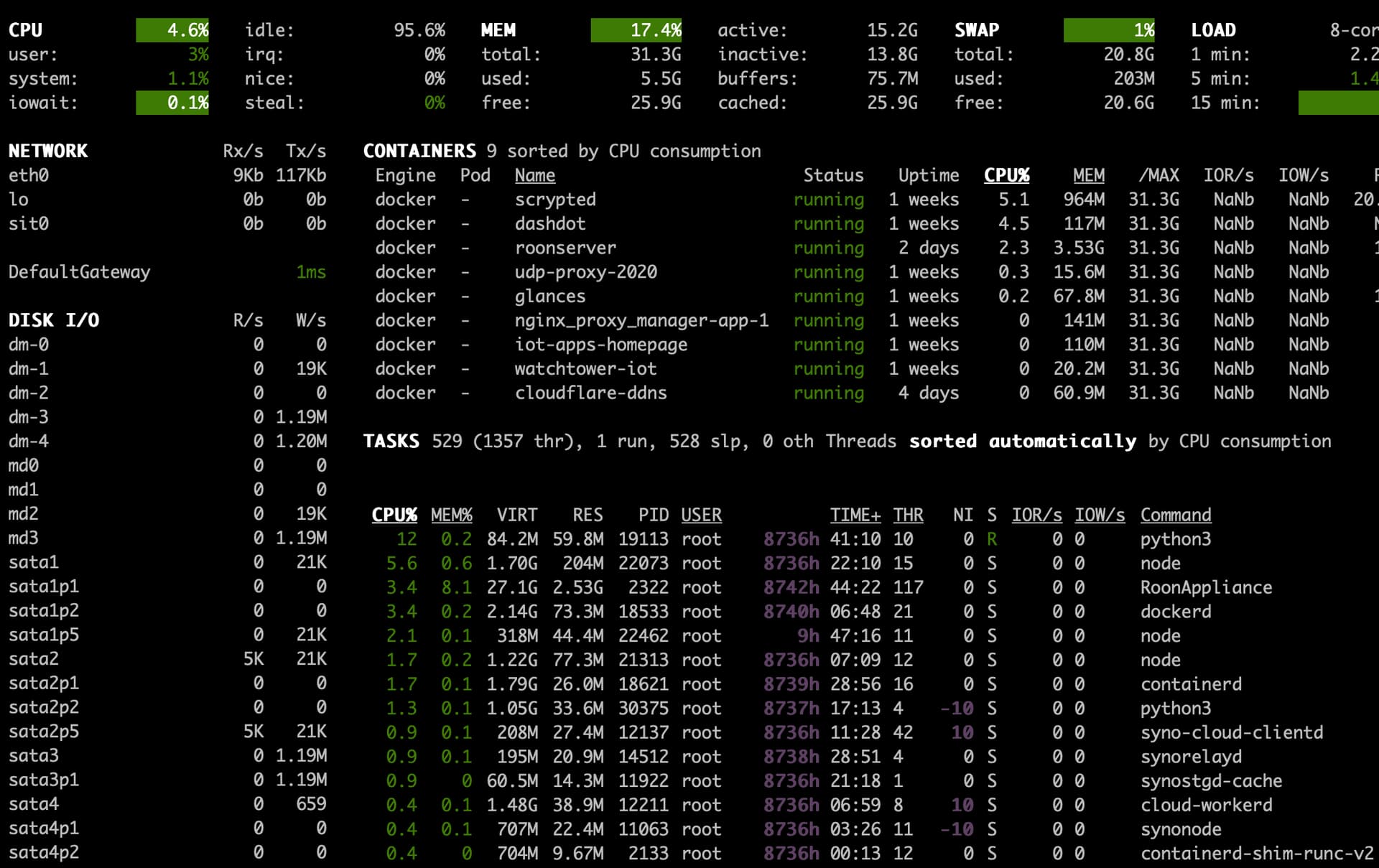
nicolargo/glances. Glances. This one is worth showing a partial screenshot of. Super helpful for insights into what’s running, memory usage, i/o, etc. Marius has a pretty good walkthrough about how to do this with Portainer on Synology. It’s straightforward to translate his Portainer instructions into the equivalent “Project” steps - should be able to use his docker compose intact, I thinkl

I also run Dashdot but Glances is better and I should probably drop Dashdot since I don’t actively use it.

Maybe something interesting in there for you :slight_smile: I will say that I’ve actively worked in the tech industry for over 30 years and I’ve treated my home as a learning lab for all of that time. We’re a long way away from the days of Active Directory, mail servers, distributed tape backup, or home-rolled RAID arrays on SuperMicro chassis with SCSI backplanes! Using a home as a lab is a fantastic way to just keep learning. Hope you keep it up, too!

@gTunes is showing some great things you can run on your Synology NAS.

FWIW, as you can probably see from my original post, I have a lot of that sort of stuff running on a small dedicated box running the free pfSense+ platform, which is just an incredible little core router/firewall system. This allows my NAS to be dedicated 100% to music-based things (I have two other separate NASs - one for standard files, and the other for videos & photos).

On that pfSense box, I run:

  • Core routing
  • IPv4 NAT stuff/port forwarding
  • pfBlockerNG firewall with lots of rulesets selected
  • Suricata IPS/IDS, mostly for the blocking of port scanning but also to block other odd non-SSL-encapsulated behaviors (highly configured with rulesets over many years)
  • Dynamic DNS
  • DNS Resolver, using root DNS servers/DNSSEC
  • Local certificate authority for certificates for all local devices (this is overkill but nice)
  • DHCP (and reservations for every standard device on my local network)
  • Traffic Shaping
  • Local NTP server for everything on my network

…etc. You can run a million things to make your network just what you need.

But the best thing about it is that the configuration is exportable, able to be run on new hardware when you want/need it. All the above is guaranteed to run for years and years and years as currently configured, without worrying about what happens if I have to buy replacement hardware (unlike standard consumer based gear, which needs complete reconfiguration from scratch when you throw your all-in-one router when it fizzles out every 4 or 5 years).

To get wireless, I have two dedicated wireless access points, which are completely separate from my core router and core switch. If those flake out or go or become outdated, I can replace them in a few minutes without having any impact on all those bullets above.

It’s super cool.

So, what you could say is, I’ve component-ized my network gear in the very same way we would component-ize our audiophile systems.

On what other forum could I make that analogy? :rofl:

Thanks @gTunes and @DDPS . Loads for me to read up on here! Thank you!

Update: in the past couple of months, I have also added this site to my list of places where I discover new music - I wish I could add it to my original post, but I no longer can:

I should have added a link to my old configuration, using a more traditional 4-bay NAS, and using an eSATA-connected external SSD for the Roon database:

A bit off topic if I may … I like DS Audio, but it constantly logs me out on my iPad and iPhone (DS Video too), and is a PITA to login each time (I have 2FA). Does that happen to you? I wonder if I have it setup wrong somehow on my Synology for audio and video files. Would love to use it more if I could get around this (so I tend to use Plexamp instead). Just curious … maybe not an easy answer for this. Thanks.

It does not. But I don’t use 2FA for it. I find that superfluous because I have alerts and blocks configured for invalid or questionable login attempts.

Thanks, good to know that it’s just my particular setup then with this happening. I’ll have to re-review my settings for audio and video files with the assigned user account (I did setup a media-type user to segregate it from my other stuff). It gets confusing real quick for me in those permission settings for user accounts and folders.

Hi there. Thanks for this really interesting post. I have been using Audio Station/DS Audio for over a decade and on the whole I’m happy with it. Like you I have a large library (130,000 tracks) and have spent much time rating tracks and creating many smart playlists by genre/decade/artist etc. However I do have issues with Audio Station, mainly 1) no volume normalisation can be really problematic with playlists. 2) I’d love to be able to sort smart playlists, for example chronologically 3) no folder structure for playlists meaning having to scroll a very long list. I have requested these features but it seems very unlikely they will happen. Therefore I’ve been looking to see if there’s a way for me to have a better platform/set up to incorporate such features and future proof my system. From my research it seems there’s no easy way to transfer my years of ratings to another platform, but I would be interested in running Audio Station alongside something else. I don’t understand a lot of the technical information in your post but my main question to you really is what you get in addition to Audio Station from running Roon alongside it? How do you use the different platforms and what specifically does Roon offer you with respect to playing your collection? As I understand it you can’t incorporate ratings, but can import playlists? How easy is this? And can this allow me to tackle some of the issues I have with Audio Station. Would really appreciate it if you could share your thoughts on this to help me decide if this would be a good option for me. I currently have an old Synology NAS DS414j so would need to make a number of upgrades and add a Roon subscription, so want to decide if the investment is worthwhile. Thanks. Phil.

Yes, so cool.

For 1) Agreed, 100%; no volume normalization and 2) Yes, it is such a tease that way; it has column headers, but no clickability.

If you are using star ratings, they could be transferred this way:

  1. Create smart playlists in Audio Station for each of your five ratings;
  2. Make a dumb (standard, non-smart) playlist out of each smart playlist by using Select all - Save to group playlist - new playlist. This places an .m3u file in a folder in your music folder called “playlists”
  3. Rescan your library in Roon and allow Roon to import these dumb playlists
  4. When viewing each of the playlists one by one in Roon, “select all” and apply your rating
  5. When all done, delete the dumb playlists in Audio Station.

Note that this is something that, should you continue to update star ratings in Audio Station, you will want to manually update in Roon or re-do this process once in a while.

Well, Roon’s user experience in regard to biographies, reviews, and links among relationships in your collection is the main reason I love it; it is something Audio Station can’t touch.

Roon also keeps a play history, which is something I like very much and miss from the old iTunes days (I used to use iTunes before I switched to AudioStation 12 years ago).

In regard to playlists, I documented this in my OP, but if you maintain dumb playlists in Audio Station, they will be off of your music folder in a “playlists” folder. When Roon scans your music folder, it will import those playlists as “shared” playlists in its playlists section. I love that.

If you have smart playlists, just selecting all the songs in each and adding them to a “dumb” playlist (just like I suggested you do for your ratings) will get those playlists transferred over into Roon.

Yes, you would do well to upgrade your NAS to something using a non-ARM architecture. I recommend a model in this series (https://www.synology.com/en-us/products?product_line=ds_plus), either a DS923+ or DS1522+ in particular, decking it out in the confgurations I noted in my posts above.