I’ve been happy using basic remotes with FLIRC devices plugged into Raspberry Pi endpoints. But the remote I enjoy most is the RooMax setup with a Xencelabs device. There’s a discussion group in this community for RooMax and associated products, if you’re interested. rooMax – Best wireless Roon remote ever!
2 Likes
This is what we are currently working on:
rooExtend – The easy start with Roon Extensions - Audio Gear Talk / rooExtend - Roon Labs Community
Best DrCWO
2 Likes
Home Assistant opens up tinkering options, but nothing turnkey.
I use it with a Zigbee antenna and use Philips Zigbee controllers around the house. I use controllers that have four buttons on the top and you can automate single, double, triple, etc. press of each button. They have a rotating ring around the outside which can be used for volume.
I publish a Home Assistant “Blueprint” that makes it quite easy to set up the controllers to work with Roon or any Home Assistant integrated media player. Instead of writing individual automations that detect and react to “events”, you use drop downs and sliders to configure each remote.
It’s an option.
1 Like
I forked @SMANGELS’s excellent project for Flirc USB IR Remote integration. He did all of the hard work, so it was not terribly difficult to get the $10 [Argon IR Remote] Argon IR Remote – Argon 40 Technologies Web Store) working with my existing Argon ONE V2 case for Raspberry PI 4.
The case is pretty deluxe. It has an IR receiver built-in, so it was fun getting the buttons working with Roon. I set up the following mapping:
- Left and Right are Previous and Next track, respectively
- The center button is a Play/Pause toggle
- The “Back” button does “Stop” (same as pause, but moves position to start of current track)
And, if the zone supports volume control (e.g., DSP Volume):
- Plus/Minus keys are Volume Up/Down
- The “Home” button is Mute
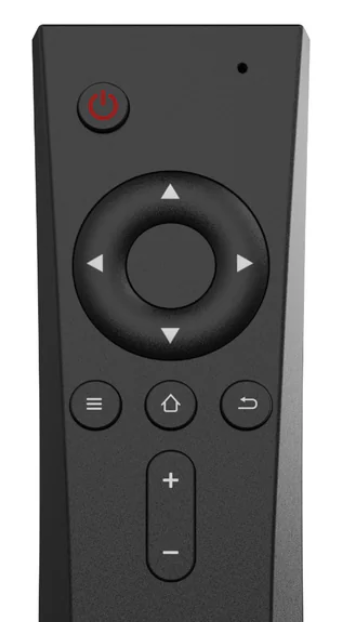
This is definitely a DIY / Tinkering sort of thing since my instructions assume that your Roon endpoint is running AudioLinux for Raspberry Pi, but here’s a link for the gory implementation details:
Appendix 2: Optional IR Remote Control
Although the setup could be ported to some other OS, like RoPieee (perhaps it already has?), I think AudioLinux brings some nice features to the table. Worth exploring, IMHO.
2 Likes
I’m flattered. Exciting to see how others are using it. Thanks for sharing your use case @David_Snyder .
2 Likes
Like you, my preference is a physical remote for basic controls like play, pause etc. Over the years, I have gone through multiple different approaches.
Initially, I used a Harmony remote control with the Deep Harmony extension (Roon Extension: Deep Harmony - rich feature set for Logitech Harmony).
This was followed by a short period of using a Surface Dial with RooExtend (rooDial a Wireless Volume Knob for Roon with Microsoft Surface Dial).
Nowadays, I am using the above mentioned Unfolded Circle Remote on a daily basis as well as a Philips Hue Tap Dial with @gTunes’s HA blueprint.
As mentioned above, Ropiee with a Flirc dongle and any IR remote is another option. If I remember correctly, you can configure this setup in a way that it controls another endpoint. I.e. you could use a Ropieee setup to control your Pro-ject streamer.
1 Like
Why not just use your cellphone?
For some maybe that’s a non-issue, but IMO physical remotes are easier to use for quick playback or volume changes. No need to fuss with looking at a screen, unlocking a phone, navigating, etc. Not to mention if someone else wants to make changes and they don’t have your phone.
1 Like
Is it just me that’s surprised that an EU product is sold in the Netherlands 20% more expensive than in New Zealand?
I use Microsoft Surface Dial and Bettertouch Tool on my mac (windows works too) - works well…but a cheap alternative is an old phone with Roon arc of course