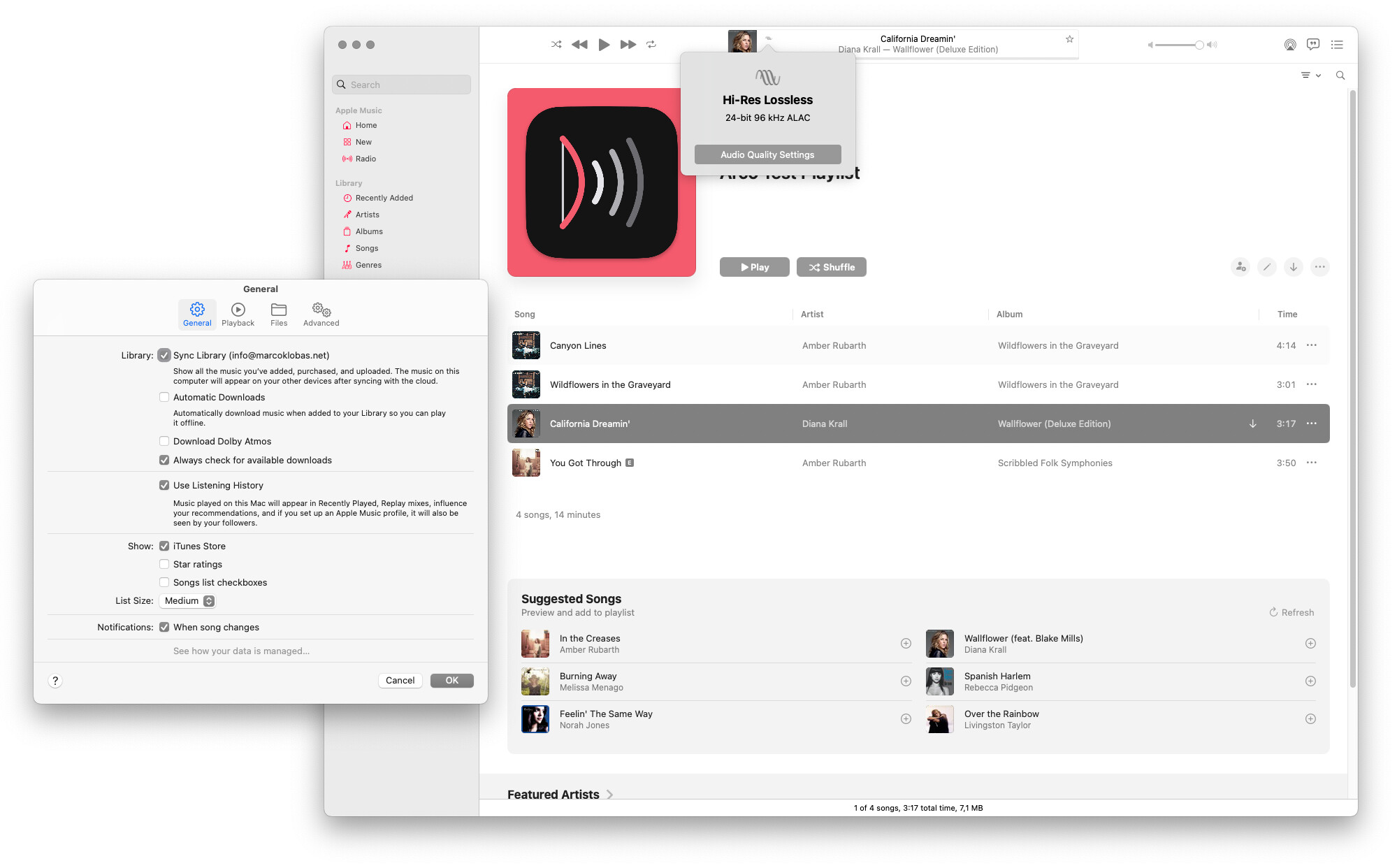
Yep – the idea is that it switches. There will be a small gap at sample rate changes as Roon needs to fetch the new stream.
Can you paste the log lines (there’s a log option in the menu) around the timeframe of the track switch? What macOS version are you running on the mini?
Sequoia 15.8.1 (the last macOS available for my Mac). Here’s the log. Arco is set to 48 kHz and its sample rate is kept regardless the played track’s sample rate.
For the record Wildflowers in the Graveyard should be 44.1 kHz and California Dreamin’ 96 kHz.
Streamer is a Lumin T2. The Mac and the streamer are wired with Ethernet. I get the same behavior playing through an RME audio interface.
2026-10-08 12:14:00.755 on: zone LUMIN T2
2026-10-08 12:14:00.804 device: Arco at 48000 Hz; source Music
2026-10-08 12:14:00.938 capture: reading the Arco input at 48000 Hz
2026-10-08 12:14:00.946 capture: first input, 512 frames at 48000 Hz
2026-10-08 12:14:06.045 music: playing — Wildflowers in the Graveyard
2026-10-08 12:14:06.053 session: began on the zone; slices at http://192.168.7.101:9277
2026-10-08 12:14:07.111 capture: first sound after 579 inputs
2026-10-08 12:14:07.111 runs: sound — writing
2026-10-08 12:14:07.112 runs: 1 begins at 48000 Hz (now)
2026-10-08 12:14:11.219 roon: playing(track: "1") (ours)
2026-10-08 12:14:11.219 play run 1: Roon answered Playing
2026-10-08 12:14:21.267 run 1: 14156 ms written; Roon in run 1 at 7000 ms
2026-10-08 12:14:31.220 run 1: 24108 ms written; Roon in run 1 at 17000 ms
2026-10-08 12:14:36.704 music: playing — California Dreamin'
2026-10-08 12:14:36.745 runs: 1 dropped (a skip)
2026-10-08 12:14:36.745 next track: California Dreamin' — a skip, a new run at once (151.4 s were left)
2026-10-08 12:14:36.745 runs: 2 begins at 48000 Hz (now)
2026-10-08 12:14:37.139 roon: failed(track: "1", reason: "MediaError")
2026-10-08 12:14:39.195 roon: playing(track: "2") (ours)
2026-10-08 12:14:39.195 play run 2: Roon answered Playing
2026-10-08 12:14:41.220 run 2: 4480 ms written; Roon in run 2 at 0 ms
2026-10-08 12:14:51.220 run 2: 14485 ms written; Roon in run 2 at 8000 ms
2026-10-08 12:15:00.600 music: paused
2026-10-08 12:15:00.727 runs: 2 — pause: 89 ms of fade and silence taken out (9 ms silence)
2026-10-08 12:15:00.727 runs: silence — waiting for sound
2026-10-08 12:15:00.818 roon: paused(track: "2") (ours)
2026-10-08 12:15:01.219 run 2: 23878 ms written; Roon in run 2 at 17000 ms
Heh – all clear. It’s not you, it’s me: since I have the Basso engine running as primary interface, I didn’t notice that the rate-switching logic didn’t compile in to Arco…
Working on it now – I’ll update when 0.3.0 is ready for download. You can update in the Arco menu directly (Check for Updates…). Bonus is that we get to test that as wel…
The 0.3.0 version does a change in the sample rate, unfortunately it doesn’t match the song’s sample rate.
Here I started with Arco set at 48 kHz and played a 96 kHz track: Arco switched to 44.1 kHz instead:
2026-10-08 13:30:09.282 run 3: 19213 ms written; Roon in run 3 at 13000 ms
2026-10-08 13:30:18.144 device: Arco changed to 48000 Hz (was 44100)
2026-10-08 13:30:19.282 run 3: 19213 ms written; Roon in run 3 at 13000 ms
2026-10-08 13:30:28.669 music: playing — California Dreamin'
2026-10-08 13:30:28.863 runs: 3 dropped (a skip)
2026-10-08 13:30:28.863 next track: California Dreamin' — a skip, a new run at once (177.9 s were left)
2026-10-08 13:30:28.887 clock: California Dreamin' — 44100 Hz (the Music app): Arco 48000 → 44100 Hz, from the start
2026-10-08 13:30:29.051 music: paused
2026-10-08 13:30:29.203 roon: unpaused(track: "3") (ours)
2026-10-08 13:30:29.386 device: Arco changed to 44100 Hz (was 48000)
2026-10-08 13:30:29.419 music: playing
2026-10-08 13:30:29.427 roon: paused(track: "3") (ours)
2026-10-08 13:30:29.434 roon: playing(track: "3") (ours)
2026-10-08 13:30:29.755 roon: failed(track: "3", reason: "MediaError") (ours)
2026-10-08 13:30:30.240 runs: sound — writing
2026-10-08 13:30:30.241 runs: 4 begins at 44100 Hz (now)
2026-10-08 13:30:32.751 roon: playing(track: "4") (ours)
2026-10-08 13:30:32.751 play run 4: Roon answered Playing
2026-10-08 13:30:39.282 run 4: 9041 ms written; Roon in run 4 at 2000 ms
2026-10-08 13:30:44.149 music: paused
2026-10-08 13:30:49.282 run 4: 19049 ms written; Roon in run 4 at 12000 ms
Moreover, I’ve noticed that sometimes the track info on the streamer’s display doesn’t always match the played song. The info of the previously played track is displayed instead even though the actual music stream changes. It’s like Roon isn’t providing all the updated metadata, for lack of a better word. Granted, in these tests I’m continuously stressing the system hopping from one track to another…
Regardless the issues, you are doing an excellent job. Having Apple Music reach a streamer not through the usual AirPlay is already a leap forward.
Thanks. From the log, Arco did exactly what the Music app told it: Music reported 44,100 Hz for California Dreamin’, and Arco went from 48 to 44.1.
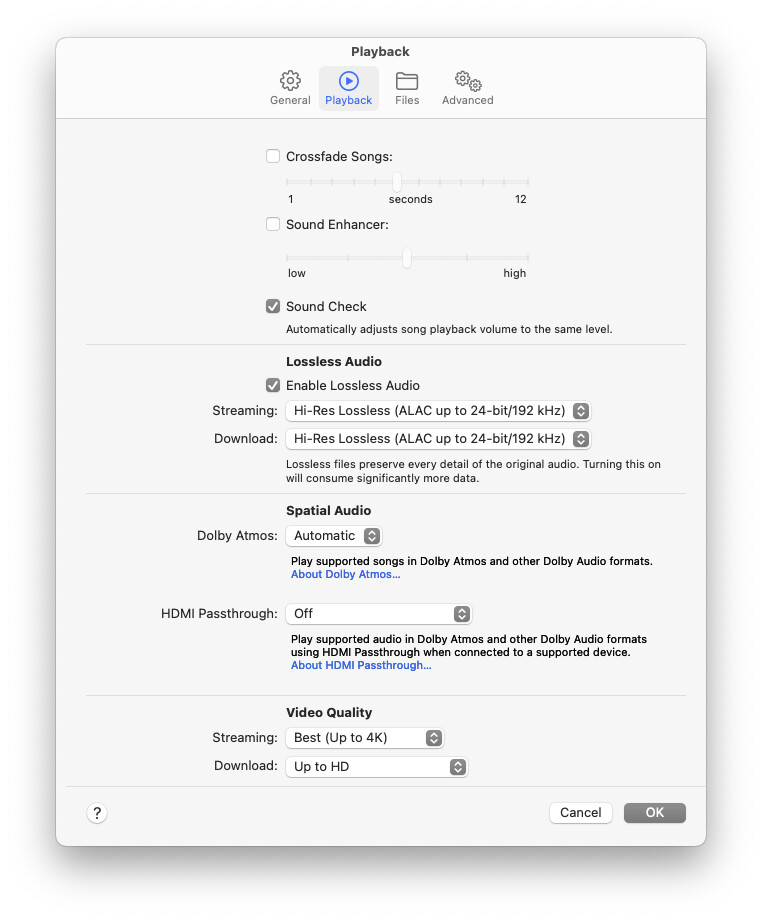
I suspect 44.1 is actually right here. The version on “If You Can Believe Your Eyes and Ears” is listed in Apple Music as Lossless, not Hi-Res Lossless, and Lossless is 44.1 or 48 kHz. Could you check which album/version your copy is on, and what Music’s own quality badge says while it plays? Click “Lossless” or “Hi-Res Lossless” in the player bar while the tracks plays and it shows the format (like “ALAC 24-bit/96 kHz”). If the badge says 96 kHz while Arco goes to 44.1, that’s a real bug and I’d like to know. And just checking: Music app is set to Hi-res in Settings > Playback?
For the track info that lagged behind: if it happens again, the log lines around that moment would help. I’ll build some extra logging into 0.3.1 that will make things a bit clearer.
Moreover, I’ve noticed that sometimes the track info on the streamer’s display doesn’t always match the played song.
What does Roon say at moments like this? As in: is the metadata up-to-date in Roon, or is it lagging as well?
The display issue seems now gone: I repeatedly skipped from one track to another (back and forth) and so far the shown info has been correct. I don’t know honestly what happened in my first tests when the info appeared stuck. I’ll keep an eye on it.
Oh, one more thing: the track scrubbing doesn’t update the time on the streamer’s display. Let’s say that I play a song for 15 seconds and then I jump to 1:20, the audio changes correctly yet the display keeps running as nothing changed 16, 17, 18… At the end of the song the next track is correctly played updating the timer for the new song.
Yeah – please share the list – I’ll run it here. In the meantime 0.3.1 is out, with some extra logging and the sample rate it is passing to Roon displayed in the menu bar. Regarding your screenshot: the second tab (Playback) is what I’m looking for.
The way this works: Apple Music only indicates the variant: Lossy, Lossless and Hi-res (I’ll leave Dolby Atmos out of this). Lossless can be 44.1 or 48; Hi-res 88.2, 96, 176.2 or 192. AM only communicates the final sample rate at play (usually within the first second, sometimes later, sometimes not at all(!)). Arco detects the rate: if it is the same as what’s already playing, it plays straight through, if is changed it sets the new rate, throws away the buffer and starts a new stream.
That also explains why it is a bit fragile with fast skipping and scrubbing: AM is the weak link – and there’s a lot of (re)buffering going on. Regardless – in normal use the system works well here – as it should for you.
You may want to turn Sound Check off, as it makes Music app apply volume normalization (output is not bit-perfect anymore). Should not matter for rate switching, but it’ll sound a bit better.
I tried your list, got 2x 44.1, 2x 96 – as it should. Arco now logs what Music app is telling it is outputting:
2026-10-08 16:32:17.387 runs: sound — writing
2026-10-08 16:32:17.388 roon shows: California Dreamin' · Diana Krall (loading)
2026-10-08 16:32:17.403 music: playing
2026-10-08 16:32:19.426 run 3: 2440 ms written; Roon in run 2 at 11000 ms
2026-10-08 16:32:19.451 roon: playing(track: "3") (ours)
2026-10-08 16:32:19.451 play run 3 (California Dreamin'): Roon answered Playing
2026-10-08 16:32:21.782 clock: California Dreamin' — five seconds in, the Music app says 96000 Hz
Here’s another log – played a 44.1 kHz song from the playlist a few seconds and then switched to a 96 kHz one – the sample rate always stuck at 44.1 kHz:
2026-10-08 17:22:17.258 run 4: 98637 ms written; Roon in run 4 at 92000 ms
2026-10-08 17:22:18.042 music: playing — Canyon Lines
2026-10-08 17:22:18.291 runs: 4 dropped (a skip)
2026-10-08 17:22:18.291 next track: Canyon Lines — a skip, a new run at once (98.5 s were left)
2026-10-08 17:22:18.320 clock: Canyon Lines — readings 44100 at 0.02 s; remembered 44100
2026-10-08 17:22:18.321 clock: Canyon Lines — 44100 Hz (the Music app), Arco is there already
2026-10-08 17:22:18.567 roon: unpaused(track: "4") (ours)
2026-10-08 17:22:19.042 runs: sound — writing
2026-10-08 17:22:19.042 runs: 5 begins at 44100 Hz (now)
2026-10-08 17:22:19.414 roon: failed(track: "4", reason: "MediaError") (ours)
2026-10-08 17:22:19.415 roon shows: Jealous · Ingrid Michaelson (stopped)
2026-10-08 17:22:19.916 roon shows: Canyon Lines · Amber Rubarth (loading)
2026-10-08 17:22:21.543 roon: playing(track: "5") (ours)
2026-10-08 17:22:21.543 play run 5 (Canyon Lines): Roon answered Playing
2026-10-08 17:22:23.497 clock: Canyon Lines — five seconds in, the Music app says 44100 Hz
2026-10-08 17:22:27.258 run 5: 8219 ms written; Roon in run 5 at 1000 ms
2026-10-08 17:22:35.450 music: paused
2026-10-08 17:22:35.589 runs: 5 — pause: 88 ms of fade and silence taken out (8 ms silence)
2026-10-08 17:22:35.589 runs: silence — waiting for sound
2026-10-08 17:22:35.671 roon: paused(track: "5") (ours)
2026-10-08 17:22:36.801 music: playing — California Dreamin'
2026-10-08 17:22:36.991 runs: 5 dropped (a skip)
2026-10-08 17:22:36.991 next track: California Dreamin' — a skip, a new run at once (237.6 s were left)
2026-10-08 17:22:37.021 clock: California Dreamin' — readings 44100 at 0.02 s; remembered 44100
2026-10-08 17:22:37.022 clock: California Dreamin' — 44100 Hz (the Music app), Arco is there already
2026-10-08 17:22:37.023 roon: playing(track: "5") (ours)
2026-10-08 17:22:37.461 roon: failed(track: "5", reason: "MediaError") (ours)
2026-10-08 17:22:37.505 roon shows: Jealous · Ingrid Michaelson (stopped)
2026-10-08 17:22:37.920 runs: sound — writing
2026-10-08 17:22:37.920 runs: 6 begins at 44100 Hz (now)
2026-10-08 17:22:38.455 roon shows: California Dreamin' · Diana Krall (loading)
2026-10-08 17:22:40.431 roon: playing(track: "6") (ours)
2026-10-08 17:22:40.432 play run 6 (California Dreamin'): Roon answered Playing
2026-10-08 17:22:42.056 clock: California Dreamin' — five seconds in, the Music app says 44100 Hz
2026-10-08 17:22:47.259 run 6: 9340 ms written; Roon in run 6 at 2000 ms
2026-10-08 17:22:49.665 music: paused
2026-10-08 17:22:49.799 runs: 6 — pause: 88 ms of fade and silence taken out (8 ms silence)
2026-10-08 17:22:49.799 runs: silence — waiting for sound
2026-10-08 17:22:49.893 roon: paused(track: "6") (ours)
2026-10-08 17:22:50.594 music: stopped — -
2026-10-08 17:22:57.258 run 6: 11783 ms written; Roon in run 6 at 5000 ms
2026-10-08 17:22:37.022 clock: California Dreamin' — 44100 Hz (the Music app), Arco is there already
It appears that in older versions, Music does not report truthfully for streaming media (it does for local files). So basically, you Music app tells Arco ‘44.1’ – and Arco responds accordingly. There are other ways of obtaining the correct rate (log streaming) – if you’re up to it, can you do the following:
Could you run this in Terminal while playing audio, skip to California Dreamin’ and to one or two other tracks, then press Ctrl-C and paste what it printed? It only shows the audio format the Music app sets up (no personal data):
log stream --style compact --predicate 'process == "Music" AND eventMessage CONTAINS "Creating AudioQueue with format"'
On my Mac it shows a line like Creating AudioQueue with format:'qlac', framesPerPacket:4096, sampleRate:96000 for each track. If it prints “Must be admin”, that’s worth knowing too.
Cool project Rene. I’ve taken the liberty of creating a homebrew cask for it for easy installation via Homebrew. You can check it out here. Let me know if you have any concerns or would like to maintain it yourself.
Great – that’s exactly what we wanted to see. I’ll extend the track-changing logic:
Log streaming first, with the added advantage that with regular queue play we know the rate of the next track beforehand;
With manual skips, it takes 1/1,5 s before the rate appears in the log – in this case Arco will wail until it can capture the correct rate;
Applescript remains as fallback / validation for current versions of Music app.
Give me a bit of time for building and testing – new release sometime this evening. Don’t worry about about this – I would very much like to support systems like your anyway. You valiant efforts as guinea pig are much appreciated.
@Marco_Klobas: Moment of truth: released 3.3, rate switching now based on log streaming first. This should work on your Mac. One caveat: your Mac account needs admin rights in order to be able to read the logs (if you’re the only user, this is usually the case).