Enhancing the Headphone Experience - Applied Psychoacoustics and Binaural surround sound

Hi @Gimlet. I downloaded a trial of Virtuoso and wanted to test it out. It took me some time the get the audio routing from Roon to Virtuoso to work on Windows. I didn’t succeed with JackAudio but it finally worked with VB-Cable.

Now I want to test it out with something else than Qobuz’ classical 5.1 tracks. Can you recommend some good pop/rock multichannal recordings for demoing?

I see that they have a Black Friday sale this year again. So now is a very good time to buy :slightly_smiling_face:

1 Like

Hi. Most of my multichannel collection is ripped classical SACDs or old quad recordings from the 1970s. I have picked up a few classic rock recordings - notably Dark Side of the Moon which sounds amazing in multo-channel. Also I have a Porcupine Tree album which sounds great.

But if you go onto the web (eg Head-fi’s Smyth Realiser section) you will get better recommendations from the serious rock and surround fans. Enjoy!

1 Like

Thank you for the suggestions :+1:

1 Like

Another good site is https://www.quadraphonicquad.com/forums/

Update - I have spent the last few months testing the Supperware headtracker and the included Bridgehead software - cost about £80 in the UK. Overall very positive feedback and “out of the head” realism (when used with APL Virtuoso v.2 https://apl-hud.com/product/virtuoso/) although the magnetic tracking isn’t as good as the optical tracking on my Smyth Realiser. However, it gives a fairly convincing rendition of anything from 2.0 to 7.1 channels in a home audio or cinema room with simulated Genelec or Spendor loudspeakers. Also works well with Netflix playing 5.1 movies using the Netflix 1080p extension for Chrome.

+1 easiest way to keep up to date with past and upcoming multichannel releases IMO

1 Like

Also worth mentioning, some of the older quad mixes, particularly from the 70s are AWESOME, and for albums that have ended up being remixed into 5.1+ , sometimes an interesting counterpoint to those newer mixes.

Big big multichannel fan, I’m so glad it hasn’t died. There were a few dark years but I honestly think, BD-A combined with what Steven Wilson started doing really revitalized the interest in multichannel.

1 Like

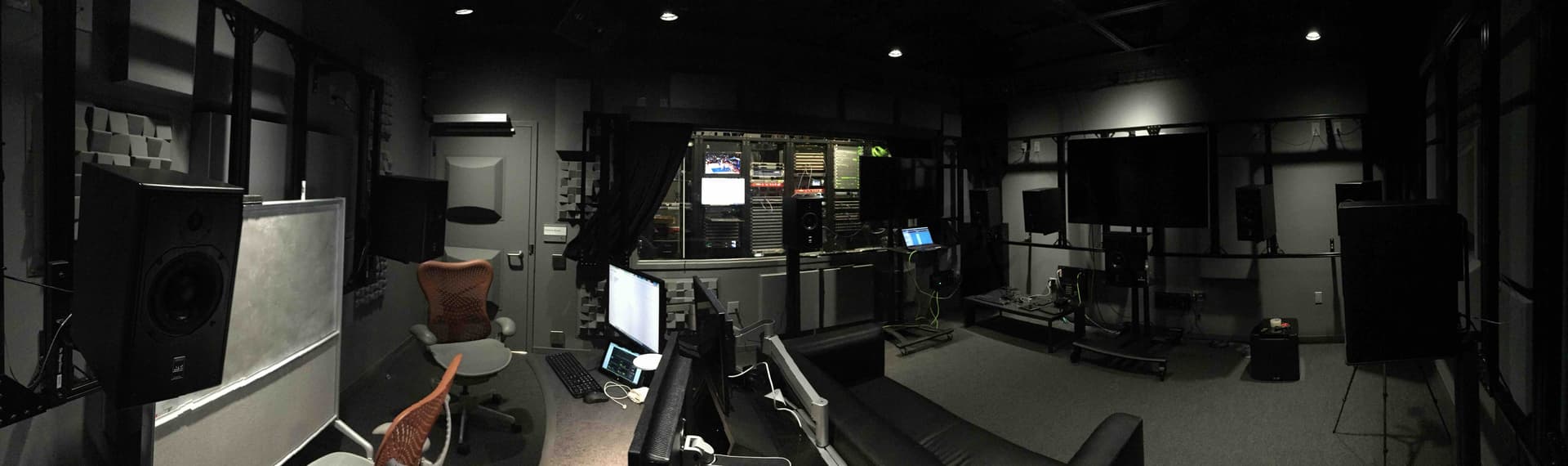
Yes it’s great to see more interest in multichannel and immersive mixes. As well as talented people like Steven Wilson, I think this may also be driven by better immersive headphone technology, as well as, of course, Dolby Atmos. I visited the Dolby studios in SF a few years ago, and was lucky enough to be given a tour by one of the lead Atmos developers (the husband of a colleague).

Alongside the amazing sound quality, I remember being impressed by the 16 and 24 channel mixing studios (see ATC studio pic below) and multiple Smyth Realisers - which eventually inspired me to get my own Realiser. I should also mention the improvements in upmixing technology which has really enhanced my enjoyment of stereo. Listening to stereo classical and opera upmixed to 16 channel surround using Auro 3D is a whole new experience. No weird surround effects - it’s just far more immersive than normal stereo.

Gorgeous studio.

I’m not a fan of upmixing on music but I do dabble in my own stuff. A Steven Wilson interview actually helped me realize that I was on the right track with the approach I had been taking (weirdly mirrored what I do).
Basically, I mess around with material where I have access to the original multitrack recordings / sessions, I start by ‘rebuilding’ the mix, close to the original in stereo, and then from there I build it out into 5.1.

1 Like

OK so I got the Virtuoso program and I’m learning as I go along. If you don’t mind some newbie questions I have some :slightly_smiling_face:

After some reading I found out that it does not seem possible to decode Atmos on a windows PC without the Dolby Reference Player which they only sell to companies. I think 5.1 or 7.1 sounds good through Virtuoso but how much am I missing when compared to a fully decoded Atmos track played through Virtuoso?

I can rip an Atmos blu-ray and play it back as 5.1 or 7.1. What setting do you use in Virtuoso for such files ITU-R or the Dolby Atmos settings?

If I rip to MKV Roon can’t play the file. What player do you use to play multichannel MKV’s? I used good old JRiver but it sorts MKV files under video making it a bit messy. Are there any good alternatives?

And finaly I’m thinking about getting a custom HRTF made. I know of Genelec’s Aural id. Are there any other good options?

1 Like

I am mainly a Mac and ROCK user, so apologies in advance if my Windows knowledge is limited.

Dolby Atmos - you are 100% correct that Virtuoso doesn’t include an Atmos decoder. To my knowledge, the only headphone processor that includes Atmos, DTS-X and Auro decoding is the Smyth A16 Realiser (which provides up to 24 virtual speaker channels). Having compared both the Smyth and Virtuoso on stereo, 5.1 and 7.1 music and movies, there is a significant difference especially in bass quality and precision of speaker location, but Virtuoso is still great value for what it can do.

However, I haven’t personally found Atmos music (from Apple Music) to be super impressive - it seems to be lossy and/or upmixed. Movies are a very different matter, as Atmos can transform your entire experience. I have also played ripped Atmos blu-ray music through Virtuoso, using the 7.1 SMPTE layout (which has the classic F C R speaker location) with good results. The Virtuoso manual gives a lot more detail on alternate speaker layouts so you can experiment.

MKV - I have only played MKV movies, not music. So I can’t advise on this. I have transformed all my multi-channel music ripped from SACDs into FLAC files, and these play fine, alongside the limited multichannel FLAC streams from Qobuz.

HRTF - I believe that the Genelec HRTF costs around £1000, just for the measurements. If you are prepared to spend that kind of money, you could consider buying the Smyth A16 Realiser ($4,000) rather than Virtuoso, as it has full HRTF personalisation and room/speaker measurement capabilities, and is the go-to headphone virtualisation tool at many studios, including Dolby themselves. I also own an A16 Realiser but use Virtuoso when travelling. It’s a big investment, so check the Head-Fi thread https://www.head-fi.org/threads/smyth-research-realiser-a16.807459/ if you are interested.

Virtuoso works best with a headtracker, and preferably some ability to modify the HRTF response for individual ears. Most people recommend the £80 Supperware tracker (which I use), but then you are restricted to the 5 standard HRTF options in Virtuoso. Another option is Earfish https://www.earfish.eu which used to enable you to maker a custom HRTF. However, Earfish now seems to have been restricted to academic research users. The third alternative is Waves NX https://www.waves.com/hardware/nx-head-tracker which also has some HRTF personalisation options.

Hope this helps. Good luck!

1 Like

Thank you for the advice.
I think the Genelec HRTF pricing is down to 375€ now. The Smyth A16 Realiser is sadly out of my budget range :slightly_smiling_face:

I will check out the headtrackers :+1:

1 Like

Quick update for the multi channel headphone listeners. To upmix stereo into surround sound, I have been experimenting with creating a Hafler Matrix (as used for quadraphonic) within Roon, using Muse Procedural Eq. Starting with a basic 2 to 4 channel upmixer, with a difference signal sent to RL and RR virtual speakers, plus filters and 18ms delay, I have achieved a convincing quad sound for my modest Sennheiser headphone setup, using the APL Virtuoso software (running on a Mac) to create the virtual speakers for headphones within a typical home cinema environment.

Roon setup as follows.

Step 1 - Route R & L audio into virtual surround channels AND a reversed phase signal into the same channels. That means that the difference signal only stays in surround. Front Left and Right are unchanged. I have reduced surround levels by 3db for digital headroom.

Step 2 - Hi and Lo Pass Filter for Surround Channels

Because reflected sound typically lacks the low bass and high treble, and also to ensure that front channel imaging isn’t affected by the surround effects.

Step 3 - Delay

This is a matter of taste, but I personally prefer a minimal delay (18 ms here) to avoid the dreaded stadium echo or bathroom effect. You want to add some ambience but also retain the original character of the recording.

Step 4 - Final mix for playback, reducing the volume levels of the virtual surround speakers to retain the front imaging but with added quad ambience

This has been tested on both my headphone virtualisers (APL Virtuoso and Smyth) but still requires a bit of improvement. Of course, it should also work on normal speakers if you are using a Roon source with multichannel (typically HDMI) into a home cinema system. Most home cinemas deliver Dolby Surround and even Atmos - but for music, this is much more configurable, and you can also add more channels. Here’s the final result of the 2 to 4 channel Roon upmixing shown on the APL Virtuoso control screen.

Incidentally, I came across an old school article on how to create a Hafler Matrix with amp and speakers, which I have attached below for those who are interested. A quick read will show that Roon’s capabilities are far superior, and much more flexible.

2 Likes

Well, I have the DRP and I am not a company and I know others as well who have purchased it from a national pro audio dealer. What’s cool about having it is that with the Dolby Atmos helper in MMH, conversion to wav files — decoded specifically for the speaker layout you have — is all automated. I decode to a 5.1.2 format, convert the decoded wav files to FLAC and then can play the albums out through Roon since Roon can handle 8 channels (as can my Okto dac8pro DAC). JCR

1 Like

Yes I also have the reference player now and I am not a company - last time I checked​:blush: MMH is a fantastic tool to make a sort of locked atmos version. Can’t recommend it enough​:+1:

Firstly, many thanks Gimlet for the thread and Igor_Is for the reference to JackAudio.

I’ve just started the trial, and so far I am impressed. The highlights have been listening to 60s/70s classics like The Doors, Hendrix, Rush, and Fleetwood Mac. Going to start listening to some classical - the Sibelius Symphonies and Orff’s Carmina Burana…

My main audio gear is in storage, so I’m almost positive that an issue I am encounting with JackAudio (the audio routing for Windows) is down to the poor laptop I’m using and the Realtek HD Audio chip. And I won’t really hear any difference on my current headphones (WH-1000XM5).

In JackAudio you can set the sample rate, but anything higher than the default (44100 Hz) most of the time either kills the JackAudio server or the tracks are skipped in Roon. The RealTek does support 24bit/192000 Hz, which Roon handles without problems without Virtuoso running (ie downmixing the same 5.1 tracks).

Can anyone notice any obvious issues with my configs? I am also using ASIO4ALL…

Virtuoso does correctly report the sample rate set in JackAudio, upto 192000 (when and if the JackAudio server is running).

Is there a JackAudio setting (.ini file or something) which tells the software to set sample rate on the fly?

Any ideas gratefully received. But as I said, it’s most likely down to the laptop I’m using, but would like to 100% confirm there isn’t a 44100Hz limit in JackAudio, before I buy Virtuoso for my proper setup.

Thanks.

1 Like

Glad you are enjoying Virtuoso. I will refer your question on JackAudio to the Windows experts, as this software isn’t required for Macs (I use Blackhole). However I have a couple of general comments.

  1. Virtuoso is quite processor intensive, so I recently upgraded my Mac laptop partly to avoid dropouts.
  2. Virtualising speakers involves a factor increase on the number of individual processor calculations. Even the Smyth A16 (the leader in this field with studio hardware) can import 16 channels at 96/24 but then downsamples to 48k for the headphone virtualiser, although it can passthru stereo at 96/24.
  3. So, given that Dolby and other studios can live with 48/24, the limitation of 44.1/24 might not be that big an issue - it’s a personal view. Obviously they still master at 96/24 - this is just about the headphone output resolution. Personally I find that 24 vs 16 bits is significant, whereas doubling the frequency response isn’t, but my ears are now 65 years old!
1 Like

Thank you, Gimlet. That all makes perfect sense. I guess I just wanted the reassurance I wasn’t messing up my settings.

I’m certainly going to buy Virtuoso (and look into a headtracker), thank you for raising awareness of the software!

I’m listening to Carmina Burana at present; impressive, even on my Sony’s.

1 Like