Well, it would make a difference if I ever switched jacks. I assure you it’s CAT7 cables that run through our house.
Agreed, I will go further and say pedantic.
@Boris_Molodyi, @Nick_Zwar, @Marian
I suggest a line is drawn underneath this now. So the discussion can focus on more important aspects of good network topology.
3 Likes
Just curious, what kind of difference? Cables in my house are CAT5E, some of them pushing 20m, and they work perfectly fine at 2.5G.
2 Likes
Please make a note of the moderation post above you.
Before this thread gets totally out of hand.
This has been hashed out enough already.
Let’s please move on!
3 Likes
I use a Roon Nucleus One into a Silent Angel Bon N8 switch and 20 m of CAT8 cable to my listening room. The game changer for me was adding an EAHibrid cyberfilter in the connection before my streamer. It worked really well improving the sound quality to the point it was now at least as good as my optical transport. I known it’s controversial but my ears tell me it works.
1 Like
I think that all attempts at constructive comments appear to have been ignored in favour of point scoring. Unfortunately i’m not a moderator or i would close this thread.
Hopefully the OP has got something from the thread in between the endless bickering.
Enough, over & out…
3 Likes
I genuinely don’t know what the issue is with this thread? I withdrew from the discussion because it was requested and I’m fine with it, but I have no idea why any of this discussion seemingly irks some folks?
1 Like
I also don’t really get it. I would expect the mods to fork it if it veers, although we were still talking about networking.
1 Like
When the conversation devolved into a pissing match a mod rightly asked that the pissing match end and the thread topic get back on message
I must have missed that. Nitpicking, yes, but probably done in earnest.
1 Like
Well this has been an interesting exercise, thanks to those who actually contributed on the infrastructure side I was looking for advice on.
A few out there who need to get out more…
3 Likes
Bit late, but I do actually have a Unifi network set up for about 11 Roon zones, my main hifi (not Roon) and my AV.
I use the 24-port 2xSFP POE+ switch. The fibre port 25 goes direct to my hifi streamer (Pulsar, no switch, just a FMC and filter) and the fibre port 26 goes to a switch for the various AV components.
All the Roon zones work wirelessly. I use 6 access points, slight overkill, but the house is quite big on 3 floors and one access point is a garden room. You can see below 5 access points powered by PoE and the shed port 19 uses a local power brick.
Roon Server sits on a Mini M2 on port 16, headless next to the Unifi switch. My music library sits on a Buffalo drive on port 23.

These are the connected Unifi devices.
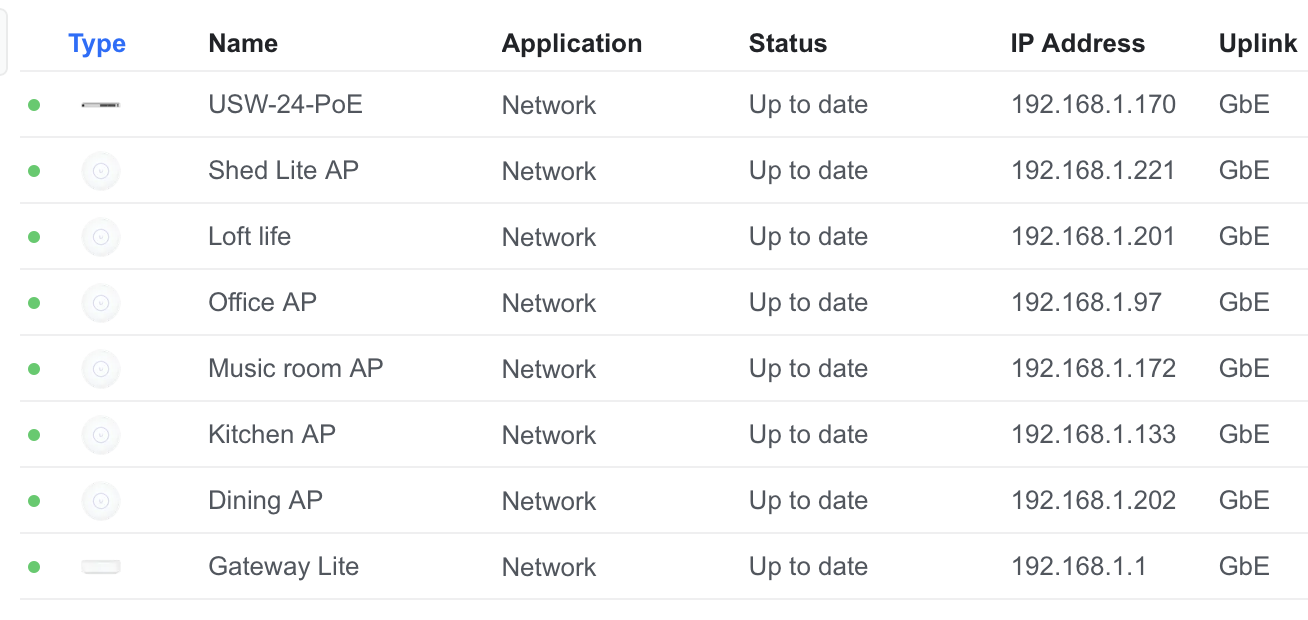
You will see I have a Gateway Lite attached to provide a VLAN. I have a dedicated network set up for the main hifi called “Music”, but it sounds no different with separated traffic, so I don’t use it.

You can also see I have 88 devices currently connected, the Roon zones work wirelessly at 24/192 PCM, the network performs faultlessly.
For some 1m runs by the switch to the Mac Mini and library I used some Blue Jeans CAT6 I had spare. Otherwise I used generic cables from Amazon. I also used some spare AudioQuest Pearl CAT6A, it’s got a very robust shield if you’re worried about damaging cables.
I’ve had to do some terminations, I use a crimper if I can do a termination test, but these non-crimp connectors are cheap, very easy to use and idiot-proof.
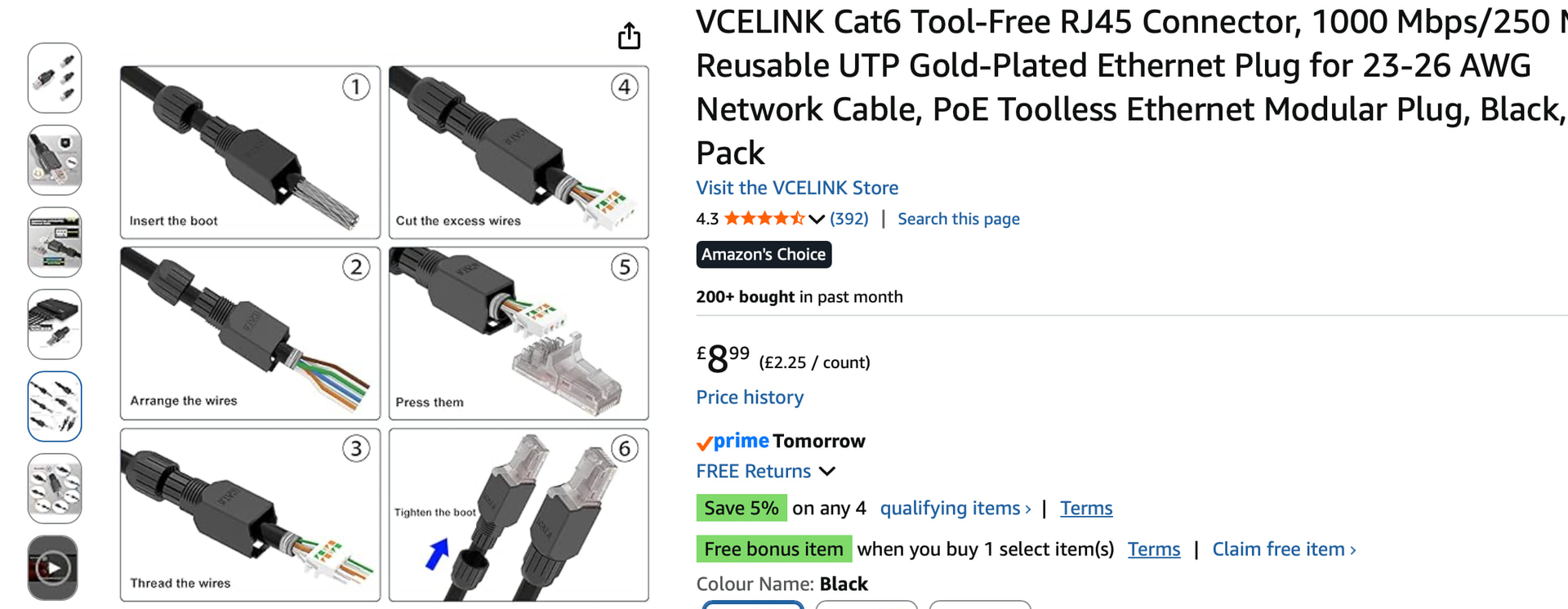
I’ve run CAT cables parallel to the fibre cables and use them for access points. You will likely have fibre to two of your systems and CAT to the third, but I’d run CAT parallel with the fibre just in case.
4 Likes
p.s. I have a fairly hi-end system, with an Innuos Pulsar streamer and an Aqua Formula Rev2 DAC. The only audiophile components I have in my network is an iFi power supply on my TRENDnet fibre converter and a Stack audio clock/filter. I don’t have any audiophile cables or switches.
3 Likes
Hello,
Here are my tips for a home network setup:
- Set up a mesh network that’s as SIMPLE AS POSSIBLE
- 1 router
- 1 switch to which all your devices are connected
- 1 or more Wi-Fi access points connected via Ethernet cable
- Avoid cascading switches; always keep things as simple as possible. In my opinion, it’s better to run multiple cables than to have a switch at the end of the line—it’s more reliable, though not always possible.
- PoE switches tend to fail more quickly (just something to keep in mind)
- If you don’t need VLANs, use unmanaged switches (especially if you lack networking expertise)
- Choose switch brands that are well-established in the enterprise market (CISCO, HP, NETGEAR, ZYXEL…)
- Avoid network cable lengths exceeding 80 meters for Base-T. Use shielded S/FTP cable, Cat 6A or higher. Double shielding is required if you’re using DVI. S/FTP cable is more expensive to purchase and more difficult to install.
Have a great day,
What you described is, thankfully, not a mesh network; it’s a textbook star topology.
Besides that and the recommendation to use shielded network cables, I agree with everything you said.
Remember, audiophiles and music enthusiasts: UTP (Unshielded Twisted Pair) is your friend!
1 Like
Not quite. It is as far as the wired network is concerned but …
More than one Access Point, with mesh capable APs suitably configured makes it a Mesh system - albeit one with the very much preferred wired Ethernet backhaul. Just make sure that the wired Ethernet connections to the APs have enough bandwidth to handle maximum WiFi data rates (or at least maximum expected) or the backhaul data rate may become the limiting factor. With modern WiFi systems this may mean a 2.5Gbps (or higher) switch is required if the APs support a 2.5Gbps wired connection.
If a Mesh WiFi system is to be used, a wired backhaul is likely to give best results because it prevents bandwidth contention between device traffic and backhaul traffic.
Alternatively, use a dedicated WiFi channel, say a second 5GHz channel or the 6GHz channel, to carry backhaul traffic and make sure WiFi connected devices do not use that channel. This also makes sure that there is no backhaul contention but can result in less overall bandwidth to share between your WiFi connected devices so it is more likely that device to device contention will occur.
1 Like
Thanks Guys,
I will be putting in 3 x Mesh routers although all hard wired and connected to a Unifi managed switch while the audio feeds are hard wired and all coming direct from the Unifi Cloud Gateway - it is a big house…
I’m curious why UTP is preferred for audiophiles over STP when my own trials have shown CAt7 cables to be superior to Cat6 and the primary difference there is CAT7 is STP vs UTP on CAT6.
The big reason is that STP cables create a ground connection between the devices at each end of the wire (assuming the shielding is terminated in the devices at each end which is not always the case) and thus they introduce the potential for ground loops which will do more to degrade your audio than a little EMI/RFI introduced by an unshielded cable would ever do.
4 Likes
Good question! The reason I say that audiophiles should prefer UTP over STP (including Cat7/Cat8 cables) for digital audio comes down to galvanic isolation and ground noise.
-
Preserving Galvanic Isolation: All standards-based Ethernet ports use internal isolation transformers (magnetics) that break electrical contact between devices. With UTP, we get galvanic isolation for free.
-
Shielding Bypasses Isolation: STP/Cat7 uses a physical drain wire and metal shielding that connects to the metal RJ45 collar. When you plug STP into grounded audio gear and a network switch, you create a direct physical ground link between them, bypassing Ethernet’s built-in galvanic isolation.
-
Ground Loops & RFI: If there’s any voltage potential difference between the chassis ground of your network closet and your audio system, noise currents will flow along that cable shield directly into the ground plane of your streamer or DAC. Furthermore, unless shielded cable is properly bonded to a dedicated enterprise technical ground at both ends, the shield can act as an antenna for RFI/EMI.
In trials, shielded cables sound different because they alter the noise floor or introduce high-frequency stray currents into the chassis, which manifests as extra brightness that is mistakenly perceived as “detail.” However, keeping the network electrically decoupled via UTP (Cat6 or Cat6A) results in the lowest overall system noise floor.
4 Likes
As someone else already recommended, you may benefit from hardwiring with SFP instead of regular CAT. This creates a galvanic isolation between the devices. It made the biggest difference in my network setup when I compare my network of three Afterdark switches connected via CAT versus connected via SFP (with cheap fibre and cheap DELL transceivers that were designed by Finisair). The difference is so huge that I even attached the CAT cable coming out of my PrimeMini4 RoonCore to a media converter that is going via SFP to the Afterdark switch just to benefit from the isolation there, too (which also had an immediately audible impact). Sooner or later, I will switch to a RoonCore and a streamer that already come with SFP ports.
1 Like