Just for the record, I’m using 64 GB of G.Skill DDR5-6400 CL32 RAM. Asrock motherboard, and it is stable for 3+ months uptimes even under sustained 100% constant loads. Such as building HQPlayer OS image, which is about 12 - 24 hours of 100% load on all cores, plus high RAM and I/O load (with 32 GB RAM it would crash mid-build due to out of memory). Cooled by beQuiet AIO cooler and five fans. Equipped with RTX A4500 GPU and powered by 1000W Seasonic hybrid PSU (most of the time PSU fan is stopped).
Should be since my 6400/CL32 XMP1 is perfectly fine for me to do DSD1024 with ASDM7EC-super using default filters. Same RAM, but i9-13900T CPU can do DSD1024 with ASDM7EC-light using default filters. This before ASDM7EC-fast and the optimizations, so I cannot say for sure if -fast work on the 13900T or not, but I’d assume it will. No GPU offload in these cases, filter offloaded to E-cores.
My air cooled 13900T (in the corner of my office) is dedicated to running my DAC200 behind a NAA (in the living room), it is a small air cooled design built into Fractal Design Ridge case. Seasonic PSU and RTX2080 Founders Edition GPU.
I am practical… my setup with 14900KF, RTX5080, 64GB DDR5 at 5600 was delivering hiccup’s, while same setup with 32GB DDR5 at 6400 was running smooth and sound.
I am building a new HQPlayer PC, in about 2 days it will be assembled. 14900KS water cooled, new motherboard with z790 chipset DDR5 8000 documented and the same water-cooled RTX5080. This box will probably be the production machine for my parties.
Latency is important. Since CAS Latency (CL) is reported in clock cycles, you need to divide the CL figure with the clock frequency to get the actual latency in time. This matters almost as much as the raw transfer bandwidth. So worth paying attention to both.
Then other factors are things like amount and speed of CPU caches.
Apple’s M-series is not particularly shining on CPU clock frequencies, but they do very well on memory bandwidth with their stacked unified NUMA-style memory architecture. More CPU core blocks you have, more memory channels you’ve got and the memory bandwidth increases as function of the CPU blocks. So each step, base → pro → max → ultra doubles the memory bandwidth from the previous.
Yes, good test and example. My guess 5600 chip may had “unfriendly” CL. Where 6400 are very common with CL32 producing the true latency of 10ns. I use this common formula: (CL ÷ data rate) × 2000 = true latency.
About a year ago I’ve “burned my fingers” in attempt to tame 8400 chip: F5-8400J4052G24GX2-TZ5RW
After countess yet educational hours, main learning for me was that 8000+ performance is not out of the box despite attractive make to believe marketing. I got that chip stable at 8000 sharp only, and guess what… true latency with all my tweaks for that stable run was 10ns.
It would be cool, when you have your build ready to share your experience. 14KS+5080 looks attractive and may be price/performance ratio is better than 14KS+4090 at the end.. no
Yes, this one needs to be thermally controlled. I find my AIO, liquid freezer II, fit for job all right. But my strategy for the build was bald power, and noise aspect did not matter. Server is in utility / store room.
In my example, DRAM modules were the same. I just removed two of four.
Okay, launched the new BOX for HQPlayer, all modulators do fine DSD1024 with most filters, except for Sinc-L, and im not quite sure where is the bottleneck. 14900KS P-cores are running under 50% in most cases, its either DRAM latency (DDR8000-36-46-46-84) or bandwidth issues to RTX5080, or insufficient VRAM (16G). Going to try DDR6000-26-33-33-66.
Anyway 14900KS boosts up to 6400Ghz P-cores and 4700Ghz E-cores.
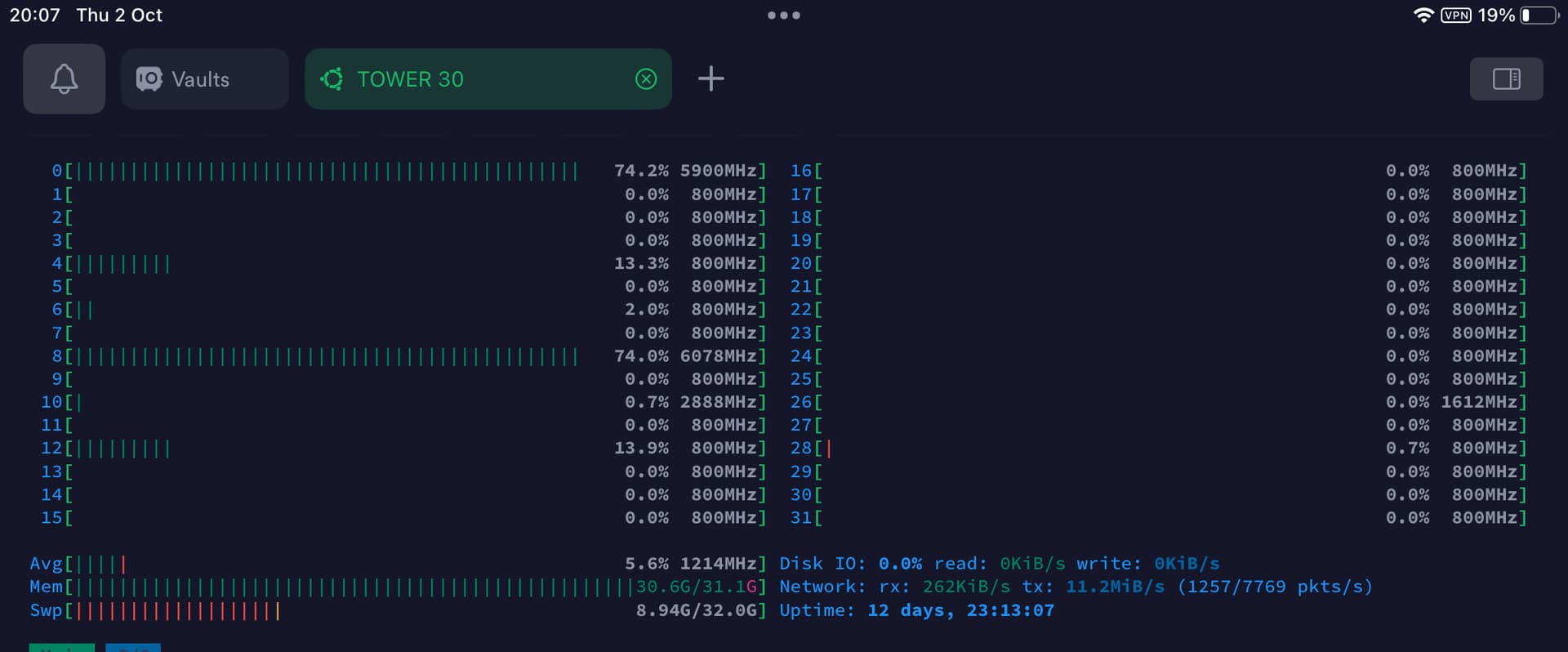
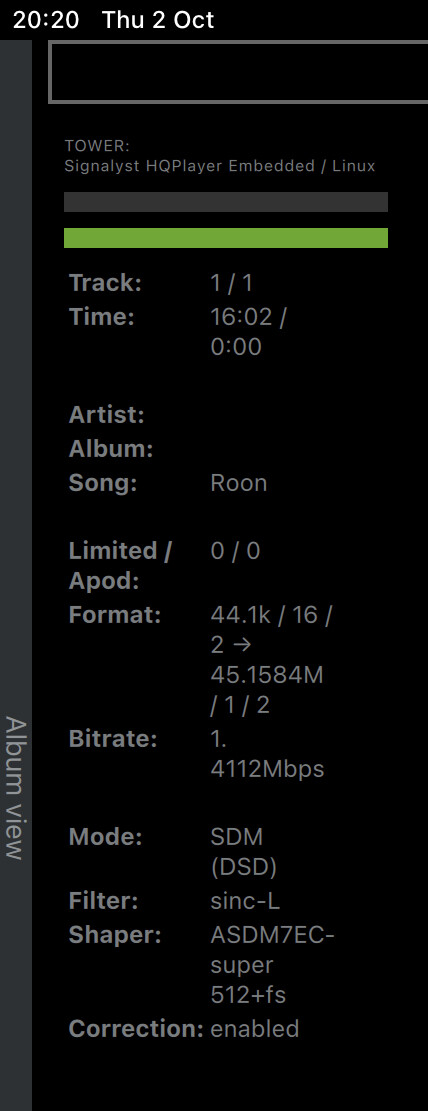
Sinc-L is a memory hungry monstrosity, indeed. My guess - GPU memory may be the bottleneck. I run Embedded on Ubuntu, just checked - the kernel is 6.8.0-83-generic, this is fine since I use NAA. Look at Sinc-L stats:
This is for 44/16 source into 1024 with 7EC-Super +512 and DAC Correction, it plays well no problem (with this filter and modulator it hicks up with 48/24 source)
sinc-L on CPU will most likely first hit memory bandwidth limits, before actual processing capacity limits. It needs to access a huge amount of memory very frequently. GPU’s generally have much better memory bandwidth. And few thousand processing units, although it is not directly comparable to CPUs.
Not really, im just benchmarking, for building the ultimate consumer grade HQPlayer Box. I am aware, that there are out there evil Threadrippers and latest Xeons that run high Ghz with tons of cores that can do any modulator/filter combination, lots of channels included(because of the memory, that runs alot more then two channels), but im not ready yet, to invest that amount.
Honestly, my setup is not suited very well for audiophile style evaluation of the sound. I may not hear the difference between similar filters. While i have stashed away some expensive active(DSP) speakers, and replaced those with passive ones + class H power amp(at 1/25 of the cost), still my aim is professional sound delivery. Yeah, sound improved alot, without double ADC/DAC, but still, i am not using silk dome tweeters and Acoustic Elegance grade transducers. I’m a real fan of the compression drivers and high SPL midrange with insane subwoofer support, cops are my frequent guest LOL. The the goal of this entire quest, is to build best possible sound for a nigh/disco club, and not for chilling at home listening low decibels.
Thanks for the tip, Jussi. Tomorrow im going to receive new modules and do some more testing. But for now, i can say that even E-cores on 14900KS can do DSD1024… so its more like a 24core CPU rather that 8+16… it can probably do 16xDSD1024 with offloading.
Indeed, with proper cooling they deliver tops. To bad they don’t manufacture 5080 with 24/32 GDDR7
Btw, replacing DRAM will alter hardware fingerprint ?
That’s interesting. I tried Asahi Fedora on a MM M1 and HQPlayerEmbedded ran fine. But not any faster than MacOS that I saw. Obviously adding an eGPU would be a game changer.
Unfortunately, the Asahi project seems dead in the water. Aside from TB4, they can’t the boot loader to work reliably on M3/M4. “According to AsahiLinux devs, nobody is working on M3/M4 support at the moment”. And the best brains on the project have left …
I would like to build a machine that can play DSD1024 - Sinc-L - ASDM7EC-Super without any problems. I currently have a 9950X3D processor and 64GB DDR5 6400Mhz memory. Unfortunately, the music drops out every few seconds. The GPU is a 5070TI 16GB. The system memory usage is about 91% (HQPlayer - 46GB usage). With DSD512 settings, it runs smoothly and HQPlayer uses about 20GB of system memory, and the system memory usage is about 47%. Maybe it’s because of the GPU video memory? I notice that 16GB is not enough.. Dac: Holo Audio Cyan 2
But why sinc-L? Do you really absolutely need that one? And at DSD1024? RTX 5090 gives you plenty of RAM. Nvidia RTX PRO series provides larger RAM amounts and relatively lower TDP. If music starts playing, either there is enough GPU RAM, or the offload is not active. Is it working?
With Cyan 2 you get better technical audio band performance at lower rates. Or with AHM7EC8B at DSD1024, which is notably lighter to process.



 does HQPlayer support multiple CUDA cards for offload ?