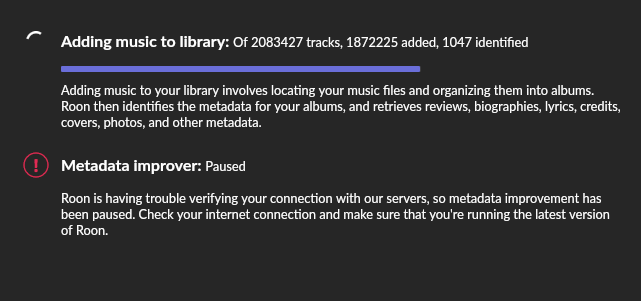
I am still scanning my library of “acquired” music - its getting near finished but it has really slowed down.
Its now running on an 9th gen i5 with 128g of ram, and roon appliance sits at 90-100 gigs in use at all times, even when it was only part way thru the scanning process it was getting up there and just levelling off with the odd drop or increase in it.
One weird thing is that it says this, so I think its not doing a complete scan of tracks.
Twice now when I have restarted the computer or there was a power outage it has died and I had to restore a backup. It has needed me to go back several days to get it to work and on some restores it would come up with no tracks, no audio devices and refuse to do anything if I chose the option to rescan the folders.
My storage is all on windows storage spaces on 2 other computers, and it is slooooow which is probably why this is taking so long.
So if you are prepared to put 128g into a machine (which is not really viable at the moment and I went with upgrading my 8th gen machine to a newer CPU and DDR4 because of the stupid pricing at the moment) then it seems to mostly work.
Current concern is that my user profile folder is now hitting 300ish gigs as are the backups that it makes.
For such a large library I would strongly recommend a dedicated Linux based server. I have a library with 1.15 million tracks which is running on an UnRaid server. Prior to setting up the server about a year ago I was using a very overbuilt Windows 10 computer as my Roon Core and the problems trying to get Roon to run reliably were constant and endless. These issues are now a thing of the past and Roon runs smoothly most of the time. Whenever Roon begins to slow down and become sluggish I just restart Roon and everything runs smoothly and quickly again. I tend to restart Roon a few times each month.
Given how many years Roon has been around, there’s surprisingly limited guidance regarding proper sizing for a Roon Server. Though most users have nowhere near the size of libraries being discussed here, there should be a set of specific pointers, based on DSP usage, number of active zones, library size, etc. Early on, memory was a key to improving performance, and faster and more capable client side devices also helped with overall response, while local storage versus network storage seemed consequenctial. But like audio systems in general, it’s a chain. Weakest link will often prove crucial. I happen to use NAS with 4 drives but I’m unclear on how it actually manages all the files, if at all. Back in the day (I worked on mainframe beasts) reorganization of files often required backup and restore utilities to rebalance things, especially before we eventually got to “virtual” operating systems. Without having some better insights into how Roon actually performs its work, we are faced, like the blind approaching and trying to explain the elephant to one another, a bit of shoot in the dark experimentation. It’s one thing when everything is contained in a single box. But it can quickly go haywire one it’s split across devices and across networks, Ethernet or WiFi!
This error is caused by not connecting to Roon Cloud, if you had a power outage your NUC and hence Roon will start much quicker than your network so when Roon needs to connect at startup it can’t
Just restart the server software in the Web Admin page and it will fix it
after an outage , wait until your router is showing the internet light steady before restarting the Roon PC (we used to get 3 outages per day at one stage)
I wanted to move my core and library to a M1 Mac mini from my 2012 Mac mini, but unfortunately couldn’t get it to work because of the bug between the Roon Server software and the newest OS from Apple.
How long will it take Roon to fix it ?
Which bug? There is the need to reaffirm local network access for Roon after updates with macOS Sequoia and Tahoe, but this shouldn’t prevent it working in general.
Nothing about it (other than what I mentioned) is well known here on the forum (nor did you open a support topic for it), so maybe post a link or explain what you mean.
Edit: I googled and found nothing other than the local network access reaffirmation issue
Two weeks ago, I transferred from MacBook Pro 2021 with M1 chip running latest OS to MacBook ProMax 17 with M4 chip running the same OS and I’ve noted the performance improvement in this thread