Roon Extension: Discord Presence

nope, i went to sleep after that and it was still showing when i woke up

Hi!

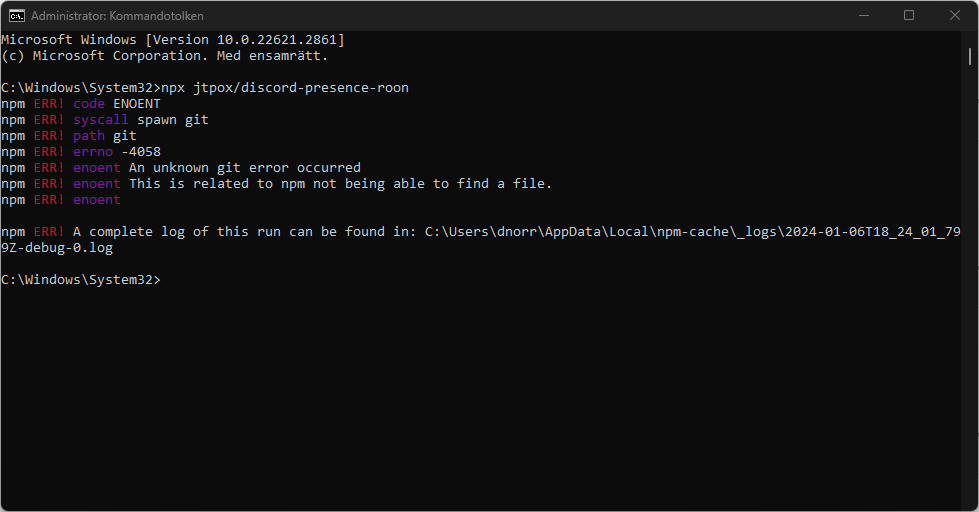
I’m trying to get this to work but it just won’t.
When trying to run the script I get this and I have no idea how to move further.
Can someone help?
Thank you so much!

It was a difficult install as Ive never done anything like this but after a few fresh starts I got it to work. Now, time for me to make a script to easily start the service :slight_smile:

@jtPox currently I made a .bat script to start the service & left it on my desktop but I had a couple of questions.

I put @echo off in the file however the command prompt still opens when the service is running.

Is there a way to hide the command prompt? also the service randomly stops sometimes. Is there a way to keep it persistent if Roon & discord are both open?

Would really appreciate some guidance as this is outside of my mechanical engineering background XD

Thanks for writing this! Works super well. In order to properly background it on MacOS, I had to run it through both nohup and disown to fully detach the SIGKILL signal, but after that, it works great.

For those that may benefit, the full command is:

nohup npx jtpox/discord-presence-roon 0<&- &>/dev/null & disown
1 Like

Also, to avoid typing in the full command when running the extension, it’s prudent to set a shell alias.

Depending on your MacOS version, it could either be a file at ~/.profile or ~/.zshrc. Adding:

alias discord-roon="nohup npx jtpox/discord-presence-roon 0<&- &>/dev/null & disown"

to the end of the file will create an alias from discord-roon into the above command. That way, instead of having to type the whole thing, you just type discord-roon.

Of course, you can set the alias to whatever you want it to be.

I’ve been trying to turn this into a Docker container to no avail. Unfortunately, Discord has locked its websocket RPC api and named pipes to the Discord client doesn’t seem to be working if you mount it in the container.

If anyone have any idea to go about doing it, feel free to let me know!

If I need always presence on discord, do I need running cmd- node .?

And when roon switch tracks, update time very slow

Nice thank you :+1:

I had to modify the timestamp section as it would crash when listening to radio.

Would love if I could use this via roon extension manager or as something on roextend!

1 Like

I actually started building my own upgraded version.

Real-time Discord Rich Presence for Roon + HQPlayer:

• signal path

• PCM/DSD mode

• sample rate

• timers

• soon: album art via Roon API

Still cooking, but it’s already working in my truck while driving :eyes:

Any chance for a simpler / more durable install? I worry that if I set it up on my Linux box it won’t survive any sort of reset. An extension or docker image would solve this

Funny you mention that — durability/easy install is already on my roadmap.

Current focus is stability + album art, but long term I want:

• survives reboots

• background startup

• much simpler install

• possibly Docker / easier Linux deployment

Goal is definitely “set it and forget it” instead of babysitting scripts

Looking forward to that! I’ll definitely test once that’s ready

1 Like

Would this work if I run the CLI on my nas, but discord on my laptop?

No — the CLI has to run on the same device as Discord Desktop, since Discord Rich Presence uses local IPC.

However, your Roon Core can still run on the NAS. As long as your laptop and NAS are on the same network, the Roon Core should discover the extension normally.

So the setup would be:

NAS = Roon Core

Laptop/Desktop = Discord + RoonPresence CLI

1 Like