This looks very promising. I can see it being used on TVs too as there’s no native app.
Thank you!
@nihil loving the queue stuff. This keeps getting better and better. Love to see it in the mobile version.
Ah but in my case the screen is completely empty. Seems like this doesn’t work with Roon 1.8.
If they changed the API in 2.0 then hardly surprising your running a version no longer developed for.
I think @s73nm and @ger_tielemans were referencing the change made on roon side: they’ve removed the requirement for an active internet connection for a roon server (the new name of core) to run, hence, from their point of view, the last reason not to update to 2.0.
Regarding your problem with this app, and just to satisfy my curiosity (and also validate my hypothesis), what are the extension logs in debug?
The other reasons are that with 2.0 the hardware os requirements also changed, and ARC isn’t something some want. I don’t think internet side is/was the main blocker for most. Also 1.8 was more reliable overall. 2.0 has been a bit of rollercoaster in regards to bugs.
1 Like
There are three log files in the archive in debug mode: roon-extension-manager, roon-extension-snapshots, roon-web-stack. The roon-web-stack looks exactly the same as with the previous version:
2024-03-23T14:23:47.118034000Z {"level":"INFO","time":"2024-03-23T14:23:47.112Z","hostname":"DietPi","msg":"Server listening at http://0.0.0.0:3000"}
2024-03-23T14:23:47.118201000Z {"level":"DEBUG","time":"2024-03-23T14:23:47.112Z","hostname":"DietPi","msg":"roon-web-api is ready"}
2024-03-23T14:23:47.124219000Z {"level":"INFO","time":"2024-03-23T14:23:47.113Z","hostname":"DietPi","msg":"starting discovery, don't forget to enable the extension in roon settings if needed."}
2024-03-23T14:23:47.161733000Z {"level":"INFO","time":"2024-03-23T14:23:47.161Z","hostname":"DietPi","msg":"extension version: 0.0.5, paired roon server: <redacted>"}
Let me know if you want any further info.
Well, it’s kind of surprising, as it seems that the http requests are not even sent, which is in contradiction with my hypothesis.
Next step would be to check what’s printed in your browser console
Completely empty as before (screenshot shared earlier)
I’ll take a look at GitHub to see which Roon APIs are called to find out where the flow is being broken.
I’m not convinced though that this is due to Roon 1.8 because the roon web controller is working perfectly which is also using the same API if I’m not mistaken.
Thanks for your interest in any case.
Well, something is definitely wrong with your install.
It’s like your not calling the app at all from your browser: in debug mode there should be logs for the index.html and the javascript files served from the backend in the extension log (and debug node is activated as there’s a debug msg).
What’s the address you’re calling in the browser?
Is there any firewall, or other network complexity that could block the call?
Can you share a full capture of your browser dev tools on the network tab, with the console open at the bottom and the first request highlighted?
100% sure that somethings wrong in my setup.
This is what the network tab is looking like with the first request highlighted:
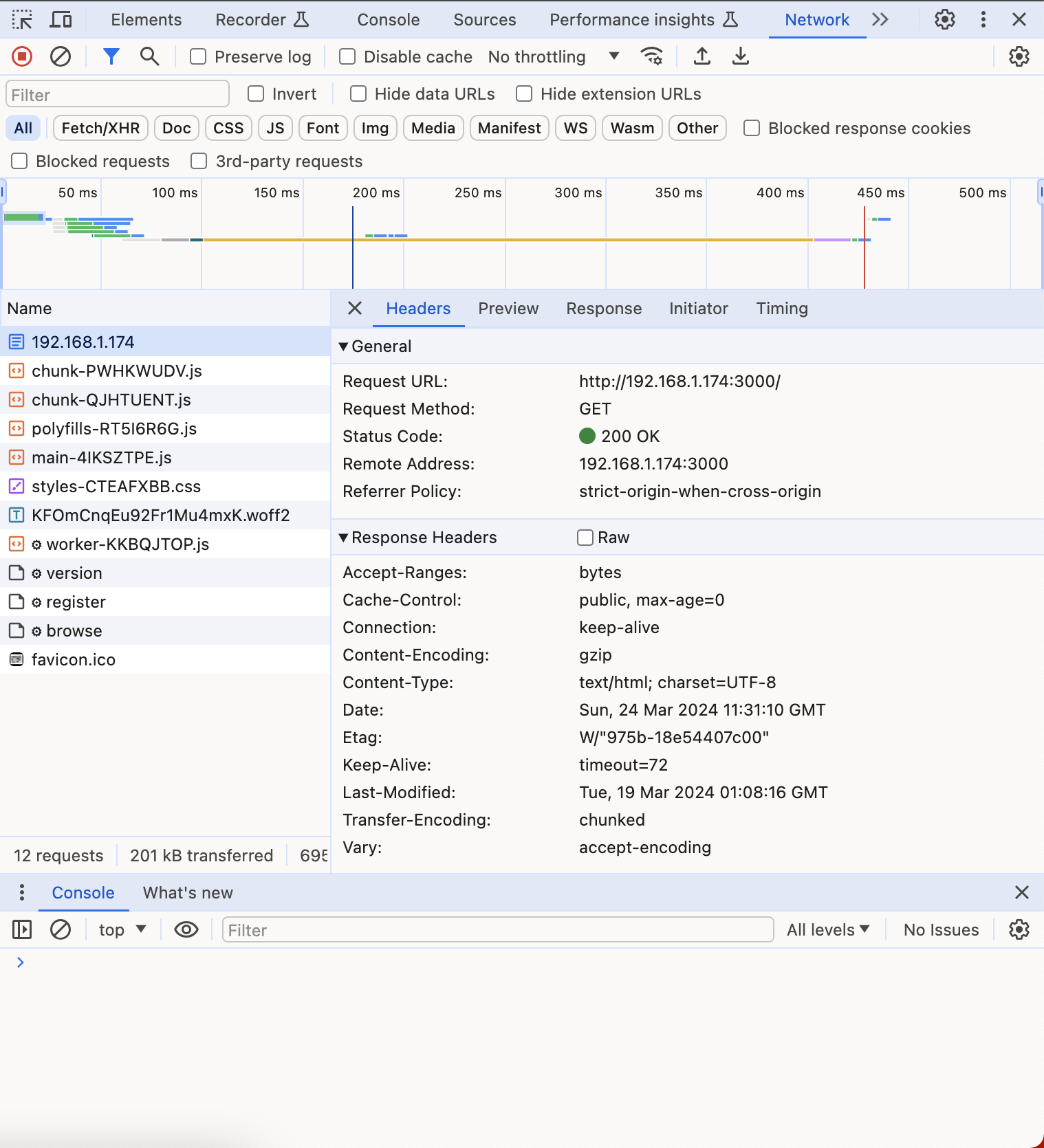
I’m calling http://<ip address>:3000 from the browser
Interesting to see that /api/* endpoints are giving 404:
{
  "message": "Route GET:/api/register not found",
  "error": "Not Found",
  "statusCode": 404
}
Although the /chunk-*, /polyfills-*, /main-* js files are getting readily fetched by the browser from the same IP, when I right click on the corresponding request and click Open in new tab. This also rules out any firewall or related network issue. There’s no firewall anywhere in my flat class C home network.
The call seems to be pending at the browse request and I’m getting a 404 if I try to open this request in a new tab, like the other /api/* requests as explained above:

Ok, so this does not match the extension log you’ve shared… but makes way more sens!
{
“message”: “Route GET:/api/register not found”,
“error”: “Not Found”,
“statusCode”: 404
}
is nornal, this is a POST endpoint and it returns the expected response or the browse call won’t happen. Same thing for browse, this is a POST endpoint, so it’s normal to get a 404 if you try to open it as a ressource (by double-clicking it).
You can actually see the http method (or verb) for each request if you expand the frame under the request URL.
Can you share the logs from the extension coreponding to this attempt?
There should be way more traces (at least 2 by requests you see on the screen).
But sadly, this seems to lead to the way your core in 1.8 handles the call coming from roon node API (built form the last sources available).
The only thing that could lead to this behaviour is an extension that was enabled and is not, at least, it’s the only way I can reproduce it on my side.
This is from the browser, when I hit the /api endpoint url and not from the extension log.
{
“message”: “Route GET:/api/register not found”,
“error”: “Not Found”,
“statusCode”: 404
}
Please let me know which logs you exactly mean by extension logs? I’ve shared all collected logs from the extension above. The roon server log shared as well for this request, which has only that weird System.NullReferenceException error.
I guess it would be useful to know why the browse call is pending as can be seen in the Chrome network tab…
I know, and I’ve already explained to you why you can’t open /api/register form the browser: it’s a POST endpoint, not a GET endpoint (what a browser does when you access stuff directly via the address bar), so it’a normal to have a 404: there’s no GET /api/register, just a POST /api/register.
Nothing fancy, just basic http and REST concepts, I hope it makes sense.
The log you’ve shared from the extension is not complete, or it has been extracted before the attempt to open the app in your browser which you’ve shared your dev tools screen capture: when the extension runs in debug, there’s 2 log msg for each http request received by the extension: 1 at the beginning of the request processing, another on at the end.
So there should be two log msg for each resource (index.html, each *.js, styles.css, etc.) but also for each api call (so 2 for GET /api/version, 2 for POST /api/register and at least one for POST /api/${client_id}/browse).
It should confirm that this request hangs, and maybe provide a trace message with the roon error.
{"level":"INFO","time":"2024-03-24T16:30:24.651Z","hostname":"client-host","reqId":"req-i","req":{"method":"GET","url":"/api/version","hostname":"server-host","remoteAddress":"::1","remotePort":60078},"msg":"incoming request"}
{"level":"INFO","time":"2024-03-24T16:30:24.651Z","hostname":"client-host","reqId":"req-i","res":{"statusCode":204},"responseTime":0.2581669995561242,"msg":"request completed"}
{"level":"INFO","time":"2024-03-24T16:30:24.653Z","hostname":"client-host","reqId":"req-j","req":{"method":"POST","url":"/api/register","hostname":"server-host","remoteAddress":"::1","remotePort":60079},"msg":"incoming request"}
{"level":"INFO","time":"2024-03-24T16:30:24.653Z","hostname":"client-host","reqId":"req-j","res":{"statusCode":201},"responseTime":0.20825000014156103,"msg":"request completed"}
{"level":"INFO","time":"2024-03-24T16:30:24.656Z","hostname":"client-host","reqId":"req-k","req":{"method":"POST","url":"/api/ynwbaoPP8WBF2VdMcpat2/browse","hostname":"server-host","remoteAddress":"::1","remotePort":60080},"msg":"incoming request"}
This an exemple of the extension log that matches the api calls sequence at the app startup.
In this exemple, I’ve the browse request that hangs, because I’ve disabled the extension in roon while this instance was running.
This is the only way I know to reproduce the behaviour you’re experiencing  .
.
As resources (index.html, *.js, etc.) are served with cache headers, they can be missing (the browser loads them from its cache), and it’s normal.
Regarding the fact that the browse request hangs, and because you still can find occurrences of this System.NullReferenceException error in your core logs, my guess, from the beginning, is that something has changed in the protocol of roon node API between 1.8 and 2.0. I’ve already shared with you the commits where these changes happened. This could make latests releases of the roon node API incompatible with 1.8.
Once again, you’re the only user having this issue, and, as far as I know, the only user on 1.8.
You seem to disagree, and I’m ok with that. Have fun troubleshooting your issue .
Nice work! installation was very easy and User Interface is definitively promising. However I noticed it does not work on an old iPhone running iOS15; screen remains black, while it works on my other devices. I guess it’s a browser compatibility issue… Any idea about the minimum version requirement ? anything which would improve compatibility would sure be welcome!
1 Like
Hi @Sylvain_CHAFER, thanks for the feedback!
Regarding the support of iOS 15, sadly, for now, this project rely on what’s offered by default by Angular, which, for iOS, supports only the last two major versions.
I could have a try via browserlist, but it might or might not work, and it will impact every user as the generated bundle will be bigger. Another problem is that I don’t have an iPhone 7 or less to test. So adding a bunch of polyfill to the bundle for a result I can’t test is not ideal from my point of view.
I’m on pause for the coming week (despite having discover a race condition when trying to reproduce a user problem this morning… found the fix, but I’ve to focus on other things, at least for the coming week). And as you can see, I’ve other stuffs on my TODO list when I’ll be back to code (as an upcoming refactor to bring play queue to mobile while setting up the scene for more flexible layouts, on top of a bunch of bug I’d like to fix asap).
On a more general perspective, I’ve mixed feelings regarding the support of no more maintained plateforms. I know, it’s a pity for iOS, cause every browser is actually the same (at least every browser use the same rendering and Javascript engines provided by Apple), so it means that support will drop for devices as Apple stop to support them… but I’m not making the rules and it can become an endless battle I can’t fight on my own. Nothing guarantee that a workaround working today will continue to work with next Angular version, and I want this project to follow the release train of the framework it’s written with.
I hope you understand why I might not put efforts on this, despite I’m not proud of theses limitations and would love to make this app useable on as much devices as possible.
Hello,
I understand your perspective and the technical constraints you mentioned.
Your comment made me think though, as I got interested in web based Roon UIs primarily because they offer a way to control Roon from (older) devices, not supported by the native app.
This was actually my primary driver for installing the one I’m using today on this old iPhone (i.e. the ‘Web Controller’ extension, which works reasonably well).
If your extension is out of the picture for technical reasons on these older devices, I guess I’ll have to stick to what I’m using today.
Meanwhile, I’m wondering what feature would convince me to abandon Roon’s native app for any other device on which it can run.
Hopefully your future developments will bring answers to this question 
I’m looking forward to your next updates!
Hey everyone, v0.0.6 is out!
You can find it on docker hub or via the update functionality of the roon-extension-manager.
It’s mainly a maintenance version with only fixes:
- The images with very long
iamge_keyare not missing anymore! (this should fix the cases for most of radio images!) - There was a rare race condition that could happen at
applaunch, it shouldn’t happen anymore - There was an issue with the display of the informative message if the app doesn’t successfully loads, it’s now fixed
- In a very experimental way, more browsers support has been added. This has not been widely tested, but
iOS 12is broken (personally tested), whereasiOS 15andiPadOS 15seem to be fully functional (not personally tested, but tested still).
Happy update, and happy music listening!
(for reason I don’t understand, I can’t change the first post or the title of this thread to reflect this change )
4 Likes
You can give a shot to v0.0.6 that’s just out.
It’s bringing wider browser support (but without guarantee, as explained before). One of my relative have confirmed to me that this version was working with iOS 15.
Regarding the motivation for the usage if this app, it’s a well known discussion around here, as it already was in the roon web controller thread.
I mainly use it with a raspberry pi connected to a touch screen in kiosk mode.
It’s also faster to load this app on my phone than launching the roon app, so anything I can do in this app, I tend to do in this app.
Some are using it to display roon on their TVs…
1 Like
I changed the title for you.
Very little effort for me, for all the good work you are doing 
No idea why you can’t do it though 
(Edit it might lock after a certain number of post’s and only people of a certain level can rename them)
2 Likes