Technically making such is not a problem. Then next question is how much processing power it should have. That’s not so straightforward, because HQPlayer can scale to various different scenarios. From very simple and light things to very complex and heavy ones. So from that perspective much more flexible and scaleable than M Scaler.
But another way to look at it is that there are various NAA output devices on the market. But no NAA input device products. The UP devices and RPi4 discussed here are the closest ones, and actually rather easy to take into use.
OK, another attempt to fix the package such way that it is easy to get going. Can you please try again with the new attempt? Please also reboot after installing the package.
Since I have only one UP-Board available where to test and it is not “clean install”, but instead has been development platform, it is not easy to ensure it works also on a pristine system.
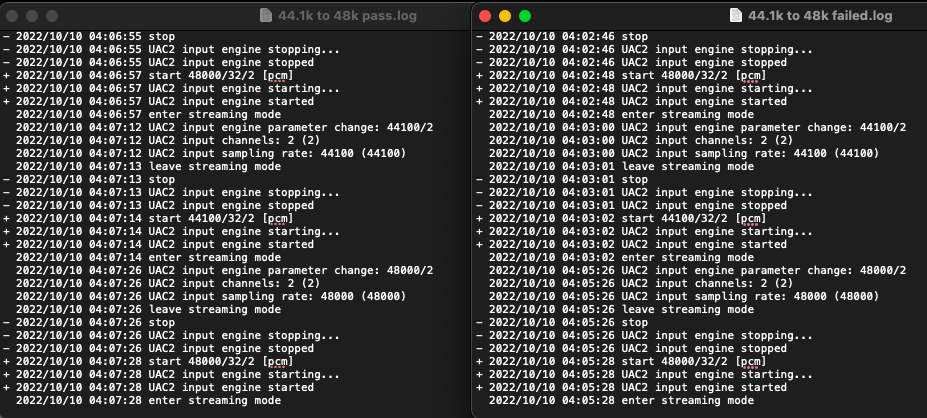
Here is networkaudiod log. Left is 44.1k to 48k pass (no issue) and right is 44.1k to 48k fail (static). So unfortunately nothing in the naa logs to show issue.
I was using HQPlayer with my test playlist from Windows 10, since I didn’t have any other exclusive mode playback software installed. At the other end HQPlayer Desktop on Ubuntu playing to DSD512 output.
I found one issue on NAA backend when you ask it to start for example at 44100 and source is initially at 96000, then it ends up playing at wrong speed. It should work setting sampling rate to 0. But it doesn’t now, I’m fixing this.
I’ve now managed to go through your playlist without issues. I’ve uploaded networkaudiod 4.3.0 that contains fair amount of changes. I have also made changes to NAA backend on HQPlayer, so you may need to wait for next release. But you can already try with the new networkaudiod if it works. Primarily I wanted to get it working with “audio:default/0” URI which didn’t work without changes to HQPlayer.
I’ve tested with HQPlayer Desktop, just selected the NAA UAC2 as input device. This is the resulting line from settings.xml:
Audio transport: rate=0 channels=2 format=pcm buffer=0 (normal)
NAA input requested rate 0 not available using 768000 instead
NAA input set sampling rate: 768000 (768000)
But the auto rate changing actually works fine - so that’s good.
I think I was the one that discovered you have to set sample rate to 44100 in Embedded (matching how it works with Desktop) so this is a milestone !
However I still get the static.
When the static issue comes, for the first brief moment (maybe under half a second) I hear the track playing perfectly fine and then the volume goes really quiet + then I hear the track playing quietly with the FM radio type static
But the interesting part is it briefly plays fine which makes me think the track is feeding correctly into hqplayer.
But if you can’t reproduce it then there’s nothing else that can be done until we wait for someone else to try
@Chunhao_Lee reproduced my issue previously so maybe he can retry later if he has spare time or someone else can.
Maybe your development system has something different to mine (like how networkaudiod was failing to work for me for a few builds but was working fine for you). So we need someone else to try.
I don’t get static, but just garbled output with quiet music. Easiest way to reproduce with Qobuz player was to switch output devices while playback was proceeding. For some reason the problem appeared more if I started Qobuz playback with output going to some other device and then on the fly switched to HQPlayer. While if I start HQPlayer input by hitting play in Qobuz application it didn’t happen. I found out this accidentally, because restarting NAA makes the USB device disappear and Qobuz automatically switches to some other output device. And then I just switched back when I got NAA restarted.
But now with some changes things work. But please try again with next HQPlayer release. As I made some changes to the NAA backend as well.
I used fixed 44.1x512 output rate, since the E30 I used for testing doesn’t work correctly with 48x512. Also less unnecessary stop-start hassle for the DAC and thus faster rate switches.
This is also something I fixed on HQPlayer and NAA.