Cost has nothing to do with nor does it make it better. Unless you have an internal network capable of above 10gb Cat7 or 8 or just not needed and they won’t make a bit of difference to file size. At home you don’t need the shielding these cables have it can bring more issues than it solves with ground loops. They are designed for industrial use where there is lots of rf and machinery that can affect the signals. In a home environment this is just not necessary and if you have not properly grounded your equipment lead to issues.
OK, calm down. Try and resist the flow, LOL. I can see why many don’t bother to respond here after years.
I’ll join them!
It’s a good thing that incorrect things get corrected
That would make me sad if you took this as “please don’t respond”!
It is true that all components of a network (cables, switches, NICs, etc) need to be capable of a certain protocol to actually get the benefits (speed, error handling, etc). It’s also true that shielding can be nasty to deal with if you don’t have an actual office infrastructure (eg, dropped ceilings, underfloor conduits, etc) which my home definitely doesn’t have.
But also, we should be welcoming and accept that everyone has a different starting place. One weird thing about this community is that there are a lot of specialists about who have deep knowledge in certain arenas. The interaction effects between those who know a lot and other folks like me who know fairly little (except in a couple tightly defined areas) can be wild to behold.
I hope you keep posting!
J
I had my house wired years ago when I started using Roon. Wi-Fi worked most of the time but the occasional dropouts were irritating. Felt sorry for the installers, low roof and not much attic space, and didn’t worry about the cost but it was expensive for 8 drops throughout the house. The installers used CAT 6 for the main runs through the attic from the switch location to the wall jacks. I’ve used a combination of cat 6 - 8 for the jumpers from wall plates to components. It all seems to work fine without me really knowing anything about the differences in the cables.
The one very noticeable difference is the speed test on my laptop, with wi-fi its around 400 down and with Ethernet its over 900.
No, you don’t. There is no such thing as a CAT7 cable with RJ45 connectors you can actually plug into any consumer equipment.
That CAT7 would not make any difference even if you were able to plug it in has already been mentioned, too.
Really?
Are these fake then or is the seller flat out lying?
3x Long Cat7 Ethernet Shielded(STP) 10GB Fast Network Cables (1x 50’, 2x 100’) | eBay
Or here, tons on eBay and Amazon
50 Feet Amazon Basics Braided RJ45 Cat-7 Gigabit Ethernet Patch Internet Cable | eBay
What is Cat7? Similar but not the same
Where Cat7 cables sound great on paper – especially considering when they were originally released – there are some reasons why the standard is not as useful or as viable as comparable cables like Cat6A.
One of the most important reasons is that the Cat7 specification is a proprietary standard developed by a group of companies. It is not an IEEE standard and is not approved by TIA/EIA. Cat7 cables don’t use the traditional RJ-45 Ethernet header (technically known as an 8P8C connector). The GG45 connector that is used instead, is a proprietary connector. It is, however, backward compatible with RJ-45 and could be used interchangeably for the most part, but due to the limited adoption of Cat7 Ethernet cables, the GG45 Connector is hard to come by. Cat7 cables are also compatible with the TERA connector, although that has also seen very little use in the industry. (see below)
Image Credit: Wikipedia
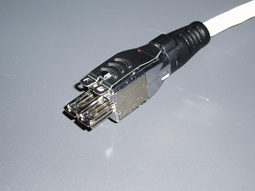

Good information, so technically those listings are incorrect stating the use of RJ45 and should say GG45 although they do and will work with consumer gear.
I bought a set of the flat cat7 myself just because I could and use them from my router to my downstairs switch and out of the switch to server and other Roon Ready gear so I know they flat out work just fine.
Any advantage?
Probably not…lol
You may just as well stick with Cat 6a, which effectively superseded Cat 7 and killed it as a potential standard. In the home, you wouldn’t benefit from the higher bandwidth of Cat 7 anyway, since you’re connecting consumer equipment.
I’m using Cat 5e cabling throughout my home and see no need to replace this. Certainly not for streaming media.
Oh I agree but also see no point in removing it or changing it as it works just fine.
But yes not something I would recommend anyone to buy.
Good. Glad we’ve got that cleared up 
I’ve been streaming for 15 years and my first ever connection didn’t work because I decided to save £5 on a switch and it wasn’t fast enough.
For 9 years I’ve had my main hifi wired fibre optic with CAT6a at the ends. $10 Blue Jeans tested. Frankly the tests aren’t very relevant to home audio because home audio uses so little of the available bandwidth. Galen at Belden tells me many high end ethernet cables fail the standard industry specification test, but they will work perfectly fine.
Having had the opportunity to run new cables, I run parallel fibre and CAT6a to the audio and fibre and CAT8 to where the AV sits. The CAT8 is overkill, but I thought why the hell not. I use Supra for the long runs because the outer cover is the strongest I’ve seen and the conductors are slightly thicker and easy to connect with a crimping tool.
Someone on a forum recommended Ubiquiti, it’s enterprise grade wifi, people here have been using it for years. I have 4 wired access points and it supports dozens of audio units streaming at up to 24/192 PCM. It works faultlessly.
In my music room I have both a cabled 2-channel system and a 6-speaker wireless system. Apparently wifi access points can interfere badly with electronics, so I put my access point in that room about 4m away.
I have a 50m run of the flat cable to an outbuilding. It’s fragile and I would hate to reterminate it. I would never use it again.
Ditto, with RJ45 and flat. Must admit transfer rate didn’t improve over the cat6 but I’m a sucker for updates but by the sound of it may be a downgrade. I very much regret opening this thread 
Wow, my experience was just the opposite. That is a robust wifi signal you have! Good luck!