You were going to try a different PC? Did that work?
ROCK won’t appear in the navigation pane of File Explorer until after you have successfully connected to it. And even then, it will sometimes disappear from the list until you retype the address into the address field. All part of the wonders of Windows networking…
UNC paths from Run-command is fine…
Yep, Mine rarely if ever shows up in the network section. But I got around that by mapping it as a network drive.

I learn something new every day - never used the Run command to open Windows File Explorer before. Doubt that I’ll ever use it again for this purpose 
1 Like
We all find our slightly different paths to accomplish our common tasks! 
1 Like
Yep, got fed up with hacking into my main machine, I went ahead and set up an old spare computer and tried from there, it works fine… So, it must be something to do with corp IT policies on my work-managed notebook.
I thought as much… Best to pick your battles wisely… 
Rock on Intel NUC i5 migrated from Synology NAS
Still an issue with accessing Rock data from Mac OS (both Monterey and Ventura). I can see the IP address\data area but cannot access the USB drive under Storage. I can get to it via Parallels (WIn10 and 11) on either system so I believe the format for the USB drive on the NUC is *FAT not HFS. Using guest and no password.
No obvious issues with Security and Privacy. Roon.app is allowed access to removable volumes in Files and Folders.
Martin Booker
Get its ip address and use that rather than the “rock” moniker:
smb://192.168.1.123/data
Works fine for my Macs? And, connect as Guest.
Hi,
Tried that first (sorry the original post separated ‘IPaddress/data’)
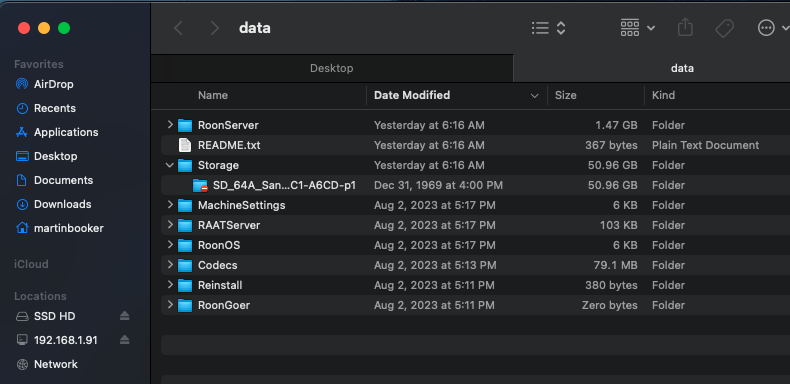
I have been updating my digital music files using the Mac and am looking for a less complex way to get them to the NUC. I suppose I can stop the Roon Server, put the USB into the MAC to move files, then back into the NUC and restart. Just thinking as a former IT guy that doing file services through the network would be easier ;>)
Martin Booker
Are you sure the SD doesn’t have it’s write protection tab set to lock?
And what kind of filesystem does it have? Both FAT, NTFS and exFAT should do?
I found a solution.
Now click Programs and in the new window “Turn Windows features on or off”, find “SMB 1.0/CIFS File sharing support” on the list, expand “Client” should be selected and lower down in the next branch “SMB direct” (if there is no SMB direct, then doesn’t bother me, the client is enough)
The next thing is to enable insecure guest access.
To enable the insecure guest access feature, you can configure the following Group Policy settings:
Win + R and type gpedit.msc then:
Computer Configuration/Administrative Templates/Network/Lanman Workstation
Enable insecure guest logins
3 Likes