Thanks for all the help already provided here. I have a (perhaps fairly basic) question around the recommendation to Match Your Docker Mount Paths to increase the speed of adding files to the Roon library.
Once the Docker is running, how can one check whether the docker mount paths are successfully matched, so the SSD accesses the music folders and files as directly as possible on the NAS, i.e. not by logging into via the router separately?
When running via Docker, you will map your NAS’s local music folder directly into the Roon container (as /mnt/music:/music:ro)Using these local paths provides much better performance than scanning the NAS over the network via SMB.
The reason I’m asking is that adding ~70k FLAC files, ~40k of which are classical music tracks to my roon library, on my NAS (QNAP TS-464, 16 GB RAM, recent SSD, 2 SATA drives with 12 and 20 TB respectively) goes at a speed of roughly 2-3 files per second, which means it’ll take a long time.
Given I’ve already stopped potentially competing apps on the NAS (e.g. QNAP’s media streaming and multimedia console), and turned off Roon’s volume analysis, I have a feeling that the adding of the files should go much more quickly. Another thing: the NAS has been on and functioning all week while I was away, and upon my return home it was still adding files, when I opened the Roon desktop app on the iMac.
The tips given to this thread might also help others, so thought it worth asking to the experts.
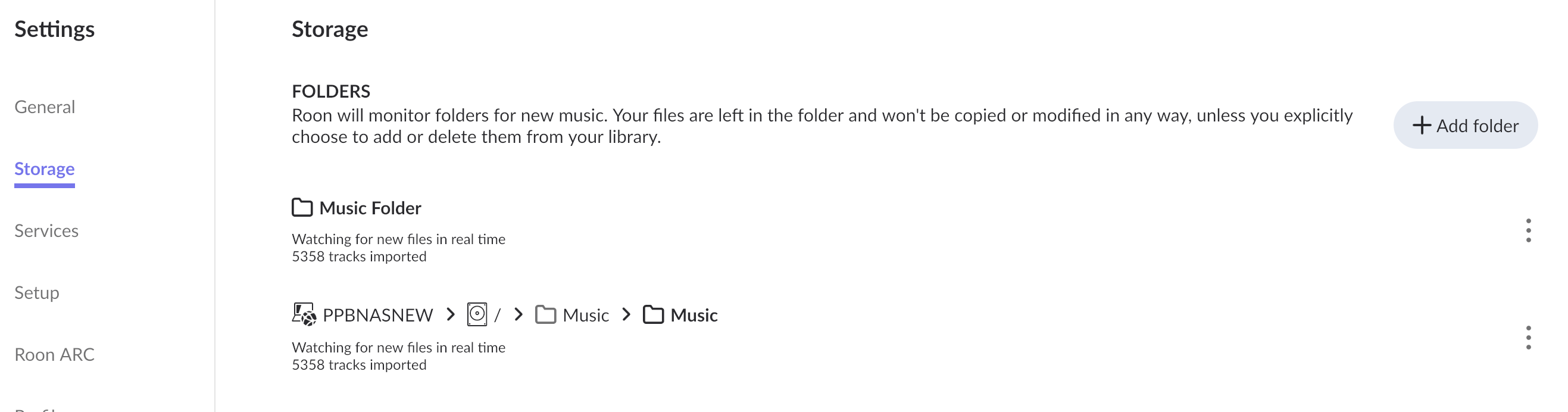
In Settings > Storages, you should see a folder named ´Music Folder´. As far as I understand, that one represents the second path, which inside the container is the :/Music folder structure. If it is enabled and showing no files found inside, the path most likely is wrong.
After restoring a backup and deleting the remnants of pre-docker paths, or SMB share paths in your case, according to my experience, roon usually finds the new path to the known files relatively quickly. My library is similar in size compared to yours (60K tracks, half of which are classical, and lots of huge FLACs) and CPU/QTS are the same, maybe it was 2 or 3 hours to recognize everything? Don´t remember precisely.
You might want to make sure the folder structure with the FLACs does NOT contain a zillion of other files, such as separated metadata files, pictures or deleted files (which tend to hide in the @Recycle subfolder, but through the container path, they are fully visible).
If you need assistance in creating a valid second share path for the docker container, feel free to share a screenshot of your top-level folder structure on all volumes containing music files.
RE Deleting the remnants of pre-docker paths, how would i do this?
To your point on other files than FLAC, I’ve already removed (most) of those, and some of them I’d like to keep, but good point for checking.
Re valid second share path, see screenshot below.
It’d still be helpful to know how I can check the actual code in the Docker, to see whether the Roon server connects directly “inside” the NAS to the SATA Drives. Any thoughts?
The idea behind container systems like Docker, under others, is to provide isolation of the containerized app from the host OS. So from inside the Docker you see the defined mount points, but you don’t know where they point at and if that makes sense or not.
Look into your Docker Compose file (Container Station > Applications from the Actions cogwheel choose + Recreate) instead and check your mappings there. But in short, if your files show in Roon then it would seem you got your mapping(s) right.
As the number of identified tracks is identical in /Music folder (via Container share path) and SMB path, we might have a situation in which one and the same track is identified twofold, causing roon to have duplicates, struggling to identify them as ´your´ files, and slowing everything down.
I suggest to disable the second, the SMB parth, and see what happens in the /Music Folder.
You don´t need to delete the pre-docker paths as you seemingly have none. But you might want to check what happens if you keep the Music Folder permantently disabled (which means roon will get file data solely via SMB), or you need to delete the SMB storage path, preferably immediately after restoring a backup, so roon would recognize files in the main /Music Folder as the ones it already knows.
I assume you have defined the second share path for the container as:
/share/MusicSharedFolder/Music:/Music
am I correct? If this folder contains the /RoonOnNAS folder with the previous installation, you might face performance problems simply because you give roon the task to scan all the database files in this one, which together with legacy backups can exceed 100,000 files in number. I would move all folders containing lots of files, away from the music folder the container can see.
You can check the path in Container Station > Containers, clicking on the container name, so you get to Container Details, the last section is Storage.