Choosing a program to manipulate file metadata

I am starting a process of converting my music file library. Here, I am knowingly avoiding describing that process to avoid a separate - and surely more consequential - future conversation, but suffice it to say that my collection has a lot of classical music. To this end, I would like to explore software that allows me to manipulate the metadata in music files. I believe that I will need to do so, beyond the metadata manipulation tools in Roon, to have Roon recognize the organization that I seek. Before I engage in the larger conversation, I’d like to explore on my own, if nothing else than to be able to ask better informed questions later.

There are a plethora of programs to manipulate file metadata (it is overwhelming for someone with a day job!); is there a list somewhere or can you briefly comment on program pros and cons? Or point me to a prior thread. (I use Macs, I’ve not yet decided on what the final lossless format will be.). Or will any work, and I’m being too cautious?

and

2 Likes

Yate is frequently liked on the Mac. A forum search for Yate will find older discussions and references to other programs.

Google will find you a bunch of lists such as

1 Like

For the file format might want to just review this:

edit: And for some light reading (to help you sleep? :smile:):

There are several other KB articles and FAQs on the Roon Help/Knowledge Base website.

Check out SongKong for automating the task. Jthing.net

The link is jthink.net

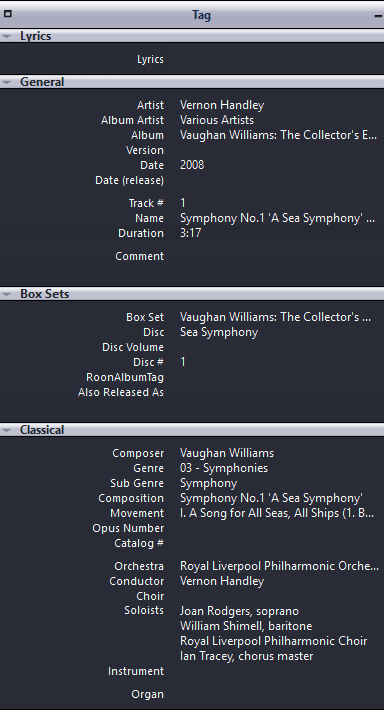
Choose an editor that supports custom tags , tagging classical can be a nightmare as many tags are not standard eg Orchestra, Conductor, Composition, Movement. , Choir etc

Roon is a lousy editor , do it external to Roon

I use JRiver its a good editor despite what naysayers say about it’s old fashioned look.

Before you start decide upfront what format you want the composition to take and STANDARDISE !!

The second key is to split your tags up so use Composition, Movement etc as separate tags rather than a composite name, Roon supports Composition/Work and Movement/Part

Stick to Composer as Beethoven or Ludwig van Beethoven only that is how Roon sees it. No fancy dates etc

Mine are in theis format

Symphony No.4 in F minor Op.36 - I. Andante sostenuto - Moderato con anima - Moderato assai, quasi Andante - Allegro vivo

This is my structure , including box sets

Shout if I can help further, I have been at it just a few years

4 Likes

If it’s tagging your own music files you are concerned with, I can highly recommend MP3Tag. It’s very fast, you can batch edit (for example, convert all “Rachmaninov” tags to “Rachmaninoff” in one go), you can identify albums and import tags from various sources or manually edit tags, including custom tags.

And don’t let the name stop you or throw you off; while it is called “MP3Tag”, it tags all kinds of music formats, including ALAC and FLAC, it’s really an all-round music file tag editor and gives you full control over all your music file tags.

It’s available for Windows and MacOS.

4 Likes

As for someone who has converted his entire CD collection to lossless, I did put a lot of consideration into this, I can recommend the following (and I’m not ideological about it). A few things to consider:

  1. As long as you rip lossless and use a tool that rips “securely” (dBpoweramp, EAC, Foobar2000, etc.) you only ever need to to this once, because the beauty of lossless is, that you can later convert from one to another format.
  2. Of the lossless formats (ALAC, FLAC, AIFF, WAV, APE), basically only two are suitable for large scale music collections: ALAC and FLAC. AIFF and WAV have comparatively poor (AIFF) to virtually no (WAV) Metadata support; these formats have their uses and are important for music editing etc, but not not for music collections. APE is a proprietary codec that nowadays has ecosystem problems and is also not really relevant anymore.

Leaves ALAC and FLAC, and I’ve used and experimented with both of these. They are 98% identical in what they do and how good they do it, and I haven’t encountered a higher end streamer who doesn’t support both, so the differences are minimal. They may have their ideological apologists, but basically: pick the one you like, the one that works best with the tools you want to use and don’t worry about it

FLAC has the advantage of integrated checksum checking to verify integrity of the audio stream, which is nice a nice bonus. ALAC has the advantage of a more strict metadata architecture (based on the ISO Base Media File Format with formally defined MP4 atoms that enforce structured, typed, and hierarchically organized metadata rather than FLAC’s “anything goes” free‑form tags, which can theoretically lead to cross-compatibility problems), so such classic “why is my cover not shown problems” etc. are virtually unheard of in ALAC files.

Both of these advantages are in my experience more “theoretical” and have rarely a real significance “in the wild”. The FLAC checksum verification advantage can easily be compensated (file systems like ZFS do this natively anyway) and the ALAC metadata advantage can be compensated by keeping your own FLAC tags clean and consistent.

However, since you could always convert from one lossless format to another, I would simply start with choosing the format that suits you most right now. If you’re on a MacOS, ALAC seems the logical choice. I have my collection on Windows but nevertheless use ALAC (for legacy reasons) for my lossless/high-res music files. A few years ago I once considered converting it all to FLAC (since I am on Windows anyway), but in the end decided against it, as it wouldn’t have brought me any actual advantage anyway.

3 Likes

I am using AIFF for my ripped album collection, and as far as I know and experience, AIFF has the same metadata support as FLAC.

I made that choice more than 10 years ago and stick with it.

Nevertheless, if I would start today, I would go for FLAC, as it is the most universal format, and you can even choose the compression level if you really want to (level 0 = no compression at all , i.e. file size equals AIFF/WAV)

AIFF has support for almost all tags that FLAC does these days.

I am using AIFF for my ripped album collection, and as far as I know and experience, AIFF has the same metadata support as FLAC.

As I said, I’m totally non-ideological about it. Anyone should use whatever format makes them happy, and if you’ve used AIFF for ten years and everything works for you, there is no reason to change. And AIFF certainly has better metadata support than WAV.

However, nevertheless, compared to ALAC and FLAC, AIFF’s tag support is “poor”. It is poor because it’s basically a “hack”. ALAC, for example, has a very strict and clearly defined way for metadata implementation. The tags are all atom-based and hierarchical, with a set of clearly defined (and therefore universally understood) tags, though within that hierarchy it also allows custom tags.

FLAC has also a very formalized way for metadata implementation. It is less “pre-defined” than ALAC, but nevertheless formalized, and has a standard set of tags that are universally read by various programs. There is clear separation of the Vorbis comments (basically the “tags”), the stream info (technical data such as channels, bit depth, etc.) and the audio data, and the tags are still “machine readable” and cross-platform compatible.

So ALAC and FLAC have a very clear and defined metadata structure. AIFF, on the other hand, does not. Once you have your ALACs/FLACs well tagged, these tags tend to work with any player or system you pick. Not so with AIFF, which has inconsistent handling across tools. AIFF lacks a standardized metadata vocabulary and hence the metadata reliability is modest in direct comparison with FLAC and ALAC. True, in practice, AIFF can store useful descriptive fields, and your experience shows that you can come a long way with AIFF, but since there are no specifications for a rich, unified tag model, these tags are not stable across devices or systems.

I made that choice more than 10 years ago and stick with it.

I had some AIFF’s in my collection, but one day I noticed that (after a database upgrade) my sorting tags were gone. Turns out some tools (including iTunes) don’t store sorting tags within the files in AIFF. That’s when I dug into the differences between tag implementation in AIFF and ALAC, which I thought should be basically the same (hey, it’s both Apple), but it’s not.

Hence just the caveat about metadata: yes, AIFF supports metadata, but structurally, their implementation is less reliable cross-plattform than ALAC or FLAC.

2 Likes

Hi all, these comments are exceedingly helpful to me and I was hoping to get some time to dig in a bit before I respond further. But one thing I have resolved, is that I will go with FLAC format. In part because it does seem very broadly used, in part for the reasons described above, but perhaps driven as much by very local considerations: I am likely to receive one or more collections of music and the one I know most about (and the biggest) is all FLAC files. I’d like to keep one (lossless) format going forward.

I hope to get back on other stuff soon!

Thank you all very much,

Dan

1 Like

What iTunes (/Music app) does here is a bit unusual. Although it stores sort-by (and similar) fields in it’s own database, this is over-ridden by the corresponding metadata field on the file. Ie if a sort-by field is present in the metadata, this will show in iTunes and editing this in iTunes has no effect on the file or in iTunes.
In updating from my edits, I do a two-pass update run from my custom database: Pass1 updates iTunes (via Applescript), Pass 2 updates the metadata through Yate.
As all my files are in AIFF, I cannot tell if this behaviour is file format dependant.

I agree and strongly recommend this software. mp3tag is basically freeware and the developer keeps the software advertising-free for many years now. You’re not only tag and modify metadata for any kind of music formats but also the file names itself however you want with a batch function.

2 Likes

It is file dependent, which is why I’m pointing it out. In ALAC files, iTunes stores sorting tags within the files themselves; in AIFF, it does not. Why? Heck if I know. This only becomes apparent if you move files or change the database. Since cross-plattform compatibility is important for me, I have noticed other inconsistencies with AIFF files as well.

I mention this because the original poster was at the start of his decision process, committed to lossless, but not yet settled on a format. My thought was that is exactly the moment when a clear overview of the trade-offs is most useful.

This isn’t an argument against AIFF. People here have large collections and strong preferences. They may use FLAC, ALAC, AIFF, WAV, and all for various and good reasons, and that’s perfectly fine. No one-size-fits-all approach needed.

Since all lossless formats are sonically 100% bit-for-bit identical, the choice comes down to other factors: software compatibility, streamer and DAC support, tagging architecture, and such things. And as far as tagging is concerned (and the original question was for tagging software, so it seems to be quite relevant), there is a meaningful difference worth stating plainly: FLAC and ALAC have formalized, structured metadata schemas; AIFF does not. That’s simply a fact.

You can tag AIFF files and get along fine within a consistent toolset, but because there’s no formal standard, how different applications implement, read, and interpret those tags varies considerably. The more specialized your tagging needs, the more likely you are to hit inconsistencies.
The OP mentioned classical music and was asking about tagging software, which suggests he may want fields like “work” and “movement.” For that use case, FLAC and ALAC are on solid ground; AIFF less so. That said, I personally know people who maintain large AIFF collections without issues, so of course it can be done. Just with that caveat in mind.

1 Like

@Nick_Zwar is right, AIFF does not have a specific formalised structured metadata schema for AIFF. Instead it utilises a flexible approach to metadata storage and includes various types of metadata within its file format.

However, over on Audiophile Style it was recommended in their ripping strategy as the preferred playback format in the Apple environment but FLAC for archiving/backup.

This is what I have done for the past ten years without any problems and I am very particular about my metadata.

For a simple but good editing software you could try Metadatics. For Ripping dBpoweramp.

Thanks for the clarification

1 Like

I’ve been re-reading the Roon help files on tags etc, and the responses here. All very helpful. I guess my next step should be to dip my toes into a few file editors and compare their output when viewing my files, and changing the tags (in a test directory of files). I see that FLAC editing can be made from the linux command line; interesting but I guess an editor app is a better route.

I’m also thinking about the metadata structure I want to standardize on, still a work in progress. I will return to the comments above! (In this I am highly comforted that I can improve it in the future, with attendant effort to upgrade the library files. It feels a bit foolish, honestly, that I - with the least experience at this - should be specifying or at least extending a metadata format.) To this end, how much should I learn about the internals of the FLAC file format, and how much can I just rely on whatever (hopefully competent) editor that I settle on? If some education is suggested, is there a suggested link? As a start, I’ve poked around xiph.org. I don’t know if there is any practical limit to what I can store in the metadata file header (it will be tiny compared to the audio), need to figure out padding, and if there is any conflict between what is standard under FLAC and what Roon expects. While I want my curated metadata in the files, not in Roon, obviously I’ve made a happy bet with Roon, and want as much compatibility as is possible. The more Roon understands about my files, the better the functionality that I will enjoy.

A bit more. As best as I can tell Roon pays no attention to the directory / subdirectory names in which music files reside? So on my computer I can organize my classical file directories by Last, First names and my non-classical file directories by Artist, and the sub-directories as makes sense to me? Ludvig von Beethoven is not a problem but most classical composers I know by their last name; while Davis, Miles or Corea, Chick or Jagger, Mic is a foreign sound.

I ripped lossless but did not rip securely. That is, I thought I was doing so but: At least, for CDs I used a standard CD drive and relied on iTunes to get it right. Is that something I should revisit, and if so how? Is every CD in my library flawed (quelle horror). But many CDs (the better produced ones) still sound good to my tin ears :slight_smile:. For albums I ripped, I processed with software to eliminate surface noise and a few more details; I am more than happy to call that modest level of audio engineering bit-perfect. (And fun to have my own recording studio - sort of.). When I return to it, I will find that the software I used does not run on modern Macs and will have to revisit the issue after I up my game with a new tone arm, cartridge, and possibly a new audio recording interface.