@mjw, thank you for your continued help, but I think we might be talking past each other. Let me try to clarify my issue again:
Docker Setup: I have two separate folders mounted in the Docker container: /music and /music2. These are mapped to different directories on my host system (/mnt/d/My Music/ and /mnt/d/Molly Music/ respectively). The Docker container correctly shows these as two distinct directories when I list the contents using docker exec roon ls -lat "/". The permissions and ownership are also correct.
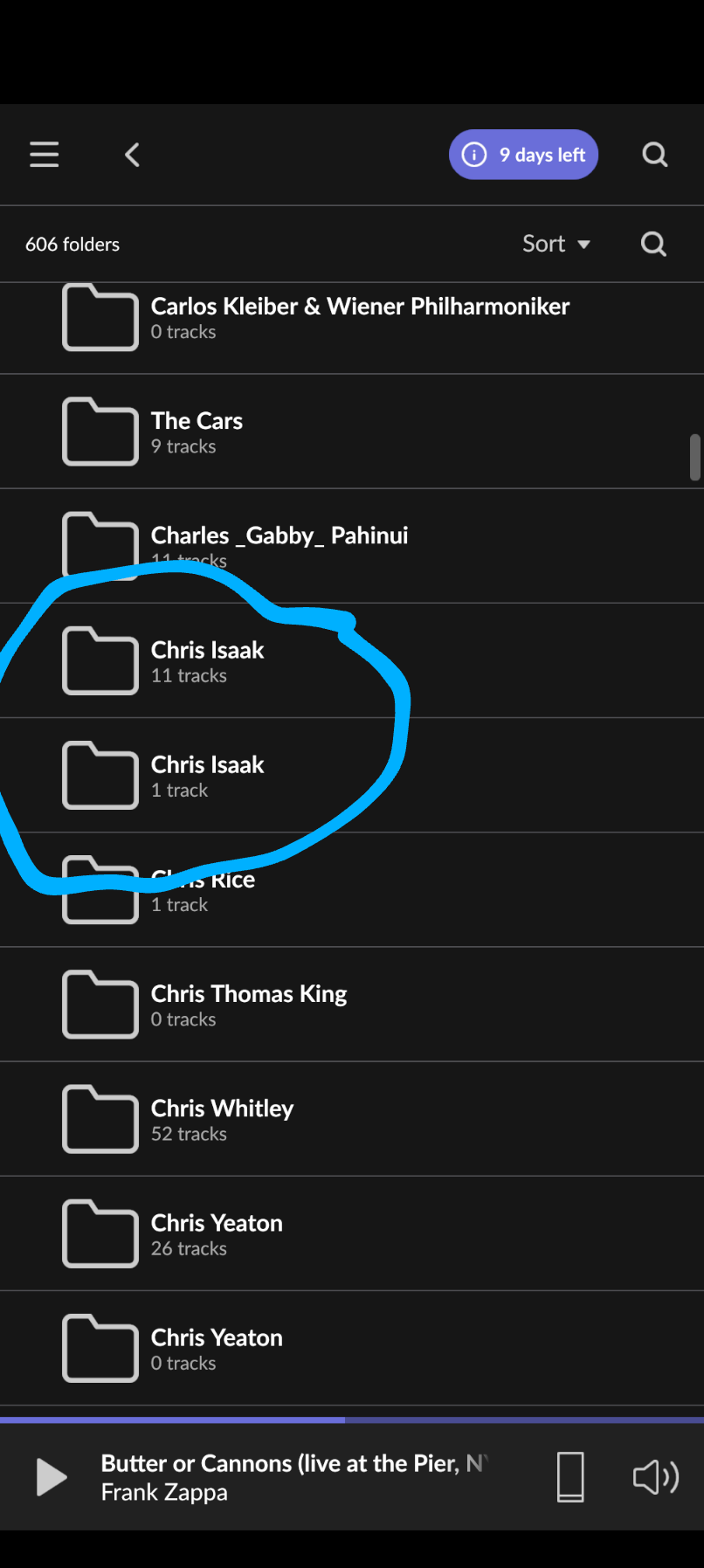
Roon Behavior: In the Roon app, I only see one folder called music, and it appears to be merging the contents of both /music and /music2. For example, if I have an artist like “Chris Isaak” in both /music and /music2, Roon shows two folders for “Chris Isaak” under All folders > music > Chris Isaak, even though one album is actually in /music and the other is in /music2.
Roon Settings: I understand that Roon allows you to add multiple storage locations, but in my case, even though I have two separate mount points (/music and /music2), Roon seems to be treating them as one. This is not the behavior I expected. I expected to see two separate folders (music and music2) in Roon, each with their own contents.
Docker VOLUME Statement: While I appreciate the suggestion to use the VOLUME statement in the Dockerfile, I don’t believe this is the issue. The VOLUME statement in Docker is used to define mount points that can be used for persistent data, but it doesn’t affect how Roon interprets the folder structure. The -v flag in the docker run command is sufficient to mount the directories correctly, and as I’ve shown, the directories are indeed mounted and accessible within the container.
My Question: Why is Roon merging /music and /music2 into a single folder view (music) instead of showing them as two separate folders? Is this expected behavior, or is there a way to configure Roon to treat /music and /music2 as distinct storage locations?
I’m not looking to change the Docker setup (it’s working as intended), but rather to understand why Roon is merging the two folders and if there’s a way to prevent this.
Thanks again for your help!
mjw
(Here I am with a brain the size of a planet and they ask me to pick up a piece of paper. Call that job satisfaction? I don't.)
23
Until you get past this position, where you believe Roon is merging the folders, when you only have one setup in Storage, you will not see this resolved.
So, before we continue, please share an up-to-date screenshot of Roon Settings → Storage.
This is what you posted earlier.
If this is unchanged you won’t get very far, since the mapped folders on the host (/mnt/d/My Music/ and /mnt/d/Molly Music/) are irrelevant because Roon only sees the mounted folder(s) inside the container, i.e. /music and possibly /music2.
I haven’t changed anything, that screenshot is still what the Roon Android app shows.
Until you get past this position, where you believe Roon is merging the folders, when you only have one setup in Storage , you will not see this resolved.
I don’t understand this comment. The reason I came here is to find out why my 2 folders are merged, when Roon only shows one folder in the Storage setting.
I know the two folders are merged because both Chris Isaak albums are visible in Roon. Under the folders view, you can see the two Chris Isaak folders. One is from /music, and the other is from /music2:
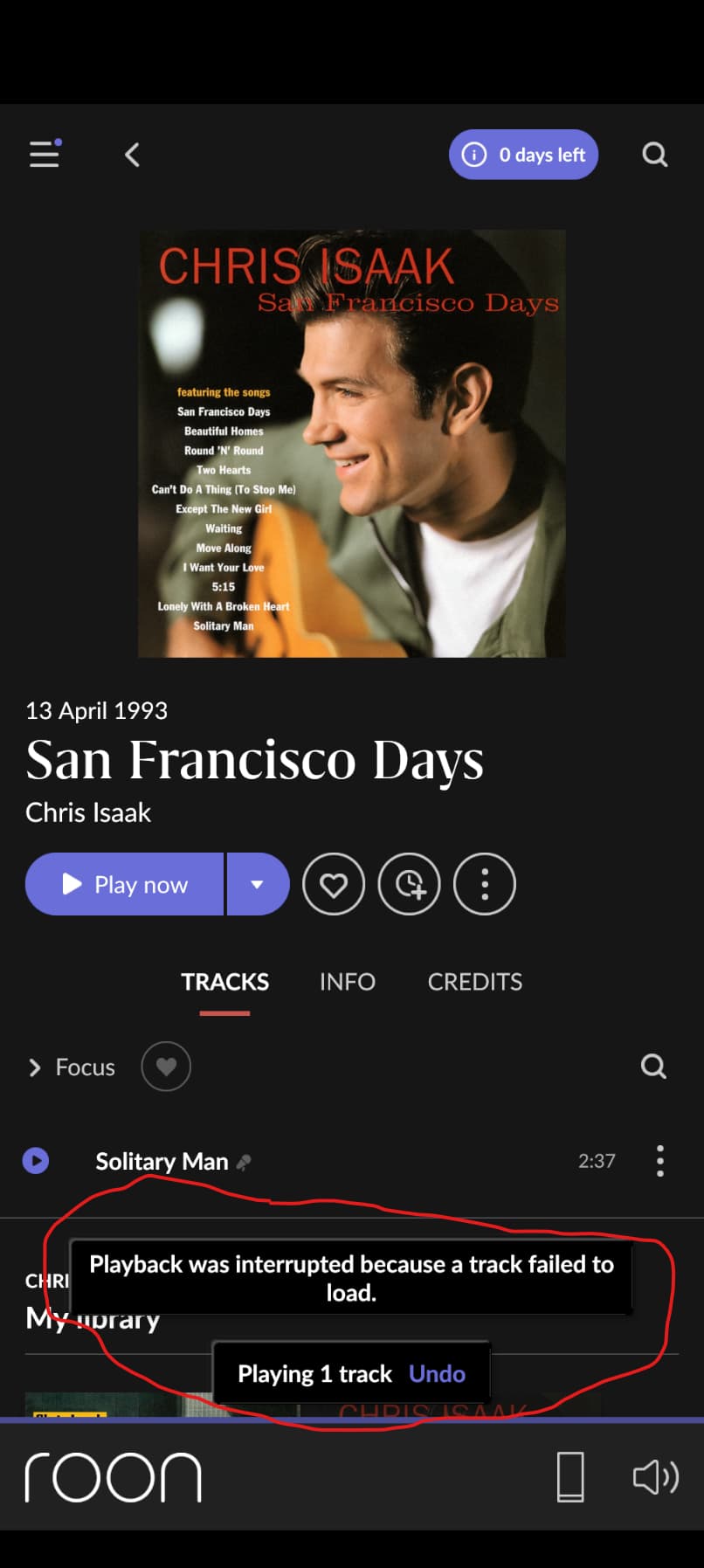
OK here’s something interesting. The tracks in /music2, while they are listed in the Folders view and under Artists, Albums, etc will not play. For instance:
Every Roon Server machine has (many) more folders than needed for Roon and don’t get magically merged. Many users have more than one music library folder – by defining them in Roon and not some magical merge. To be honest, you’re the only case I/we know of with this issue and as far as we can say from experience – it is not Roon’s fault.
Maybe you set up a (hard/soft)link somewhere that merges these two folders? Maybe it is a “feature” of Docker and/or the way you use it? Maybe you need to delete old content from the database (Cogwheel|Library|Library maintenance > Clean up library)? Maybe you can spot irregularities by inspecting the logs?
mjw
(Here I am with a brain the size of a planet and they ask me to pick up a piece of paper. Call that job satisfaction? I don't.)
27
You have been informed by myself and others that Roon isn’t merging the folders. It knows nothing about your /music2 folder.
Therefore, the only conclusion is that (a) your container is the culprit, or (b) you haven’t created the mountpoints on the host correctly.
I believe I’ve shown ample evidence that Roon does know about my /music2 folder. Roon sees all the files in it! I’ve documented this several times above.
What’s interesting is that Roon can’t actually play any of the files it sees in /music2. So Roon knows about them but cannot play them.
Roon doesn’t see any files from music2, only music. That is why Roon can’t play some of those files – they are (no longer?) available in/from music (got moved to music2?). All your pictures from Roon show that Roon only knows about music and it believes that all the files are located in music (Roon does not know about music2, the path music2 is not showing-up in any picture you posted). This is why it can’t play tracks that are (now) located in music2. Did you clean up the library (database) in Roon? Did you check for filesystem links?
There are no hard or soft links. The Docker container is plain vanilla and contains the mount points correctly, with correct permissions. I tried the cleanup to no avail.
When I try and play one of the tracks in /music2, the log shows:
02/07 14:04:22 Error: [Worker (2)] [zoneplayer] Unexpected Failure While Opening Sound: /Chris Isaak/San Francisco Days/12 Solitary Man.m4a: System.Exception: failed to open location '/Chris Isaak/San Francisco Days/12 Solitary Man.m4a': IoFailure
   at Sooloos.Audio.MediaDecoderAudioSignal..ctor(String location, CacheHints cachehints)
   at Sooloos.Broker.Transport.AudioSignalFactory.<>c__DisplayClass0_0.<Create>b__0(CallingThread cx)
02/07 14:04:22 Info: [Worker (2)] [Pixel 9 Pro XL] [zoneplayer]     Open Result (Playing):Result[Status=UnexpectedError]
02/07 14:04:22 Warn: [Worker (2)] [zoneplayer] couldn't play URL /Chris Isaak/San Francisco Days/12 Solitary Man.m4a: other error
02/07 14:04:22 Warn: [Broker:Transport] [zone Pixel 9 Pro XL] Track Stopped Due to Error
02/07 14:04:22 Info: [Broker:Transport] [zone Pixel 9 Pro XL] OnPlayFeedback StoppedEndOfMediaUnnatural
02/07 14:04:22 Debug: [Broker:Transport] [zone Pixel 9 Pro XL] _Advance (Track)
02/07 14:04:22 Trace: [Broker:Transport] [Pixel 9 Pro XL] [LowQuality, 24/44 MP3 => 24/48] [100% buf] [STOPPED @ 0:00]
The files were never moved from /music to /music2.
Its interesting that the folder structure under /music, as displayed in Roon, shows duplicate folders corresponding to where my wife’s and my collections have the same artists. This is not possible in any filesystem that I know of. So why does Roon see it that way?
music and music2 only exist inside your Docker environment. You may have experimented with the setup of your container and changed/swapped the folder mappings. We don’t know. You should know.
We don’t know what you did. The reason for that are very most likely located outside of Roon. This is your issue (alone). No one else is known to have it (running Roon in a supported setup).
NOTE: The folder browser in Roon is not a filesystem browser – it is used to browse stored (in Roon’s database) music by path (as seen and recorded by Roon in its database on initial import [and potentially updated during housekeeping if applicable]).
You still did not answer the simple questions I asked you. Did you check? Did you clean up?
mjw
(Here I am with a brain the size of a planet and they ask me to pick up a piece of paper. Call that job satisfaction? I don't.)
34
No, Roon can only see what’s in /music …
Roon see’s what is in /music, which may, for a currently unknown reason, include the content of /music2. However, that content is presented through /music.
I suggested that you create the volumes in the Dockerfile, but you declined. I pointed out irregularities in run -v syntax, but you haven’t responded. I asked for details of the host mount points, i.e., /mnt/d/My Music and /mnt/d/Molly Music, and you provided no clarification. Your permissions inside the container look incorrect, too.
Try stepping back from the position that Roon is the cause, and execute docker exec roon ls -Flai /music/Chris\ Isaak. What do you see?
You’re right, I missed that, thanks for pointing it out.
I suggest you try a plain install without Docker and see if you can reproduce – if yes, then please open a support ticket.
So I went in and added /music2 as a folder and now it is visible and music will play from it; however the ‘ghost’ folders are still visible under /music.
I wonder if the way I added the folders originally has anything to do with it. I added both folders during initial setup in the Roon app, rather than add one then and another later.
I don’t think that would make any difference.
However, never say never … you could remove /music watched folder from Roon and then add it back it.
mjw
(Here I am with a brain the size of a planet and they ask me to pick up a piece of paper. Call that job satisfaction? I don't.)
40
After creating a container based on your installation approach, I can’t replicate the behaviour in Roon; Roon sees each folder correctly. The only differences I observe are:
I’m using a non-privileged container where you are probably not.
The music and music2 folders I created in the container are owned by root:nogroup (my /srv/samba/music folders on the host.) Your folders are owned by ubuntu. This seems odd, since /mnt should be owned by root.
I suspect something has gone awry when setting up the container or the the host mounts (you never did say if these were local or remote folders.)
Anyway, I’m confident the issue is local, and not a Roon or Docker issue.
It would make far more sense to create a single mount in the container (/music) for /mnt/d, or better still, use /media/d/, and then set Roon Settings → Storage to import My Music and Molly Music.