With the release of B1660 3-days ago, my ROCK server (after some unrelated power cycles) Roon server has had an uptime of Running 2 days, 15 hours (the hardware 3 days, 14 hours)
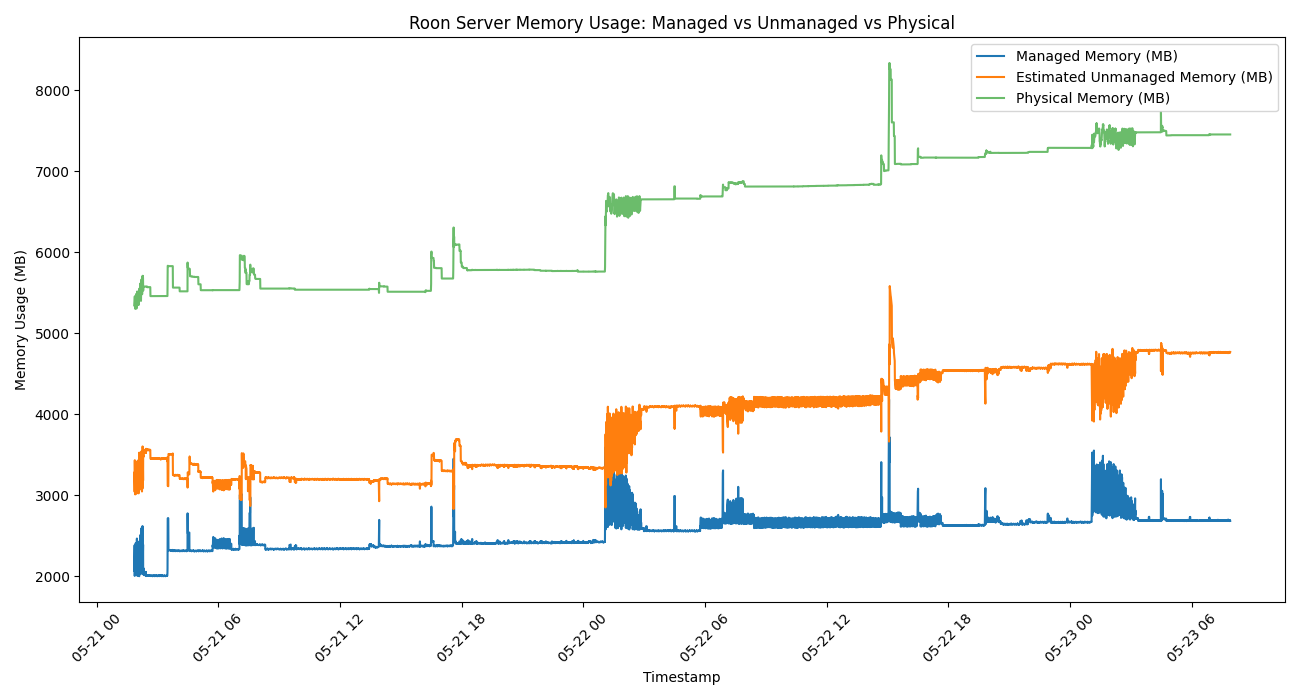
Over this time the RAM usage has been
So it was staying at 5.5GB to 6GB, but then increased to over 6.5GB, with a peak of over 8GB, presently 7.5GB
A Backup was taken on 20th May (so one due tomorrow at 6am, after the Scheduled Activity)
Without measurement on my side that looks like what I experienced last night. After 2.5 days up the UX was very slow. Opening albums slow, opening artist discography super slow. Curating a playlist becomes very very tedious.
On the plus side, a server restart is still only about 3 minutes now.
Yes, but we shouldn’t have to restart the server to make the Roon application usable. That’s just poor software.
I haven’t noticed any slow down or sluggish in the UIs since these releases that bought the RAM usage for my library etc. back under 8GB. And with the releases every week or so, have not had a server running for longer than a week in a while.
Will take a look later & pull the logs out, as a Backup ran at 6am-ish, so be interesting to see if that additional activity had any impact on the RAM usage.
This is the reason I didn’t renew my annual subscription. Never had sluggishness as I reboot my Mac daily. However I refuse to use software that wastes resources. Roon, as far as memory management goes is extremely poor.
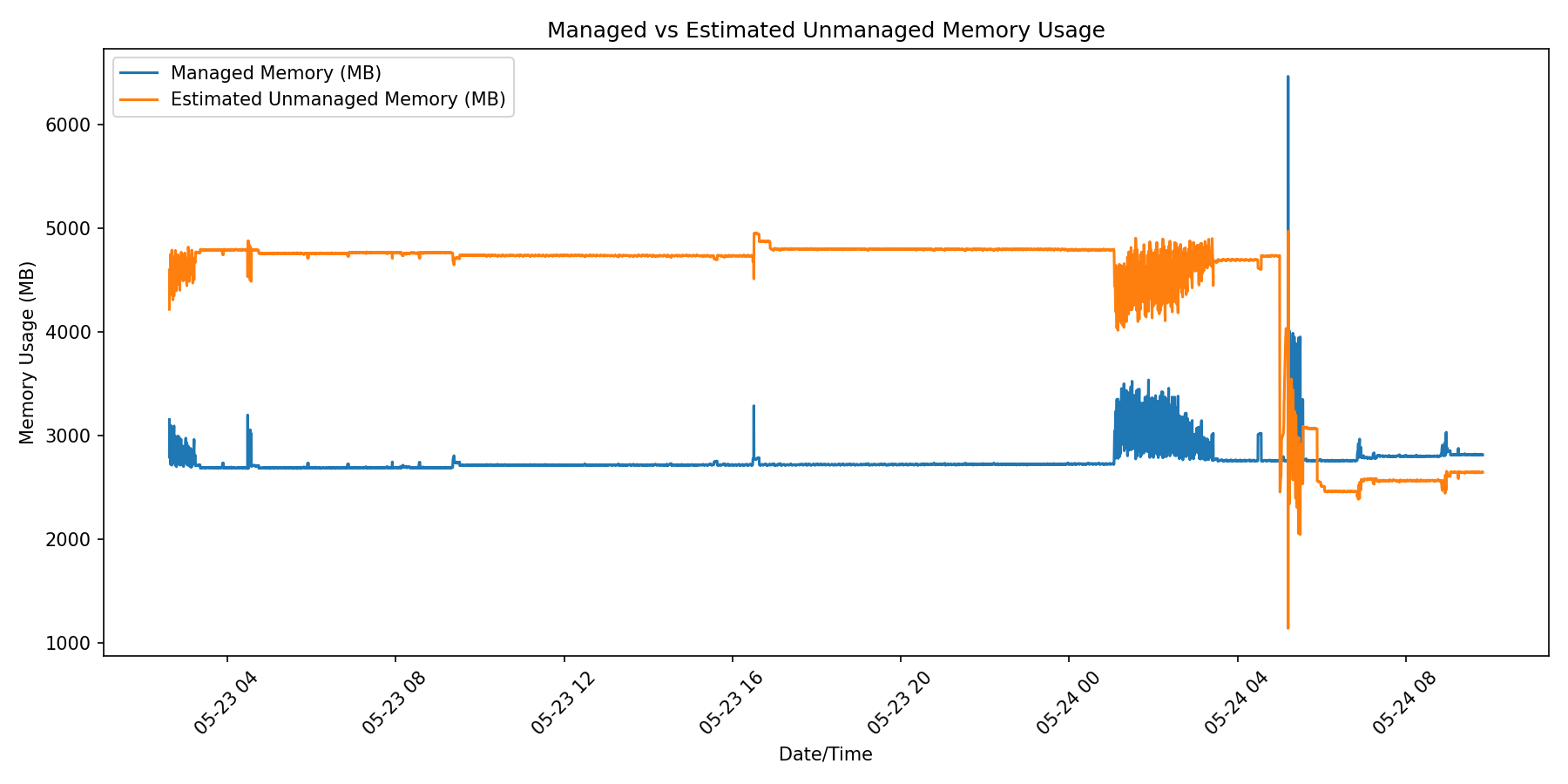
So following from the previous chart, which including yesterday ‘Scheduled Activity’ the usage was stable at 7.5GB and during this morning ‘Scheduled Activity’ (2am to 6am UTC+1), but then as the backup prepares there is an increase to 8.5GB and then down to 5GB.
Roon Server is still reporting “Running 3 days, 17 hours, 32 minutes”, so there was no server crash/restart
Looking at the unmanaged vs managed memoryOverlap ummanaged vs managed memory usage on the graph, much of the unmanaged that was held has been released, but at the start of the Backup process there is a spike in managed also.
Perhaps one of the take-aways, is not to schedule a RoonOS database Backup during the Schedule Activity window, as they could clash badly, and the second is to reduce memory usage, run a scheduled backup every few days, as this seems to release some of the unmanage previously held.
Good point. Apart from the memory usage, though, this seems obvious to me because why would one want to back up a half-finished metadata update. Sounds like pointless to me in the best case and asking for trouble in the worst case. Perhaps the UI shouldn’t allow this in the first place.
Yes, but before the introduction of the ‘Scheduled Actvity’ window for Metadata updates, Library scanning, i.e. moving all the background tasks that were affecting playback to an offline time, rather than fix the underlying software and networking architectural issues, I had the Backup scheduled for night time operational. As I do with all my rsync jobs, NAS housekeeping tasks etc.
I had then forgotten that, so needed to pull the Backup task out, after the ‘Scheduled Activity’ had run - now I see the RAM usage, even more so.
True, but I suppose the collision probability might be higher if the background work is constrained to a tight window and the backup happens in the same window, rather than background work being spread out over 24 hours (and can be postponed when backup starts).
Seems to me that at least with large libraries, the background work can take hours and the backup can, too (at least this is what it says in the message when starting a backup), so I suppose there is a chance that a 4 hour scheduled window may become too tight and it never actually finishes. Dunno, just guessing.