hi nicola,
did you migrate the same roon version to docker?
how did roon work before that? Also in a container or with help of the native roon app on qnap?
hi nicola,
did you migrate the same roon version to docker?
how did roon work before that? Also in a container or with help of the native roon app on qnap?
Hi,
Yes, in the end I moved everything to the same current production release. The official container downloaded and installed Roon Server version 2.64 build 1646.
Before that, I was not running it in a container. It was running through the traditional QNAP setup, not Docker. That is exactly where I noticed the difference.
Previously it worked, but it was clearly slower: during playback, if I searched the library, the system tended to bog down and sometimes playback would stop until the search had finished. With Docker it is much more responsive: searches are almost instantaneous, the library can scan in the background, and playback continues without any issue.
So, in short: same current production branch/version, but before it was on the classic QNAP installation, not containerized. And in my case Docker performs significantly better.
The only downside is that it can see the old backups, but it does not complete the restore.
hi again,
have you moved the database from a hd to a ssd?
currently i‘m using the roon app because of lesser ram usage than with docker. but before roon ran in docker. i could not detect differences in performance between these two versions at the time when i switched to the app. the data base and the music was always on a ssd.
cu günter
No, the database is still on HDD. I did not move it to SSD.
My library is about 11 TB of music in total, and even with the database still on HDD, Docker is performing noticeably better in my case than the previous QNAP setup.
So the improvement does not seem to come from moving the database to SSD, because I simply did not do that.
Best,
Nicola
hi nicola,
ok then it seems that some system libraries in die docker image perform better than those in the qnap os…
thx. cu günter
Hi Günter,
I think you may be right. On my side, the containerized setup seems to behave more efficiently than the previous native QNAP installation, so my guess is that the Docker stack is simply a better fit here.
The difference became obvious in everyday use. In the old setup, library searches could interfere with playback. With the current Docker installation, navigation is much smoother and the whole system feels more immediate.
For reference, my library is not small:
4,228 artists, 8,416 albums, 128,722 tracks, and 1,241 composers, with a total size of about 11 TB.
The collection is quite broad, with a strong classical presence but also rock, pop, jazz, fusion, Italian repertoire, and a fair amount of older digital and audiophile material. So it is a reasonably demanding library both in size and in metadata variety.
That is why I found the improvement quite striking.
Best,
Nicola
Hi Nicola,
My library is a bit smaller, about 80,000 tracks, almost exclusively FLAC files, with a few DSF and Qobuz albums. In total, it’s a little over 4 TB. Your tracks are apparently uncompressed.
As a result, Roon uses between 4 GB and 5.5 GB of RAM out of the non-expandable 8 GB while running. With the Docker version, the RAM usage is just a bit too much. The NAS then quickly starts swapping. In my case, the QNAP app requires about 1 GB less.
I hope the promised RAM reduction makes a significant difference.
Kr, Günter
Hi Günter,
actually my library is not uncompressed. Most of it is FLAC, so compressed PCM. The heavier part is that I also have quite a lot of SACD material, mainly DSF, plus some DFF files and a number of Qobuz albums.
At the moment the library mix is roughly:
FLAC 5098, DSF 1148, DFF 96, Qobuz 1094, plus a small number of ALAC, WAV and MP3 files.
In terms of resolution, there is also a fair amount of high-resolution content:
44.1 kHz 2805, 48 kHz 475, 88.2 kHz 473, 96 kHz 1789, 176.4 kHz 31, 192 kHz 737, 352.8 kHz 8, and on the DSD side DSD64 1201, DSD128 30, DSD256 13.
So the library is mostly compressed FLAC, but with a significant amount of DSD/SACD content, which may also contribute to the load during scanning and background analysis.
Also, my QNAP is not running with the stock 8 GB anymore: I upgraded it to 16 GB RAM. So in my case RAM ceiling should be less of an issue, and that makes it even more interesting that the Docker image seems to behave better than the native QNAP package.
Best,
Nicola
Hi,
Roughly how much RAM does Roon use in Docker and in the QNAP app?
KR, Günter
Hi Günter,
I did not make a strict before/after benchmark, so I cannot give you a precise number for the old QNAP app installation.
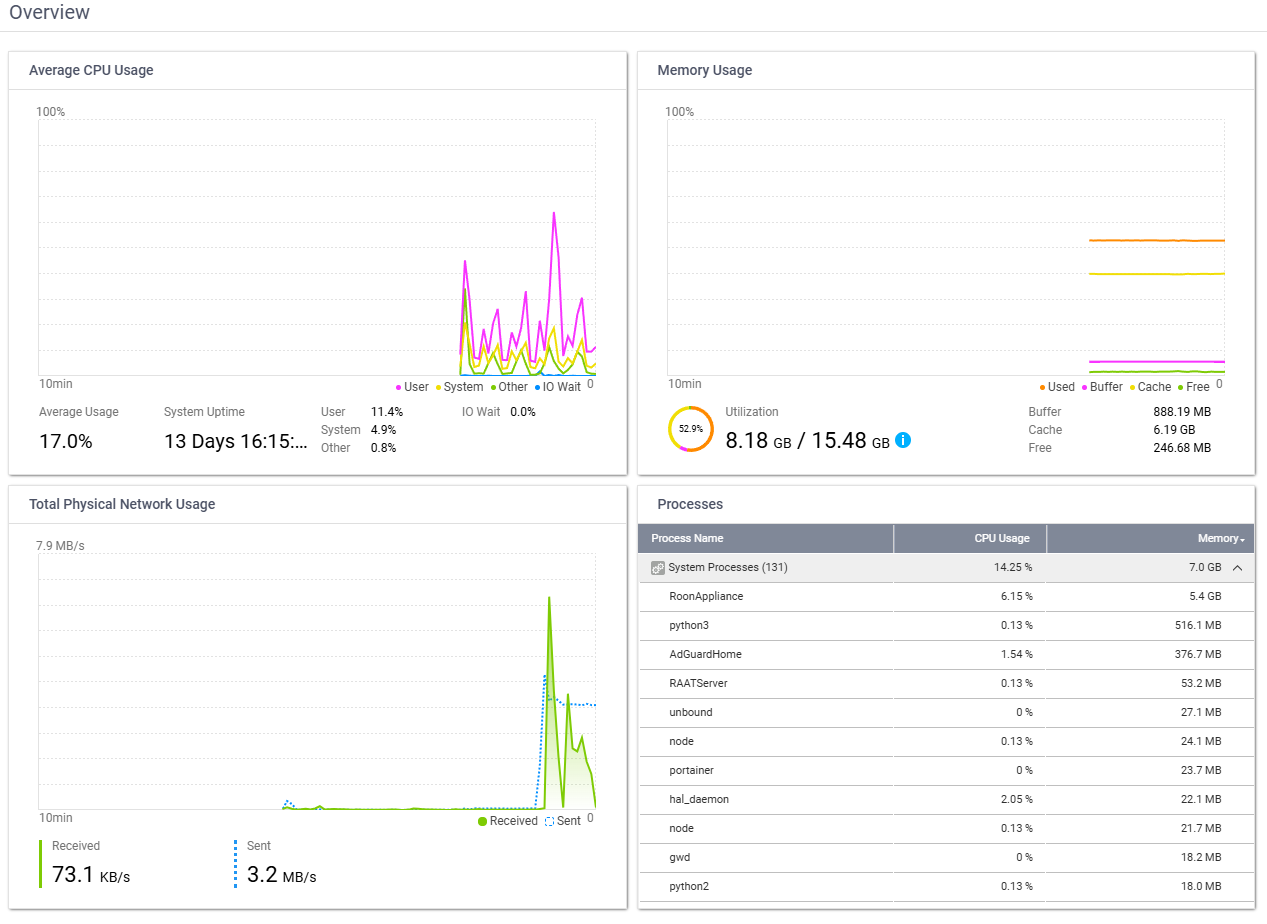
What I can say is that with Docker, after the library scan, the container is sitting at roughly 40–43% of the 16 GB installed RAM, so in practice around 6.5 GB more or less on my system. Total system memory usage on the NAS is around 50%.
With the native QNAP app, RAM usage seemed lower, but I did not record exact figures before switching. In spite of that, Docker is clearly faster in my case, so the higher memory footprint does not seem to be a problem on my setup.
Best,
Nicola
thx. kr günter
You’re welcome.
KR,
Nicola
This is still happening for me even if I select QNAP before copying the yml and pasting into a new application within Container Station on my NAS. I’m not super technical but I’m comfortable poking around and experimenting - not sure what I’m missing to set up the volumes to get it working…
Any help or clear step-by-step instruction (appreciate there will be an offical setup guide in due course) gratefully received.
Update - I’ve got it working with help from Claude (very impressed by this!).
I think people will need explicit foolproof instructions to set up the shared folders in the right place so Roon can see them. Also the case-sensitivity of Linux is very confusing - I would suggest using lower case throughout (e.g. music vs Music) so this doesn’t trip people up.
I’ll keep watching these threads with interest…Thanks all.
I am glad that you got it sorted.
Thanks for catching that. I just pushed a handful of changes/fixes/improvements that includes a fix for that. I haven’t recreated the image yet because there might be a couple more things coming very soon.
We are still working on cleaning things up and building some documentation. Hopefully we’ll be able to make the transition fairly smooth.
Hi,
In any case, I have now been running Roon 2.64 in Docker on a QNAP TS-453Be for a few days, with about 15.5 GB usable RAM, and it is working really well.
My main issue at the beginning was getting the network and storage paths set correctly inside the container. I used ChatGPT 5.4 to help me sort out the correct settings, and once those were in place everything was up and running in about 15 minutes.
At the moment, the NAS is showing about 54% total memory usage out of 15.48 GB, while the RoonServer container itself is using about 7% CPU in that snapshot.
So far, the Docker setup clearly feels better than my previous QNAP installation.
Best,
Nicola
I’ve been running Roon 2.64 in Docker on QNAP TS-253Be for a couple of days, also with 15.5 GB of useable Ram, all is smooth.
it’s way faster than the old Roon on NAS, and to be honest I don’t notice big differences in speed vs my OLD HP laptop i7 with Rock (Mock) on it: the i7 is only better in DSD 256 streams, but everything else is very similar in speed and performance and user experience.
Roon appliance is taking 5,4 GB of ram and i’m at 17% cpu at the moment (2 simultaneous flac streams, it goes up to 40% when I have 4 simultaneous audio streams)
ARC streams do seem to be much more CPU intensive than Roon app streams?
The NAS runs several dockers (unbound / adguard / homeassistant) and also runs Plex
I do run all my dockers (and also Roon) from SSD
the multimedia is on mirrored HDD
Container station on qnap is not very good though, I use portainer or just ssh with docker-compose commands to make 1 docker compose yml file with all dockers combined in 1 app
I edited my docker-compose like this:
cachedev3_data is my ssd disk
cachedev1_data is the mirrored hdd disk
  roonserver:
    image: ghcr.io/roonlabs/roonserver:latest
    container_name: roonserver
    network_mode: host
    init: true
    restart: unless-stopped
    stop_grace_period: 45s
    environment:
      - TZ=Europe/Brussels
    volumes:
      - /share/CACHEDEV3_DATA/ContainerFast/RoonDocker:/Roon
      - /share/CACHEDEV1_DATA/Multimedia/Music:/music:ro
      - /share/CACHEDEV1_DATA/RoonBackup:/Roon/backup
It’s also very easy to add roon extension manager in the same docker compose app
Might depend on your quality settings in ARC unless you have “original quality”?