I always use Arch or Arch based distros BTW. Roon Bridge’s behavior is expected since it uses ALSA.
Yes, even after you stop playing over roonbridge you have no linux sound. Does roonbridge release the device after some time?
No GUI last time I checked.
IMPORTANT NOTE FOR EARLY ACCESS USERS (and future stable client): You need to install .NET 10!
Instructions:
- Open Bottles.
- Select your Roon bottle.
- Under “Options,” click “Dependencies.”
- Look for “dotnetcoredesktop10” and click download button.
- Wait for it to install and you’re done!
UPDATE: New installations don’t need to follow this as the PR has been merged to add .NET 10 by default. This only applies to existing installations.
I had the washed out effect on Wayland on Fedora 43. Roon was installed in a bottle via Ropiee’s script from github. The Wine versions on Fedora all produced the washed out window behavior.
I’ve just installed Roon per the instructions in this thread using Bottles and it works as expected without the washed out windows.
Only part I don’t get is adding the desktop entry. It opens a little window with the Roon icon. I can’t click anything and it doesn’t add anything on the desktop. What am I missing?
Just hit enter
Thanks! Roon is now in my application launcher.
I’m using CachyOS, I’m noob linux user.
Hey, i got bottle with Roon for maybe a month or more. Latest system update make my bottle don’t run any more and i get this.
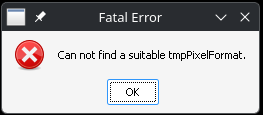
I’m tired this Roon joke about supporting linux user. Any idea how to fix it?
This most likely means you don’t have the correct or up-to-date OpenGL drivers.
As a self-declared Linux newbie, you should avoid an Arch-based bistro, and use a beginner-friendly OS like Ubuntu LTS or Linux Mint.
1 Like
Likely mismatched Flatpak Nvidia runtime and system Nvidia driver. Upgrade your flatpaks, or upgrade to AMD GPU.
Wielkie dzięki, Many thanks, Grazie mille, Muchas gracias, Gratias tibi ago maximas, どうもありがとうございます。, Moc děkuji, Vielen dank, Asante sana
It’s works. I thought I had it updated.
I still happily run this on Fedora 44. I had overlooked the mention of a scalefactor setting making it hard on a 3K display. A nice 1.5 and everything is visible.
The only caveat to running this is everytime it starts, it stops activity on my Bluesound Node. Doesn’t matter if radio is playing or Roon is playing music the player stops. Could be Fedora though, I’ve had a few such cuts when it boots up and Bluesound is active.
Thank you for posting this solution. Recently switched to Linux and was really frustrated at Roon being unable to connect to my Desktop audio devices (would just stop at Enabling the audio device…) and it was going to be a deal breaker, but this worked and saved me!
Thanks for the setup, but I’m stuck trying to log in. I click the button in Roon, it opens a browser in my Linux OS, I click my account, get redirected to what should be a temporary URL, then …nothing. I started a thread here about that, but thought it might be better to follow up here in case any of you folks know how to get past this.
You need to login using a mobile device because the OAuth handshake will fail when running Roon on Wine Bottles.
I tried my Android phone, but while it sees the server, it stalls when trying to connect.
Edit: it looks like if I disable UFW, the connection goes through, even though I did follow this topic on firewall settings.
Try this post for up-to-date UFW settings.
2 Likes
Oh, that’s much better. Thanks!
2 Likes