Hi guys,
I’ve got my hands on an old TOTL SoTM 1000 music streamer that runs Vortexbox, as it turns out, it has a normal 32Bit Intel Atom motherboard inside so it must be doable to convert this box to a perfectly working Roon Endpoint and see if it will use SoTM’s funky AES/EBU and USB cards that are built in.
What would be the easiest way to do it? Roopiee and DietPi are meant for RPi’s only. The CPU is a 32Bit N270 and it has 2GB of RAM. Ir’s pretty much a fully fledged ITX sized computer, with built in graphics card and all.
I don’t need any additional processing, just a passthrough endpoint from another Roon core.
Installing Win7 x32 doesn’t feel like the best way to go considering Windows’s vulnerabiity of going bums up on updates and refusing to boot after power failure/forced reboot.
Vortexbox is pretty antique and doesn’t support Roon, the machine has been upgraded with a 250GB SSD in the past but Vortexbox seems to only be DLNA or LMS capable so it’s a waste of resources.
I’m now looking into Linux Debian, this one still has x86-32 support. My main goal is a ‘stupid’ machine that only needs the push of the power button to be a Roon endpoint, just like a raspberry pi.
What kind of storage? Is there a bios?
The first you want to attempt is to get something to boot. If I was in your shoes I’d find the thinnest lightest Linux distro possible that was x86 based (not amd64). That might be Mint or some flavor of Mint without any graphics support. Attempt to get that to at least boot. Then, based on storage options, you can attempt an install. Once you’ve got an OS installed it should be easier to work towards building the Roon Bridge software and then you’re… probably going to get completely stuck enabling anything but a USB DAC. It really depends on what is needed to get that AES/EBU card to be recognized as an output by Alsa. Yup, that last part is the trick. Roon Bridge will allow you to enable any Alsa hardware (aplay -L).
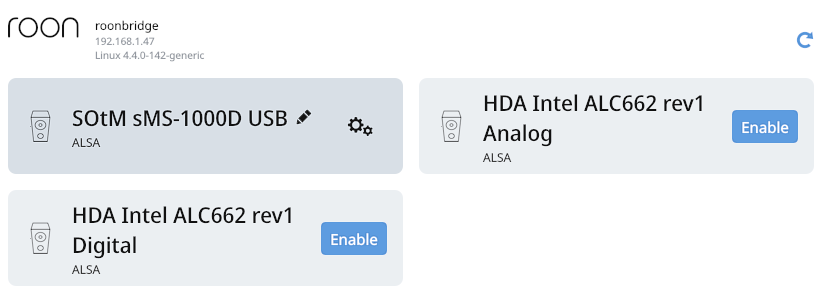
When I first got it, I’ve managed to get it visible in Roon with some kind of SSH trickery (I think it was a plugin for Vortexbox) - it showed up in Roon as “vortexbox” but I couldn’t enable the main outputs.
The storage is a 250GB Samsung 860EVO SSD.
Roon bridge runs as a task, you won’t see anything in the host but should be visible once you have a dac connected in the audio devices under roon settings, without a dac it maybe will only show up up in the about lists unde settings
Argh, completely forgot about that! Roopiee does the same - it will only show up in Roon if it has a DAC connected to it.
Still, I think I’d prefer a more lightweight distro than Debian.
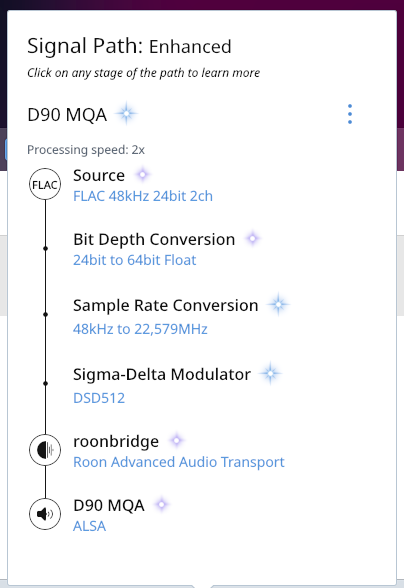
Debian wasn’t a success, now running older Ubuntu Server (32 Bit). Roon Bridge installed succesfully but needed a manual ALSA installation beforehand. I have to dig into the cabling of this device to see where they take SPDIF and AES EBU from. The “USB” naming is wrong, it’s now playing 24/96 through coax to a Topping D90:
DSD caps out at DSD64 in DoP format over coax.
USB output from the SOtM built in USB card works as well!! DSD is in DoP format but it does take DSD128 without issues. Will have to give it a listen tomorrow and check for any noise/clicks or pops, can be interesting to hear if it’s any better than a RPi4.
So far it seems like a success - from the outdated vortexbox/LMS to a perfectly working Roon Endpoint with all SOtM qualities.
Just leaving this for future reference if someone ever wonders what to do with an older SoTM-1000: This series uses an industrial Intel ITX motherboard with built in Intel Atom N270 32-Bit CPU (1 core / 2 threads) paired with 2GB of DDR2 SO-DIMM memory.
It’s relatively easy to turn it into a fully fledged Roon endpoint.
Use Balena Etcher to burn the image it to a USB drive
Connect a screen, mouse, keyboard and LAN to your SOtM, insert the USB drive and power up the machine, it should boot from USB automatically. Install Ubuntu Server, when asked which packages you’d like to install, check the box to install OpenSSH (makes remote management through puTTY possible). Ubuntu Server has no GUI but after you’re done, it’s 100% headless, just use the power button to power it off and on
I am aware that Ubuntu doesn’t provide 32 bit packages anymore. So you have to go back to the oldest available version with 32 bit support, which is 16.04. But there are other options, most prominently Debian which still offers current 32 bit versions of its software.
Yes, I agree. I wouldn’t run a GUI on this hardware. But you could try and install a web admin tool such as Cockpit, which would allow for browser-based graphical remote administration and monitoring without need for PuTTY and ssh.
I don’t know how well this tool would work on your hardware, but I would give it a try.
Installed Debian with CLI only, then ALSA-utils and RoonBridge x86.
Not sure if it’s due to newer Debian / ALSA support but DSD512 works fine as well now.