TO expand on what @Mark_Sealey said. CDs are always read as data, because that’s all they are, just some digital representations of whatever’s recorded on them. But there is a difference in how it is read. A CD player will read whatever it can from a CD, no matter how scratched or damaged it might be, and will play it, doing some small tricks to deal with errors, but it can only do so much. It can’t spend a minute reading and re-reading a section that it needs to play in the next fraction of a second, so it will, at best, interpolate something.
When ripping with something like Media Player, it will do pretty much the same thing. It might try dealing with errors, but won’t do too much or try too hard. On the other hand, something like dbPowerAmp will try turning on all the error detection and correction features of the drive, and will put a lot of effort into trying to read the data accurately. On top of that, it uses and online database of accurate rips and at least for most commercially available and somewhat popular disks it can compare your rip with a presumably correct one and warn you if yours isn’t right. Sometimes you just need to try again, or clean the disk. Sometimes you might find that although you can rip the disk, it will never be right.
In short, if all of your disks are scratchless and clean, chances are a tool like dbPoweramp won’t add too much value. But if they are not, you currently don’t know if your rips are perfectly accurate or not.
This is the key. Lots of rippers out there (windows media, itunes, etc.) will rip CDs and convert them to digital files that can be played on Roon, etc. But one is not sure that the rip is actually bitperfect with no glitches. But as noted, 99% of the time, there is no problem with a file regardless of what was used to rip it. I’ve ripped 4 to 5 thousand CDs. I might have had errors on maybe 100 or so of those CDs. so that is a rate of 2%. So 98% of my CD rips would have likely been fine ripping with Windows Media. (Although this is not entirely true, as dbpoweramp does some error checking and keeps trying to re-do certain data frames until it gets it right. Windows Media does not make this effort).
But the idea is that secure ripping is like an insurance policy on your house. You only need it when you need it. And you hope you never need it. But many of us want to "rip once and rip right’. So the extra ‘effort’ that a secure ripper like dbpoweramp (or EAC or similar) puts into ripping that CD is that ‘insurance’.
FLAC is a mostly universal lossless format that many of us use. A benefit not often mentioned for FLAC files is that they contain embedded CRCs, created at the time the file was created. This means that it is trivial at a future date to run a batch procedure to ‘test’ all your files for any possible corruption. Essentially, the test decodes the file, creates a CRC from the decode, then compares this CRC to the one created at the time the file was encoded (ripped). If these match, the file is identical and there is no corruption. There are many ways to do this, but in dbpoweramp, one simply selects the top level folder, runs TEST CONVERSION, and let’s it run. At the end of the process, any corrupted files will be reported. I always do this process anytime I get a new HDD and transfer all my files to that new drive. Running this process gives me comfort that the copied files are all okay.
p.s. I’ve seen lots of horror stories on the forums about a HDD that starts going bad. The user figures this out early on, and notes that only a few files seem corrupted and most are ok. But with 100,000 files the question is which ones are OK. When these files are WAV or ALAC, or AIFF, there is not an easy way to tell. You have to essentially try to play each file. But with FLAC one simply runs a batch job and any corrupted file is identified for you.
(and these unlucky folks almost always had backups. But depending on how one backs up, one’s backup files may be copies of the same corrupted files!)
Last word, the hardest part of ripping is managing your metadata (tags). Many people mistakenly think that things like artist, album title, track title, etc. is coming from the CD. It rarely is. In most cases, this information is coming from online databases that rippers use to try to automatically fill in things like artist, album, track title, genre, etc.
For most pop/rock/jazz CDs, the ripper access to databases of correct metadata is pretty good and only minor tweaking to tag data is needed here and there (e.g., do you want the artist name to be “Miles Davis” or “Miles Davis Quintet”). And I find that I rarely agree with the automatic ‘genre’ information and change that. But for classical CDs, these databases are mostly terrible and the tag data needs to be edited to get what you really want. And you’ll likely want to use tag such as WORK and MOVEMENT and CONDUCTER, etc. This requires paying attention when ripping (although these can be added after the fact as well). But if you’re ripping classical CDs, develop a plan for your tagging scheme.
Everything I’ve said above is for people that want to created a robust, quality digital library of their CDs. But not everyone cares about that. I have a friend with at least 20,000 CDs. He rips a handful every now and then just to throw on his iPhone for a trip or for listening in his car. He’s not trying to create an archive, doesn’t run a home server, etc. At home, he listens to actual CDs or vinyl. So his CD rips are really throwaways that have only a short-term use. If you fall into this category, then secure ripping is of no value.
I just picked up a Nucleus One and have installed a SSD. The posts above have great info about dbPoweramp to get a good copy. Is there a difference between that and using a backup app (i use Chronosync on my Mac) that checks your data? And I’mm not sure I understand the procedure. If I have a cd drive plugged into my Mac, will it see the drive in the Nucleus to rip to? I presume that I do this outside of the Roon app, the put it in the library later? Sorry for the very basic questions but any help is appreciated. Thanks.
If you used DbPowerAmp to rip CD’s, then the recommended procedure is to rip to a local folder on your Mac, do any post-rip tag editing you may want to do an then copy/move the ripped files to your Nucleus’ storage folder using finder.
If I am not mistaken DbPoweramp also includes Accurip, that alone is worth the price. (I don’t use it as I already had JRiver as a perfectly acceptable ripper.)
At the end of the rip process of say “Abbey Road”, Accurip calculates a ‘Magic Number’, my name, which it compares with the same Magic Number derived from a series of rips of “Abbey Road”.
This comparison “proves” the rip to be good or bad, it then adds your rip to the collected rip database which for such an album is quite extensive. So only really obscure albums have no history
Other rippers use this tech eg EAC, CUETools etc , so the db is quite extensive
yes, a backyup app like Chronosync does some data checking of files, but it DOES not confirm that the digital file containing your music tracks actually contains the bitperfect rip of the CD. One can create a valid file that Chronosync would be ok with, yet the file could contain a song track with glitches inside. These are TWO different things. (and yes to some others, dbpoweramp uses AccurateRip to compare CRCs to those of other folks that ripped a different copy of the same CD title on a different machine. That’s brilliant! (and Spoon, the creater of dbpoweramp, invented and implements/maintains the AccurateRip database.)
I’ll make this short. dBpoweramp is an easy and awesome ripper cd to about a dozen formats. It does use Accurip. I use Time Machine for daily auto backups and Backblaze for full system. My Backblaze subscription keeps the full backups for one year but there is an option to keep them always. And decided to use AIFF Apple uncompressed format. I’ve done FLAC and ALAC also before. I have so much storage why compress?
However, one reason to use FLAC, is that it contains embedded CRCs from the time of file creation. Consequently, one can run a simple batch procedure to test for any file corruption. Something like TEST CONVERSION in dbpoweramp, or “file integrity” in foobar2000, or any number of command line FLAC commands will do this. Essentially, the procedure, decodes each FLAC files (calculating a CRC from the decoded file) and then compares this newly calculated CRC to the embedded CRC from the time of creation. If they are the same, then there is no corruption. If they are different, then one has a corrupted file. (Note that tagging changes are irrelevant; the CRC is based on AUDIO content of the file only.).
So I can select my top folder, tell dbpa to run [TEST CONVERSION] on all ~130,000 of my files, come back in a few hours and I’ll know that I have no corruption, or I’ll have a list of corrupted files. I do this often when I create a new backup HDD. After copying all my files, I run this to get some comfort that the backup is good and I haven’t simply backed up some corrupted files.
And FLAC files are the only lossless files that do this embedded CRC natively. This is not done with AIFF, WAV, ALAC. This is why I use FLAC files. File size compression is not my motivation.
I’ve ripped my CDs with dbPoweramp on my MacBook Pro with an attached Apple Super Drive.
I’ve used uncompressed FLAC as format. So the end results are basically a 1 on 1 copy of my CD’s. Storage space isn’t an issue, so no need to use compression.
Ok, I’m missing something here. I’ve installed the SSD in my Nucleus One and put it back in the system. I’m running Roon on my Mac with Sonoma OS. I’ve looked both in my disk utility and in the Roon app. I don’t see the SSD. Once I install dbPoweramp how do I get the files to the Nucleus One? Thanks.
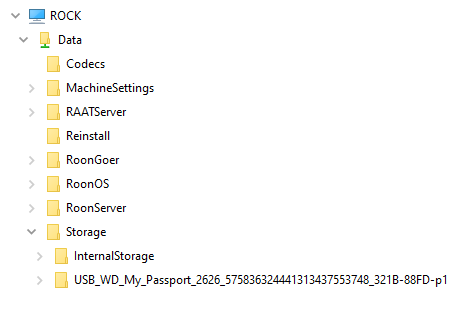
I don’t use Apple but this is what it looks like in Windows 10 under Network. The InternalStorage folder is used (with any subfolders you like), and you pass content across the network , preferably with the Roon Sever software shut down.
After you have ripped the files on the Mac, you copy them over the network to the Nucleus One. You should be able to see the internal drive as a network accessible share using the Mac’s Finder.