Linux Server + Tailscale - GREAT! Home Roon wherever I go! (success story)

Longtime Roon user. When I started using Roon I set up the server on an old Mac Laptop. It worked OK but eventually wore out. Then I got an Intel NUC and tried running it on Windows 11. What a mess. Constant OS updates and it is not designed to run as a standalone server. It was restarting and locking up 2-3 times a week.

I took the plunge and finally built a real-deal-big-boy Linux server with Ubuntu 26 and got Roon running. The biggest challenge was getting the storage to work. I rip my CDs and do some Roon on an old Mac Tower, so I need to access the server storage via that. (Samba Share) I also have the media on a SSD which is not the system drive. Getting the concept that you need to create a “Mount Point” with the storage you want to use and make sure Roon + your Administrator can both access the data was challenging, but once I got that done it worked great locally.

I built a real computer (AM4, AMD based, DDR4) for this and Ubuntu is FAST. It was so much faster than the NUC running an i9 CPU on Windows 11. It chewed through my library of about 35,000 tracks in about 2 hours.

All well and good, but now I want to enjoy this media outside the home. Roon ARC NEVER worked for me. NEVER EVER. I have a really tight home network running OMADA equipment and I also do some networking professionally so I know more than the average user. I could NEVER get it to work even though all firewall settings were correct. I had to run PLEXAMP for my out of the home stuff which is RIDICULOUS since I have Roon. I mean, a total fail for Roon considering how expensive it is relative to PLEX.

Anyway, since I have this beautiful server running I got Tailscale up and got ARC working in sort order. Great right? Then I went to work and wanted to enjoy my Roon at my desk. I have a nice DAC and Amp at my desk and was ready to go, when I realized that ROON DOESN’T OFFER A DESKTOP SOLUTION for outside the home. Not even ARC. What?! Come on. Back to PLEXAMP I guess…

Well, not so fast! I figured if I have Tailscale up and running for ARC, why not use it for the standard Roon desktop program? The trick is you need to tell it the Tailscale IP Address as it will not find the server automatically. BOOM. I’m running Home Roon wherever I am. No ARC. All the same stuff. I can even run this on my iPhone! AMAZING!

Anyway, total cost for the server was about $400. Tailscale is “free” for a home user. It’s a sweet system and now I can bring my home Roon with me everywhere.

The Linux server will not update unless I tell it to, and if the power fails it will restart and reload Roon automatically. Theoretically I can go on vacation and still enjoy big boy home Roon wherever I go. Pretty amazing.
7 Likes

Hey, great news and well done. I also tried to find a solution to make Roon work on my Computer while out of home.

Just a question: where exactly do you tell Roon the Tailscale IP Adress? I also tried in my Standard Roon ios App, but being out of home, I can’t open it.

Thanks for your help and cheers.

You don’t need to do anything in Roon as it is all handled by Tailscale. In the Tailscale app (or web interface) add your server and Android/iOS devices, and you’re good to go.

1 Like

When you have Tailscale setup, could you use the normal Roon app? Or does it need to be Roon Arc?

You must use Roon ARC when away from home. While the Roon app will open and function, it can only control devices on the home network.

1 Like

mjw —

I needed a solution to play music on my office computer, not phone. ARC only works on phones.

I use my home Roon app on my work computer using Tailscale, and I use my home iOS Roon app in my car using Tailscale.

No ARC for me! I would rather use Plexamp, or Finanp in those situations as ARC is such a mess.

I am GREATLY ENJOYING having my home Roon at work. Didn’t think it would make that much of a difference.

Can you expand on this? Roon doesn’t work across subsets, and therefore, discovery of the remote device usually fails.

I use the regular Roon App and it is amazing. It’s like everywhere I go I am home!

1 Like

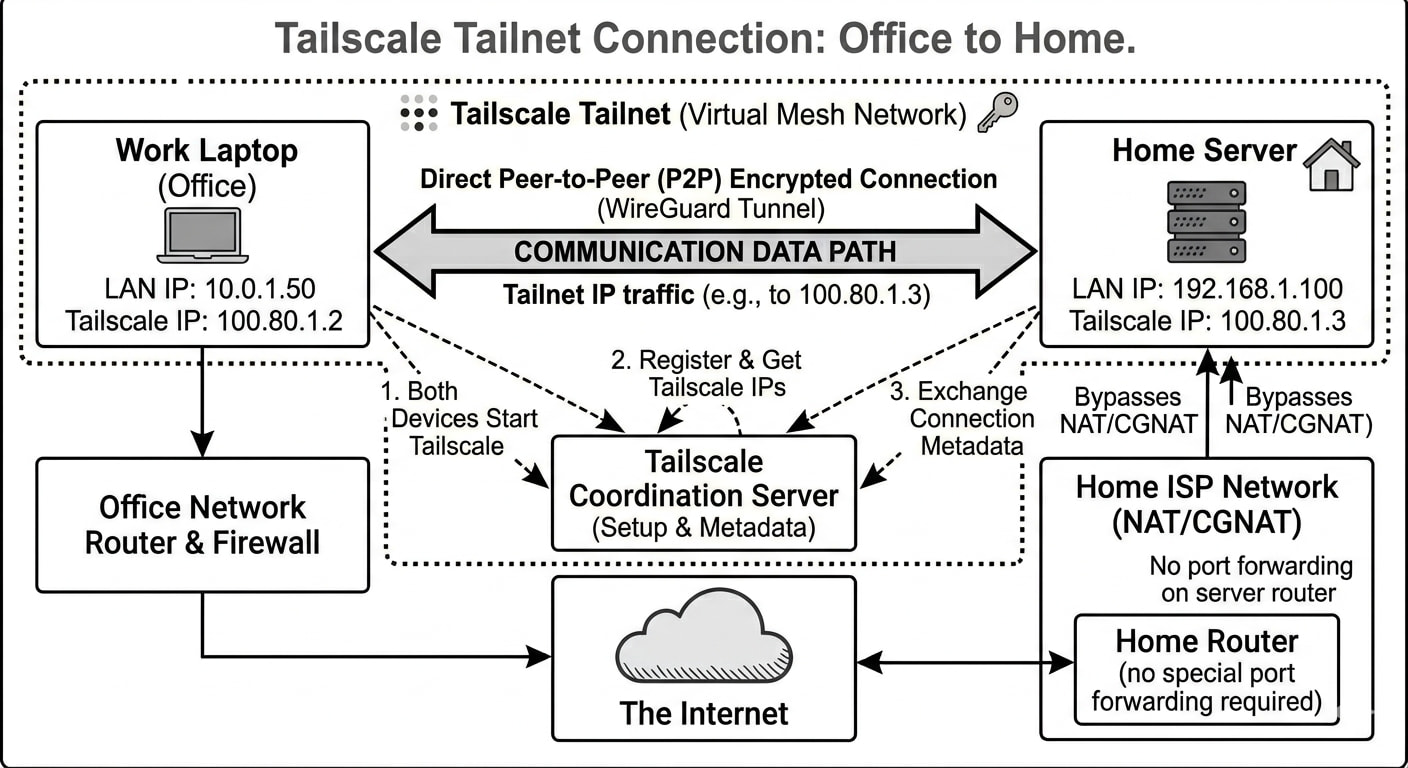
Roon client running on the laptop at work. David specifies that the Roon server is reachable at 100.80.1.3 as in the example above. I ran a couple experiments to replicate David’s setup.

  1. Can confirm that Roon client on my phone (vanilla Tailscale install) streams music over the cellular network from Roon server at home. Tailscale was installed without modifications on the computer that hosts Roon server.
    • Note that a classic VPN tunnel works equally well.
  2. Tried the following without installing Tailscale on the computer that hosts Roon server. Although I can control Roon server, zones, and endpoints, the phone is not detected as an audio device.

With the Roon client running on my phone. I can control Roon Server to start/stop music on all zones and endpoints, but the phone is not detected as a music device.

Phone → Tailscale → Laptop → Server
Roon client (not ARC) Tailnet Macbook Roon Core
Cell network Internet Home LAN Home LAN
Tailscale vanilla install 2 nodes active Tailscale Subnet Router enabled

“When SNAT is enabled, traffic from a device behind a subnet router appears to come from the router itself, not the original device.”

I’ve read Roon networking analysis a couple times now and I’m scratching my head.

Would love to know why scenario #1 works to stream music but #2 does not.

in scenario 2, im assuming you have tailscale installed somewhere else, behaving as a SNAT to bridge the client (phone with tailscale) into the network?

Scenario 1 works likely because the tailscale install is local to the roon server, allowing direct communication with it from the phone over tailscale.

If my assumption is correct, then the issue with the SNAT setup has to do with multicast and how roon opens additional connections to the target IP. In the cast of a SNAT, it would attempt to open a connection to the subnet router, and that router does not have an active flow in its state table to translate that back to the phone.

I’m not super familiar with tailscale, so I can’t say if theres a way within the software to configure it to handle this. What is the reasoning behind needing to offload to a subnet router rather than use tailscale direct on the roon core?

That’s correct, Tailscale was running on a Macbook with SNAT enabled.

Seems logical. I didn’t bother to dig into it; just followed on-screen instructions to turn on the SNAT features. Scenario #1 would probably be what most folks would want and do. In my case, I use a Wireguard VPN and not Tailscale.

I wanted to experiment with the following use cases for the Tailscale curious:

  1. I can easily install Tailscale on computer running Roon server.
    1. NUC on desk
    2. Mac Mini on shelf
  2. I cannot install Tailscale on computer running Roon server.
    1. Nucleus on music rack
    2. NAS server in closet
  3. I can install Tailscale on computer that SNATs traffic for the subnet Roon server is a part of.
    1. This is what was failing in my experiment.

It might be possible to offload the networking to a separate device entirely (not the one running the roon server) and use SNAT so you can access the rest of your network, including roon. There are some other software packages on linux that could be used in conjunction with the subnet router, namely multicast relay and udp broadcast relay, that might enable streaming and control to a remote device.

1 Like

There are some other software packages on linux that could be used in conjunction with the subnet router, namely multicast relay and udp broadcast relay, that might enable streaming and control to a remote device

I’ll leave that to the folks who truly need such a solution :nerd_face:

Thanks @David_Overbeck for an engaging hour to investigate Tailscale. I was wanting an excuse to install it on my devices and see what it’s about.

I have tried the roon app over ts in the past, it has never worked. Is this a change in the new roon release?

When l last tried, it didn’t work for me. The device could control other remote endpoints, but not the device itself.

When I have time I’ll try again as follows.

  • Unprivileged Podman container running under dedicated user account
  • Tailscale running under the same user
  • Roon ARC/Roon and Tailscale on Android using a work account via Shelter

Using a work account should allow me to run two VPNs on Android, and isolate apps needing LAN access.

I have an unprivileged proxmox container with roon and tailscale. With an android phone connected to tailnet (wifi off) the roon app works just like on the home network through wifi.

I think you would have to install ts inside the container (with roon, I suppose).

Well this is interesting. I’ve just tried it and the Roon Android app on my phone works perfectly well connected to my server via Tailscale. I didn’t realise that would work.

I have never had a problem running ARC on my phone, either via NAT or Tailscale but running the Roon Android app itself solves one of the major annoyances of ARC for me. When I return home I can’t transfer the ARC stream to another Roon endpoint (except by manually selecting the Album, navigating to the track etc).

Must play with both ARC and Roon Android app and see if there are any negatives!

Week it was working, I was shouting here in a café listening to Jennifer Warnes. I wrote the above post, went back to Roon and now this Android phone endpoint has disappeared.

Needs exploring!

I have tried that before and the roon app could never find the server, so I suspect this might be a new feature.

Might be interesting for people struggling with multiple subnets.

“Negatives”:

  • You cannot switch between different resolutions for wifi and mobile
  • No offline mode
  • No support for usb dongle dacs in android

I think I can use the official standalone Tailscale container, and then connect other containers to my Tailnet. This can be done inside a pod.