I moved my Roon Server PC over to my FiOS router and also my Macbook. I connected both directly to the FiOS router over ethernet. In that configuration I had some very strange behavior. Roon Remote was disconnecting far more frequently in this configuration than when going through the Netgear ethernet switch to Google WiFi.
Lots of investigating on possible causes. I wound up uninstalling and reinstalling the Chord DAC driver. That didn’t seem to fix anything.
Then I dug into Windows Firewall settings and I think I may have found a fix. I looked at the Windows Firewall settings for allowing apps to communicate through Windows Defender. There are 4 entries for Roon applications. Two of the entries are roon.exe and two entries are for roonappliance.exe. One of the roon.exe entries had a check box for Private and the other roon.exe had a check box for Public. Same for roonappliance.exe. I checked both the Private and Public check boxes for all of these app entries. After doing so I haven’t had a dropped connection to the Core. Attaching a picture of the settings window after selected both Private and Public for your reference:
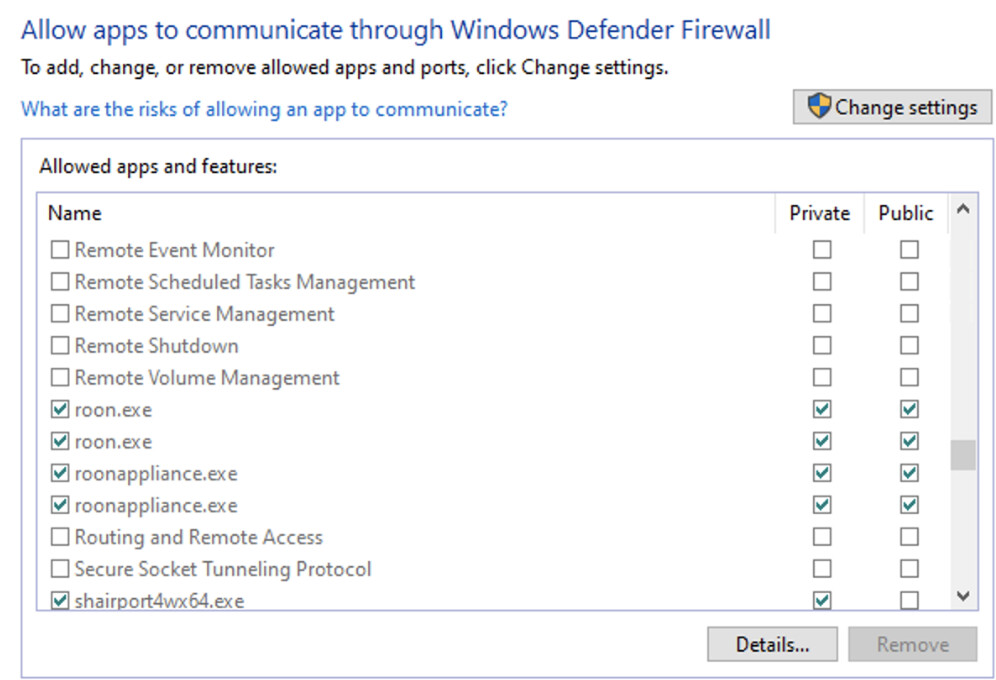
I don’t know why there are duplicate entries for roon.exe and roonappliance and I don’t know why Private was selected on one and Public on the other. With both Private and Public checked on both apps I don’t seem to be experiencing the disconnections from the Core. I’ll run in this configuration for a day or so before I restore the last backup I did prior to the reinstall of Server.
Please advise on how these settings should be set and if this might create a security problem.