MOCK - Tell us what strange gear you've installed ROCK on!

I had an idea when reading a query yesterday about suitable ROCK hardware. I decided to see if I could build something easily and cheaply using a gen 11 Celeron processor. This popped up when perusing Amazon (UK) and came pre equipped with 8gb RAM (soldered in) and a 256gb M.2. With discounts and a voucher this came to £149.99 in total. Look at £200 plus normally. After unpacking I simply booted into bios, loaded ROCK and after a short delay it presented me with an IP. I added ffmpeg and signed in to Tidal. The final picture is the most telling. This thing up- samples to DSD256 on a single core and 512 in parallelise mode. Easily. It has a fan. The fan is quiet but obviously not silent. It is responsive and snappy in use and as a networked core I see it handling small libraries and some upsampling to a single endpoint with ease.
I have upsampled for a while now and it seems to be coping well.

4 Likes

Nice share Henry and a cracking price for such a capable little device.
Hopefully will give some people the thought of trying one of these super cheap mini PCs for running Roon Rock
1 Like

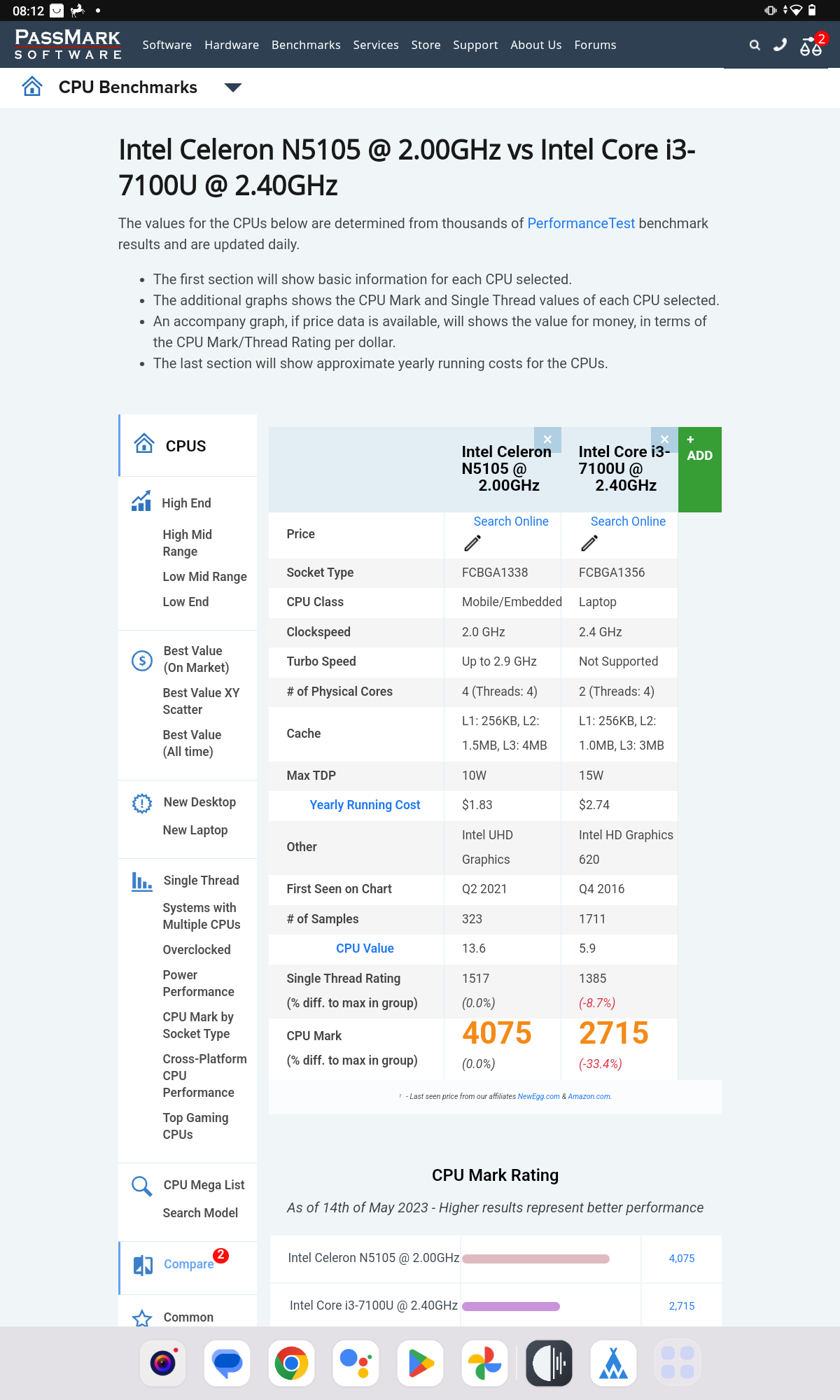
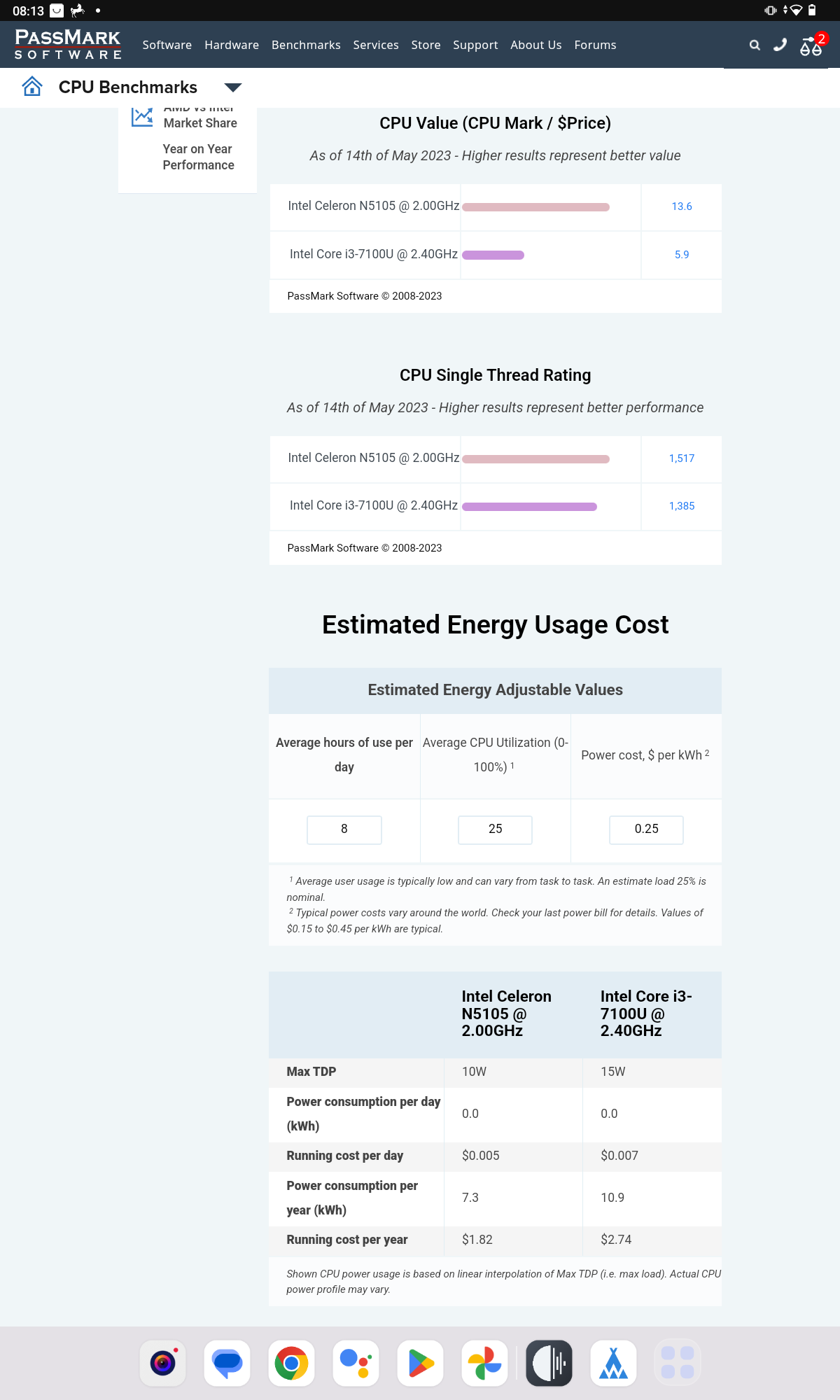
A comparison between the N5105 and the i37100U in the original Nucleus.


3 Likes

OK, next stress test was adding a library using a USB drive. It is a 2TB Toshiba. Mine has a few MP3, but is mostly CD or DSD with a few HD purchases thrown in. It took 3.5 hours to analyse 14,500 tracks with three cores running. It warmed up and the fan could be heard (a whisper) but it ripped them in that time with no issues. I played tunes while it ripped and they played without a glitch.
My conclusion is this works extremely well for core duties. I guess the real test would be longevity but it works well in every other respect.

1 Like

Thanks for experimenting with this Henry! I was on the fence about signing up for Roon. I grabbed the same unit on Amazon for my ROCK install. So far so good. I don’t have much of a local library. Maybe 800 FLAC files. So far I’ve only used it to stream Qobuz and Tidal on several endpoints. So far so good.

3 Likes

This post is not exactly about “where Roon Core is installed”, but rather how remote connection via ARC can be simply routed.

Basically I have two nucs - one is powered on 24x7 where besides Roon Core lot of other stuff is running and the other nuc is used from time to time as dedicated Roon Core. Only one instance of Core is active at time and i need to rsync roon data to new “active nuc” when migrating. But this is not the interesting part , as thanks to LAN discovery Roon can find core on new IP without any issue.

However for ARC from remote location this means static NAT won’t work as each Core has it’s own IP , so I have tried (successfully :slight_smile: ) to use nginx to route incoming ARC traffic to whichever Core is alive. Again nothing genius, just glad it works and maybe could help someone.

###############################################
# Roon ARC TCP Proxy

stream {
  server {
    listen 55000;
    proxy_pass roon-arc_backend;
  }

  upstream roon-arc_backend {
    server 192.168.1.X:55000;
    server 192.168.1.Y:55000;
  }
  
  log_format basic_stream '$remote_addr [$time_local] '
                 '$protocol $status $bytes_sent $bytes_received '
                 '$session_time';

  access_log /var/log/nginx/stream-access.log basic_stream ;                    
  error_log /var/log/nginx/stream-error.log warn;
}
2 Likes

FYI, I have now installed Roon Rock on a computer based on a Ryzen 7600, 16GB 6Ghz RAM and MSI Pro B650m-A Wifi. After a lot of messing around I had to back date the BIOS to 7D77V13 (July 2022, latest version is June 2023) in order for Roon Rock to load. I’ll explore further. Anyway, compared to my Intel installs (and even Ryzen 5 5600g) the Ryzen 5 7600 is yet another improvement. So much for those who claim the Rock hardware should have no bearing on the SQ!

2 Likes

I installed my ROCK on a Supermicro X10SLM-F, with an Intel® Xeon(R) CPU E3-1220 v3. bought it second-hand for about €120. Installing ROCK was very smooth, no issues whatsoever. I have it in a server rack, streaming to a NAD CS1, which in turn is connected over COAX to my Cambridge Audio CXA60. Pretty happy with all of it so far.

1 Like

Khadas Mind v1 anyone?

1 Like

INTEL 14th i5-14600KF (14core 20thread)
3rsys RC1900 White
Gigabyte B760M Aorus Elite DDR4
Nvidia GT310 512MB
Samsung DDR4 3200MHz 32gb x 4
Samsung SSD 980pro 512gb
Crucial P3 Plus 4tb

It’s a high-performance system that I’ve been creating and using these days. I’ve installed and running Roon Rock with headless. It’s so fast that you can’t compare it to NUC and it’s stable. The case is a little bigger than the size of ITX, but it’s much smaller than other mini-tower cases, so it doesn’t take up a lot of space, and there’s almost no cooler noise. Nvidia’s GT310 is installed to use only very little power consumption while also using it for display output when needed. In fact, a PC with this specification can operate a window-based system that can utilize hqplayer, but I personally don’t like upsampling, so I’ve removed windows and made it a perfectly simple configuration.

3 Likes

What is the NIC it uses, I presume ROCK finds it OK?

If I was in the market for a new server I would buy a fanless PC from SilentPC, probably a Streacom FC8 with a Raptor Lake I7 and 16 GB ram. With two SSD’s you can get it for less than two grand. It’s way overkill for Roon, but a ROCK, DietPi, or even Windows install will be lightning fast. It will outperform the Titan at potentially half the price.

A post was split to a new topic: Issue running ROCK on Asrock H87 Pro 4

Motivated by @Matthew_Willims, I finally built a new ROCK server with Topton FU02, which is based on Ryzen 7 7730U CPU. $300 comes in a fanless case. I spent a few hundred more to upgrade with 1TB Hynix NVMe SSD, 32GB Crucial DDR4 RAM (yes an overkill but what the heck), and Crucial internal 4TB SATA drive. For nearly the price of Nucleus One, this makes a brilliant fast ROCK server.

My earlier ROCK built on NUC 7i5 in 2018 was clearly outdated. This machine is rock solid and fast enough for my library of 10,000 albums and 130,000 tracks. Now all the sluggish search issue is gone! Other than 5-7 sec delay on the home page to show the New Release section, all other clicks are executed with minimal delay. Highly recommended. Thank you @Matthew_Willims for the tips!

For those who are interested, rest assured that there is no additional complication dealing with the Ryzen system. While the Bios page looks different, I didn’t have to update it and just went to the Boot section to change the boot order after plugging in the USB stick created by Balena Etcher (USB boot option shows up only after the USB stick was plugged in). ROCK installation was a breeze, and a new ROCK server is built in no time.

3 Likes

Hey, no worries Andrew. So happy my experience was of use to someone else. It will be interesting to see if sonics changes after a week or so of use as mine did. It started off somewhat warm and muddy and gradually improved over a week or so until I ended up with the best sonics I’ve had. Did you heat a linear power Sony for yours or are you using its stock power brick? It’s pretty fantastic either way. :slight_smile:

2 Likes

I already had an LPS (Chinese but well built) from the previous ROCK. It is located in a different room, so I suspect their sonic impact may be less (I hope…). Cheers!

1 Like

Yeah, I didn’t notice a huge difference with the linear power supply though as I mentioned initially the MOCK sounded warm/muddy. I probably should swap in the stock power brick to compare at some point…… But can’t really be bothered.

Did you strip out the Wi-Fi card in yours? Ensures cleaner power and less interference. Only a single screw holds the card internally so easy to remove. Power to it can be switched off in the bios if you’d rather leave it in. Most of the integrated audio can be switched off in the bios also. :slight_smile:

Mine lives in the garage. I still can’t understand why there was audible impact as given how TCP/IP works it really shouldn’t. I have noticed that different network cables to my NAS make zero difference to sonics, however the cables on my router and ROCK do make a difference so there appears a difference only with streamed content, yet not with media accessed from a file share.

Once more just my observation and not how TCP/IP works…. It truly is lossless so I can’t explain the differences I hear.

Sure I did, as I wasn’t going to use wifi anyway. I wasn’t sure about the exact RAM so I ordered one with 256GB SSD and 16 GB RAM rather than barebone. I did get the correct Crucial RAM so wasn’t necessary, but I have the SSD with Windows 11 installed, so just in case… :slight_smile:

God knows what makes the SQ difference. As you may have seen in my earlier post, I tested different Roon servers on ROCK/Linux/MacOS and there were clearly audible differences. I don’t find any issue with this new Ryzen ROCK. It sounds good to me.

1 Like

Aye, it sounds good initially but does improve over a week or two. It started off as an improvement over RoonOnNas and just got better. :slight_smile:

In fact Id say that ROCK + and overspec opnSense router have made two of the bigger sonic improvements I’ve experienced in my system recently. Part of it was prioritising all traffic to and from the ROCK over all network traffic, and deprioritising IoT traffic

1 Like

Successfully and easily installed on this: KAMRUI Mini PC, 12th Intel Alder Lake- N95 up to 3.4 GHz,16GB RAM+512GB M.2 SSD, Windows 11 Pro Mini Computer,Support 2.5" SATA SSD,WiFi 2.4G/5G,Bluetooth4.2,Triple Display,4K Reliable Office Small PC: Minis: Amazon.com.au Only AUD248! That’s US$151.10 :slightly_smiling_face:


A library of 33790 tracks on external SSD. Runs beautifully.

2 Likes