Have been doing some more testing, after changing to the latest LTS stable kernel (6.18).
My Chord Hugo2 behaves like it used to: rock solid.
the cheap Apple USB dongle shows a lot of buffer errors (samples dropped), independant of content.
i’ve been able to remedy this by changing the buffer settings in Roon for this specific device.
after this change those buffer error appear, but only when switching tracks for example and then only once or twice.
Here’s what I’m thinking… this could be related to the latest RoonBridge version - maybe this latest version is a little bit more critical when it comes to buffering. The difference between the Chord and the cheap dongle might be related in hardware buffers.
Would be interesting to see if those buffer settings make things differently for you as well…
Sorry for not responding, but I was lost in all this
Anyways… after switching out for the new LTS kernel and do some further digging on the ‘why’ part… I can’t reproduce it anymore. So I guess that’s good news, because last week it was rather trivial to reproduce the ‘dropped samples’ error message.
Tomorrow I’ll be releasing a new beta build with this new kernel, and I’m really curious what this does to your situation.
Hey Harry, yes I have but unfortunately not been very successful.
It’s still working perfectly on some of my devices and not others. The consistent thing that’s breaking is the two USB DAC brands on newer kernels/drivers (one of them is working perfectly on an old Rpi2 running RopieeeXL). I’m also still getting the “storm of packet errors” that appear to be a network problem but are only occuring with these DACs and not on a different DAC that is connected to the same endpoint (i.e. identical network path).
So, I’m leaning toward it being a linux driver issue, but I haven’t had the time to do a full rebuild and try an older driver/kernel on those devices. I really don’t think this is a network problem, but as it happens I’ll be making a bunch of changes to my network later this week (upgrading some older components) so it will be very interesting to see if that changes anything. I’ll keep you posted.
That’s really weird. Because I was able to reproduce this very easily when playing to a cheap USB dongle, but with this latest build (and new kernel) this is all gone. I don’t understand why this still happens on your unit(s)…
I also don’t think (after extensive testing) that it is a network issue: I’ve been streaming to 2 dac’s on the same RoPieee, where one has this issue and the other one not.
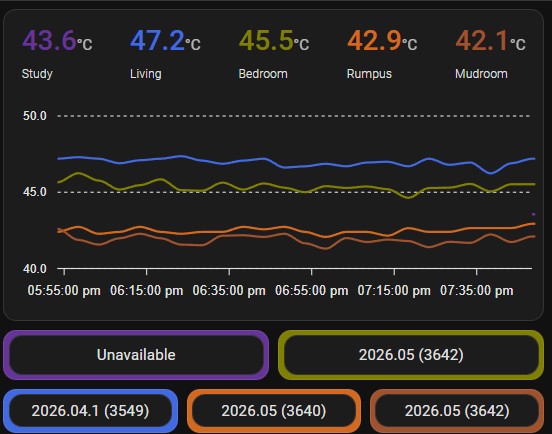
Hey @spockfish, ok I have replaced all of my core networking equipment (which I was doing anyway) and done some more testing (including now with the later build 3642). It’s definintely still happening… the short version seems to be:
Still encountering the “storm of packet errors” when trying to play higher resolution files to these problematic DACs. As discussed, although it seems like a network problem, it only occurs with specific USB DACs, and other DACs/endpoints have no problems.
On a positive note, I haven’t encountered as many of the audio quality issues I was experiencing earlier, but I more frequently just can’t play certain media to that DAC at all. So the same scenarios break, it’s just that more never start at all (rather than start but sound wrong).
The nature of networking/infrastructure means I can never 100% rule out the network or Roon server as the cause, but:
My Roon server plays 24/192 fine to other ropieee endpoints, and while playing the server performance seems to hover around 5-6% CPU and 75% RAM. Network traffic is flat at ~1.2Mbps (which given my equipment and only wired connections shouldn’t be a concern ).
One of the endpoints that is breaking on one USB DAC works fine on the other USB DAC (i.e. the server is successfully delivering network traffic to that Rpi for the other DAC with no issues at the network/infrastructure level).
One of the problem DACs is working fine on a much older kernel/driver with a Rpi2 (which should show worse network performance than the others, not better)
So, I’m sort of stumped. I’ve been thinking for a while that the root cause is a linux driver issue but I also think that RAAT is somehow not handling the driver well and is generating packet errors that corrupt the signal (sometimes terminally).
Honestly, I do. I was able to reproduce the packet loss on one of my units, and my network is fine (me saying this with some confidence ). It’s Unifi based. Yours?
I can’t imagine that. The USB UAC driver is a generic driver, used for basically all USB audio devices (DAC’s). We use the stable kernel, in use by a gazillion people.
Yeah… this is very strange. Can’t wrap my mind around this.
I think we need to call in help from Roon. Maybe this is related to local ALSA (the Linux audio subsystem) buffering on the device - maybe something changed in the latest RoonBridge (RAAT) implementations… I don’t know.
@James_Fitzell
I am absolutly no expert, but I have a question. Which version of Roon Core are you using, and which version of Roon Bridge is installed on your RoPieee? They have to work together, so if that isn’t correct, …
Just a wild gues.
My network is Unifi based too and has been working reliably for years but some of it was unsupported/legacy and I decided to upgrade recently so it’s now total overkill (10Gbps backbone between gateway and the two rack switches) and a pretty flat structure so my “core” switch is only 1 hop to every other switch (and the gateway). All my house services are on the other rack switch. All my audio gear is in one VLAN (I do have others but they are not talking to Roon/ropiee etc).
Hey @spockfish , I want to report something that I’m not at all sure is a Ropieee thing, but given our other discussions above and the network “dropouts” I want to mention. One of the reasons I decided to replace my core switches was because I’d recently had a few desk stitches all go offline at once and I was blaming the core switch (which powers many of them by PoE).
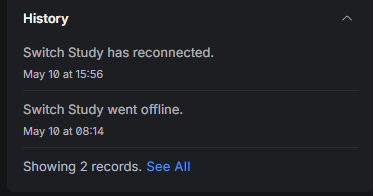
When I did the cutover, I had massive problems bringing up one of the switches, and was eventually only able to do so by unplugging all the devices connected to it (including a Ropieee unit). Today, I had my main desk go offline and the fix to bring it back online was to unplug the Ropieee that is plugged into it. That’s now 2 of my switches that have been down for 8+ hours in an “adopting loop”, despite factory resets etc, and the thing that fixed both was unplugging the raspberry pi. I didn’t even reboot the switch, just unplugged the pi and everything came back up… then I plug the pi back in.
So, we have recent kernel doing something weird in conjunction with Roon, and now my switches are dying while a Pi is plugged into it. Related? Terrible luck?
ideally , the switches should provide some hints on what’s tripping them in the logs - broadcast / multicast storms (note: when the switches were unresponsive, did your port activity LEDs where blinking like crazy - this would back the packet storm theory), .. ( ; and I don’t expect any loops / spanning-tree issues, but you never know )
Ok, so in the case during setting up the new gear the Pi didn’t have a screen and so all I know is that after the switch came up I yanked the power on the pi and rebooted it as part of plugging it back in.
With my desk issue today, I didn’t do that and it also has a screen. I can see from the screen that the Pi crashed at 8:10am, which is 4 minutes before the switch went offline. It came back up when I unplugged the Pi.
Unfortunately I can’t get you feedback from the unit, because if I plug it back into the switch, it goes offline again. I have a video where you can also see my computer (on the same switch) and the second I plug in the Pi the computer loses its NIC connection. So I’ll now yank the power on the Pi, but naturally it’ll come back up and I’ll be none the wiser.
I completely agree, but unfortunately I get nothing. The switches going offline are the cheaper Unifi Flex switches which have no local SSH or anything. With this scenario now, when I plug in the pi it goes offline and stops responding to the network properly (and at some point the Unifi controller then tries to reprovision it and never succeeds).
I’ve got RSTP turned on (always have) and there should be no loops. It’s a fairly flat network with everything hanging off the ”Core switch”
└── UXG Fiber
│
├── Port 1 ──── UniFi Server
│
└── SFP+ ────── Switch Core, USW Pro Max 16 PoE
│
├── SFP+ ── Switch Infra, USW Pro Max 24
│
└── ×7 smaller switches (US-8-60W, USW Flex Mini)
The 7 smaller switches basically take the link to each room where I have between 2-5 things generally plugged in (e.g. my computer and the Pi are plugged in at my desk). Almost everything is set to DHCP but the Unifi controller has “fixed” IP’s configured for devices so they always get the same IP.
One thing that I don’t think would be relevant but is probably different to many people is that I’m using Home Assistant to hit the Ropieee API to store data in some sensors, but it’s not that frequently. Gets temperature every minute, and checks version/update every 10 minutes.
Definitely, my PC is on a different VLAN with a totally different IP address (ditto the other 2 PC’s on my study switch).
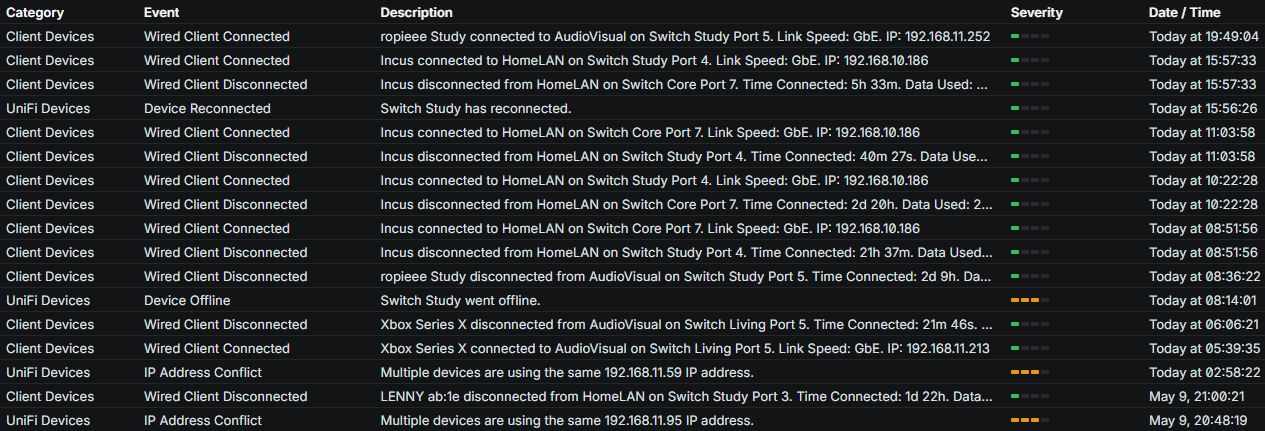
My Unifi logs do actually show two IP address conflicts (on a different VLAN in a different room/switch). It’s a little odd though, both IPs are the Tesla powerwall (one on LAN and one on Wifi, which I understand is the recommended setup and uses LAN unless it goes down and has been this way for 2 years) and nothing else is using those IPs, it’s almost like the Unifi is telling me I have a conflict because the Tesla shows up twice, rather than that the IP’s are actually conflicting with anything (see the two near the bottom).
I’ve just turned off the Tesla Wifi, certainly don’t want that complicating the issue. (it’s still showing as online in the screenshot but I expect will drop off soon)

 ).
).