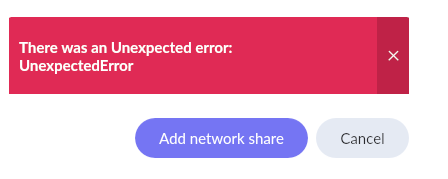
Installed Container Station on QNAP NAS and after a few failed attempts got it somewhat working. I still do not have my painstakingly over several years curated Playlists. I tried to restore backup but get this very informative message when trying to add share in the Browse Backup menu. I have tried //servername/share and many more same result. An help would be appreciated.
Did you allow the container to load/mount shares (in Docker Compose yaml code to setup the container)?
Yes - for the watched music folders
You don’t do that for watched music folders. You just allow it for the container or you don’t. Please post your current container configuration (Docker Compose yaml code).
services:
roonserver:
image: Package roonserver · GitHub
container_name: roonserver
network_mode: host
environment:
-
ROON_INSTALL_BRANCH=production
-
TZ=America/Denver
volumes: -
/share/Container/roon:/Roon
-
/share/Music:/Music
-
/share/Container/roon-backups:/RoonBackups
-
/share/Music_CD:/container/Music_CD
-
/share/Music_24_Bit:/container/Music_24_Bit
-
/share/DSD:/container/DSD
-
/share/Music_Multi_Channel:/container/Music_Multi_Channel
restart: unless-stopped
logging:
driver: local
So you missed to allow the use of network shares for the container. It may be best to recreate your configuration in the tool and this time scroll down and enable the use of network shares (SMB/CIFS mount support). Then use that code to recreate (Container Station > Applications from the Actions cogwheel choose + Recreate) your container. The missing instructions are:
    cap_add:
      - SYS_ADMIN
      - DAC_READ_SEARCH
    security_opt:
      - apparmor:unconfined
      - label:disable
thanks - a little confused if I recreate the configuration file enabling SMB/CIFS mount support that will create the missing instruction cap_add:… ?
Recreate gives you the opportunity to change the Docker Compose yaml code used to create the container. It is though up to you to seize this opportunity and change the code according to your needs.
That did the trick for playlists and i needed to edit the storage path in settings to point to the container folders.
Thank you for your prompt and focused help!!!