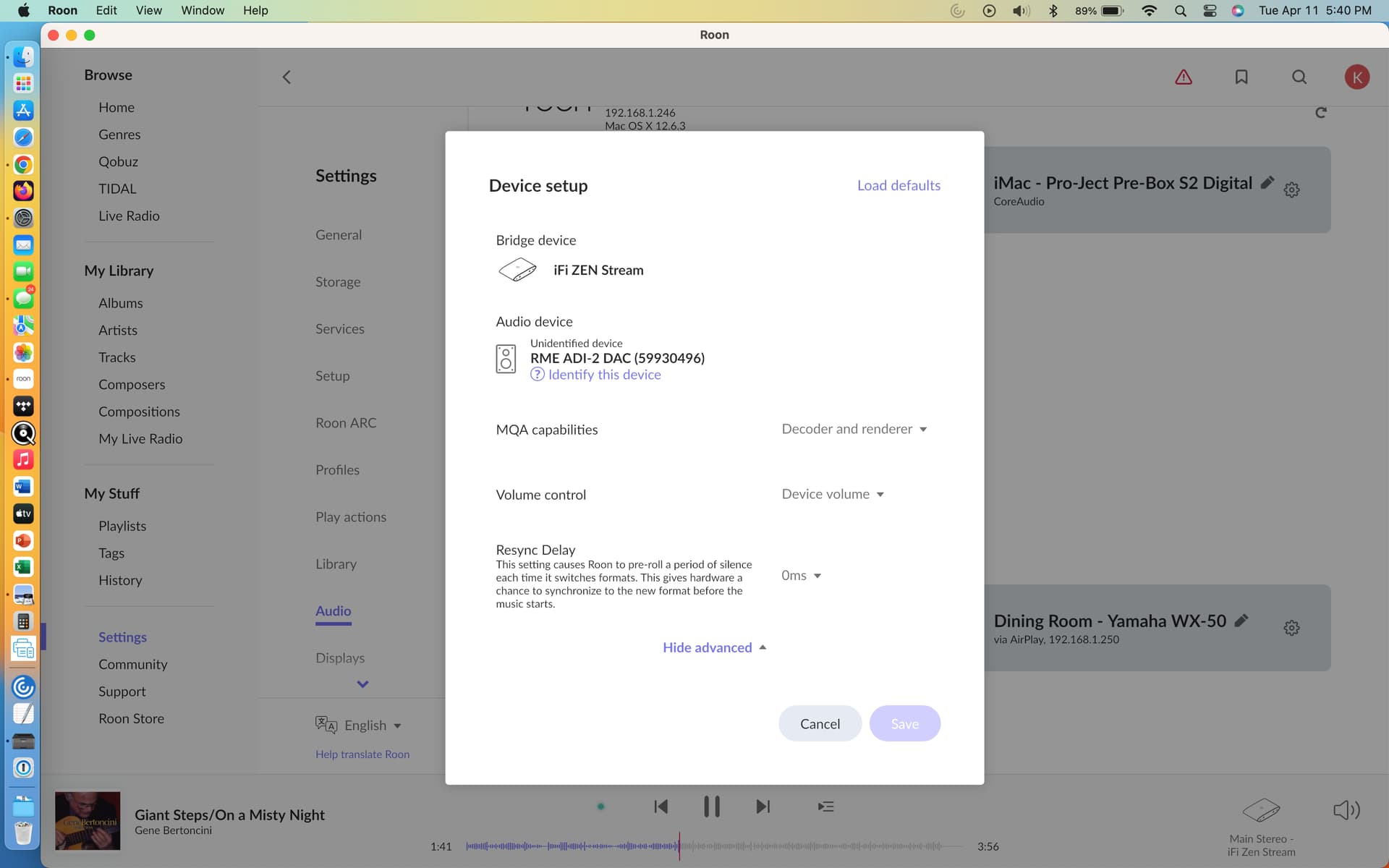
Hello - I am running Roon ROCK on a NUC connected to my router with an IFI Zen streamer feeding my DAC. I previously used a PS Audio DAC with no difficulties. I just connected an RMS ADI-2 DAC FS to the IFI streamer but am having difficulty setting it up properly.
Roon shows the IFI as a Bridge device and separately shows the RME as an “unidentified” audio device. On the audio setup screen, i have no options for such things as Exclusive Mode, DSD Playback strategy, volume control, etc.
The combo plays PCM audio just fine but when I try to play a DSD file (the RME accepts DSD), it simply converts the signal to PCM. Does anyone have ideas for getting Roon to show me the full range of audio options and for enabling DSD playback?
Did you power on Adi wait to boot, power on Zen after that? Do you connect using USB? If you connect Adi to Roon Core directly it is identified? If you open Zen web control does Zen see the ADI ok? Is zen firmware updated?
I have never played with an Adi but maybe there are settings you have to do directly on it.
I have a Zen Stream but a different DAC. My guess is that you have to configure it in the Zen Stream App (in AIO mode), after updating to the latest firmware. I’m sure the Zen Stream sends DSD over USB, but not sure when it’s connected over coax.
Thanks for your response. See below for answers to your questions:
Did you power on Adi wait to boot, power on Zen after that? Yes
Do you connect using USB? Yes
If you connect Adi to Roon Core directly it is identified? I cannot do that - the Roon Core (ROCK) is in a closet with my router, far away from the DAC.
If you open Zen web control does Zen see the ADI ok? Is zen firmware updated? I haven’t been able to check the Ifi Zen web panel - I am having trouble accessing it, but I don’t think that’s the source of the problem. The firmware should be current,
I accessed the iFi web interface and was able to select the RME as the output device (de-selecting my PS Audio DAC) and set it to output DSD Direct – I rebooted everything but same problem. I also set it to output DSD over PCM and that also didn’t work.
BTW - the RME sounds great. I’m not sure it would be any better/different if I could get it to output DSD - but it’s frustrating that I can’t
Just to check if Zen on Roon mode my last RAAT SDK was 1.1.38 what do you have? (I do not remember that well, last time I did upgrade to a beta version for Zen it did broke the roon only mode and I do not think that they fixed that, but as long as you are on stable release of firmware roon only mode works. Also I do not remember because I use ZEN in NAA only for last months playing DSD 256 to a Zen Dac sig v2)
Searching on web I see that Adi with ESS does only DoP, but at least to get that working.
If on Roon Only Mode you try to open the web page for the Roon Bridge is that working? You can also try to type directly on your browser of choice the ip adress of Zen followed by :3100 (example: 192.168.100.29:3100)
The only thing that I do not understand is why you were able to see the PSA Dac on the Zen Web settings? Is PSA still connected somehow?
I would try and see if SPDIF works if you have a cable. Also I would try another usb cable.
In my beta version of the Zen software Roon only mode is still broken.
Ken you can get 80% of the way there by using AIO mode and switching off the protocol service’s you do not use. At this point that is what I do (and hope that iFi will fix it in the future).
Thanks, everyone. I switched the iFi Zen to AIO mode and switched off everything but Roon and AirPLay. That seems to have done the trick. I at least get DSD via DoP with the normal DSD options in Roon. I am still trying to configure it to do DSD Direct – I have an AKM version of the RME so DSD Direct should work. Will keep trying. Thanks again.
Check if Zen can do it. Zen has volumio that is a linux but I think the kernel matters. Using Zen I have not been able to do native to CA 200M just DoP. With the last version of volumio with roon bridge plugin, installed on one of my old laptops I can do native DSD to the same dac. Using roon bridge on ubuntu I again cannot play native DSD to the same 200M just DoP.