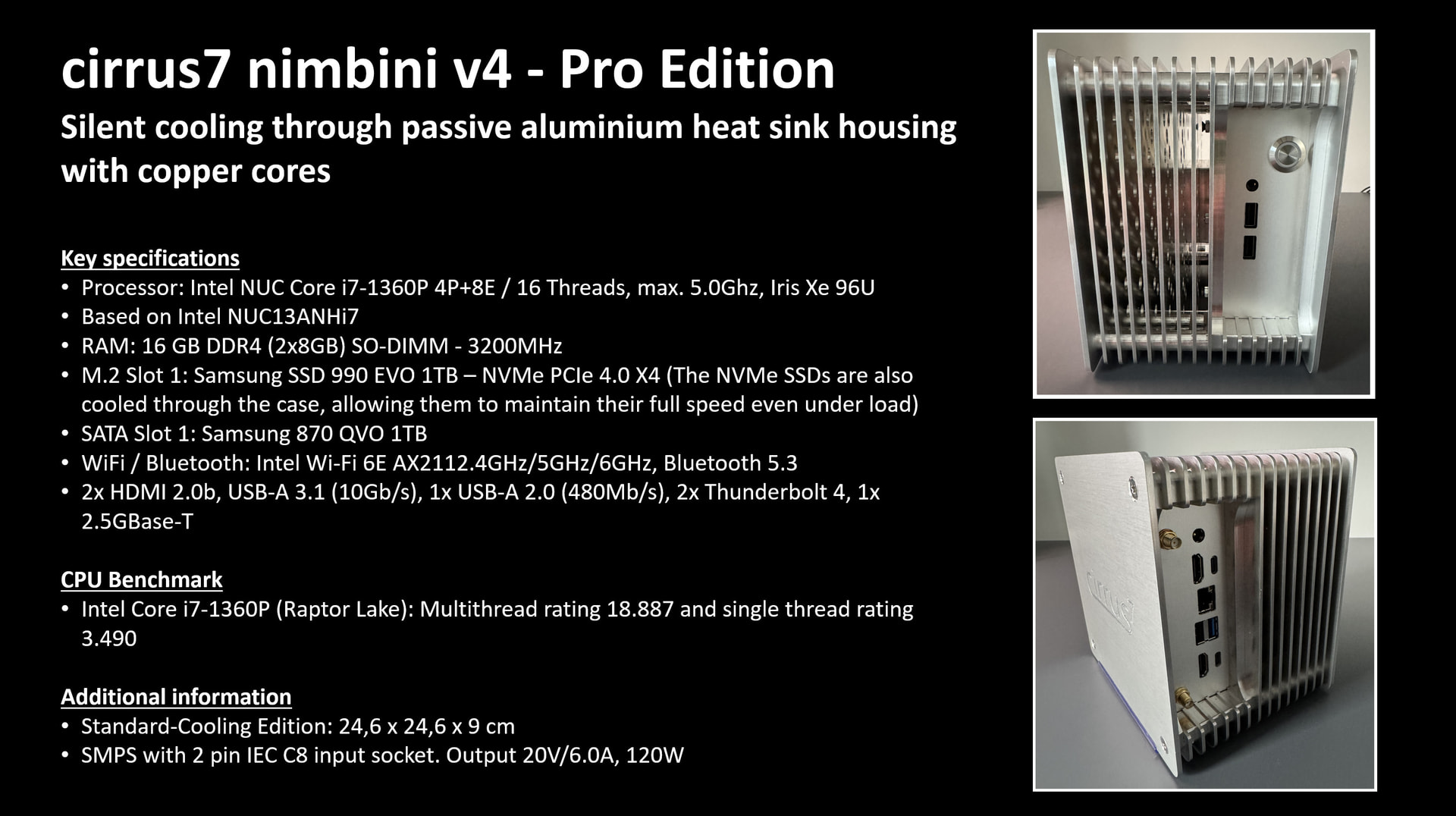
I’m thinking of replacing my trusty old NUC (with noisy fan!), and I have my eye on a Nimbini. I like the looks, and I want a fanless design. However, none of the Intel chipsets seem to be supported right now, So, I’m limited to totally different configurations. Like this one:
Edition:
Pro Edition
Cooling Edition:
Standard Cooling Edition
Processor:
ASUS NUC 15 Pro | Core™ Ultra 5 225H
4P+8E+2LP/14T | max. 4.60GHz | Intel Arc 130T
RAM:
16 GB DDR5 (2x 8GB)
SO-DIMM - 4800MHz
M.2 Slot 1:
Samsung SSD 990 Pro 1TB
VESA wall and screen mount :
None
WiFi / Bluetooth:
Intel® Wi-Fi 7 BE201
2.4GHz/5GHz/6GHz, Bluetooth 5.4
I know it is not on the hardware list, but that list seems a bit old, given that Intel has stopped further development and production of NUCs.
So if the answer is “We don’t know”, is there a chance that that list is updated in the foreseeable future?
It’s just a regular NUC 15 Pro in a fanless case. Search the forum for NUC 15 Pro and you will find various installation reports. It should work but you have to make changes to the BIOS, such as turning off secure boot, perhaps others.
Note: In case you install an update for the BIOS, make sure that you first screenshot every page of the current BIOS settings because some of them are special (e.g., cooling - no fan, and perhaps others like turbo modes). They will be wiped out if you update the BIOS and you definitely want to recreate them exactly.
The specs look fine in general. The SSD above is the only thing I would change. The Samsung 990 Pro provides much higher performance than a ROCK system will use. You may be able to save some money with no downside by selecting a cheaper, lower performance, model SSD such as the one from the EVO range. For the system drive, I would avoid any Samsung QVO SSDs or any other that employ QLC (Quad-Level Cell) memory. Such SSDs are not so reliable in the long term for write intensive applications. Note, however, that in a ROCK system, a QVO SATA SSD is fine for adding a second SSD for local library music storage since such a drive would typically be written once and thereafter only read.
Also, 1TB for the system drive for a ROCK system is far larger than you need. 256GByte should be plenty for anything except the very largest of libraries and 512GByte would likely be more than enough. For local music file storage on ROCK you need a second SSD. On the officially supported NUCs, this would be a SATA SSD because only one M.2 slot was provided. If you have two M.2 slots then a second M.2 drive can be used but, for the local library it does not have to be high performance and a NGFF (SATA) drive is perfectly adequate.
Bear in mind that with a ROCK system, beyond the OS and Roon Server application, the only thing that resides on this SSD is the Roon database and it is not practically possible to use any additional space. It can’t be used for storing music and it can’t be used for backups.
If there is a cheaper option, and if you will only use ROCK with it, order it without Wifi/BT because you definitely should have the RoonServer on wired Ethernet and there is nothing that BT is used for in ROCK. (And chances are that ROCK won’t even have the drivers for the built-in wifi/BT but I’m not sure)
The M.2 Slot 1 is the first drive and dedicated to RoonOS and the Roon database.
You can add (if the device form factor allows it) an additional SATA drive (or a second M.2 drive, depending on device) for internal music storage. In this case, as @Wade_Oram described, an EVO (or equivalent QLC) SSD is sufficient for the music storage because it won’t get written much.
Okay, new specs, based on your advice. A lot cheaper, but it does mean that if I still want the storage inside the casing, I need to buy an extra drive. The Wifi seems not removable.
Edition:
Pro Edition
Cooling Edition:
Standard Cooling Edition
Processor:
ASUS NUC 15 Pro | Core™ Ultra 5 225H
4P+8E+2LP/14T | max. 4.60GHz | Intel Arc 130T
RAM:
16 GB DDR5 (2x 8GB)
SO-DIMM - 4800MHz
M.2 Slot 1:
Patriot P300 256GB
VESA wall and screen mount :
None
WiFi / Bluetooth:
Intel® Wi-Fi 7 BE201
2.4GHz/5GHz/6GHz, Bluetooth 5.4
In order to store the local library files inside the NUC, you will need a second SSD inside the case.
The original NUCs (on the supported list), all took a 2.5in SATA HDD or SDD as the second drive - at least the ones in the tall cases. However, I believe that the NUC15 Pro has two M.2 NVME slots and does not accommodate a 2.5 SATA disk.
If I am right and the NUC15 Pro has two M.2 slots (for NVME), then I believe that the first is the full 2280 form factor slot that can take more or less any M.2 NVME SSD. This slot is probably the one you would use for your system SSD.
The second M.2 slot I believe, is a 2242 form factor slot and so only accommodates SSD cards up to 42mm long so you will need a short SSD - something like (just an example - not a recommendation. This one does not seem to be avialble on Amazon - at least here in the UK):
What I don’t know is whether or not you can use the second SSD (in the 2242 M.2 slot) as the system drive (OS, Roon Server application and database) which would give you more options for fitting a larger SSD in the larger 2280 slot and use that one for music storage. You will probably have to wait for someone with direct experience to chip in to answer this question.
According to me you can use the small, secondary SSD (the 2242 M.2 slot) as bootable Roon systemdrive. This will have to be configured in the Bios. The easiest way is to start installation of Roon with only the secondary SSD (the 2242 M.2 slot) in place. You can add the 2280 M.2 SSD later on.
I do not have the Asus NUC 15 Pro, but I used this setup in another MOCK-installation where I installed Roon on a 2242, and the music on a big (4TB) 2280 SSD. Works perfectly.
cirrus7 nimbini - Pro Edition (Delivery time: 10-14 working days (outbound))
Edition: Pro Edition
Cooling Edition: Extreme Cooling Edition
Processor: Intel® NUC Core™ i7-1360P 4P+8E / 16 Threads, max. 5.0GHz, Iris® Xe 96U based on NUC13ANHi7
RAM: 16 GB DDR4 (2x8GB) SO-DIMM - 3200MHz
M.2 Slot 1: Patriot P300 256GB
SATA Slot 1: None
VESA wall and screen mount: None
WiFi / Bluetooth: None
Additional Interfaces: No additional interfaces
Quantity: 1
Price: €1,172.27
I got this one in april this year. I asked if i can get it preinstalled. I came with everything installed. Had no issues at all. (Yes it has more power than i will ever need… but who knows). (The price was including transport and taxes for switzerland).
I use online (Qobuz) and the local files are on a 4-Bay Nas. (No local disc for audio files)