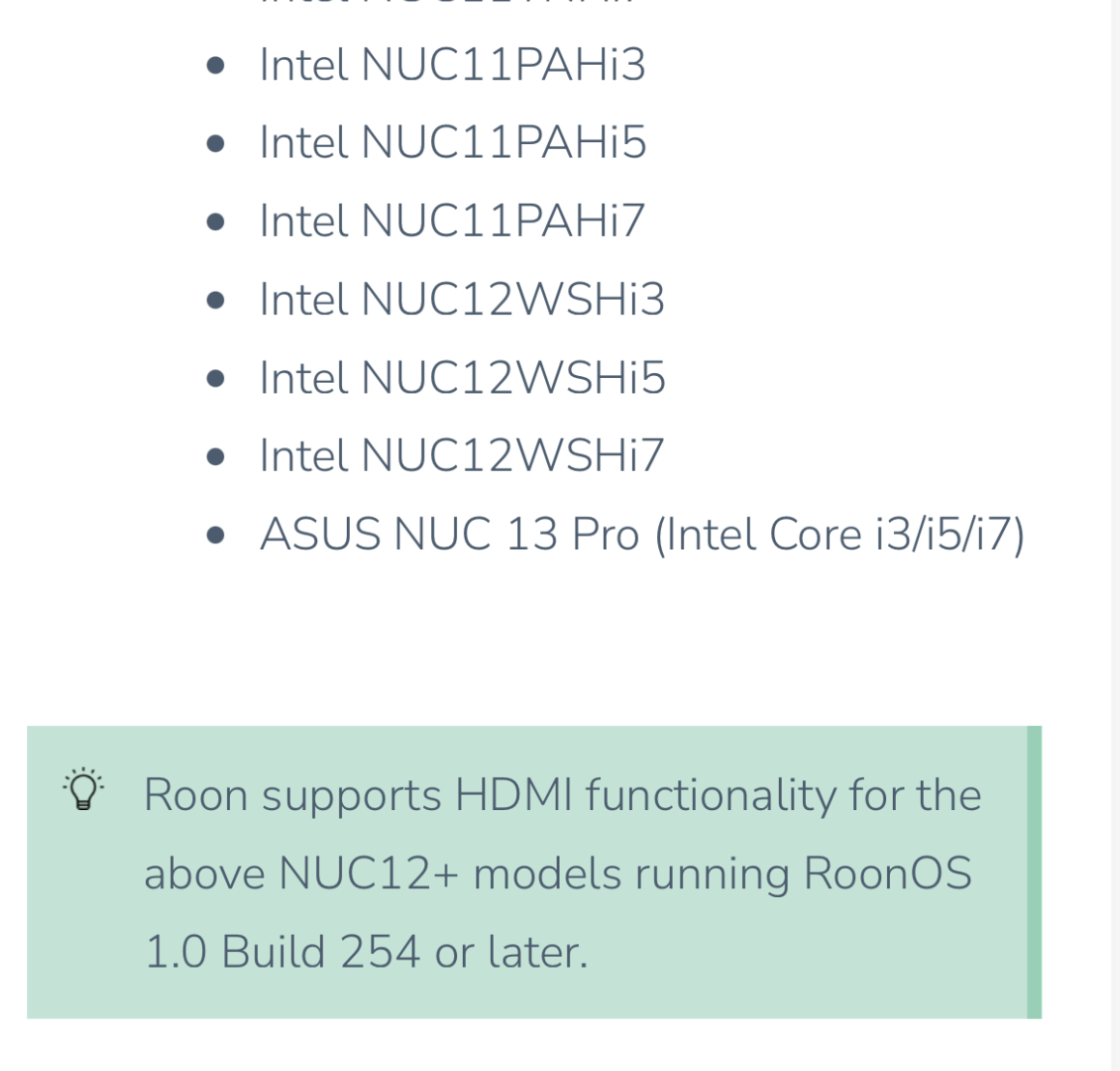
Hi! Looking for a bit of help as I struggle with HDMI out issues…
I built a new ROCK server using a NUC14 (ASUS NUC 14 Pro Tall Barebone with Intel 14th Gen Core 3 100U). Connected via HDMI to my Denon AVR-X4200. Migrated from my OSX Roon server to the ROCK and everything seems fine, except I don’t see any options for HDMI output in Roon. The ROCK endpoint doesn’t show up at all in the Audio tab of Settings. I went back and verified that I have the newest BIOS from ASUS, ran through the BIOS setup instruction from the ROCK install guide, and checked that my NUC BIOS has the audio features enabled. Also tried swapping my HDMI cable between the two physical ports on the NUC. But nothing shows up as an output. Has anyone had success with NUC 14 and HDMI output? Curious if you did, did you enable (or disable) ARC/CEC? Ive tried both, but neither seemed to make a difference. Feel like maybe I missed a step to enabling HDMI output on the ROCK?
Thanks. I was following the threads about the changes for NUC12+ and it appeared that some folks were successful with the 13/14/15s as well. But you’re correct to point out that according to this list, I guess a 13 is the newest unit one should use.
There were success reports for the NUC14 and I believe 15, too, for general operation, but IIRC (and I may be wrong) these users didn’t have a need for HDMI.
Not sure if this will help (AI response on HDMI for NUC 14 so take with a huge grain of salt):
TLDR: HDMI audio appears tied to graphics driver, so with no monitor it is disabled. A dummy plug might make it work or with certain NUC models a BIOS setting?
Yes, you can absolutely achieve HDMI audio on an ASUS NUC 14 in a headless (no monitor) setup, but it typically requires specialized, inexpensive hardware to trick the system into activating the HDMI audio port.
Without a physical monitor plugged into the HDMI port, the NUC’s graphics driver often disables the audio controller because it believes no output device is connected.
Here is how to set up audio over HDMI for a headless NUC 14:
The Essential Solution: HDMI Dummy Plug (Emulator)
What it is: A tiny, inexpensive ($5-$10) connector that plugs into the HDMI 2.1 port on the NUC.
What it does: It acts as a “headless HDMI adapter” or “ghost display,” sending an EDID (Extended Display Identification Data) signal to the NUC, fooling the graphics driver into thinking a 4K or 1080p monitor is attached.
Result: The GPU stays active, and the OS will list the HDMI output as an active audio device.
Alternative: BIOS “Headless” Settings
Some NUC BIOS versions allow you to force the display output on even without a monitor.
Look for settings under Advanced → Video → Display Emulation and set it to “Headless >Display Emulation” or “Persistent Display Emulation”.
Drivers and Software Configuration
Install Intel Graphics Drivers: Ensure the latest graphics driver is installed, as this handles the HDMI audio handshake.
Audio Output Setup: In Windows (or Linux), open sound settings and set the default playback device to the HDMI output, which might be named after your TV, AV receiver, or “Intel Display Audio”.
Potential Pitfalls
Linux/Proxmox: If you are running Linux, you may need to use amixer to explicitly set the active output or use a dummy plug as mentioned above.
Older NUCs vs. New NUC 14: While older models sometimes struggled without a monitor, the ASUS NUC 14 Pro supports DisplayPort/HDMI emulation.
Using a headless HDMI dummy plug is the most reliable, “plug-and-play” method for ensuring 24/7 audio over HDMI in a headless setup.
Thanks! I do have the HDMI connected to a video source (passing through the AVR to my display) and I see the console for the ROCK, so its definitely activating the HDMI port. But maybe that is where the trouble is coming from… Note sure if ARC or CEC could be messing with the audio channels, or sending them through the display vs sending them to the AVR. At any rate, I think the experiment with the NUC 14 was a bust, and I’m back to looking for a Roon ready streamer device like a zidoo/eversolo. They seem to be the best supported endpoint for playing multichannel DSD audio over HDMI.