Yup. I also do have a complete other VLAN for IoT and Roon could have one of it’s own. But for some reason, even though there’s no firewall between the two VLAN’s, the mobile phones couldn’t find the ROCK.
Have you configured the mDNS proxy to bridge between the VLANs? Multicast traffic doesn’t generally traverse layer 2 subnets of its own volition.
1 Like
I have. Still doesn’t work the way I’d like it to. Working on it. I have Unifi router and perhaps there’s something else still missing. On the other hand, I am now also working with the RoonLabs team to solve, why my ROCK lost my PC even though they are in the same LAN (with only a plain switch in between, not even the Unifi)…
Work continues…
As I pointed out earlier, what you’re trying to do is challenging.
I don’t do it now, but I’ve done it in the past. It’s a pain in the butt. My network has been end-to-end UniFi for many years.
You have to run the proxy on a machine that is on both vlans. There are multiple ways to do this. When I did it, I did on a box that was multi-homed (wired connections) to both vlans. I ran Roon in a docker container on this machine with host networking. I ran the proxy in another docker container, on the same machine, also with host networking. When configured correctly, a topology like this will allow Roon to discover endpoints on the other vlan.
But if your phones and iPads and computers are on the “trusted” network, and you put Roon on that network, your devices will see Roon but they won’t see the endpoints for anything else you might want to do with them (admin stuff, firmware updates, using Qobuz Connect, etc.)
You can fix this with a bunch of policies in UniFi.
If you do any home automation, you have a similar set of issues. Again, you can fix this with a bunch of policies in UniFi.
Whether or not any of this is worth it for you is a decision you’ll have to make 
I have my Roon server and the audio devices in my IoT VLAN and all the remotes, which run on phones and laptops, in the default VLAN. There’s no been no need for a third party proxy or separate machine for about a year now, quite rich and flexible mDNS proxy functionality is provided by the Unifi Network app since 9.1.118:
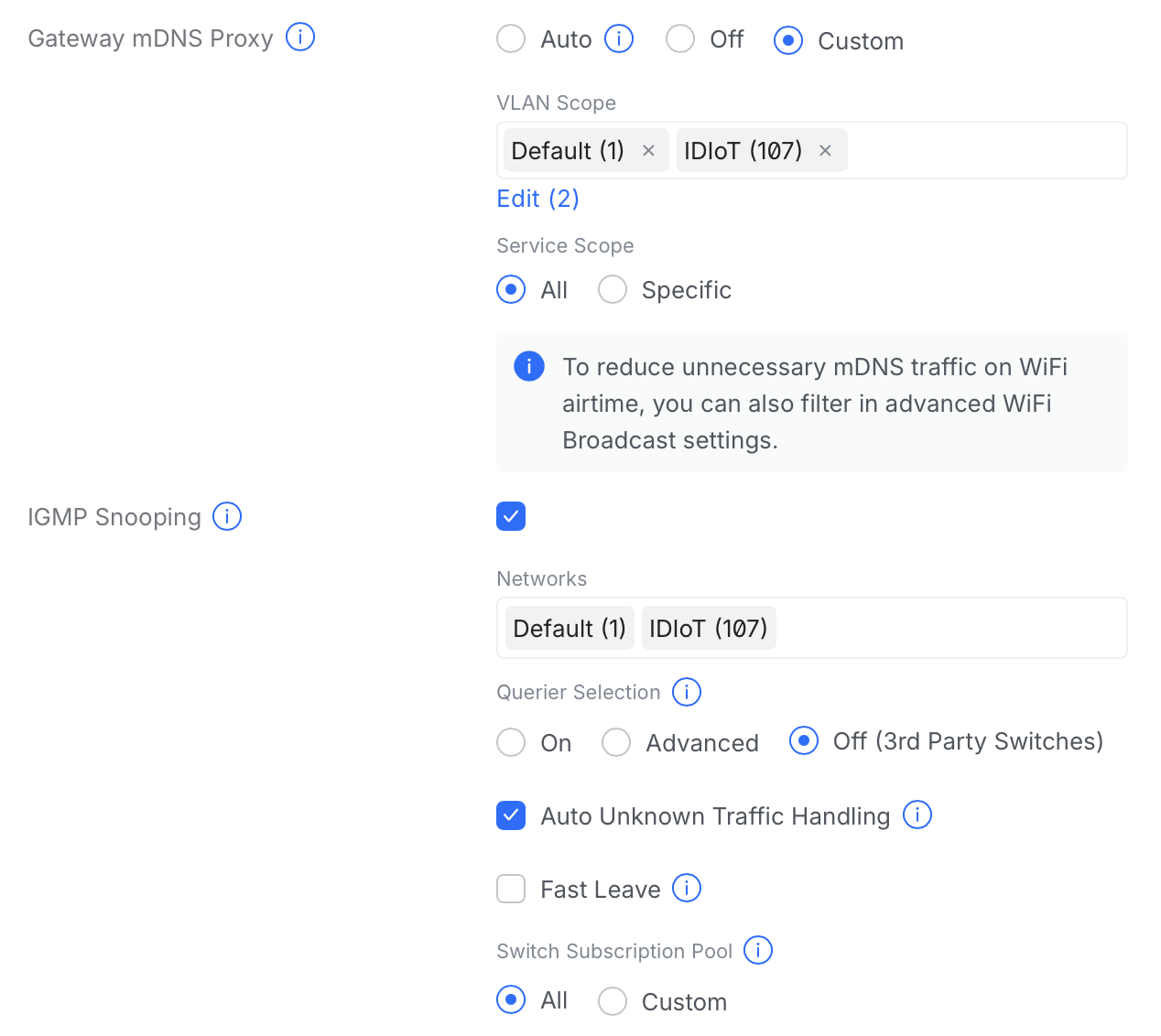
Yes, you need to define some policies, but these are much simpler to implement with zones.
I missed this when it happened! Thank you! I looked at the 9.1.118 release notes and, sure enough, it’s there (along with hundreds of other things).
I admit I haven’t revisited all of this since the introduction of Zones. I used IP Groups before which didn’t have the improved UI but I believe the essentially was the same concept. All of this can be accomplished with time and intent. I have something like 80 client devices which makes it challenging but probably also necessary.
Based on this, I may give it another run.
Thanks again!
1 Like
Their EdgeRouter line has had this ability for the better part of a decade. I don’t use it for Roon but for allowing the guest VLAN to use specific AirPlay and AirPrint devices on my main VLANs. All my APs and all but one of my switches are UniFi. My routers are ER-4s.