I’ve been trying, with mixed success, to isolate my networked music components on a vlan. I’m interested in anyone’s experience or advice on how to go about it.
The best approach I came up with was to run my Roon core on a dual-homed Ubuntu machine. One port was on the main vlan, on which our client devices like Macs and phones live, the other on a “music” vlan on which my Linn, BlueSound, KEF, Naim, Raspberry Pi, and FiiO devices live.
This mostly worked but because I couldn’t bind Roon’s ARC to a specific subnet, it was unreliable across reboots (at least it seemed to be in limited testing). On top of that, I had enough issues with Roon on Ubuntu to cause me to want to back out and move back to ROCK.
So now I’m back on Rock and I’ve moved all music stuff back onto my main vlan, but I don’t like this approach.
Anyone figure this out? I"m on UniFi gear end to end. This isn’t particularly relevant but I do also have an IoT vlan where HomeAssistant and many home automation / IoT devices live. That all works fine. It’s just the Roon stuff I can’t figure out.
I’d be very happy if I could get Roon, itself, and all of the music gear onto a vlan but that’s tough because the client devices need to be discoverable by Roon. I don’t think that can be solved with firewall rules alone.
I have Roon on its own vlan, rock and endpoints that won’t cross vlans so Roon Ready and my Marantz amp using RHeOs extension to work at on. It . I am end to end UniFi.
I have some chromecast speakers that live on a different vlan and Roon finds and can play to these and via airplay to the same speaker. This is on my video lan that Plex is on.
Remotes work on any vlan to control them. Oddly I do find I can also use my work Mac as an endpoint as well and that’s on my regular vlan. Had it like this for a few years now.
Each vlan points to the router via its vlan range so 192.168.1.1 is my main 192.168.2.1 is IoT, 192.168. 4.1 for Plex vlan and 192.168.5.1 for Roon. No issues with arc routing at all. All just works. Only one that is locked down is IoT that can’t talk to any other vlan only via the internet which is now my Hue and Harmony work.
You need to set the ports to the required vlan, I don’t rely on tagging as I don’t trust all devices support it. So I assign the different ports on the switches to feed the devices the correct vlan. All trunk connections should be set to all so they transfer it all.
I’m pretty close to the setup of CrystalGipsy. All Roon endpoints in a dedicated “Audio” vlan. My mobile remotes (iOS) are on a “WiFi” vlan and my Mac is on a vlan for wired clients.
My core is running in a docker on a Synology RS1221+ NAS. The NAS itself is in a services vlan, but my docker containers for Roon and several extensions are all on a Macvlan, each with their own fixed ip and using a dedicated NIC connected to the “Audio” vlan.
ARC is configured using a manual port forwarding to the IP of my roonserver docker container.
Admittedly I do not (yet) have traffic locked down between my vlans.
My iOS devices are only occasionally seen as an endpoint but as I’m only using these as remotes this is not an issue for me.
@Simon_Arnold3, @s73nm - I’m trying to do this with all Roon and Music related devices as isolated as possible from the “Main” vlan.
A bit more about my network - I have 3 vlans and 3 corresponding wireless networks. @Simon_Arnold3 wrote “I don’t rely on tagging as I don’t trust all devices support it”. I’m not sure wha this means if you’re on end to end UniFi, as I am. It’s only the switches/routers that need to support vlans and, by definition, you’re using tagging if you’re identifying ports as being bound to specific vlans. Tagging a port causes the switch to insert vlan tags into ethernet frames and then the switch itself, as well as all other switches, respect those tags and apply your routing rules.
My vlans are all fully isolated from one another with a firewall rule. The isolation rule is preceded by a set of allow rules. Multicast DNS is allowed between all of my networks.
With isolation in place, having Roon on a different vlan than clients of course does not work.
I just tried something that I haven’t tried in a while which is to fully allow all traffic from the Roon core to the main vlan (as opposed to just the ports I though I needed). This actually does seem to work.
I thought I just needed ports 9003 (UDP), 9100-9200 (TCP) but it looks like Roon is trying to talk to clients on some other port(s) and UniFi’s firewall logging isn’t detailed enough to tell me what that port is.
I’ll play with this some more today. I may just live with my core having access to my main network. That’s better than having all of the BlueSound, Pi, KEF, etc. stuff having access.
I don’t want to go to deep on this. I had what looked like a persistent memory leak in Roon that may have been the cause of recurring playback issues. Reboots temporarily resolved these issues. I also had Ubuntu issues that were specific to this particular Ubuntu box (I run others) and I got tired of adminstering the thing . This is all on a NUC with an 11th gen i7, 32GB, big SSD.
I should have mentioned in my previous post that I also have a rule that allows all Main → Music vlan traffic. That rule, plus the rule that specifically allows the core’s IP to access the Main vlan seem sufficient to get this working.
If anyone has insight on the port issue, I’d love to hear about it.
I’ve tried to connect ROCK to Unifi VLAN, Roon library is able to find SMB library from another VLAN.
But in case of Roon Client via another VLAN (Wifi), the client can’t find out Roon Core.
I want to know how to connect Roon Core and client on VLAN. Is it possible?
Roon detects its endpoints from its side and from what i see in the logs it uses random high ports in the 30000-60000 range.
All my normal endpoints are in the same VLAN but my phone, laptop, surface and DAP are not.
Since i have rule that blocks all inter-VLAN traffic and blocks invalid states, i had to allow the Roon server to access the client VLAN via this port range for new states.
I have a rule on my UDM Pro to allow establised and related replies from a group of IoT hosts (Roon/Sonos etc) back to the private VLAN where my i-devices live for controlling music playback.
I also allow multicast DNS between the VLANs so that client apps can find devices on the IoT VLAN.
UDP Broadcast packets don’t cross broadcast domains. A VLAN is a broadcast domain.
If you need Roon and Roon endpoints on different vlans, you might want to run udp-proxy-2020. It’s a complicated solution but it’s one way to get it to work:
Roon doesn’t release a docker image but it works fine on Docker if the image uses a supported flavor of linux. The most popular image is this one, which runs on Debian slim:
With regards to multiple NICs…I recall running Roon on a multi-homed linux box connected box. I think it binds to all the interfaces, but I wouldn’t bet on it. I’m also not sure this would solve your issues.
I’m not doing this any longer but my solution to all of this was to run both Roon and udp-proxy-2020 in docker containers on a Synology NAS with 4 network ports. My docker setup was complex - a macvlan for each port, each port on network vlan. Udp-proxy-2020 routing the UDP packets across the vlans.
Even with this, I had occasional Roon issues and now Roon and all controllers and endpoints are on my default vlan. Still have iot stuff isolated on a different vlan but Roon and its friends get to be on default.
I have a full Unifi setup and would like to have a separate VLAN for Rock, NAS and all the Ropieee’s in it. This way, also the guests (some of the kids visiting us) could use Roon from their mobile phones + & my wife and I from our trusted VLAN.
Simple question: do you think this would solve the connection issue between Remotes and Rock? I also have a computer that plays as an end device.
Some people have been able to get Roon to work in vlan environments using upd-proxy-2020. Whether or not it helps with Roon’s ability to find, connect, and remain connect to endpoints is going to be a function of your topology including where you run the Roon server and and where you run udp-proxy-2020.
That’s not the whole story, though. You’re also going to have to create a bunch of firewall rules on your UniFi router to make it possible for the phones, computers, tablets, etc. that aren’t on the music vlan to be able to talk to the things that are on it. Not just Roon but the endpoints and other things that you’ll want to be able to access for config/admin purposes.
You’re going to have to try it to understand if it’ll work for you. It doesn’t for me. I’ve tried multiple times - I can get udp-proxy-2020 work as intended by running it in on the same machine as Roon. That’s not the issue. It’s the rest of it. And it’s not for lack of competency.
In my case, I could go for a solution where the whole “Roon environment” is in one VLAN so no interconnecting issues there. The problem is how to control it if the remotes are in another VLAN. If I could only solve that, it would be a great thing. Need to study further…
Agree. I saw already some parts of it. For a moment, I was able to contact Roon from my mobile (in different VLAN) and it looked stable. Then, testing a restart and voila - connection lost.
I have all my “personal” devices (roughly speaking phones, tablets and laptops) on one VLAN and all my “headless” devices (generally IoT devices but also my Roon Server, all my music devices and my NAS which among other things contains my ripped music, etc.) on another. Firewall rules stop anything in the IoT VLAN initiating connections to each other or anything in the personal VLAN, anything in the personal VLAN can initiate connections to anything. I have 7-8 Roon devices and probably the same number of remotes and everything works fine. Is that what you are trying to achieve?


 . This is all on a NUC with an 11th gen i7, 32GB, big SSD.
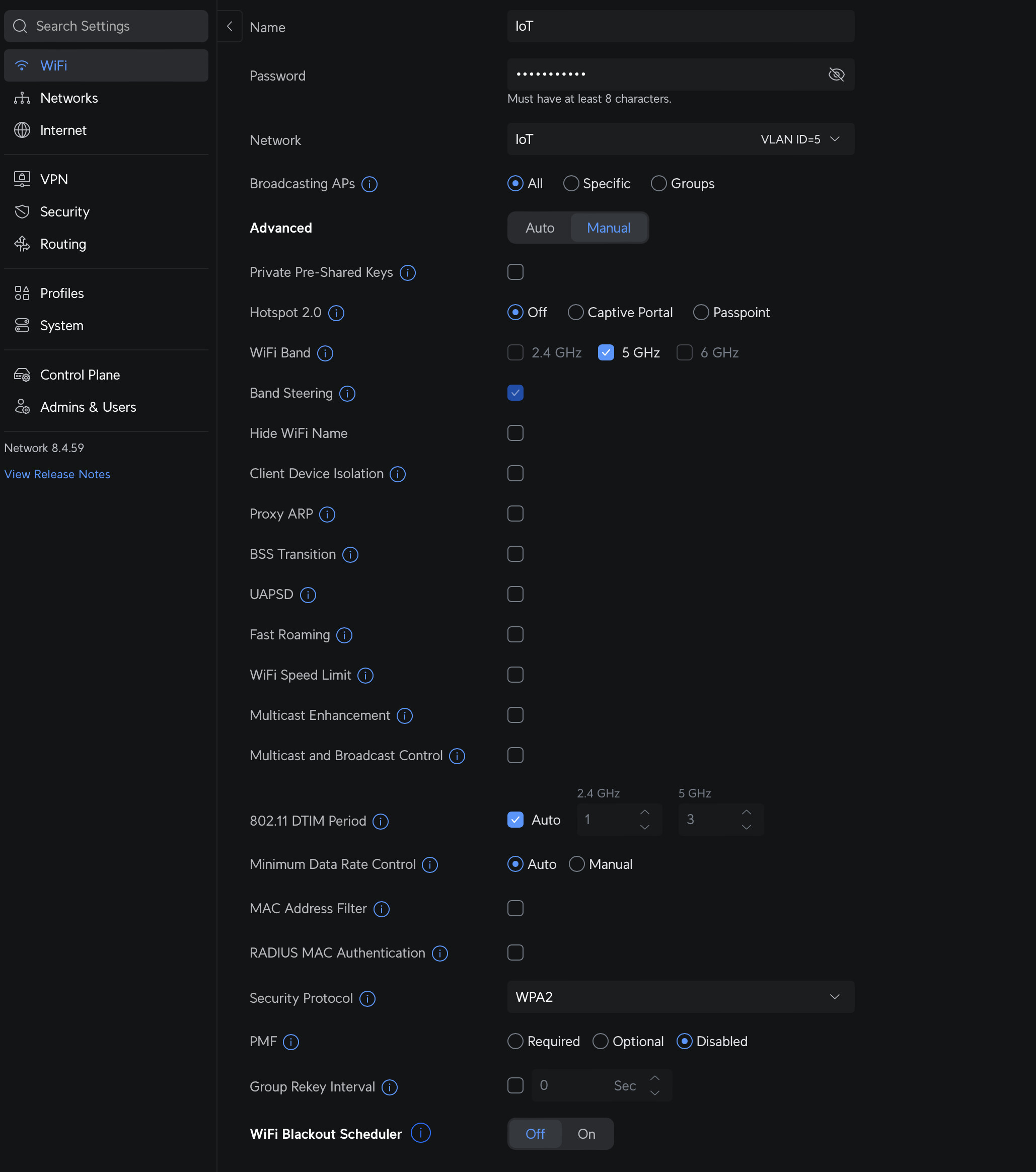
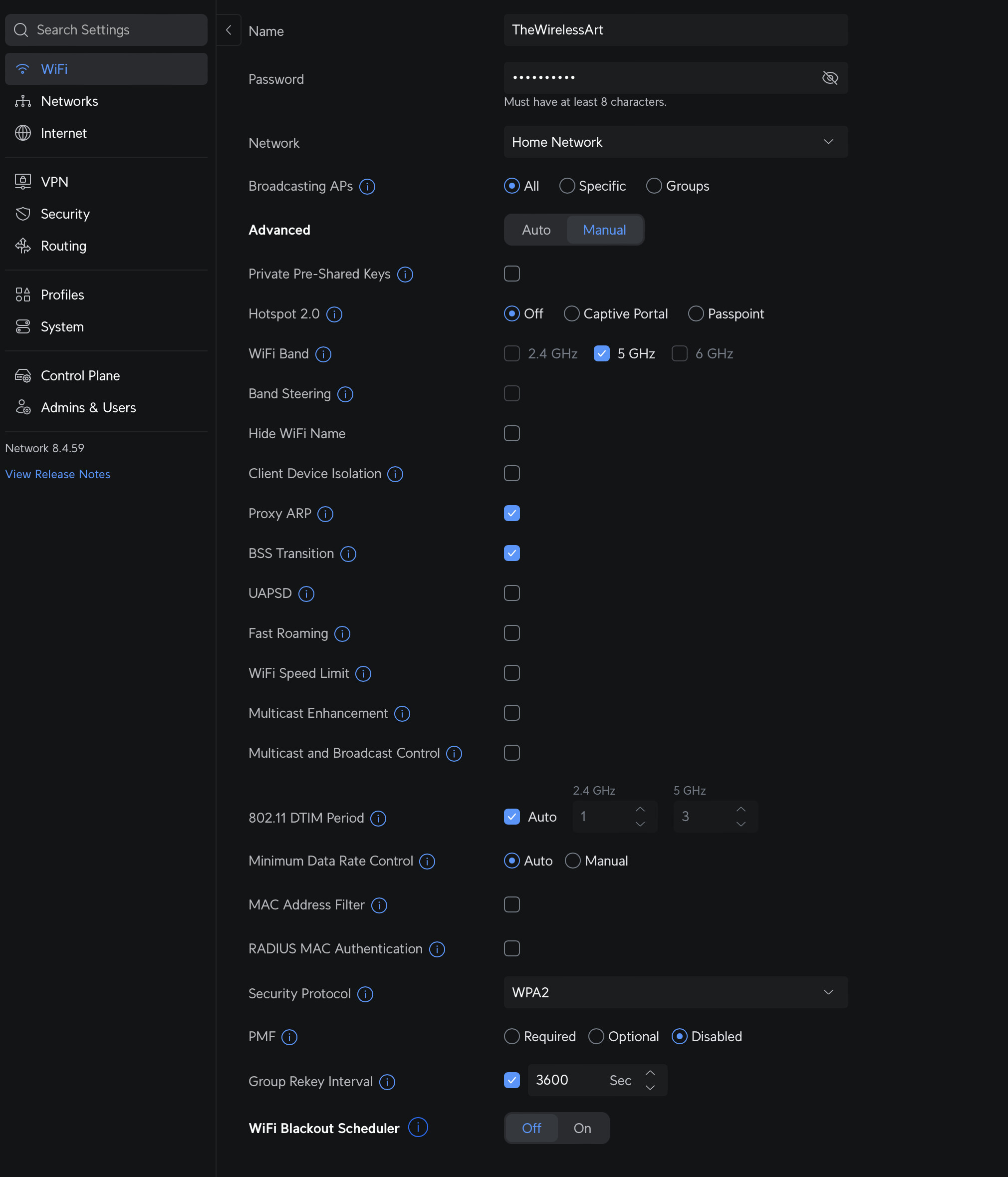

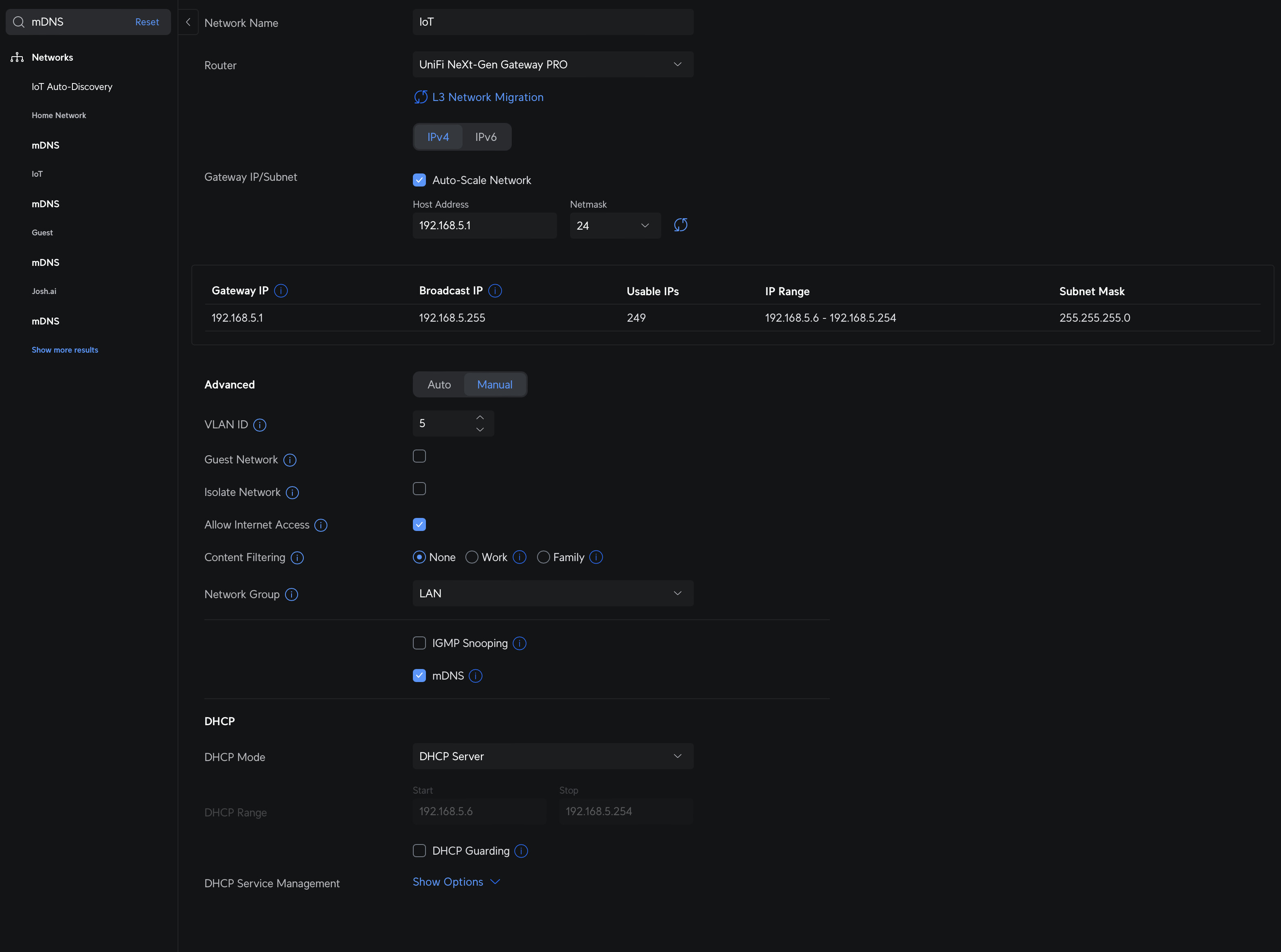


 You’ll be surprised at how challenging that part actually is.