At the moment I have a Synology NAS DS1520+ with Roon ( Rieke ) , and for the past few months I found it slugish, even dropper seconds of music from time to time. Would it be better for me to move to the docker version ? Any advice ?
Intel Celeron J4125 4-Core 2.0 GHz, Turbo up to 2.7 GHz
How many tracks in your library? And how much RAM do you have? And is the Roon database on an SSD? If it’s caused by one of these things, Docker won’t help.
That’s not a lot, in particular if the NAS also has other tasks running. Can you see memory usage on the Synology in the system control center? Is it swapping?
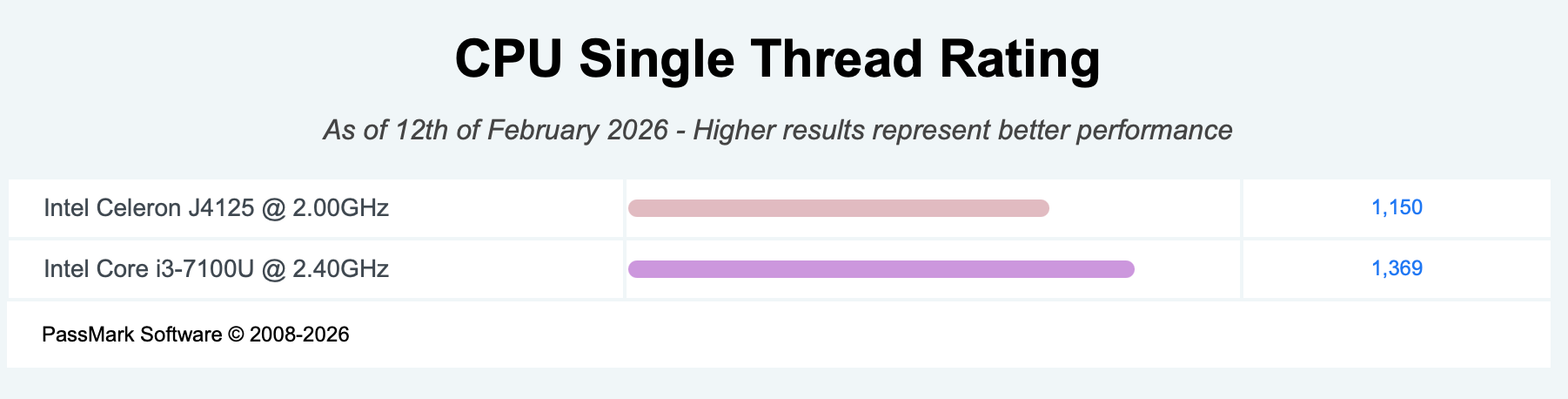
As for the CPU, it’s not super fast and, again, the NAS also has other background things running. But then your library isn’t huge. This is your CPU at the top compared to the CPU in the original Nucleus, which is rated up to 100,000 tracks (but of course has the advantage of not doing anything else):
OK. Other Dockers running probably doesn’t help If you are familiar with Docker already, you can simply try it out and see.
If the slowdown comes and goes, it may be caused by background processes within Roon (when it does database maintenance). There were many reports about this. A few days ago, a new test version has landed in Early Access where the background tasks can be scheduled to a fixed time window, outside the times when Roon is actively being used. This might help.
After stopping few Docker the CPU is at 2% and the Ram is at 72%. So I am not sure it will make a huge difference. But who knows…I ‘ll test that for a start
@Suedkiez already gave great advice. I’ll add a few small things.
You won’t get a performance improvement from moving to Docker. Don’t move to it for that reason.
We don’t know what your issues is. It could be CPU, RAM, or I/O. So here’s some generic information about improving performance on your device but without knowing the actual issue, it’s not clear which, if any, would help.
The DS1520+ ships with 8GB - 4GB onboard and 4GB on a DIMM. You can upgrade the DIMM. If RAM is all or part of the issue, that might help. Roon likes memory.
If CPU is the issue, you need to run fewer things or upgrade your device. It sounds like running fewer things didn’t help.
I/O is interesting and worth investigating. Your device has two M.2 SSD slots. These can be used for “cache”. To do this, you put an SSD into one or both slots and then configure the SSD to be used as cache. If you put just one in, it’s always a read cache. If you put two identical in, you can make it a read/write cache. You can also tell Synology to cache all file system metadata in the cache (if you’ve formatted your drives with Btrfs).
The nice thing about using SSD as cache rather than as storage is that you get performance benefits for things not just in the SSD.
If you want to experiment with SSD, you should probably buy the Synology SSD drives, even though they’re expensive. In fact, Synology may only work with those SSD drives. You want these because they are compatible and they support the required features including Power Loss Protection (PLP) and you definitely want that.
I missed this earlier. This is very much a requirement for good Roon performance.
We strongly recommend 4GB of RAM and an SSD for the Roon databases . Your music files can be on spinning disks, but ideally the Roon database should be on an SSD. This one optimization can provide the single biggest improvement to Roon’s performance and user experience.
You can either configure the database to be on the SSD or you can do the caching strategy as @gTunes outlined, I guess.
I came in here late. I am sorry. The advice you’ve been guided to by @Suedkiez and @gTunes is spot on. You can read more about my recommended configuration in the article @Suedkiez linked to up above. Please write back if you have any questions. The community is glad to help!
 If you are familiar with Docker already, you can simply try it out and see.