Roon seems to require a lot of work

Hi @paultaylor, @Mike_O_Neill

Yes… I was only referring to macOS. Sorry if that wasn’t clear.

We had this discussion (Yate vs the rest) some time ago, didn’t we :slight_smile:

I definitely don’t want to argue or be in any way combative.

My original comment was intended to steer anyone new to tagging in the direction which my experience (humbly, I hope) tells me is most likely to offer the most flexible and productive outcomes, given Yate’s extremely comprehensive feature set. Yate’s Actions feature, for example, means that the software can do almost anything which isn’t already available from the ‘built-in’ menus (and that’s not much!)

Each program has its merits; I too wish you luck with SongKong (which I also have, thanks!). But because Yate does everything which I think most of us here could ever want in terms of tagging, has been around for some time, is well documented - and so is used by many (here) I ventured the term ‘standard’.

But, as Barry often says, each to their own :slight_smile: .

1 Like

Using SongKong fixes metadata issues extremely well… for me. I don’t believe I am experiencing any of your issues…. My only complaints these days (and if you asked me last month, they’d be completely different …mainly grips about ARC) is errors claiming “music is loading slowly” and then the music giving up and then jumping to the next song and then music loading slowly, jumping to the next song for several songs before it finally plays through a complete song. This is on a local gigabit network playing songs on a local hard drive connected directly to the Linux Roon Server via USB 3.0. If I leave the house and use ARC, seemless playback with no issues at all… hallelujah after recent fixes to ARC. Coincidentally prior to fixes to playback sluggishness issues with ARC, Roon playback at home was never an issue. Crazy, but seems like there is always an issue somewhere. This frustration has led me to using Plex most of the time. Was using Plexamp on the road when ARC sucked and used Roon at home… now, I use Plexamp at home (with flawless playback and loving the Guest DJ functionality) and ARC is now winning me over for on the go playback. So funny (and frustrating) but hopefully someday I can just use Roon for in home and on the road.

1 Like
  • After a rescan, forced or automatic, some albums do not show up in the Added part of Recent Activity on the front page - but they are in the collection anyway, I just need to search for them. - Please remember that unlike other music servers which are linked to a single source, ROON is a Database which needs time to sync (and resync) to multiple sources. Sometimes this can take more than a day to fully complete. Just be patient.
  • Many, many albums do not * After a rescan, forced or automatic, some albums do not show up in the Added part of Recent Activity on the front page - but they are in the collection anyway, I just need to search for them. - see previous comment
  • Many, many albums do not cross-link in the system, meaning that they are not shown on the pages for the composers, for instance, and it takes a number of strange activities to bring some of them in place - even though it doesn’t work for all of them. Activities such as removing the composer from an “Ensamble” role of the album, or changing the original file’s compuser name from “First-name Last-name (born - dead)” to just the name, or adding the composer as a “Primary Artist Link” on the album - or whatever change can work for the individual album, which is not the same each time.
  • Albums are often split into several smaller albums when being scanned, resulting in, e.g., 3, 4 or even more albums that I then have to combine into one. Albums with multible CDs are almost never recognized as such but will need to be combined by me manually (with hundreds of those it actually requires a serious amount of work). - If your collection is mostly ripped and you are using DBPower Amp (or similar) to copy then it’s important that you get the Meta Data correct before you save to your library. ROON provides the ability for you to select your own preference for Metadata - theirs or your own and is very granular on what you can select (e.g. their artwork but your credits) DBPower amp and ROON both have settings on how you combine albums resulting from 2 or more Disc’s .
  • Many albums have been equipped with extreme amounts of credits - several hundreds - including lots of composers, so that they show up in the lists of composers who had nothing to do with them. See previous
  • There is often somewhat of a mess in the metadata, which doesn’t follow a particular style - meaning that I must adjust the metadata for each and every of thousands of albums.-link in the system, meaning that they are not shown on the pages for the composers, for instance, and it takes a number of strange activities to bring some of them in place - even though it doesn’t work for all of them. Activities such as removing the composer from an “Ensamble” role of the album, or changing the original file’s compuser name from “First-name Last-name (born - dead)” to just the name, or adding the composer as a “Primary Artist Link” on the album - or whatever change can work for the individual album, which is not the same each time. - While I have not experienced this myself i see how this could be a problem, again there are settings that may help.
  • Albums are often split into several smaller albums when being scanned, resulting in, e.g., 3, 4 or even more albums that I then have to combine into one. Albums with multible CDs are almost never recognized as such but will need to be combined by me manually (with hundreds of those it actually requires a serious amount of work). See previous
  • Many albums have been equipped with extreme amounts of credits - several hundreds - including lots of composers, so that they show up in the lists of composers who had nothing to do with them. - See previous
  • There is often somewhat of a mess in the metadata, which doesn’t follow a particular style - meaning that I must adjust the metadata for each and every of thousands of albums. See previous

**ROON has an excellent knowledge base try **
https://help.roonlabs.com/portal/en/kb/articles/editing-and-grooming-your-collection#How_editing_impacts_future_metadata_improvements
**Or **
https://help.roonlabs.com/portal/en/kb/roon-labs-llc/your-music-library/metadata-file-tags

That is pretty normal behavior as roon might be noticing only later that the added album is actually an album which was in the library already or a part thereof.

Are we talking about identified albums or unidentified ones? With unidentified this is to be expected if they do not have local tags accurately matching composer´s name and other details.

With identified albums the problem might lie in metadata contradiction: If a composer is assigned both as composer and albumartist or primary artist, the album disappears from the ´Composed by´ section. Easy fix: remove the composer from all credits except from ´Composer´.

Would rather recommend the opposite as classical composers not having a ´main albums´ section on their page are most likely to have this particular album removed from their page if they are assigned as a primary artist.

That sounds like a strong hint that disc number tags or subfolder names for all the discs are improperly named causing roon to assign a wrong disc number to one or several discs of the boxset. Once this is fixed, most of multi-disc boxsets are correctly identified according to my experience. Sometimes fixing this issue might require re-tagging, moving away the boxset, cleaning up Roon library and importing again.

Maybe because they are falsely identified as a boxset which contains the actual album? Had this case yesterday with ´Cosi fan tutte´ by Gardiner:

Metastasio, Schikaneder and Bizet - obviously nonsense originating from a multiple-album boxset. There we have the wrong album being used for metadata:

Choosing the first one instead fixed everything.

That is a problem which is definitely occurring with my collection as well but when trying to narrow it down, it in many cases turned out to be originating from local metagarbage which roon has chosen to intertwine with its own. Had a lot of classical albums (boxsets) which were ripped using EAC, foobar or iTunes/FreeDB (long before I had roon) leading to an absurd combination of 100s of tags and credits. Either re-tagging with MusicBrainz data or rigorous merging of garbage artists with their original entries have helped in most of cases.

1 Like

There are many things that Yate cannot do, but my point was just about the use of the term Standard so happy to leave it there.

It sounds like the id3 tags for your music files are really messy. I would recommend spending the time to clean up your collection using something like Tagscanner.

The only thing above I get with my collection is that Tidal and Qobuz don’t always align with my own collection and show up as double. That’s it though.

Everything else is perfect because my tags are extremely tidy.

I find Tidal and Qobuz seem to be organized properly in Roon. I enjoy the very high-quality sound on my Lumin U1X

It sounds like the id3 tags for your music files are really messy. I would recommend spending the time to clean up your collection using something like Tagscanner.

The tags are probably of a somewhat mixed quality, being created with different ripper software over time, without too much attention to the details. What I did before I got Roon was to select the albums I wanted to listen to from the folders view in first the Sonos app, later mainly the HEOS ditto. For this use, most tags were irrelevant.

But walking through all files is a big job, and it is only now that I understand the need for it in order to utilize Roon fully. I had a somewhat naive expectation to Roon that it could recognize the albums and display good information about them - but now I know that this comes from 45% own preparation, 45% of other people’s work with sending in metadata to a couple of source databases for Roon, and then only perhaps 10% of Roon’s own work with bringing this together into a good user experience.

There was a popular song being playing in the radio very often during my young years, before ripping and before Roon, where the main theme was something like “This, the priest didn’t say anything about when we stood there” - referring to a marriage and all of its trouble. Now, I am not married to Roon, but still, details unknown from the beginning have started to become apparant :slight_smile:

The system Roon tends to become a hobby of its own, rather than just supporting the music listening hobby. I am not necessarily against that, but it is a surprise.

Thanks for the hint about Tagscanner. There has been many tools mentioned in this thread, and I have started using some of them (dBPoweramp actually being one of them, even though it wasd from another thread, and now MusicBrainz and Picard), and will have a look at Tagscanner as well. I also still own a license to MediaMonkey that I used during some years, and it had/has very good features for bulk operations on tags, so it is still in my pool of potential Roon-improvers.

With the help of these tools, I can probably get a perfect Roon experience after just a few thousand hours of tag adjustments :smiley:

1 Like

Sounds like a sound explanation of the extra weight of metdata on some albums - and definitely, with a continued effort, sooner or later it will become good.

Is there any risk that Roon will ever by itself update album information (and them perhaps bring back in some unwanted tags)? For instance, when adjusting some metadata in the music files themselves, or perhaps just during an occasional round of cleaning and adjustning, perhaps connected to software updates or the like…?

I was lucky with the first one that became available in Roon after just two days - now adding more albums. And using Picard to send in the data makes things significantly faster, so goo that I discovered that tool :slight_smile:

1 Like

Thanks - the documentation may be to-the-point but it generally lacks information on exactly which field to edit, on which page. Reading the “Recording Artist” style-guide you linked to tells me what to put into the field, but not which field to put it into… (at least, I cannot see it).

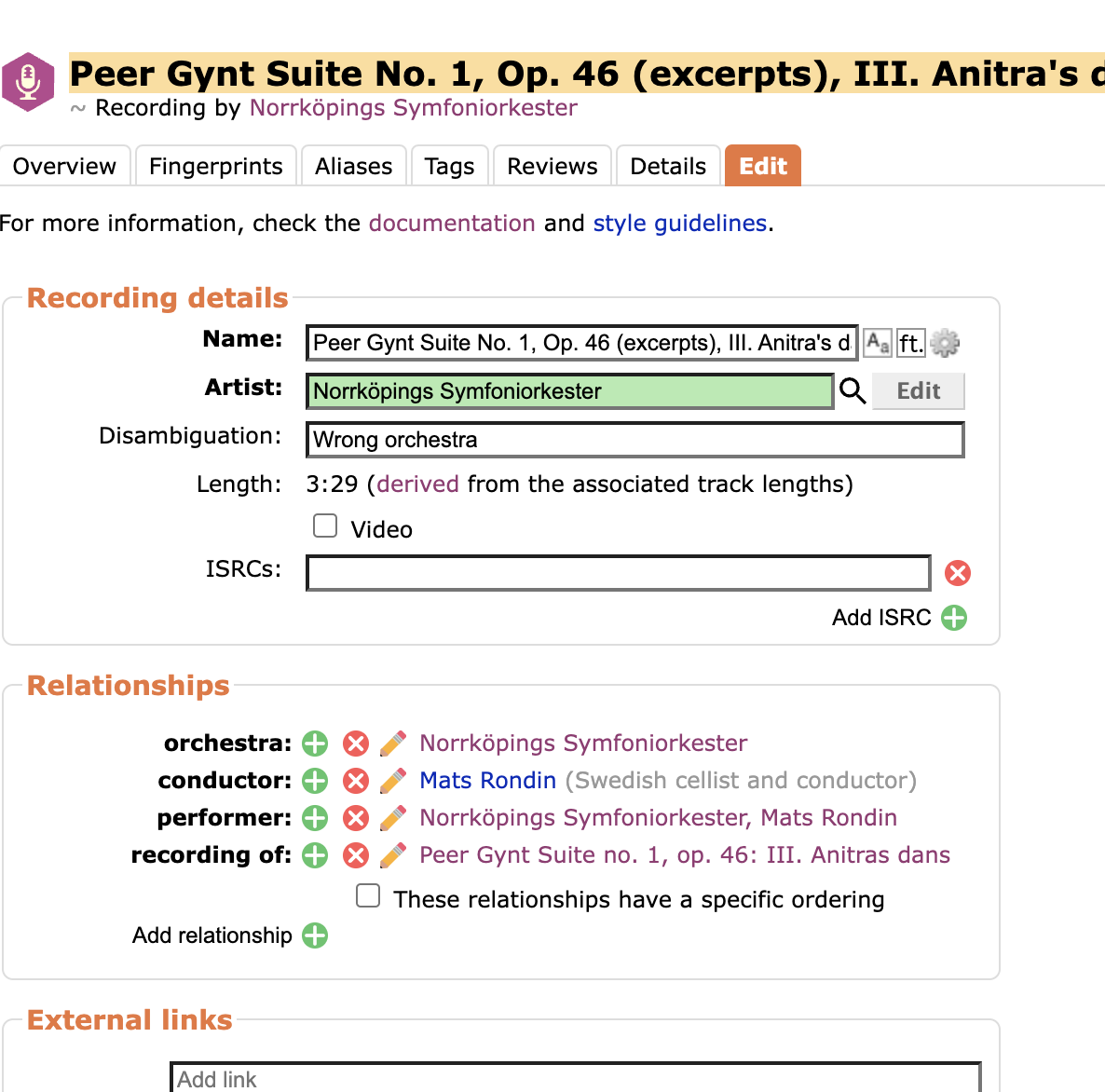
I want the recording artist to be the same as the neighboring track, “Norrköpings Symfoniorkester, Mats Rondin” - Norrköpings Symfoniorkester, Mats Rondin on the recording https://musicbrainz.org/recording/4b0c4ad9-91e7-487b-8b48-c0ea7a4ab0f9

But the main Artist field on the Edit tab will only allow one artist, and I cannot find a proper Relationship tag that will let me add a “Recording Artist” - so I am a bit lost here :confused:

As it seems, I tried with adding a performer relationship, but it doesn’t fit the bill. Also, that comment with “Wrong orchestra” is not relevant and should be removed, but I cannot do that - It comes back again. How to fix that?

I am sure that it is all very simple when I first know what to do, but until then…

Technically - d´accord! If we are talking about pop, rock and jazz which is not overly old (publishing date in the CD era) and the way the metadata is integrated, I would also agree that the browsing experience in roon is really great with just some very rare mistakes (like artists of the same name being merged or mixed up).

Problems occur when you switch to classical music and jazz recordings of the analogue era using roon´s advanced browsing features besides from just main artist and discography. Particularly composition details and lists. I gave up on Tidal when I was looking through its list of recordings of some popular Mozart compositions. Roon was showing more than 1,000 versions but many turned out to be lonely movements of that composition, classic recordings existing manyfold with several different recordings dates and a chunk of interesting recordings disappearing the moment I activated ´show only complete recordings´ (although they were complete). With classic Jazz many albums had incomplete metadata with no composers assigned.

That’s not a flaw of roon but an outcome of roon relying on rich, consistent and accurate metadata. Particularly TiVo seemed to deliver incomplete data for many classic recordings, MusicBrainz does not offer everything I wanted, and Tidal was seemingly delivering wrong information at times.

I’ll try an explain it a different way. MusicBrainz isn’t just a database of albums, there are number of different entities including release, release group, artist and recording. So a piece of recorded music exists in its own right outside of a release as a Recording and it has an Artist field, this is the Recording Artist. Then any recording can be on a number of releases, in this context it is a track and the Artist field associated with each track on a release is the Track Artist

This is different to Discogs, which only has artists albums, masters (similar to release groups) and labels, so tracks only exist within an album.

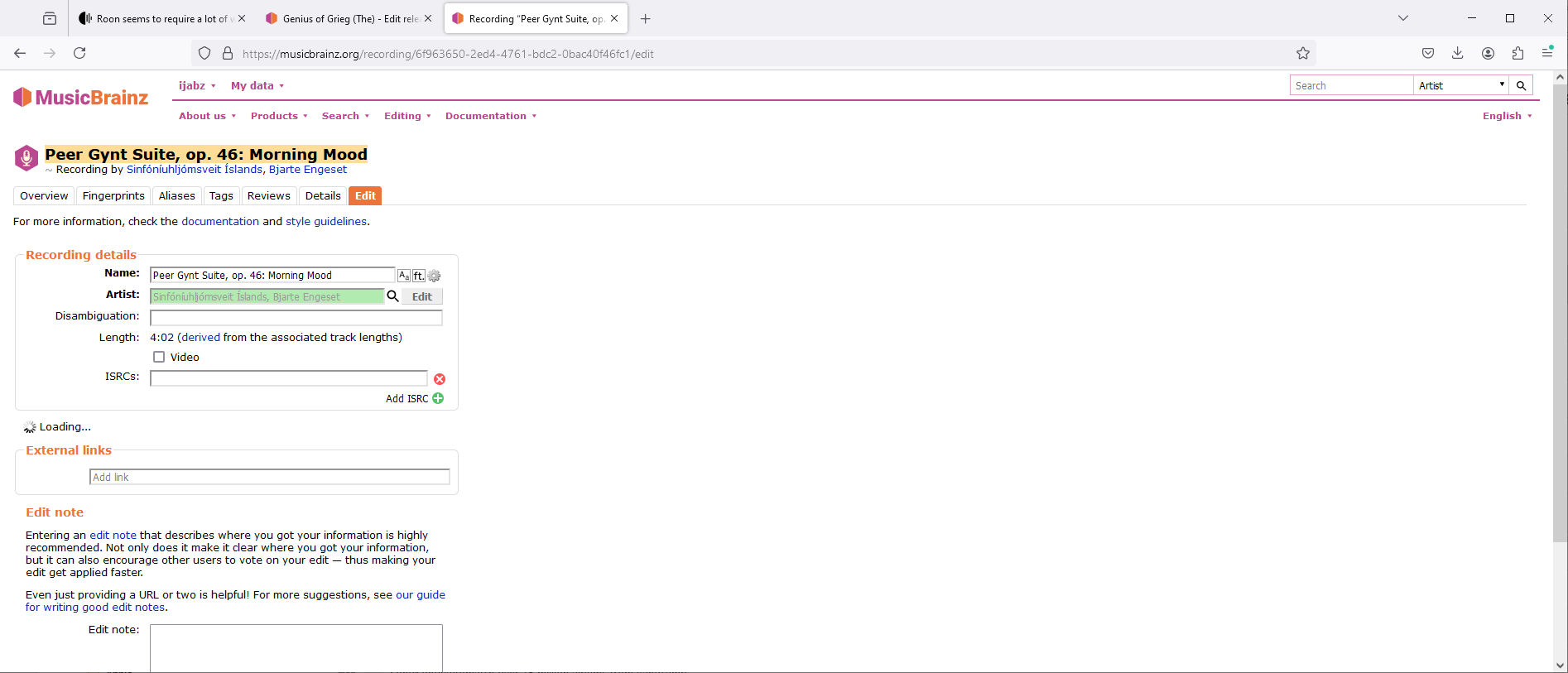
So in your screenshot above you are editing the Recording and hence the Recording Artist.

But if you go to the Release and edit the tracks with the release you’ll be editing the Track Artist.

2 Likes

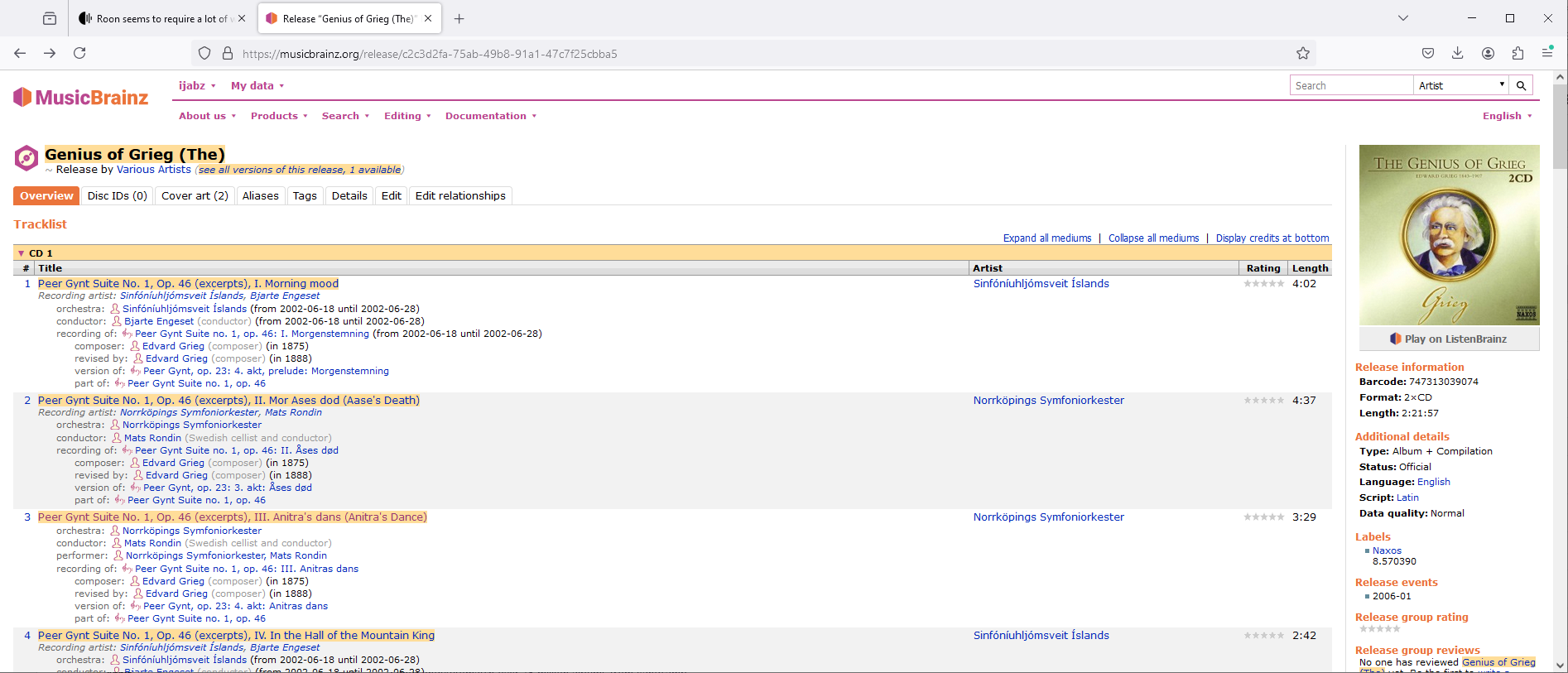
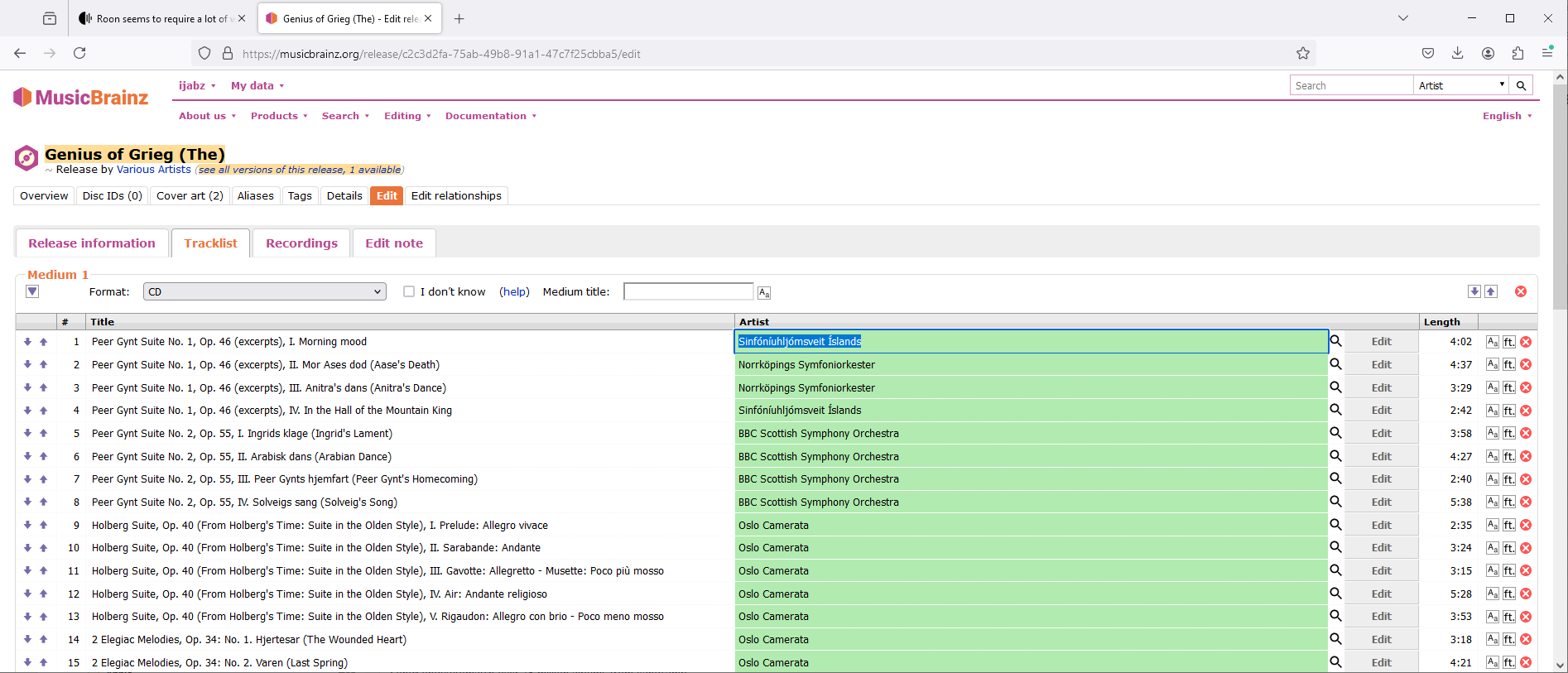
For example, look at first track of the release

Artist column has Sinfóníuhljómsveit Íslands (this is actually Track Artist)
In Title column under the actual title has Recording artist: Sinfóníuhljómsveit Íslands, Bjarte Engeset

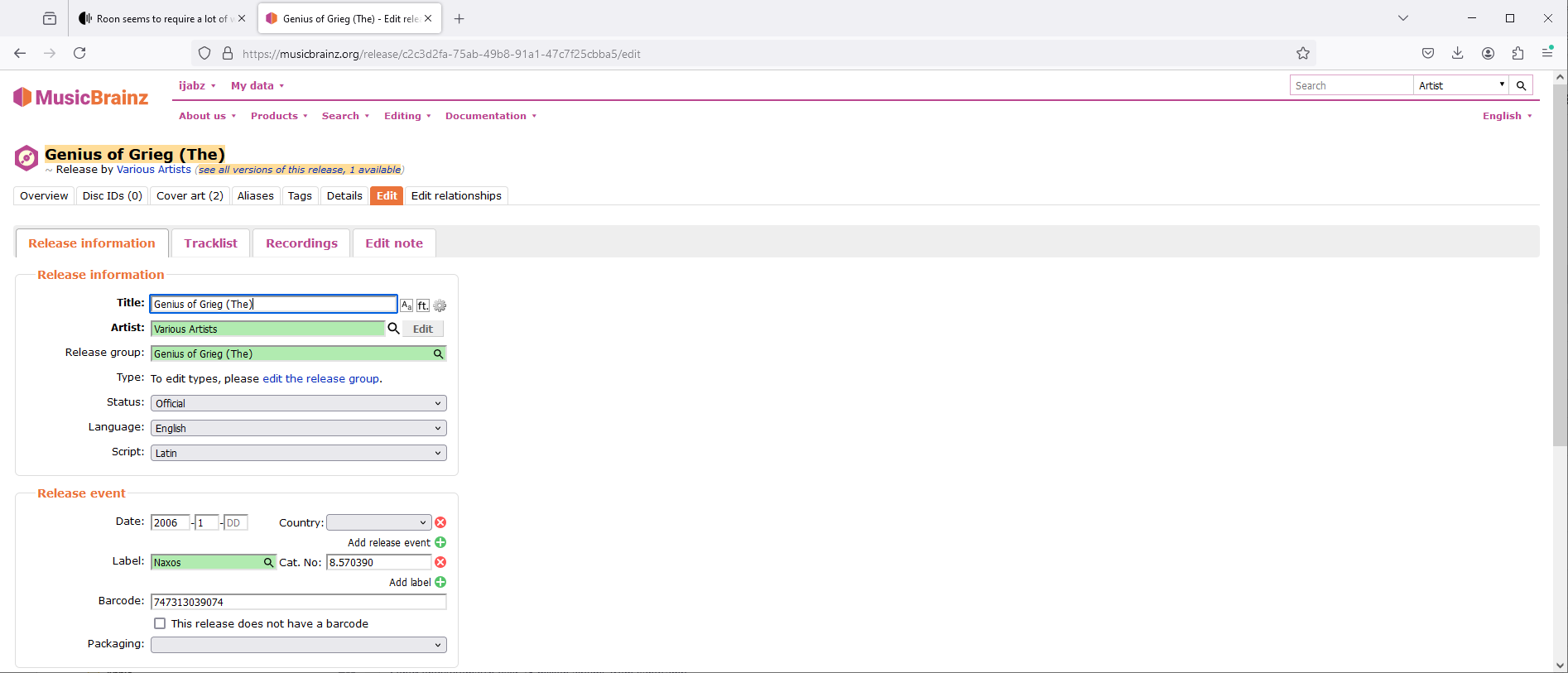
If I select Edit tab to edit the release

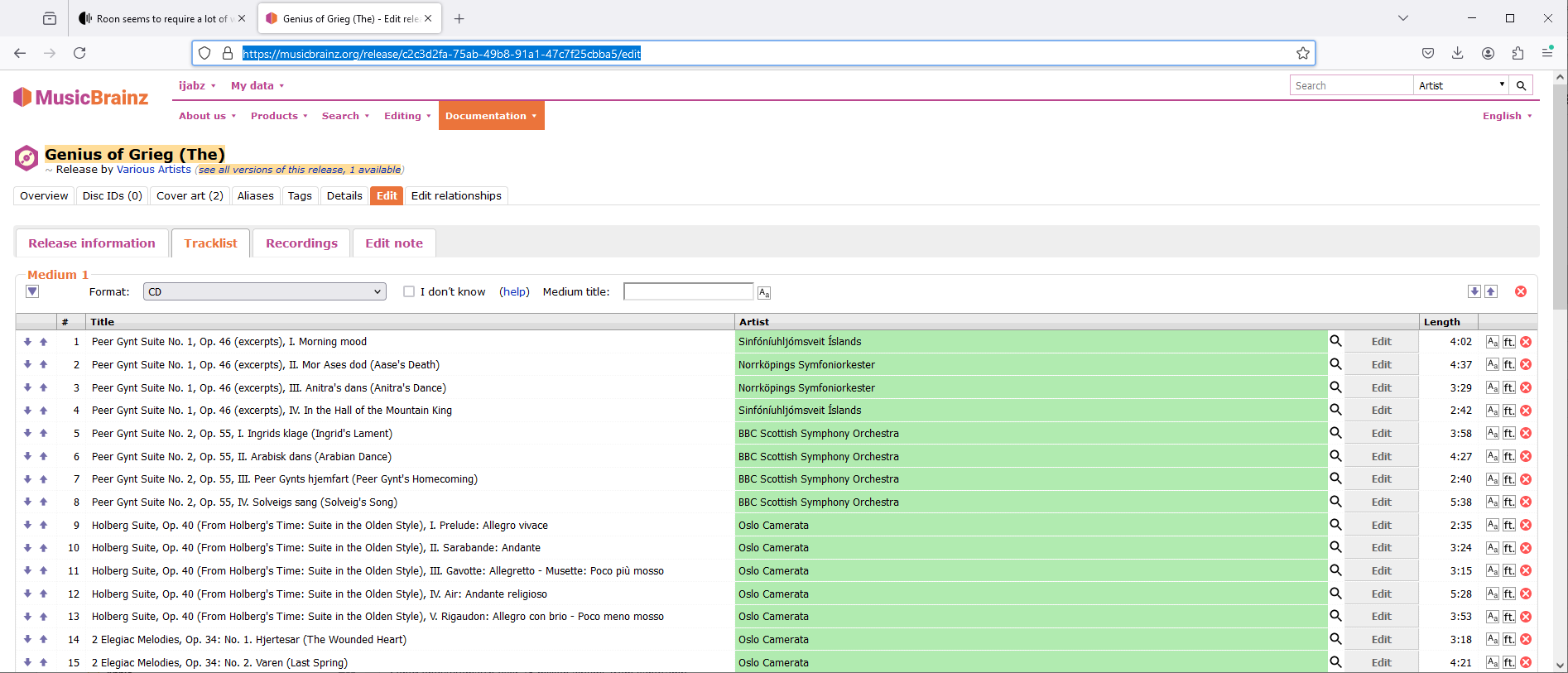
and then TrackList

I can now edit the (Track) Artist

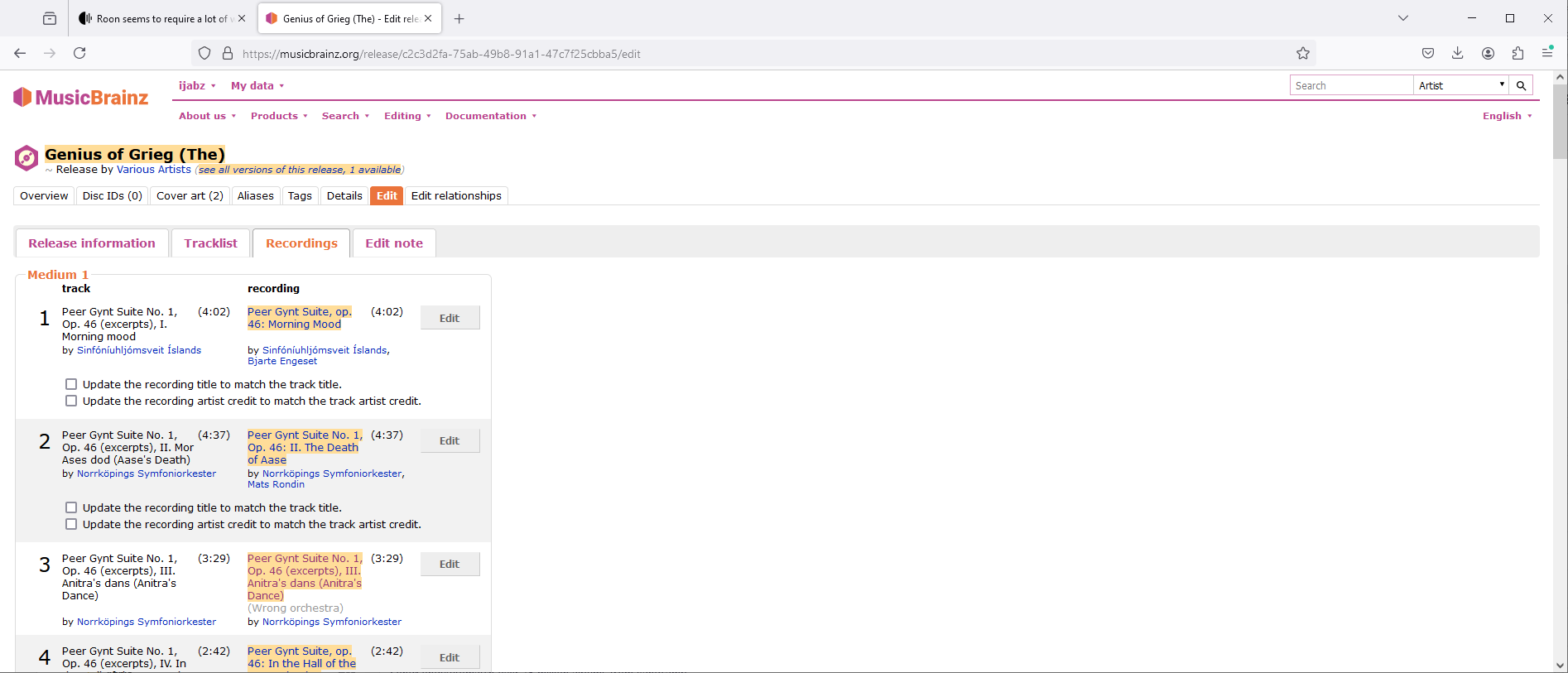
If I go to the Recordings tab you can clearly see the differences between Track and Recording

and I can select a Recording

https://musicbrainz.org/recording/6f963650-2ed4-4761-bdc2-0bac40f46fc1

and then Edit to edit the (Recording) artist

This is all rather convoluted but I hope makes it clearer the difference between Track and Recoriding. As I said earlier for Pop/Rock you dont usually have to worry because they are almost always the same, I think that is why there UI is not very streamlined when you do have to change them which is usually only the case with Classical.

1 Like

Thank you, beautiful explanation! However, I still cannot change the Artist field of the recording of track 3 to match the recording before it - I cannot add “Mats Rondin” after the orchestra, as the field will accept only one value (either the orchestra or the conductor), not both.

Also, I cannot get rid of the comment about “Wrong orchestra”.

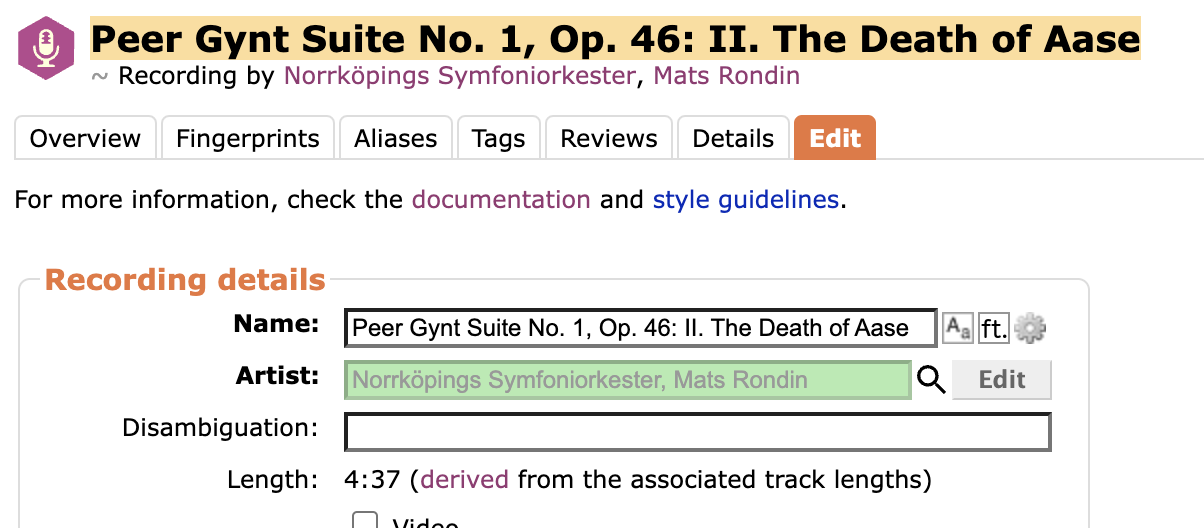
In the previous track recording info, the Artist field is as it should be also for the one in question:

What is allowed in the Artist field seems to be different for the two track recordings.

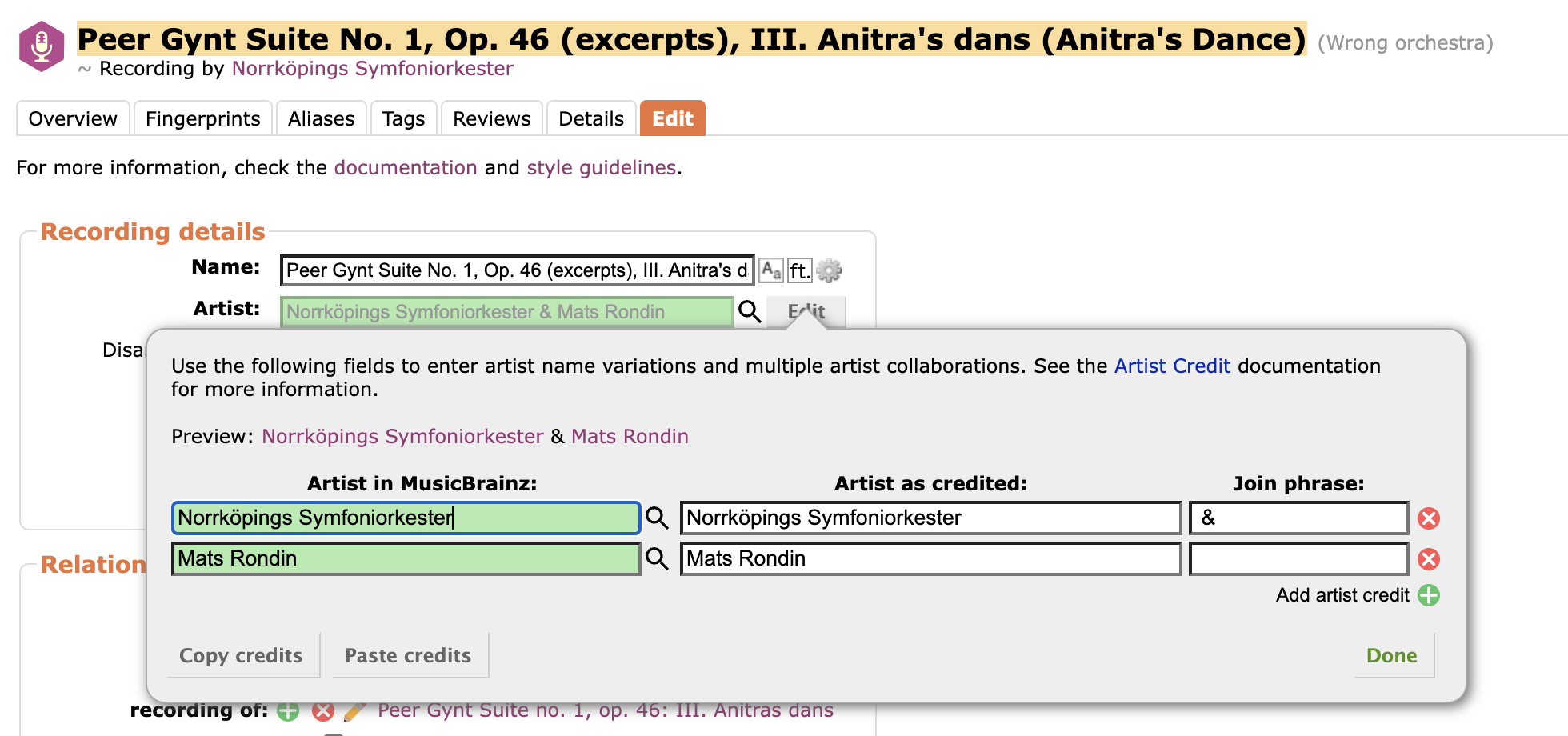
Ah, now I found out! It was the mention in the guideline that several artists could be separated by a comma - but they can’t! Instead, they must be specified on separate lines in the Edit button dialogue box:

Now I just need to get rid of that Disambiquation message, which seems to be impossible:

Yeah i ws just about to answer about artist. The Artist field isnt really an artist, its an artist credit, i.e it can refer to multiple artists. And if you want to add multiple artists you need to add each one, the search only lets you search and add the first one.

I think this is true of the digital music hobby in general. The best thing to try to remember is that your metadata work will not just benefit your work in Roon; it will help your music collection be more useful in any software you choose to use. Roon is a great tool in that it helps make your metadata issues easier to identify, while still enabling you to play your music as you work on things.

My metadata ensures that I can move to any software I wish in the future with no drama. I already use Synology Audio Station and DS Audio in parallel, and the only things I am missing are the TiVo reviews and inter-links that show the connections between the artists in my collection. The rest is fairly identical.

3 Likes

Its because some edits such as this one are subject to voting, they can accepted or voted down. After a week the edit will be accepted or rejected, if noone has voted it will automatically be accepted.

1 Like

Thank you very much for your help - and your patience.

1 Like