I’m trying to run RoonServer on a custom OS.
I have confirmed that the mount.cifs command can be used to mount a Samba drive as an OS.
However, attempting this from Roon results in an error.
I suspect this is because the OS is custom, so it differs from what RoonServer expects.
However, I don’t know how to obtain error logs or similar information, so I cannot resolve the issue.
Is there any information available to help resolve this?
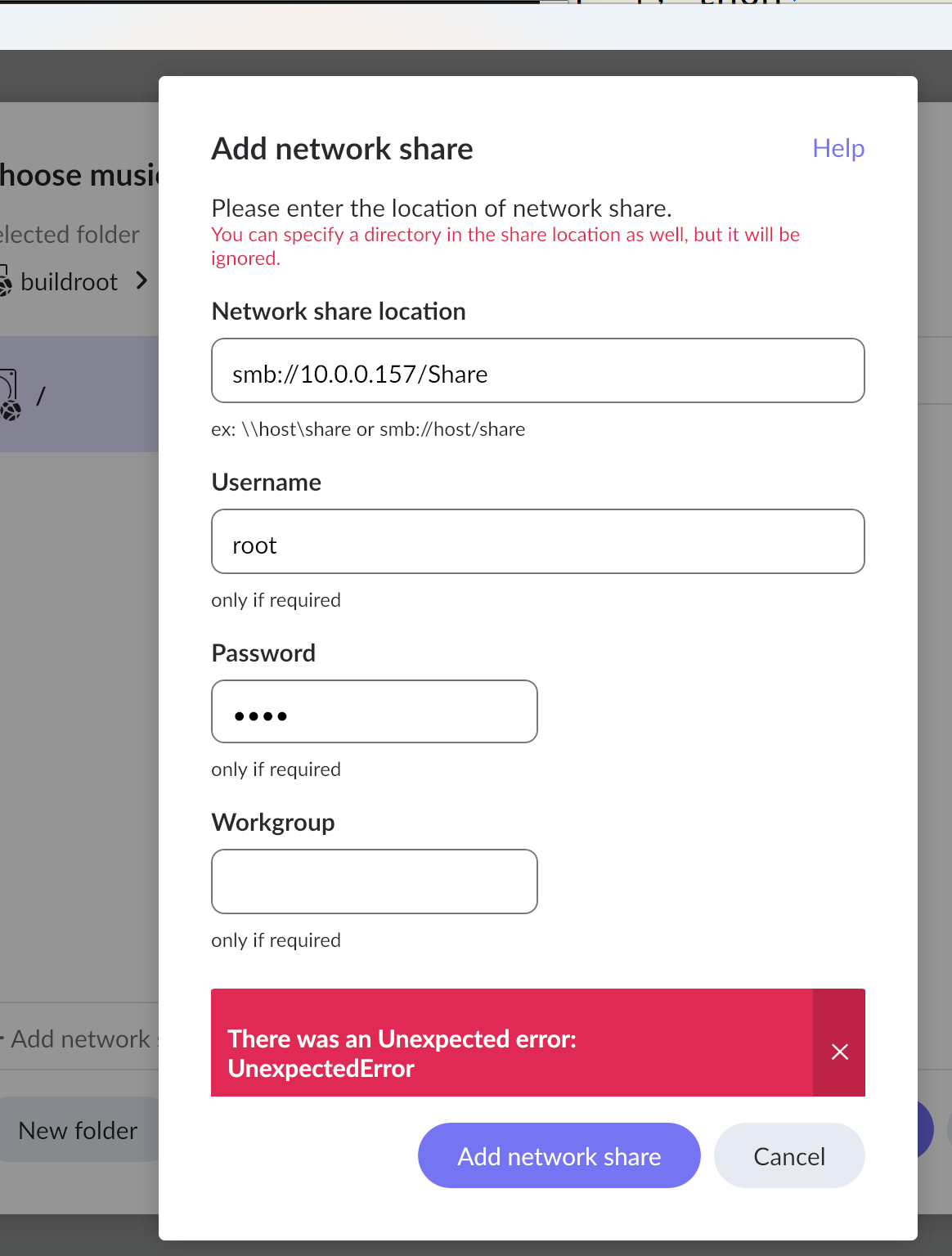
By default, Samba denies the root user.
They’re likely to be in /var/roon/RoonServer/Logs. Roon’s logs tend to be a bit of a dog’s breakfast but you can try grepping for something like “10.0.0.157” or, alternately, tail -f the current log file and reproduce your error.
On the server side, it is permitted and can be mounted via command.
Changing it to another user yields the same result.
RoonServer is running as root.
Okay, you have that covered. What OS is the desktop client using?
I suspect the logs won’t have much more than UnexpectedError, which can point to a number of issues, including credentials, invalid mount path, Samba version mismatch, or client OS CIFS / Samba settings.
I couldn’t find the RoonServer logs, but there was a sambamount error in the kernel messages.
I believe RoonServer is calling mount.cifs.
I’ll look into whether there’s an issue with the command call to RoonServer.
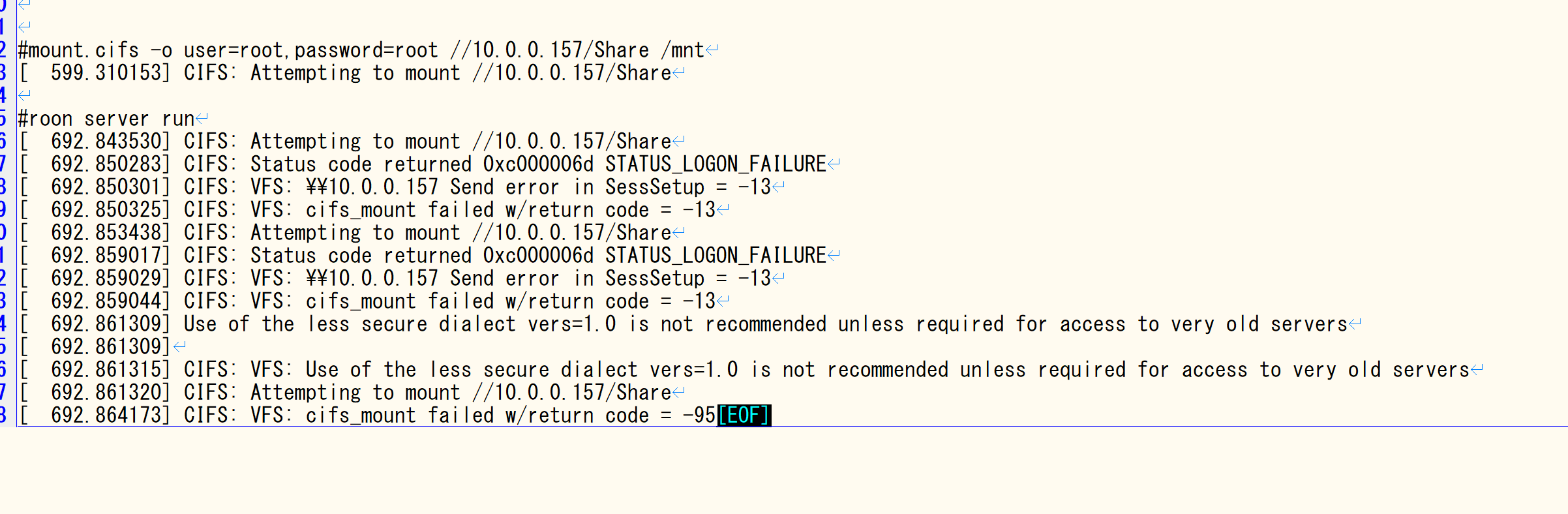
STATUS_LOGON_FAILURE is a pretty definitive sign that your SMB server is rejecting root/root. I would check the logs on the file server to see what it says.
1 Like
It could be the client not permitting password logins, or using root login from a remote clieng (bad practice to use the root account remotely.)
It appears mount.cifs was being called with these arguments from RoonServer.
Even though I entered a password, “guest” is specified.
It seems the password entered on RoonServer has been lost.
mount.cifs //10.0.0.157/Share /mnt/RoonStorage_dddffb583674cb6db75a8d08ae96b9ee07e633e1 -o guest,nounix,iocharset=utf8,user=root,domain=WORKGROUP,vers=2.1
You’ll need to share a little more information. For instance, the mount in smb.conf, the local path to the share, and your changes to permit root access.
Also, please confirm that you installed cifs-utils on the server.
The error points to a problem with the server not the client (Roon.)
I haven’t installed the full CIFS-util package, so something might be missing.
Roonserver makes too many system calls for strae to trace them all.
I’ll continue testing.
This is an explicit dependency for the Linix Roon Server package (when using network shares.)
The check.sh script in the installer only verifies mount.cifs, so other commands included in cifs.util are not tested.
Therefore, it is unclear exactly which commands are required.
Consequently, we are currently using strace and similar tools to verify if any other necessary commands or libraries exist.
If I am reading this right I had a similar problem trying to connect Roon server directly to an SMB share.
My solution was to mount the SMB share in the OS first. So for instance to map \fileserver\share locally to /mnt/smbBackup. Then in Roon you can use the local mnt path rather the SMB one. That seemed to work ok.
When installing cifs-utils, dependencies and configuration settings are also installed. If you simply added the binary, these will not be present.
This may help; cifs-utils-7.4.
Furthermore, please note that distributing the Roon binaries with a system is not permitted. However, this isn’t an issue for personal use.