I can’t get the file to move into the Roon. If I transfer it from the “Offline Library” of Qobuz to the desktop of my computer and then drag that file into the open Roon window, Roon ASKS if I want to copy the file, but then when I click “yes” nothing happens. Also, when I try to open the file I just dragged onto the desktop, I get an error message.
Also, if I try to drag the file directly to the open Roon window from the Qobuz offline library window, it doesn’t allow it. There’s a circle with a slash.
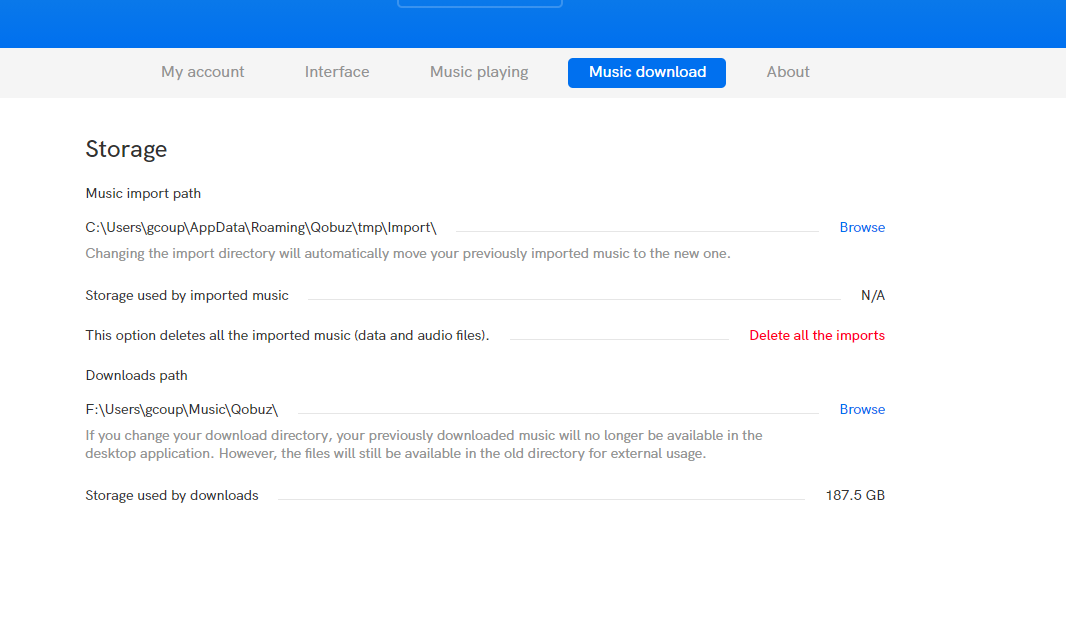
You’re probably not doing this correctly. Your downloaded purchases will probably be saved elsewhere. Go to the settings and see where your downloads are being saved. For example this is my Settings page in the Qobuz app:
You read this correctly. You buy the coins on the website and add them to your wallet. Later you can purchase and download music from the apps directly and pay with your coins.
On Mac I use Yate as a tagger. Yate | 2ManyRobots
Quite powerful. Just like you, after downloading from Qobuz, I review and update metadata. I also use it to rename my files and move them into the desired folder structure for Roon. Yate does have a steep learning curve, and is also not free.
A free alternative for Mac might be MusicBrainz Picard.
I’ve not used it myself so I don’t know if it’s any good. From what I understand, you can also use it to add metadata of unknown albums to the MusicBrainz database, which will eventually allow the albums to be identified in Roon.
Since it can do both MusicBrainz and Discogs matching and unlike other solutions you don’t have to work one album a a time, it can all be done in one go. The full version is not free but with the Lite version you can do run automated matches and see the results in details (just not save the file metadata) and manual editing and status reports are totally free with no expiry.
I had a look in the Mac App Store (Germany) and there it is free of charge. I use MP3Tag on my mac book since a couple of years for free. Maybe it will also change to charge in Europe… we´ll see.
Slightly OT: the amazingly wonderful British supplier of classical music, Presto, released their dedicated downloader a month of so ago.
Pretty rocky at first since it had to combine a representation on their website of what you had just bought and was waiting in your queue there with what the native software expected and to which you were entitled. It has become second nature once you learnt at what stage in the purchase-line-up-your-downloads cycle to refresh the app.
And they seem to be releasing better and better, more and more stable (and also - just yesterday -simpler and easier to use) updates at the rate of what seems like one a week.
Can’t wait for native Roon + Presto integration one day
Many sites use downloaders now, I suppose it’s easier for them, rather than keeping all files ready in various formats and/or transcoding and zipping them before download.
The original version of the Qobuz downloader was awful; many tags were missing, and sometimes tags were WAY too long (like a few hundred letters, because the download manager named the folders according to ALL artists, which meant folder names were sometimes several hundred letters long). It was also very slow. For legacy reasons, I have all my music files in ALAC format, but I found the Qobuz downloader downloaded FLAC, and then transcoded them into ALAC.
I actually had quite a few discussions with Qobuz about their download app (I found the Qobuz customer service by and large very good), and it has become better over time.
Though I still don’t know how well it does with ALAC? Have not tried that in a long time, simply because if the downloader still loads FLAC first and then transcodes it to ALAC on my own system, well, I can do that better myself.
Nowadays, when I purchase something from Qobuz, I have the downloader set to download FLAC rather than ALAC, then transcode it myself and tidy up the metadata in MP3Tag, before adding it to my actual music folder. Works quite well. I have noticed that you can now buy and download music in the classic Qobuz desktop app as well, though I haven’t tried it out yet.
PS: @timmo Not sure if your way is the best of fastest way, but it’s certainly something that works and should give you no issue. You can transcode FLAC to FLAC, FLAC to ALAC, back to FLAC again, as often as you want, the quality will not be diminished in the slightest. That’s the good thing about lossless. Transcoding between various lossless formats is not much different from unzipping a ZIP file and then packing it into a RAR file, or back again. The actual music file stays 100% the same.
That’s what I always understood when I researched this to death years ago when I started ripping all my CDs. I chose FLAC at the time, and I’m on a Mac so I use XLD as my main ripper program. Because I know XLD so well, I use that to change any metadata when I buy music from other sites like Qobuz. For troublesome CDs, I use my Windows VM and the EAC program … and then re-transcode again on the Mac side into FLAC with the metadata I want. MP3Tag is pretty expensive on the Mac side and just can’t justify spending that for changing some occasional metadata. Funny how there doesn’t seem to be an inexpensive/easy program on the Mac side just to change some metadata on mp3 files (unless I’m still just missing out on what those are).
I could never quite grasp MusicBrainz Picard, so I gave up on that pretty quickly when I last looked at it. I’m sure if I put the time and effort in I would understand it … life gets in the way
Yeah … I should just pay the $25 for Mp3tag and be done with it
Picard is a little tricky to understand at first but it’s very powerful tool and allows you to match it exactly to an entry in MusicBrianz or create new entry which is handy for Roon as it will identify it in a few days. It’s my first stop for all purchases and rips these days. But if not careful you can cause chaos.
I use a Melco N1z to automatic download and save the Qobuz files. HighRes and DSD/DXD format. So far I haven’t found any errors. But only rock, jazz, blues, no classical!
 Will do…
