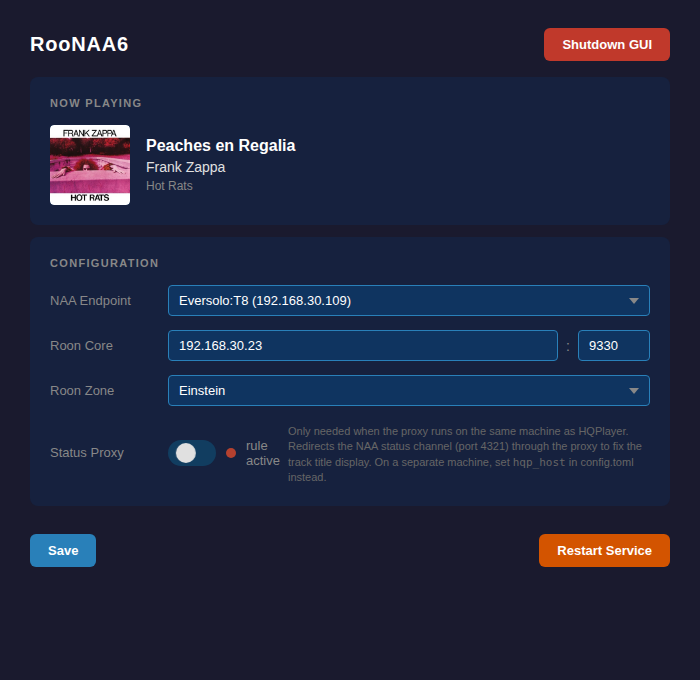
Modern streamers like the Eversolo Play series support album art and track metadata display via NAA6 (Network Audio Adapter v6), the new protocol from Signalyst. Unfortunately, Roon doesn’t support NAA6, so metadata isn’t displayed when routing Roon → HQPlayer → streamer.
To fix this, I built a proxy that sits between HQPlayer and the NAA endpoint, injecting Roon metadata into the HQPlayer stream. With it properly configured, you get full metadata display on NAA6-capable streamers when playing from Roon via HQPlayer. It works best when the proxy runs on the same machine as HQPlayer — there are some minor track title quirks, but overall it works very well for me.
It’s distributed as a Debian package and is a little technical to set up, but when working is very solid. IMHO the T8 NAA6 implementation is more stable using the proxy than going directly from HQPlayer.
Important disclaimer
This proxy is an independent, community-developed project — it is not affiliated with, endorsed by, or supported by Signalyst in any way. If you use it, please note:
• Do not contact Signalyst support for any issues arising while RooNAA6 is in use.
• If you experience problems with HQPlayer or your NAA endpoint, disable the proxy and test direct first. Only if the issue persists without the proxy should you reach out to Signalyst.
• This software is provided as-is, without warranty. Use at your own risk.
“HQPlayer” and “NAA” are trademarks of their respective owners, used here for descriptive purposes only.
So far it has been tested with an Eversolo T8 and an Eversolo A10- Your mileage may vary. Please let me know if you get this working for you - please let me know if you have nay fixes for the small issues currently experiened while using it.
Having beta tested it, I can vouch for the functionality. You may indeed need a little linux experience, but in the time of AI, anyone with the help of Chat should be able to get it up and running ;).
Great thanks to Conrad, as I’ve missed my album art on the A8 since switching over to HQP. Now you don’t have to anymore.
Just to add here, I’ve tested and listened carefully. It has no effect on the audiostream. So, no worries about possible quality issues.
My suggestion to @jussi_laako is to have a look at the code. Perhaps it could be a default in the NAA stream, but that’s my 2 cents.
Ever since I upgraded to 6.0.1 the artwork no longer shows, I only see “Roon”. Any ideas what can be wrong? I don’t see any artwork in the web ui either, even though I approved the extension. Could it be a token issue?
I simply see nothing playing, even though music is playing. Didn’t have this problem with HQPlayer v5.
I really have no idea - it never stopped working for me. Have you checked you HQPlayer settings? Have you checked the Extension in roon - maybe you have to delete the old one - start from fresh and reregister the extension. How did you update to HQPlayer 6 - how are you runnig the proxy? Lots of details needed.
Hi @Conrad_Winchester I’ve been running into this issue, the artist, album and artwork shows up, but the track title only shows up for a second and is replaced by “Roon”. Any idea what could be going on?
Yes, if you are running the proxy on the same box as HQ Player then you need to enable the IPTABLES proxy for persistent status update handling - see GitHub - piercer/RooNAA6 · GitHub
I’m still running into the issue. It shows the proper title and then is replaced by Roon. I am running the latest hqplayer as of today and this issue is still occuring (it occurred in the previous version of v6 as well). I have the iptables setting enabled and it is also enabled in the config file.
I run Roon, HQPlayer and RooNAA6 on the same VM on my NAS. I have the Status Proxy / IPTables enabled. I use 127.0.0.1 as the Roon address (used the external address and didn’t do anything). My OS is Debian Trixie updated to the latest version. Do I need to install any additional packages for IPTABLES in Trixie (should be included, right)?
 Important disclaimer