Yes, I know, I am a loyal HQPlayer user, I do use Roon → HQPlayer → M2 MM → USB (PCM out) → Linn Klimax DSM/3.
I’ve been quiet about the HQPlayer because I am happy with it so far, no issue yet, just good results.
Yes, I know, I am a loyal HQPlayer user, I do use Roon → HQPlayer → M2 MM → USB (PCM out) → Linn Klimax DSM/3.
I’ve been quiet about the HQPlayer because I am happy with it so far, no issue yet, just good results.
Simplest and what I use is Apple Music on iPad → USB-to-AES → suitable AES input → HQPlayer. Bit-perfect output from Apple Music with automatic rate switching.
Bachh ?
Anyway this thread makes more sense to discuss what you asked because this thread is about feeding any source through HQPlayer
I don’t follow your question here.
I did mention you can output to an RPi4 NAA. HQPlayer server can be running on the Mac.
Do you use Roon?
Thank you for directing my question to the right thread. You guessed correctly regarding the 3rd party software!
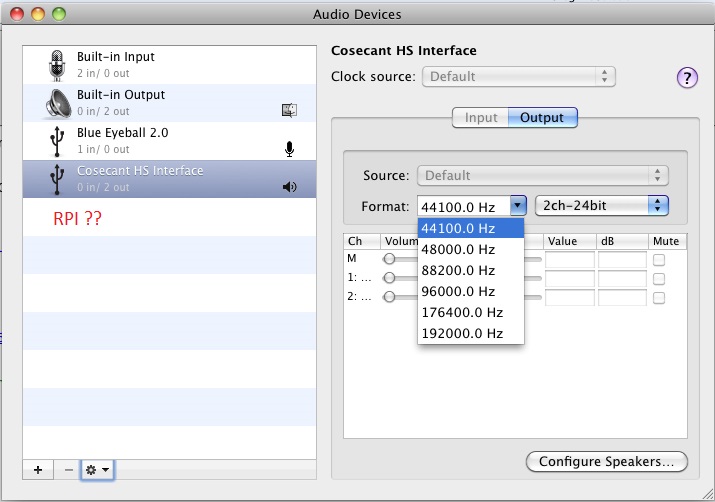
Sorry I meant whether the Mac when the Rpi is connected via USB recognizes the Rpi as an audio output device in the list on the left. In that case I can select the via Blackhole that as output device.
But I think the following route is more obvious:
‘3rd party software’ > Blackhole > HQPlayer > Ethernet > NAA endpoint.
I just hope HQP will be recognized as output device, because normally a dac is selected as output device… From what I understand, you can only aggregate a device that is in the Mac list. I wonder if HQPlayer appears in this?
This chain works. You won’t see the RPi NAA showing in Audio MIDI. You will see this NAA showing in HQP output
Also i cant see any reason to hide the Bachh name 
How are you already using Bachh?
@dabassgoesboomboom @jussi_laako Recent release of Merging’s Ravenna Linux driver works on Jammy. Although it still needs some tweaking. Here’s what I did on Jammy 22.04 standard server installation with low latency kernel 5.15…
Always update / upgrade first:
sudo apt update
sudo apt upgrade
sudo reboot
Build tools I used:
sudo apt install autoconf libtool build-essential linux-sound-base alsa-base alsa-utils avahi-daemon libavahi-client3
Then…
wget https://www.openssl.org/source/openssl-1.1.1v.tar.gz
tar -xzvf openssl-1.1.1v.tar.gz
cd openssl-1.1.1v
./config
make
sudo make install
git clone https://github.com/curl/curl.git
cd ./curl
autoreconf -ivf
./configure --with-openssl=/usr/local
make
sudo make install
cd /usr/lib/x86_64-linux-gnu/
sudo rm -rf libcurl.so.4
sudo ln -s /usr/local/lib/libcurl.so.4.8.0 libcurl.so.4
sudo reboot
git clone https://bitbucket.org/MergingTechnologies/ravenna-alsa-lkm.git
cd ./ravenna-alsa-lkm/drivers
make
sudo nano /etc/modules
In blank space, type MergingRavennaALSA and save, then in the ravenna-alsa-lkm/drivers directory:
sudo su
cp MergingRavennaALSA.ko /lib/modules/$(uname -r)/kernel/drivers
depmod
reboot
sudo systemctl enable avahi-daemon
sudo systemctl start avahi-daemon
cd ./ravenna-alsa-lkm/Butler
chmod u+x Merging_RAVENNA_Daemon
nano ./merging_ravenna_daemon.conf
Put these lines to the configuration file. Use your NIC name and your directory to ravenna-alsa-lkm. I personally prefer 352800 for DXD/DSD. And the 1fs frame size set to 128 is quite stable:
interface_name=enpXsYfZ
web_app_port=9090
web_app_path=/your/directory/ravenna-alsa-lkm/Butler/webapp/advanced
tic_frame_size_at_1fs=128
max_tic_frame_size=8192
config_pathname=/your/directory/ravenna-alsa-lkm/Butler/butler.config
default_sample_rate=352800
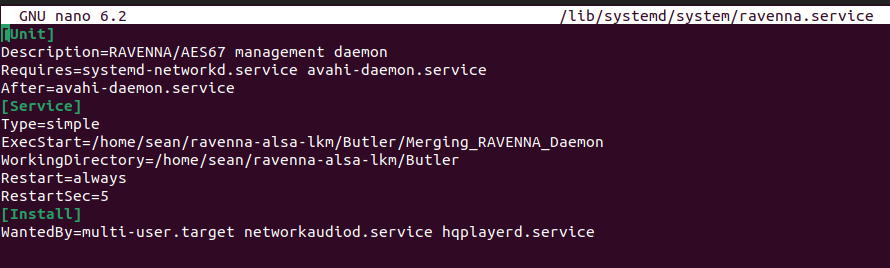
sudo nano /lib/systemd/system/ravenna.service
Put these lines to that service. Use your directory to ravenna-alsa-lkm:
[Unit]
Description=RAVENNA/AES67 management daemon
Requires=systemd-networkd.service avahi-daemon.service
After=avahi-daemon.service
[Service]
Type=simple
ExecStart=/your/directory/ravenna-alsa-lkm/Butler/Merging_RAVENNA_Daemon
WorkingDirectory=/your/directory/ravenna-alsa-lkm/Butler
Restart=always
RestartSec=5
[Install]
WantedBy=multi-user.target networkaudiod.service hqplayerd.service
Then
sudo systemctl enable ravenna.service
sudo systemctl start ravenna.service
I have two Jammy machines running Ravenna. So happy! 
Forgot to mention, when connect the Linux Ravenna devices to Merging’s devices in ANEMAN, it will show orange dot. Once audio stream sends out, the dot will become blue (if unicast) or purple (if multicast). It’s normal and intended.
Thanks @Chunhao_Lee !
Is this step I quoted essential ?
Yes, it’s essential. Default config file won’t work unless you change the NIC name, config_pathname and also add web_app_path.
Would you move the ravenna-alsa-lkm folder to your home directory and try again? Under /usr/lib/x86_64-linux-gnu directory might have permission issue.  And also make sure the ravenna-alsa-lkm is the 7/24 release.
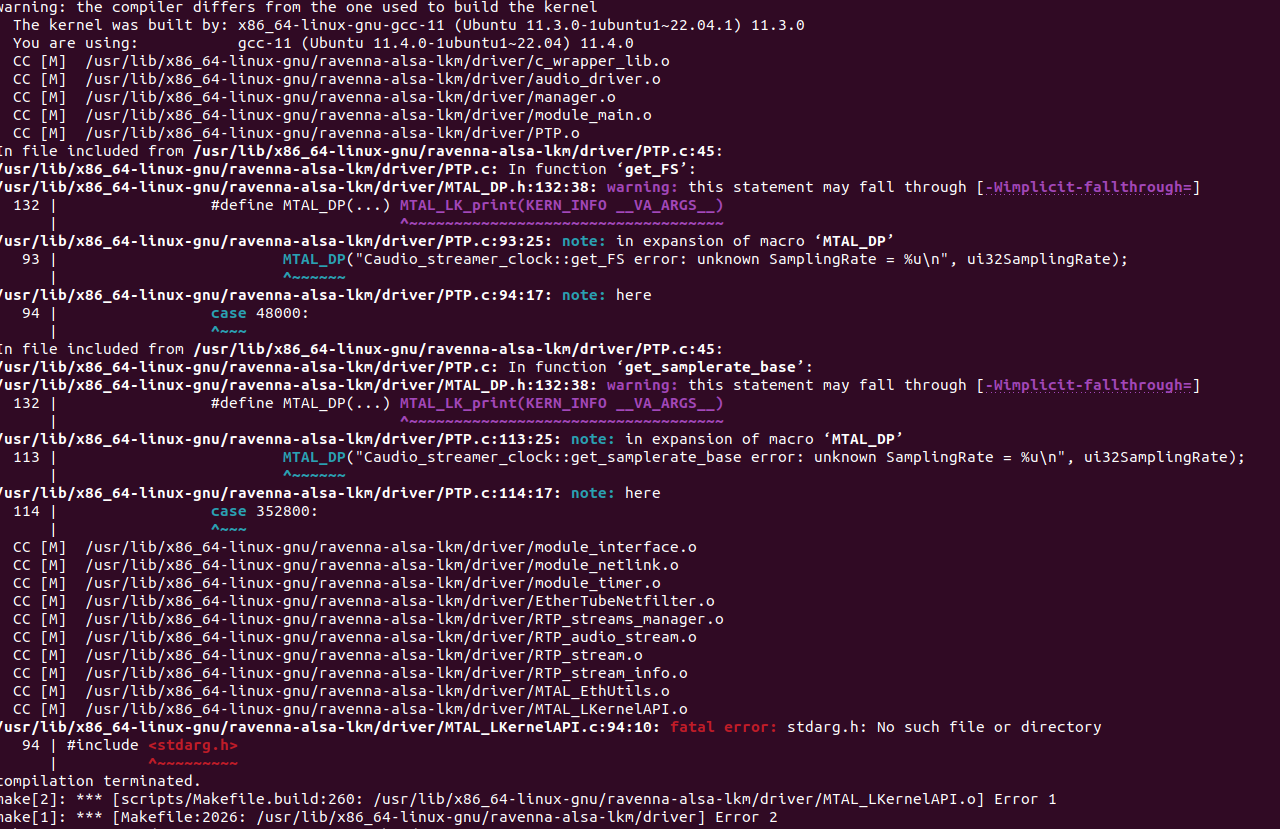
Related to this warning? Or this shouldn’t matter?
warning: the compiler differs from the one used to build the kernel
  The kernel was built by: x86_64-linux-gnu-gcc-11 (Ubuntu 11.3.0-1ubuntu1~22.04.1) 11.3.0
  You are using:           gcc-11 (Ubuntu 11.4.0-1ubuntu1~22.04) 11.4.0
What’s your kernel version? Type
uname -r
Ah yes I see you mentioned your kernel version. Mine is newer:
6.2.0-1009-lowlatency
Current Merging’s Ravenna driver is for kernel 5.15 or lower.  So I’d like to suggest to build it on Ubuntu 22.04 standard installation.
I can reboot to kernel 5.15, it is still there. And redo these steps
Last question before I re-attempt, how do you get your NIC name 
sudo lshw -class network -short
Ravenna daemon not running. Would help me go to ravenna-ALSA-lkm/Butler directory and using terminal to run the daemon? Type
./Merging_RAVENNA_Daemon
And see the result? Before run make sure you change it to excecutable.
sean@sean-B560:~/ravenna-alsa-lkm/Butler$ sudo ./Merging_RAVENNA_Daemon
./Merging_RAVENNA_Daemon: error while loading shared libraries: libcurl.so.4: cannot open shared object file: No such file or directory
this should be 4.8.0 ?